Freedom251 › Remote desktop software

Zoho Assist
by Zoho Assist
What Zoho Assist is
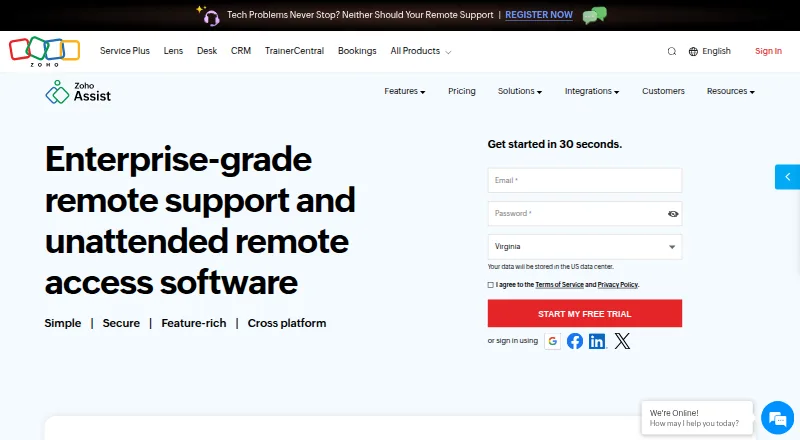
Zoho Assist provides attended and on-demand remote support, along with unattended access for connecting to devices without someone present. It supports Windows, macOS, Linux, iOS, Android, Chrome OS, Raspberry Pi, and web browsers. Tools include screen sharing, multi-monitor navigation, chat, session scheduling, file transfers, and diagnostic tools. On-demand sessions can start without prior downloads, and technicians do not need to install software to initiate them. Remote camera sharing offers augmented-reality assistance through smartphone cameras or smartglasses. Browser cobrowse provides real-time guidance with page highlighting and masking for sensitive data. The free plan includes one technician and five devices. Remote Support Standard costs $10 a month, billed annually, and provides two concurrent sessions per technician. Plans can be upgraded, downgraded, or canceled at any time. Zoho lists TLS 1.2 and AES 256-bit encryption and recurring security audits. Higher plans add team administration tools, while Enterprise Support includes 24/7 technical assistance by live chat or email.
Who it suits
Zoho Assist suits technicians and support teams providing remote help or managing unattended devices. Browser cobrowse and remote camera sharing also suit support that benefits from visual guidance.
What it does well
- Supports attended, on-demand, and unattended access.
- Works across desktop, mobile, browser, and Raspberry Pi.
- On-demand sessions require no prior downloads.
- Plans can be changed or canceled at any time.
What to know first
- Free plan is limited to one technician and five devices.
- Remote Support Standard costs $10 a month billed annually.
- Enterprise Support is needed for 24/7 technical assistance.
Plans
| Plan | Billed and limits | Price |
|---|---|---|
| Free | 1 technician · 5 devices | Free |
| Remote Support - Standard | Billed annually · 2 concurrent sessions per technician | $10 a month |
| Remote Support - Professional | 4 concurrent sessions per technician | On request |
| Remote Support - Enterprise | 6 concurrent sessions per technician | On request |
| Unattended Access - Standard | Unlimited technicians | On request |
| Unattended Access - Professional | Unlimited technicians | On request |
| Free Edition | — | On request |
| Remote Support Standard | Monthly | On request |
The first 8 of 13 plans, as zoho.com lists them, read 20 Sept 2026. The maker's own page has the final word. Every plan
Overview
Zoho Assist brings remote support and device access together with browser cobrowsing and camera-based visual guidance. It is strongest for support teams that need several ways to help customers or reach devices, though the free allowance is too narrow for a larger operation.
Attended and on-demand support sessions sit alongside unattended access, so it can serve both customer support and IT workflows. The combination is broader than screen sharing alone, but the right plan depends on whether you need mobile or IoT support, recording, or team administration.
Key features
Remote sessions and access
Technicians can share screens, navigate multiple monitors, chat, schedule sessions, transfer files, and use diagnostic tools. On-demand sessions need no prior download, and technicians do not need an installation to start one. That lowers the setup burden for occasional customer help; file transfer is specifically included in the monthly Remote Support Standard description, while recording appears on higher tiers.
Unattended access covers configured devices, making the product relevant for ongoing IT access as well as live support. The Unattended Access Standard description adds unlimited technicians to configured devices, a useful distinction for teams that need broad staff access rather than a small fixed technician count.
Visual guidance and safeguards
Camera sharing can give technicians a view through a smartphone camera or smartglasses for augmented-reality assistance. Browser cobrowse adds real-time guidance without downloads or plugins, including field highlighting and masking sensitive data. These tools make Assist a better fit when a problem is hard to explain through a screen session alone.
Zoho Assist uses TLS 1.2 and AES 256-bit encryption, with transmissions through SSL and AES protocols; recurring audits cover applications, infrastructure, and internal policies. Integrations span Zoho tools, popular third-party tools, and Zendesk. Higher plans add departments, group permissions, bulk deployment, custom reports, and session audits. Enterprise Support provides 24/7 premium technical help through live chat or email.
Pricing
The model is freemium, and a 15-day trial is available. The free plan costs nothing and allows 1 technician and 5 devices: enough to assess a small setup, but not a generous base for a team. Remote Support - Standard costs $10 a month (billed Billed annually) and allows 2 concurrent sessions per technician. Plans are pay-as-you-go and can be upgraded, downgraded, or canceled at any time.
Remote Support - Professional has custom pricing and allows 4 concurrent sessions per technician; Enterprise has custom pricing and allows 6. The monthly Remote Support Standard is aimed at customer support teams and adds file transfer and 2 concurrent sessions to Free Edition features. Professional adds mobile device support and 4 concurrent sessions; Enterprise adds departments and session recording. These tiers suit teams that need those capabilities, but their monthly prices are custom pricing.
For IT teams, Unattended Access Standard has custom pricing and adds unlimited technicians to configured devices. Unattended Access Professional has custom pricing and adds session recording plus mobile and IoT device support to Standard Edition features. The allowance and capabilities matter more than a simple entry price here: choose these plans for unattended fleets, not just occasional attended help.
Platforms
Zoho Assist supports Windows, macOS, Linux, iOS, Android, Chrome OS, Raspberry Pi, and web browsers. Mobile apps are supported. That range is useful for teams serving mixed device environments, though the specific mobile and IoT support called out in plan descriptions belongs to higher tiers.
Who it's for
Assist suits customer support teams that need quick attended sessions, file transfer, cobrowsing, or visual camera guidance, and IT teams that need unattended access across configured devices. It is less compelling for a team that only needs a few free support sessions: the one-technician, five-device cap is restrictive, while paid plan pricing beyond Standard is custom.
Pros and cons
- Multiple support modes: Attended, on-demand, and unattended access can cover customer troubleshooting and ongoing IT access in one service.
- Useful visual guidance: Camera assistance and browser cobrowse add options when screen sharing is not enough, including sensitive-data masking.
- Broad device coverage: Support for desktop, mobile, Chrome OS, Raspberry Pi, and browser platforms accommodates varied environments.
- Small free allowance: One technician and five devices make the free plan a limited fit for teams.
- Custom-priced upper tiers: Professional, Enterprise, and unattended plans require a custom-price decision rather than a clear published starting cost.
Alternatives
For a broader shortlist, see Remote Support Software, Remote desktop software, Unattended Remote Access Software, or Video Customer Support Software.
LiveCall is another freemium option with a free plan for one service URL and one user account, and supports Android, iOS, web, and API platforms. Median has a free-for-life Starter plan for one-click screen sharing and privacy controls across web, API, and self-hosted platforms; choose it when that narrower cobrowsing-style scope is the priority. Surfly is a freemium web option. Help Lightning Remote Assistance is a paid alternative for web, desktop, and mobile platforms.
SightCall Remote Visual Support is a paid option across Android, iOS, macOS, web, and Windows. SupportScreen is a paid option for web, Windows, macOS, and Linux. Blitzz Visual Remote Assistance has no free plan; its Concierge Professional costs $175 a month (billed Billed annually), includes the first 5 users, charges $35/mo per additional user, and supports 3 participants per session. Cobrowse.io is a paid cobrowsing alternative with web and mobile-app agent plans.
Verdict
Choose Zoho Assist if you need one service for attended support, unattended access, and visual guidance across a varied device mix. Its strongest case is the range of session and guidance tools; look elsewhere if a small free allowance is not enough or you need clearly priced higher tiers before committing.
Verdict
Zoho Assist combines remote access with session tools and visual guidance across a broad range of platforms. Its free plan is small, so check the listed device and technician allowance against your needs.
Facts from Zoho Assist's own pages
- Access mode
- both · zoho.com, 20 Sept 2026
- Browser cobrowse
- Cobrowse supports real-time guidance without downloads or plugins, including field highlighting and sensitive-data masking. · zoho.com, 28 Sept 2026
- Reported scale
- The page reports more than 850 million installations, 11 million remote sessions, and global customers. · zoho.com, 28 Sept 2026
- File transfer
- File transfer is included in Remote Support Standard and Unattended Access Standard. · zoho.com, 28 Sept 2026
- Founded
- 1996 · zoho.com, 23 Sept 2026
- Free plan
- Yes · zoho.com, 20 Sept 2026
- Free trial
- A 15-day free trial is available without a credit card. · zoho.com, 28 Sept 2026
- Third-party integrations
- Integrations include Zoho ecosystem tools, popular third-party tools, and Zendesk. · zoho.com, 28 Sept 2026
- Mobile apps
- Zoho Assist offers a mobile app with separate Technician App and Customer App options. · zoho.com, 28 Sept 2026
- No-download access
- On-demand sessions require no prior downloads, and technicians need no installation to initiate sessions. · zoho.com, 28 Sept 2026
- Flexible billing
- Plans are pay-as-you-go and can be upgraded, downgraded, or canceled at any time. · zoho.com, 28 Sept 2026
- Access modes
- It supports attended, on-demand remote support and unattended access. · zoho.com, 28 Sept 2026
- Camera assistance
- Remote camera sharing provides augmented-reality assistance through smartphone cameras or smartglasses. · zoho.com, 28 Sept 2026
- Core features
- Features include screen sharing, multi-monitor navigation, chat, session scheduling, file transfer, and diagnostic tools. · zoho.com, 28 Sept 2026
- Security audits
- Security is supported by recurring audits of applications, infrastructure, and internal policies. · zoho.com, 28 Sept 2026
- Security encryption
- The service uses TLS 1.2 and AES 256-bit encryption, with transmissions through SSL and AES encryption protocols. · zoho.com, 28 Sept 2026
- Session recording
- Session recording is available in the Enterprise and Unattended Access Professional plans. · zoho.com, 28 Sept 2026
- Support channels
- Enterprise Support offers premium technical assistance 24/7 via live chat or email. · zoho.com, 28 Sept 2026
- Supported platforms
- Supported platforms include Windows, Mac, Linux, Raspberry Pi, Android, iOS, and Chrome OS. · zoho.com, 28 Sept 2026
- Team administration
- Higher plans include departments, group permissions, bulk deployment, custom reports, and session audits. · zoho.com, 28 Sept 2026
Where Zoho Assist stands on Freedom251
- Remote desktop software#6 of 135
- Remote support tools#5 of 47
- Video Customer Support Software#5 of 26
- Remote Support Software#21 of 49
- Unattended Remote Access Software#15 of 29
- Remote Desktop Access Software#18 of 28