Freedom251 › Video Customer Support Software

Surfly
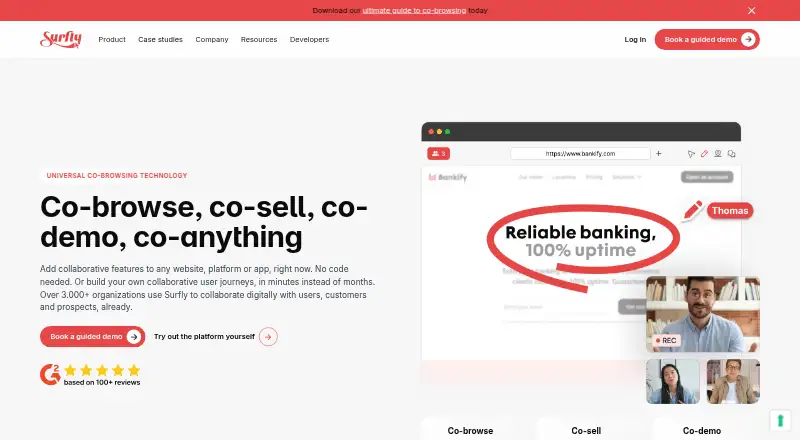
What Surfly is
Surfly adds real-time co-browsing to websites, platforms, and apps, allowing participants to collaborate in a shared web session. People join through a browser without installing a plugin or downloading software. Session tools include video calls, e-signatures, annotations, control switching, and masking for fields or page elements. Surfly lists integrations with Salesforce, Zendesk, Cisco Finesse, NICE CXone, and Amazon Connect, alongside JavaScript, REST, and embed APIs and webhooks. Deployment options are public cloud, private cloud, and on-premise; on-premise sessions run on the customer's infrastructure. Surfly says it uses TLS 1.3 and SHA-256 encryption in transit and does not store personal or session data on disk. It describes itself as AICPA SOC compliant, ISO/IEC 27001 certified, and HIPAA compliant. Modern browsers on Windows, macOS, and Linux are supported; Chrome is recommended on Android and Safari on iOS. Sessions can be joined from desktop, laptop, or mobile browsers, while native apps are supported through a WebView only. The free plan allows five sessions per month. A 14-day trial is listed, and starting it involves a demo and assistance from Surfly's team.
Who it suits
Surfly suits product, sales, and service teams that need to guide customers through a shared web session. It lists use in insurance, banking, healthcare, and enterprise e-commerce.
What it does well
- Participants join in a browser without downloads.
- Includes annotations, e-signatures, video calls, and control switching.
- Offers public cloud, private cloud, and on-premise deployment.
- Lists integrations with Salesforce, Zendesk, and Amazon Connect.
- Free plan allows five sessions per month.
What to know first
- Free plan is limited to five sessions monthly.
- Trial begins with a demo and help from Surfly's team.
- Social media sites are restricted on the free plan and trial.
- Native apps are supported through a WebView only.
Limits
The free plan allows five sessions per month, and social media sites including Twitter, Facebook, Instagram, and YouTube are restricted on the free plan and trial. The 14-day trial starts after a demo with help from Surfly's team. On the Basic plan, video chat is limited to 1,000 minutes per user per month.
Plans
| Plan | Billed and limits | Price |
|---|---|---|
| Free plan | 5 sessions per month | Free |
As surfly.com lists them, read 5 Oct 2026. The maker's own page has the final word.
Getting started
- Visit the Surfly website and request a demo.
- Work with Surfly's team to start the 14-day free trial.
- Choose a deployment option: public cloud, private cloud, or on-premise.
- Invite participants to join a session in a browser without a plugin or software download.
- Use a JavaScript or REST API, embed API, or webhook to build an integration or workflow.
Surfly is a browser-based co-browsing platform for product, sales, and service teams that guide customers through websites and apps. Its strongest case is low-friction collaboration with flexible deployment; the five-session monthly free-plan cap makes it a limited ongoing option.
Overview
Surfly adds a shared web session to websites, platforms, and apps, so participants can work through a customer journey together without installing software or browser plugins. That makes it well suited to support and sales conversations where an extra download could slow the interaction.
Beyond co-browsing, it includes screen sharing, video calls, e-signatures, annotations, control switching, masking, and video recording. This breadth supports guided assistance and handoffs, while masking can keep selected fields or page elements out of view. The free plan's five sessions per month, however, is a small allowance for teams handling regular customer volume.
Key features
Shared sessions and collaboration
Customers can join from desktop, laptop, or mobile browsers without a download. Agents can annotate, switch control, and use video calls or e-signatures during a session. Video chat on the Basic plan is capped at 1,000 minutes per user each month, so teams relying heavily on calls should account for that allowance. Native apps are supported through a WebView only; organizations expecting broader native-app support should weigh that constraint.
Integration, security, and deployment
JavaScript and REST APIs, an embed API, and webhooks give developers ways to connect Surfly to existing sites and workflows. It lists integrations with Salesforce, Zendesk, Cisco Finesse, NICE CXone, and Amazon Connect, a useful fit for teams already using those customer-service systems.
Surfly offers public cloud, private cloud, and on-premise deployment, with on-premise sessions running on the customer's infrastructure. It says it uses TLS 1.3 and SHA-256 encryption in transit and does not store personal or session data on disk. It describes itself as AICPA SOC compliant, ISO/IEC 27001 certified, and HIPAA compliant—credentials and deployment choices that may suit organizations with specific security or compliance needs.
Pricing
The Free plan costs nothing and allows five sessions per month. It gives individuals or teams a way to try co-browsing without a subscription, but the low session cap makes it unsuitable as a dependable high-volume service. Paid plans have unlimited sessions, though pricing is custom pricing.
Surfly also offers a free trial described as 14 days. Starting it involves a demo and assistance from Surfly's team rather than immediate self-service access. Social media sites including Twitter, Facebook, Instagram, and YouTube are restricted on both the free plan and trial. Paid Basic users should also factor in the 1,000-minute-per-user monthly video chat limit.
Platforms
Surfly is available across web, Android, iOS, Linux, macOS, and Windows, as well as through an API and self-hosted deployment. Sessions work in modern browsers on Windows, macOS, and Linux; Surfly recommends Chrome on Android and Safari on iOS. Mobile browser participation is supported, while native apps require a WebView.
Who it's for
Surfly is aimed at product, sales, and service teams, including those in insurance, banking, healthcare, and enterprise e-commerce. It is a particularly strong fit for teams that need to guide customers through web journeys, integrate sessions into existing service workflows, or run sessions on their own infrastructure. It is less compelling for occasional users who need more than five free sessions monthly or teams seeking unrestricted native-app support.
Pros and cons
- Pro: Browser joining without downloads reduces setup friction for customers and agents.
- Pro: Co-browsing is paired with annotations, control switching, masking, video calls, e-signatures, and recording, supporting more than passive viewing.
- Pro: Public cloud, private cloud, and on-premise deployment provide options for different infrastructure requirements.
- Con: Five sessions per month on the free plan is restrictive for teams handling routine support or sales volume.
- Con: The trial requires a demo and team assistance, making evaluation less immediate than a self-serve signup.
- Con: Native-app support is limited to WebView, and Basic-plan video chat has a monthly per-user cap.
Alternatives
Zoho Assist is worth considering when remote support across desktop and mobile platforms is the priority: its free plan includes one technician and five devices, while a paid Remote Support Standard plan is priced at $10 a month.
LiveCall may suit teams centered on service URLs and user accounts; its free plan covers one of each, while its Standard monthly fee varies by the number of accounts.
Cardina offers a 14-day free trial without a credit card and a per-seat Pro plan at $69 a month, making it an option for readers comparing seat-based pricing.
Median has a free-for-life starter plan with one-click screen sharing, privacy controls, phone mode, and Google SSO, though several visual collaboration tools are excluded from that tier.
Help Lightning Remote Assistance is another paid remote-assistance option.
SightCall Remote Visual Support is another paid option for visual support across mobile and desktop platforms.
SupportScreen is a paid alternative available on web, Windows, macOS, and Linux.
Blitzz Visual Remote Assistance may fit teams looking for a paid visual remote-assistance product with an annual plan at $175 a month for the first five users, additional users at $35/mo, and three participants per session.
Browse the Video Customer Support Software category for more options.
Verdict
Surfly is a strong choice for customer-facing teams that need browser-based co-browsing, collaboration controls, and deployment flexibility without asking customers to install software. Its chief drawbacks are the narrow free allowance, guided trial process, and WebView-only native-app support; teams with heavy session needs should compare custom pricing and limits before committing.
Verdict
Surfly combines browser-based co-browsing with collaboration controls, several deployment options, and listed business integrations. Check the free-plan session limit, trial process, and mobile-app constraints against your intended use.
Questions
Is there a free plan?
Yes. The Free plan costs nothing and allows five sessions per month.
Is a free trial available?
Yes. Surfly describes a 14-day trial; its team helps customers start one after a demo.
Which integrations does Surfly list?
It lists Salesforce, Zendesk, Cisco Finesse, NICE CXone, and Amazon Connect, along with JavaScript and REST APIs, an embed API, and webhooks.
Can sessions run on a customer's infrastructure?
Yes. Surfly offers on-premise deployment, where sessions run on the customer's infrastructure.
Can participants join from mobile?
Sessions can be joined from mobile browsers. Native apps are supported through a WebView only; Chrome is recommended on Android and Safari on iOS.
Who founded Surfly, and when?
Surfly says it was founded in 2012 by Nicholas Piël, who identified co-browsing as a way to improve remote tech support.
Facts from Surfly's own pages
- Collaboration tools
- Features include video calls, e-signatures, annotations, control switching, and field or page-element masking. · surfly.com, 5 Oct 2026
- Company history
- Surfly says it was born in 2012 after founder Nicholas Piël identified co-browsing as a way to improve remote tech support. · surfly.com, 5 Oct 2026
- Compliance
- Surfly describes itself as AICPA SOC compliant, ISO/IEC 27001 certified, and HIPAA compliant. · surfly.com, 5 Oct 2026
- Deployment
- Surfly offers public cloud, private cloud, and on-premise deployment; its on-premise sessions run on the customer's infrastructure. · surfly.com, 5 Oct 2026
- Developer integration
- Surfly offers JavaScript and REST APIs, an embed API, and webhooks for building integrations and workflows. · surfly.com, 5 Oct 2026
- Founded
- 2012 · surfly.com, 28 Sept 2026
- Integrations
- Surfly lists integrations with Salesforce, Zendesk, Cisco Finesse, NICE CXone, and Amazon Connect, along with JavaScript and REST APIs. · surfly.com, 5 Oct 2026
- Mobile support
- Sessions can be joined from desktop, laptop, or mobile browsers; native apps are supported through a WebView only. · help.surfly.com, 5 Oct 2026
- No-download joining
- Participants can join sessions from a browser without downloading plugins or software. · surfly.com, 5 Oct 2026
- No-download sessions
- Participants can join sessions in a browser without installing plugins or downloading software. · surfly.com, 5 Oct 2026
- Purpose
- Surfly adds real-time universal co-browsing to websites, platforms, and apps so people can collaborate in a shared web session. · surfly.com, 5 Oct 2026
- Security
- Surfly says it uses TLS 1.3 and SHA-256 encryption in transit and does not store personal or session data on disk. · surfly.com, 5 Oct 2026
- Session limits
- The free plan allows five sessions per month, while paid plans have unlimited sessions. · help.surfly.com, 5 Oct 2026
- Support
- Existing customers can contact [email protected], and Surfly says it aims to respond to general contact requests within 48 hours. · surfly.com, 5 Oct 2026
- Supported devices
- Surfly supports modern browsers on Windows, macOS, and Linux, and recommends Chrome on Android and Safari on iOS. · help.surfly.com, 5 Oct 2026
- Trial access
- Surfly says its team helps customers start a free trial after a demo; the trial period is described as 14 days in its help center. · help.surfly.com, 5 Oct 2026
- Trial restrictions
- The help center says social media sites including Twitter, Facebook, Instagram, and YouTube are restricted on the 14-day free trial and free plan. · help.surfly.com, 5 Oct 2026
- Video chat limit
- Video chat is limited to 1,000 minutes per user per month on the Basic plan. · help.surfly.com, 5 Oct 2026
- What it does
- Surfly adds universal co-browsing and collaborative features to websites, platforms, and apps. · surfly.com, 5 Oct 2026
- Who it serves
- Surfly says product, sales, and service teams use it in industries including insurance, banking, healthcare, and enterprise e-commerce. · surfly.com, 5 Oct 2026
Where Surfly stands on Freedom251
- Video Customer Support Software#4 of 26