Freedom251 › Video Customer Support Software

Median
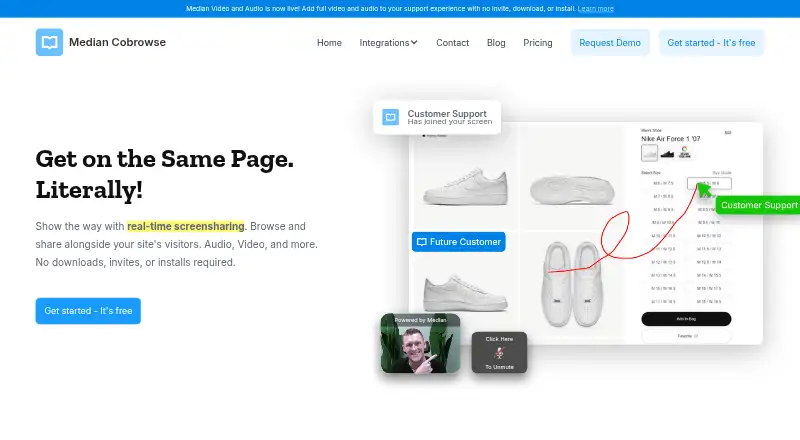
What Median is
Median is a web-based cobrowsing and screen-sharing tool for customer support teams. Its live visitor dashboard shows site visitors in real time, and an agent can join a visitor with one click, without asking them to install software or accept an invite. Agents can point with a cursor, highlight or draw on the page, then request the customer's approval to type and click. Phone Mode offers a separate route into a share: a caller presses CTRL five times and gives the agent the resulting code. One-to-one audio and video streaming through a customer's website is also available on Expert plans. Admins can exclude selected parts of a website from sharing. Median says it does not record session data and describes the service as CCPA and GDPR compliant. It works only on pages where its code is installed, not unrelated browser tabs or the desktop. The service is available as API, self-hosted, and web software. A free plan is available; paid plans start at $25 a month per user, billed annually.
Who it suits
Median suits live customer support teams, software onboarding and support teams, and call centers that need to guide visitors on their websites. Its API, self-hosted, and web options may suit teams with different deployment needs.
What it does well
- Visitors can join without invites, downloads, or installs.
- Agents can highlight, draw, and request control.
- Phone Mode supports screen sharing during calls.
- Admins can exclude parts of a site from sharing.
- Free plan and 14-day trial are available.
What to know first
- Sharing is limited to pages with Median's code.
- It cannot show unrelated tabs or the desktop.
- Business plans exclude chat integrations and audio/video streaming.
- Paid plans start at $25 per user monthly, billed annually.
Plans
| Plan | Billed and limits | Price |
|---|---|---|
| Starter | Free for Life · 1-click screen share · privacy controls · phone mode | Free |
| Starter Plan | Free for Life · 1-Click Screen Share · Privacy Controls · Phone Mode · Google SSO · no Show Cursor, Highlight, Draw, Full Control, Chat Integrations, Video & Audio Streaming, or Call Center Integrations | Free |
| Business Plan (yearly) | Per User Billed Annually · 1-Click Screen Share · Privacy Controls · Phone Mode · Google SSO · Show Cursor · Highlight · Draw · Full Control · no Chat Integrations, Video & Audio Streaming, or Call Center Integrations | $25 a month |
| Business | Per User Billed Monthly · Google SSO · cursor · highlight · draw · full control | $33 a month |
| Business Plan (monthly) | Per User Billed Monthly · 1-Click Screen Share · Privacy Controls · Phone Mode · Google SSO · Show Cursor · Highlight · Draw · Full Control · no Chat Integrations, Video & Audio Streaming, or Call Center Integrations | $33 a month |
| Expert Plan (yearly) | Per User Billed Annually · 1-Click Screen Share · Privacy Controls · Phone Mode · Google SSO · Show Cursor · Highlight · Draw · Full Control · Chat Integrations · Video & Audio Streaming · Call Center Integrations | $45 a month |
| Expert | Per User Billed Monthly · Google SSO · cursor · highlight · draw · full control · chat integrations · video and audio streaming · call-center integrations | $59 a month |
| Expert Plan (monthly) | Per User Billed Monthly · 1-Click Screen Share · Privacy Controls · Phone Mode · Google SSO · Show Cursor · Highlight · Draw · Full Control · Chat Integrations · Video & Audio Streaming · Call Center Integrations | $59 a month |
The first 8 of 9 plans, as hellomedian.com lists them, read 15 Oct 2026. The maker's own page has the final word. Every plan
Median is a co-browsing and screen-sharing service for customer support, onboarding, and call-center teams helping visitors on their websites. It is a good fit when agents need to guide someone through a supported page without a download; it is not a desktop-sharing tool.
Overview
Visitors can join without an invite or installation, while agents can spot them in a live dashboard and connect with one click. That keeps the interaction lightweight, but the site must have Median’s code installed on the pages agents need to share. The product cannot show unrelated browser tabs or the visitor’s desktop, so teams handling broader device support will need another approach.
Key features
Once connected, agents can point with a cursor, highlight page areas, and draw to direct a visitor’s attention. They can also request permission to type and click, giving support staff a way to take action rather than only narrate. These guidance tools are absent from the free plan and included with Business and Expert.
Phone Mode offers call centers a code-based way to begin: a caller presses CTRL five times and shares the resulting code. Median also supports one-to-one audio and video through a customer’s website, but those capabilities require Expert. Integrations include Intercom, Drift, LiveChat, Tawk.to, Shopify, BigCommerce, WordPress, Wix, and Webflow; chat and call-center integrations are likewise reserved for Expert.
Administrators can exclude selected parts of a website from sharing. Median says it does not record session data and that it complies with CCPA and GDPR. The Enterprise offering adds SAML 2.0 SSO, uptime SLAs, on-premise deployment, dedicated account management, custom contracts, and API access for organizations needing those options.
Pricing
The free Starter plan is free for life and includes one-click screen sharing, privacy controls, Phone Mode, and Google SSO. It omits cursor display, highlighting, drawing, full control, chat integrations, audio and video, and call-center integrations. It can suit teams seeking a basic way to connect to visitors, but the missing guidance tools make it a limited choice for agents who need to walk customers through a page.
Business costs $25 a month per user billed annually, or $33 a month per user billed monthly. Both versions add cursor display, highlighting, drawing, and full control to the Starter features. Business is the practical middle ground for guided web support, but it does not include chat integrations, audio and video streaming, or call-center integrations.
Expert costs $45 a month per user billed annually, or $59 a month per user billed monthly. It includes the Business tools plus chat integrations, video and audio streaming, and call-center integrations, making it the relevant tier for teams that need those channels. Enterprise has custom pricing and adds organizational features such as SAML 2.0 SSO, uptime SLAs, and on-premise deployment. Median offers a 14-day trial; the published plan terms do not state seat or usage quotas.
Platforms
Median is offered for the web, via API, and as a self-hosted option. Its supported sharing is limited to instrumented website pages rather than general desktop access.
Who it's for
Median is best suited to live support and software onboarding teams that help customers navigate their own websites, plus call centers that want Phone Mode. Business fits teams focused on visual guidance; Expert is the better fit when integrated chat, call-center connections, or one-to-one audio and video are requirements. Teams supporting software outside their own coded pages should look elsewhere.
Pros and cons
- Pro: Visitors can join without downloads or installs, reducing setup friction during a web support conversation.
- Pro: Cursor, highlight, drawing, and approval-based control give agents several ways to guide a visitor beyond passive screen viewing.
- Pro: Privacy controls let admins exclude parts of a site, and Median says it does not record session data.
- Con: Sharing works only on pages with Median’s code and cannot extend to other tabs or the desktop.
- Con: Business excludes chat integrations and audio, video, and call-center integrations, so teams needing those capabilities must pay for Expert.
Alternatives
Zoho Assist is worth considering for teams that need broader platform coverage, including desktop operating systems and mobile, or a free tier capped at one technician and five devices. Surfly is another freemium option, with a free plan allowing five sessions per month and support across more listed platforms.
LiveCall may suit teams that want a free starting tier limited to one service URL and one user account. Cardina offers a free 14-day trial without a credit card and a paid per-seat Pro plan at $69 a month. Help Lightning Remote Assistance is an enterprise-license alternative with customized pricing.
Grypp Universal CoBrowse is another paid co-browsing option. SupportScreen is a paid alternative from CrankWheel, whose screen-sharing product is described as serving more than 50,000 active users. Glia CoBrowsing is a paid option with a fixed-price plan whose amount is unpublished.
For a wider comparison, browse Video Customer Support Software.
Verdict
Choose Median if your support or onboarding team needs a low-friction way to guide visitors through pages on your own site, with privacy controls and optional agent control. Its main trade-off is the page-code boundary, while the integrations and audio/video features that make it a fuller support channel require Expert. If your agents need desktop-wide access or those capabilities are beyond budget, compare alternatives before committing.
Verdict
Median combines guided website sharing with controls for visitor privacy and agent access. Check the page-code requirement and plan limits before choosing it, especially if you need chat integrations or audio and video streaming.
Facts from Median's own pages
- API
- The CoBrowse API can create subaccounts, generate sessions and embed co-browsing into another web application. · developer.hellomedian.com, 15 Oct 2026
- API authentication
- Median's REST API uses HTTP Basic authentication with the API key as the username and a blank password. · developer.hellomedian.com, 15 Oct 2026
- Audio and video
- Median offers audio and video streaming for one-to-one conversations through a customer's website. · hellomedian.com, 2 Oct 2026
- Changelog item
- Median's updates archive lists the launch of Phone Mode on August 17, 2022. · hellomedian.com, 15 Oct 2026
- Company facts
- LinkedIn lists Median as privately held, founded in 2017, headquartered in Dallas, Texas, with 2–10 employees. · linkedin.com, 15 Oct 2026
- Company focus
- LinkedIn describes the company as building real-time visual communication software for sales and support teams. · linkedin.com, 15 Oct 2026
- Company legal name
- Median, Inc. is identified in the terms as a Delaware corporation. · hellomedian.com, 15 Oct 2026
- Compliance
- Median's FAQ says the service is CCPA and GDPR compliant. · hellomedian.com, 2 Oct 2026
- Compliance claim
- Median states that its service is CCPA and GDPR compliant. · hellomedian.com, 15 Oct 2026
- Documentation depth
- The developer documentation includes REST endpoints, JavaScript snippets, viewer methods, event tables, JWT guidance, Ruby on Rails examples and Node.js examples. · developer.hellomedian.com, 15 Oct 2026
- Enterprise options
- The Enterprise offering lists SAML 2.0 SSO, uptime SLAs, on-premise deployment, dedicated account management, custom contracts, and API access. · hellomedian.com, 2 Oct 2026
- Guidance tools
- Agents can show their cursor, highlight areas, draw on the page, and request full control to type and click after customer approval. · hellomedian.com, 2 Oct 2026
- Headquarters
- Wylie, Texas, United States · hellomedian.com, 28 Sept 2026
- Integrations
- Median advertises integrations with chat and website tools including Intercom, Drift, LiveChat, Tawk.to, Olark, WordPress, Wix, Shopify and Weebly. · capterra.com, 15 Oct 2026
- License
- The terms grant a revocable, non-transferable access license and reserve ownership of the service's intellectual property to Median and its licensors. · hellomedian.com, 15 Oct 2026
- Limit: agent website scoping
- An AppSumo purchaser wanted the ability to restrict agents or groups to particular websites rather than allowing access to all websites. · appsumo.com, 15 Oct 2026
- Limit: customer support
- The sole Capterra reviewer said the system was user-friendly when working but that support was unreachable when it failed. · capterra.com, 15 Oct 2026
- Limit: value and reliability
- Software Advice lists secondary scores of 2.0 for value, 1.0 for customer support and 3.0 for functionality, with the reviewer reporting unanswered support requests. · softwareadvice.com, 15 Oct 2026
- No-install access
- Median says customers can join a visitor's screen without invites, downloads, or installs. · hellomedian.com, 2 Oct 2026
- Performance claim
- Median says its JavaScript loads after the customer's website and should have virtually no effect on page performance. · hellomedian.com, 15 Oct 2026
- Phone mode
- Phone Mode lets a caller press the control button five times to receive a six-digit code that an agent uses to start co-browsing. · developer.hellomedian.com, 15 Oct 2026
- Praise: ease and responsiveness
- A G2 reviewer said live co-browsing worked smoothly and made it easy to explain website sections or resolve customer issues. · g2.com, 15 Oct 2026
- Privacy claim
- Median says sessions are not recorded and session evidence is terminated when a session ends. · hellomedian.com, 15 Oct 2026
- Privacy controls
- Administrators can exclude CSS selectors and pages from sessions, preventing matching form or input values from being transmitted. · developer.hellomedian.com, 15 Oct 2026
Where Median stands on Freedom251
- Video Customer Support Software#3 of 26