Freedom251 › Remote desktop software
GNOME Remote Desktop
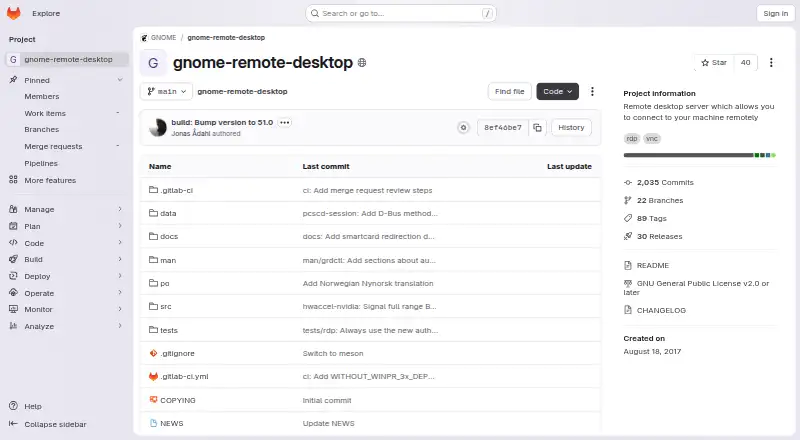
What GNOME Remote Desktop is
GNOME Remote Desktop is GNOME’s Linux server for remote assistance, single-user headless desktop access, and headless remote login. It offers RDP and VNC backends, though support for operating modes differs between them. Assistance connects to an active session, and locking the screen ends that connection. Headless multi-user login integrates with GNOME Display Manager and is available only over RDP.
The server uses PipeWire for pixel streaming, libei for input events, and Mutter’s remote desktop API for management. RDP requires a TLS key and certificate; VNC allows password or prompt authentication. GNOME Settings can show an encryption fingerprint to compare with the client. GNOME 50 adds hardware acceleration using Vulkan and VA-API, HiDPI scaling, camera redirection, Kerberos authentication for certain setups, and support for sessions launched with gnome-headless-session. Known working clients include Remmina, Connections, xfreerdp, mstsc, and Thincast. H.264 can reduce bandwidth under specified graphics and encoder conditions. The software is free and open source under GNU GPL v2 or later.
Who it suits
It suits Linux users and administrators who need remote assistance or headless desktop access. Those planning public-internet access should note the project’s warning against opening the firewall to the public internet.
What it does well
- Free and open source under GNU GPL v2 or later
- Provides both RDP and VNC backends
- Supports headless multi-user login over RDP
- GNOME 50 adds HiDPI scaling and camera redirection
What to know first
- Operating modes are not supported by both backends equally
- Multi-user headless remote login is RDP-only
- RDP connections require a TLS key and certificate
- Project cautions against public-internet firewall access
Limits
The free plan is listed as free and is licensed under GNU GPL v2 or later. Its RDP and VNC backends do not both support every operating mode; multi-user headless remote login is RDP-only.
Plans
| Plan | Billed and limits | Price |
|---|---|---|
| GNOME Remote Desktop | GNU GPL v2 or later · RDP and VNC backends · not all operating modes work with both backends | Free |
As gitlab.gnome.org lists them, read 7 Oct 2026. The maker's own page has the final word.
Getting started
- Visit the GNOME Remote Desktop project website.
- Use a Linux system; the listed platforms are Linux and self-hosted.
- Choose the RDP or VNC backend for a supported operating mode.
- For RDP, prepare a TLS key and certificate; for VNC, choose password or prompt authentication.
- Connect with a listed compatible client for your operating system.
Overview
GNOME Remote Desktop is a Linux remote desktop server for helping someone in an active session, reaching a single-user headless desktop, or logging in to a headless machine. It suits Linux users who want a free, open-source server and can work within the differences between its RDP and VNC modes. Its broad set of access modes is useful, though backend and session limits shape which deployments fit.
Key features
Remote assistance connects to an already active session, and locking the screen ends the connection. That provides a clear boundary for support, but it makes this mode a poor fit for unattended access once the user locks the machine.
For headless access, single-user desktop sessions and multi-user remote login serve different needs. The multi-user option integrates with GNOME Display Manager but works only over RDP. RDP uses FreeRDP, while VNC uses LibVNCServer; neither backend supports every operating mode. Teams should choose the access mode first, then confirm that its required backend works with their client.
PipeWire streams the screen, libei handles input events, and Mutter’s remote desktop API manages the session. RDP requires a TLS key and certificate; VNC supports password or prompt authentication. GNOME Settings can show an encryption fingerprint for comparison with the client, giving administrators a way to verify the connection’s encryption identity.
GNOME 50 adds Vulkan and VA-API hardware acceleration, intended to improve session smoothness, latency, and power use. It also adds HiDPI scaling for remote clients, camera redirection for using a local webcam remotely, Kerberos authentication for screen sharing or single-user headless servers, and support for remote login sessions launched with gnome-headless-session. H.264 can reduce bandwidth when the graphics pipeline is in use, the client supports H.264, and an NVIDIA NVENC encoder is available; that benefit depends on all three conditions.
Known working clients include Remmina, Connections, and xfreerdp on Linux, mstsc on Windows, and Thincast on Linux, Windows, or macOS. The project cautions against opening the firewall to the public internet, so deployment needs a more controlled network arrangement.
Pricing
GNOME Remote Desktop is free: its GNU GPL v2 or later plan costs nothing and includes RDP and VNC backends, with operating-mode support varying by backend. There is no paid tier or trial to weigh against the free plan. The price is accessible to individual users and organizations, while setup and network planning remain part of operating the server.
Platforms
The server runs on Linux and is self-hosted. RDP and VNC clients are supported across several desktop platforms, but server availability is Linux-only.
Who it's for
It is a good fit for Linux users who need remote assistance, single-user headless access, or GNOME-integrated multi-user login and can match their chosen mode to RDP or VNC. Organizations needing multi-user headless login should be prepared to use RDP. It is less suitable for people seeking a public-internet-facing remote desktop or a mode that stays connected after an active session is locked.
Pros and cons
- Pros: Free, open-source access to several remote desktop modes, including GNOME Display Manager integration for multi-user headless login.
- Pros: GNOME 50 adds hardware acceleration, HiDPI scaling, camera redirection, and Kerberos support for specified session types.
- Cons: Multi-user headless login is limited to RDP, and the backends do not support all modes equally.
- Cons: Remote assistance ends when the active screen is locked, limiting its usefulness for unattended support.
- Cons: The project warns against exposing the service to the public internet, which constrains network deployment choices.
Alternatives
For remote desktop access, Brother P-touch Editor, NAPS2, KODAK Capture Pro Software, OCRFeeder, PaperScan, PaperStream Capture, Q-Dir, and scanservjs are also listed as alternatives.
Verdict
Choose GNOME Remote Desktop if you need a free Linux server for GNOME sessions and can select a supported backend for your access mode. Its range of assistance and headless options is the main reason to use it; RDP-only multi-user login and the project's network caution are the main reasons to look elsewhere.
Verdict
GNOME Remote Desktop covers several Linux remote-access modes, with backend-specific limits to consider. Its security setup and network guidance matter when planning deployment.
Questions
How much does GNOME Remote Desktop cost?
The listed plan is free. Its pricing note says open source, and the plan lists GNU GPL v2 or later.
Does it support both RDP and VNC?
Yes. It provides RDP and VNC backends, but not every operating mode is supported by both.
Which platforms are listed?
The listed platforms are Linux and self-hosted, and supported platforms are Linux.
Which clients are known to work with it?
GNOME lists Remmina, Connections, and xfreerdp for Linux, mstsc for Windows, and Thincast for Linux, Windows, or macOS.
Can it handle multi-user headless remote login?
Yes. That mode integrates with GNOME Display Manager and is available only over RDP.
How are connections authenticated?
RDP connections require a TLS key and certificate. VNC supports password or prompt authentication.
Facts from GNOME Remote Desktop's own pages
- Access mode
- both · gitlab.gnome.org, 20 Sept 2026
- Authentication and sessions
- GNOME 50 adds Kerberos authentication for screen sharing or single-user headless servers and support for remote login sessions launched with gnome-headless-session. · release.gnome.org, 7 Oct 2026
- Bandwidth
- H.264 encoding can reduce bandwidth when the graphics pipeline is used, the client supports H.264, and an NVIDIA NVENC encoder is available. · help.gnome.org, 7 Oct 2026
- CLI administration
- The grdctl command-line utility enables backends, sets credentials and certificates, changes view-only mode, and reports status. · github.com, 15 Oct 2026
- Company founding
- GNOME’s own history says the project was founded in 1997 by Miguel de Icaza and Federico Mena. · gnome.org, 15 Oct 2026
- Company size
- Crunchbase lists GNOME’s headcount range as 101–250 people. · crunchbase.com, 15 Oct 2026
- Compatible clients
- GNOME lists Remmina, Connections, and xfreerdp for Linux, mstsc for Windows, and Thincast for Linux, Windows, or macOS as known working clients. · help.gnome.org, 7 Oct 2026
- Current Fedora package
- Fedora’s testing repository lists gnome-remote-desktop version 51.0-1.fc45 dated September 17, 2026. · packages.fedoraproject.org, 15 Oct 2026
- Display and camera
- GNOME 50 adds HiDPI scaling for remote clients and camera redirection so a local webcam can be used in a remote session. · release.gnome.org, 7 Oct 2026
- Distribution availability
- Fedora packages GNOME Remote Desktop as a screen-sharing service package. · packages.fedoraproject.org, 15 Oct 2026
- Documentation scope
- The repository documents configuration, Kerberos authentication, and smart-card redirection. · github.com, 15 Oct 2026
- Encryption verification
- GNOME Settings can display an encryption fingerprint for comparison with the connecting client’s fingerprint. · help.gnome.org, 7 Oct 2026
- Firewall guidance
- The project documents firewalld rules for its default RDP and VNC services and warns about exposing them to the public internet. · github.com, 15 Oct 2026
- Funding
- Crunchbase identifies GNOME as a nonprofit and lists one grant funding round backed by Handshake, with the amount obscured on the public page. · crunchbase.com, 15 Oct 2026
- GNOME 47 change
- GNOME 47 added persistent remote-login sessions that continue after a disconnection. · release.gnome.org, 15 Oct 2026
- GNOME 50 change
- GNOME 50 improved remote desktop performance with Vulkan and VA-API hardware acceleration. · release.gnome.org, 15 Oct 2026
- Hardware acceleration
- GNOME 50 adds hardware acceleration support using Vulkan and VA-API to improve remote-session smoothness, latency, and power use. · release.gnome.org, 7 Oct 2026
- Headless sessions
- A single-user headless mode connects directly to an independently configured headless GNOME graphical session. · github.com, 15 Oct 2026
- Headquarters
- Crunchbase lists GNOME in Orinda, California, United States. · crunchbase.com, 15 Oct 2026
- Licence
- The project is licensed under GNU GPL version 2 or any later version. · github.com, 15 Oct 2026
- Limit: display scaling
- Ubuntu documents that desktop-sharing resolution follows the server session and can appear too small, too large, or blurry on the client. · ubuntu.com, 15 Oct 2026
- Limit: internet exposure
- Ubuntu warns that router port forwarding exposes the machine to attackers and recommends a VPN for private groups. · ubuntu.com, 15 Oct 2026
- Limit: reported NixOS failure
- A March 28, 2026 NixOS issue reports system-level RDP connections failing because the GDM handover daemon never starts, ending with a connection-cancelled error. · github.com, 15 Oct 2026
- Limit: user complaint
- A Reddit user reported unreliable RDP, changing credentials after reboot, removed VNC fallback, and difficulty getting the service working on Ubuntu and Fedora. · reddit.com, 15 Oct 2026
Where GNOME Remote Desktop stands on Freedom251
- Remote desktop software#2 of 135
- Subtitle tools#3 of 31