Freedom251 › Label Design Software
Brother P-touch Editor
What Brother P-touch Editor is
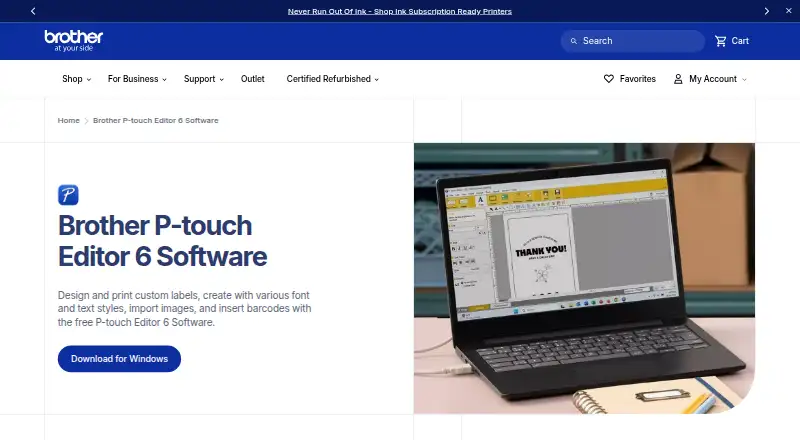
Brother P-touch Editor 6 is free software for designing and printing custom labels with text, images, and barcodes. Its design resources include more than 700 clip-art designs, frames, patterns, and tools for drawing shapes. Users can select installed TrueType or OpenType fonts or fonts included with the software. Search helps find templates and previously created labels. Tables can hold text, numbers, symbols, or barcodes, and the software can create both barcode and QR code labels.
Label contents can use data from Excel and other databases, including for mailing lists and asset-management labeling. Brother lists image support for JPEG, GIF, BMP, PNG, and TIF/TIFF files. Barcode and specialty labels can be printed individually or in batches. Printing requires a compatible P-touch or Brother QL printer connected to a PC through USB or Bluetooth. Brother describes compatibility with Windows and Macintosh and lists Android and iOS platforms. The Windows version is listed as 6.0 and works with select Brother P-touch and QL models. For macOS 10.15 or higher, Brother directs users to download the P-touch Editor app from the App Store.
Who it suits
P-touch Editor suits people creating custom labels for personal, mailing-list, or asset-management use. It is also relevant to users who need variable label content from Excel or other databases and have a compatible Brother printer.
What it does well
- Offers more than 700 design elements.
- Creates barcode and QR code labels.
- Uses Excel and other database contents.
- Supports individual or batch label printing.
- Imports several common image formats.
What to know first
- Printing requires a compatible Brother printer.
- Printer connection is by USB or Bluetooth.
- Works with select P-touch and Brother QL models.
Limits
The listed Windows version is 6.0 and works with select Brother P-touch and QL models. Printing requires connecting a compatible printer to a PC by USB or Bluetooth.
Plans
| Plan | Billed and limits | Price |
|---|---|---|
| P-touch Editor 6 | Free software download · Windows version 6.0 · compatible select Brother P-touch and QL models · printer connection by USB or Bluetooth | Free |
As brother-usa.com lists them, read 14 Oct 2026. The maker's own page has the final word.
Getting started
- Choose the P-touch Editor version for your platform; Brother directs macOS 10.15-or-higher users to the App Store.
- Connect a compatible P-touch or Brother QL printer to a PC by USB or Bluetooth.
- Design a label with text, images, shapes, or barcode content.
- Use Excel or another database for label contents if needed.
- Print labels individually or in batches.
Overview
Brother P-touch Editor is desktop software for laying out and printing labels, best suited to people who already use a compatible Brother P-touch or QL printer. Its mix of graphic design tools and database-fed labels is useful for both occasional labeling and repeat jobs, but the printer ecosystem is a firm boundary.
Rather than a general-purpose design app, P-touch Editor is built around getting a label onto Brother hardware. That focus makes its free Windows edition appealing for users with a supported printer; anyone choosing software before choosing a printer should first confirm that their model is compatible.
Key features
Design and find layouts
Layouts can combine text, imported images, clip art, frames, patterns, and drawn shapes. More than 700 included design elements give users material for varied labels without requiring every element to be created from scratch. Font choices include TrueType and OpenType fonts installed on the computer as well as fonts supplied with the software. Image imports include JPEG, GIF, BMP, and PNG, with Brother also identifying TIF/TIFF graphic files.
Search helps users retrieve templates and labels they have made before, a practical advantage for teams or individuals who revisit established formats. Tables can hold text, numbers, symbols, or barcodes, while barcode and QR-code labels support identification and tracking tasks.
Data and printing
Labels can draw content from Excel and other databases, supporting mailing lists and asset-management work where entering each record by hand would be tedious. Barcode and specialty labels can be printed singly or in batches. That makes the editor more useful for recurring runs than a layout tool limited to one-off output, though printing still depends on a compatible Brother device and connection.
Brother describes connecting a printer to a PC by USB or Bluetooth. Administrators can also prepare label templates and distribute them to users for transfer to a printer with P-touch Transfer Express, which suits shared workflows where layouts need to stay consistent.
Pricing
P-touch Editor 6 costs free. The free software plan is the Windows version 6.0 and works with select Brother P-touch and QL models. There is no paid tier described, so users do not have to weigh feature reductions against a subscription; the meaningful constraint is device compatibility.
For a free desktop tool, its support for database content and batch label printing adds value for repeat work. It is less compelling if the user has no compatible printer or needs label output from a different hardware ecosystem.
Platforms
The specific P-touch Editor 6 plan is a Windows desktop release. Brother also describes compatibility with Windows and Macintosh, and directs users on macOS 10.15 or higher to download the P-touch Editor app from the App Store. Android and iOS appear among the supported platforms, but the desktop plan’s capabilities should not be assumed to apply to mobile apps.
Who it's for
This is a strong fit for small offices, shops, and individuals who need custom labels on select Brother printers, especially when labels must incorporate spreadsheet or database records, barcodes, or QR codes. Asset labeling and mailing-list jobs are natural uses. It is not the right pick for someone seeking a general document scanner, a cross-printer label designer, or a mobile-first workflow.
Pros and cons
- Pro: Database-fed labels and batch printing reduce repetitive work for mailing lists, assets, and barcode runs.
- Pro: A library of more than 700 clip-art designs, frames, and patterns, plus font and image support, gives layouts more flexibility than text-only labels.
- Pro: Template search and administrator-led template transfer can help users reuse and distribute consistent layouts.
- Con: Printing is limited to select Brother P-touch and QL models, so printer compatibility can determine whether the software is useful at all.
- Con: The concrete free plan is a Windows desktop release; the mobile platform listing does not establish what Android or iOS users can do.
Alternatives
For label-focused comparisons, browse Label Design Software or Barcode Labeling Software. If the main job is scanning rather than label production, the Document Scanning Software category is a better starting point.
NAPS2 is a better fit for document scanning across Linux, macOS, and Windows: it is free for individuals and businesses with no ads or restrictions. PaperScan suits Windows users who need scanning and importing, with a free edition capped at 10-page batch TWAIN/WIA work and a $79.00 USD one-time Home Edition for unlimited batch TWAIN/WIA scanning/import. PaperStream Capture is another Windows scanning option, offered as a free download for current fi Series scanners and requiring PaperStream IP TWAIN or ISIS drivers.
ScanMole, GNOME Remote Desktop, Q-Dir, ScanPapyrus, and Skanlite are also alternatives.
Verdict
Choose Brother P-touch Editor if you need flexible, data-driven label design and already have a compatible Brother printer; its free plan covers a useful range of design and batch-printing work. Look elsewhere if your priority is document scanning, mobile-first use, or printing beyond select Brother hardware.
Verdict
P-touch Editor 6 provides label design tools, database-driven content, and batch printing for select Brother printers. Confirm printer compatibility and connection requirements before using it.
Questions
How much does P-touch Editor cost?
The listed P-touch Editor 6 plan is free, at no cost.
Which platforms are listed?
Android, iOS, macOS, and Windows are listed. Brother describes the software as compatible with Windows and Macintosh, and directs macOS 10.15-or-higher users to the App Store.
What printers does it support?
Brother says it connects to select P-touch and Brother QL models.
Can it use spreadsheet or database information?
Yes. Labels can reflect contents from Excel and other databases, including for mailing lists and asset-management labeling.
Can it make barcode labels?
Yes. It can create barcode and QR code labels, and tables can contain barcode content.
How do I print labels?
Brother instructs users to connect a compatible printer to a PC by USB or Bluetooth. Barcode and specialty labels can be printed individually or in batches.
Facts from Brother P-touch Editor's own pages
- Architecture limit
- Brother states that no drivers are available for ARM-based Windows processors on the referenced model download page. · support.brother.com, 14 Oct 2026
- Barcodes and QR codes
- The software creates barcode and QR-code labels by selecting a code type and entering data. · brother.co.uk, 14 Oct 2026
- Batch printing
- Brother says users can print barcode and specialty labels individually or in batches, depending on their needs. · brother-usa.com, 30 Sept 2026
- Company founding and headquarters
- Brother Industries, Ltd. lists headquarters in Mizuho-ku, Nagoya, Aichi; Brother USA says the parent was founded in 1908 in Nagoya. · linkedin.com, 14 Oct 2026
- Company history
- Brother says the Brother Group began in 1908 as a sewing-machine repair business. · download.brother.com, 30 Sept 2026
- Company legal name
- Brother Industries, Ltd. is the Japanese parent company identified on its LinkedIn page. · linkedin.com, 14 Oct 2026
- Compatible systems and devices
- Brother describes P-touch Editor as compatible with Windows and Macintosh and says it connects to select P-touch and Brother QL models. · brother-usa.com, 30 Sept 2026
- Databases
- The database feature can use Excel and other database programs to generate continuous or batch labels. · brother.co.uk, 14 Oct 2026
- Data sources
- Labels can reflect contents from Excel and other databases, and the software supports mailing-list and asset-management labeling. · brother-usa.com, 30 Sept 2026
- Design elements
- The software includes more than 700 clip-art designs, frames, patterns, and tools for drawing shapes. · brother-usa.com, 30 Sept 2026
- Design library
- P-touch Editor 6.7 advertises over 1,200 symbols, more than 30 fonts, and over 160 frames. · brother.co.uk, 14 Oct 2026
- Documentation depth
- Developer documentation includes getting-started guides, printer discovery, image/PDF printing, template transfer, template printing, and sample applications. · support.brother.com, 14 Oct 2026
- Fonts
- Users can choose TrueType or OpenType fonts installed on their computer or fonts included with the software. · brother-usa.com, 30 Sept 2026
- Founded
- 1934 · brother-usa.com, 28 Sept 2026
- Headquarters
- Nagoya, Japan · brother-usa.com, 28 Sept 2026
- Image formats
- Brother says the software imports JPEG, GIF, BMP, and PNG images, and also lists BMP, JPG/JPEG, GIF, and TIF/TIFF graphic files. · brother-usa.com, 30 Sept 2026
- Image import
- The editor imports BMP, JPG/JPEG, GIF, TIF/TIFF, and PNG graphics for logos and custom artwork. · brother-usa.com, 14 Oct 2026
- Licence
- Brother terms describe proprietary software owned by Brother and grant a free, non-exclusive, non-transferable use licence while forbidding reverse engineering. · refresh.brother-usa.com, 14 Oct 2026
- Limit: interface complexity
- Druckerchannel says the professional interface is crowded and may discourage beginners, requiring learning time. · druckerchannel.de, 14 Oct 2026
- Limit: macOS feature parity
- Apple reviewers report that the Mac version lacks Windows features, has communication failures, crashes, and removed Save As or Duplicate workflows. · apps.apple.com, 14 Oct 2026
- Limit: QR and vertical text workflow
- ITreview reviewers say QR content is not automatically linked to text changes and English characters rotate incorrectly in vertical writing. · itreview.jp, 14 Oct 2026
- Limit: usability bugs
- Software Informer reviewers report dated interface behavior, confusing text-box resizing, printer-specific bugs, and label-size recognition failures. · brother-p-touch-editor.software.informer.com, 14 Oct 2026
- macOS download
- Brother's support page for macOS 10.15 or higher directs users to download the P-touch Editor app from the App Store. · help.brother-usa.com, 30 Sept 2026
- Mobile SDK
- Brother Print SDK supports development of mobile apps that print to Brother label and mobile printers, with Xcode and Android Studio guides. · support.brother.com, 14 Oct 2026
Where Brother P-touch Editor stands on Freedom251
- Label Design Software#1 of 32
- Label Printing Software#1 of 18
- Barcode Labeling Software#2 of 35
- Barcode Printing Software#1 of 17