Skanlite
What Skanlite is
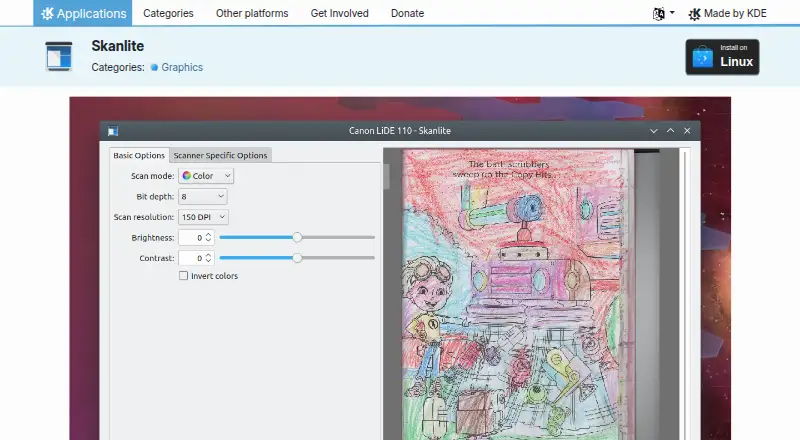
Skanlite is a free Linux application for scanning images, optimized for flatbed scanners. With supported scanners, it can capture photos, documents, transparent slides, and filmstrips. A preview and selection feature lets users choose the area for a final scan, and the application can scan multiple selections from one image. It supports network scanners. For saving, users can choose a dialog for each scanned image or send images directly to a specified folder using autogenerated names and a selected format. Listed export formats include PNG, JPEG, JPG, JPEG 2000, and BMP. Linux installation is available through Discover and other AppStream application stores, distribution package managers, and Flathub. The Skanlite page links to a handbook, forum, and bug reporting route, and lists the GPL-2.0+ license. KDE says its software generally does not transfer information from a device except after explicit user action, while noting third-party distributors may make changes that affect privacy. Flathub identifies KDE as the publisher.
Who it suits
Skanlite suits Linux users who want to scan images with supported flatbed or network scanners. It can also suit users who need to select several areas from an image or choose between per-image prompts and direct folder saving.
What it does well
- Scans photos, documents, slides, and filmstrips.
- Preview and selection tool for scan areas.
- Supports multiple selections and network scanners.
- Offers per-image or direct-to-folder saving.
- Available through Linux application stores and Flathub.
What to know first
- Available for Linux only.
- Image capture depends on supported scanners.
Limits
The listed plan is for desktop use on Linux. Capturing photos, documents, transparent slides, and filmstrips depends on supported scanners.
Plans
| Plan | Billed and limits | Price |
|---|---|---|
| Skanlite | Desktop only · 8 MiB download | Free |
As apps.kde.org lists them, read 8 Oct 2026. The maker's own page has the final word.
Getting started
- Install Skanlite through Discover or another AppStream application store.
- Alternatively, use your Linux distribution's package manager or Flathub.
- Connect a supported scanner and choose a preview selection.
- Choose whether to open a save dialog for each scan or save to a specified folder.
Verdict
Skanlite covers common image-scanning tasks, with preview selection and flexible saving options. Its Linux availability and requirement for a supported scanner are the main points to check.
Questions
Is Skanlite free?
Yes. Its listed plan is free.
Which platforms does Skanlite support?
The listed supported platform is Linux.
What can Skanlite scan?
With supported scanners, it can capture photos, documents, transparent slides, and filmstrips.
Which formats can it export?
Listed formats are PNG, JPEG, JPG, JPEG 2000, and BMP.
Is Skanlite open source?
Its page lists the GPL-2.0+ license.
Who publishes Skanlite, and where can I get help?
Flathub identifies KDE as the publisher. The Skanlite page links to a handbook, a forum, and a bug reporting route.
Facts from Skanlite's own pages
- Distribution
- The official page lists Linux installation through Discover and other AppStream application stores, distribution package managers, and Flathub. · apps.kde.org, 8 Oct 2026
- Founded
- 1996 · apps.kde.org, 28 Sept 2026
- Headquarters
- Berlin, Germany · apps.kde.org, 28 Sept 2026
- Help and support
- The Skanlite page links to a handbook and a forum for help, and provides a bug reporting link. · apps.kde.org, 8 Oct 2026
- License
- The Skanlite page lists the GPL-2.0+ license. · apps.kde.org, 8 Oct 2026
- Maker
- The Flathub listing identifies KDE as Skanlite's publisher. · flathub.org, 8 Oct 2026
- Multiple selections
- It can scan multiple selections of an image. · apps.kde.org, 8 Oct 2026
- Network scanners
- Skanlite supports network scanners. · apps.kde.org, 8 Oct 2026
- Preview
- It provides a preview with a selection feature for the final scan. · apps.kde.org, 8 Oct 2026
- Privacy
- KDE says its software generally does not transfer information from users' devices except as a result of explicit user action, while noting that third-party distributors may modify software in ways that affect privacy. · kde.org, 8 Oct 2026
- Purpose
- Skanlite is a simple image scanning application optimized for flatbed scanners. · apps.kde.org, 8 Oct 2026
- Saving
- Users can choose a save dialog for every scanned image or save images immediately to a specified folder with autogenerated names and format. · apps.kde.org, 8 Oct 2026
- Scan types
- With supported scanners, it can capture photos, documents, transparent slides, and filmstrips. · apps.kde.org, 8 Oct 2026
Where Skanlite stands on Freedom251
- Scanner Software#10 of 22
- Document Scanning Software#12 of 26
- Photo Scanning Software#16 of 29