Skanpage
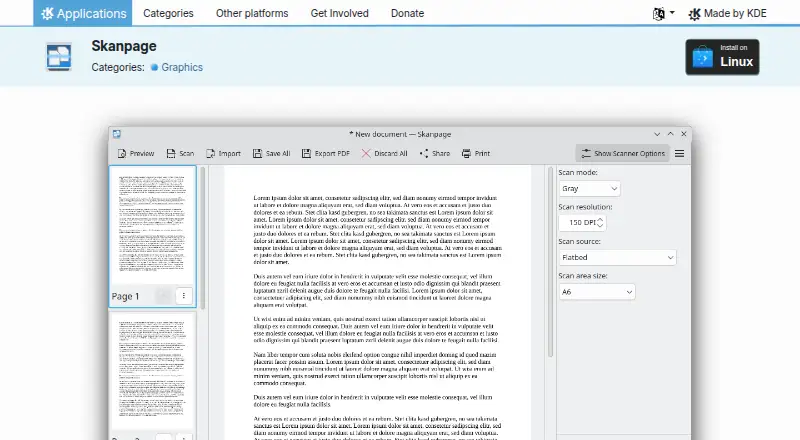
What Skanpage is
Skanpage is a free Linux scanning application designed for multi-page documents, and it can also scan single-page documents and images. It works with flatbed scanners and automatic document feeders (ADFs), with configurable options for the scanning device. Before saving, users can reorder, rotate, or delete scanned pages. The application saves multi-page scans as PDF documents and can also save image files; OCR is included. KDE lists Skanpage under the GPL-2.0+ license. Linux installation is available through AppStream application stores or a distribution package manager, and KDE also links to Flathub. The KDE page links to the source code and a bug-reporting page, and lists a community discussion forum for help. KDE's software privacy policy says its software generally does not transmit information from users' devices unless the user takes an explicit action. KDE e.V. is a registered non-profit organization that represents the KDE Community in legal and financial matters.
Who it suits
Skanpage suits Linux users who want to scan multi-page documents, single pages, or images from flatbed or ADF scanners. Its page editing and PDF output may help people assembling multi-page scans.
What it does well
- Works with flatbed and ADF scanners.
- Pages can be reordered, rotated, or deleted.
- Saves multi-page scans as PDF.
- OCR is included.
- Free and licensed under GPL-2.0+.
What to know first
- Available for Linux only.
- No free trial is listed.
Plans
| Plan | Billed and limits | Price |
|---|---|---|
| Skanpage | Free scanning application · Linux | Free |
As apps.kde.org lists them, read 3 Oct 2026. The maker's own page has the final word.
Getting started
- Visit the Skanpage page on KDE Applications.
- Install through an AppStream application store or your distribution package manager.
- Alternatively, follow the Flathub link on the KDE Applications page.
- Connect a flatbed or ADF scanner and configure its device options.
Verdict
Skanpage provides scanning, page rearrangement, OCR, and PDF output in a free Linux application. Check that Linux is suitable for your device before choosing it.
Questions
Is Skanpage free?
Yes. Its free plan is listed as free.
Which platforms does Skanpage support?
Linux is the listed supported platform.
What file formats can it save?
It saves multi-page scans as PDF documents and can also save image files.
Does Skanpage include OCR and ADF support?
Yes. OCR and automatic document feeder support are listed.
What license does Skanpage use?
KDE lists it under the GPL-2.0+ license.
Who represents the KDE Community?
KDE e.V. is a registered non-profit organization that represents the KDE Community in legal and financial matters.
Facts from Skanpage's own pages
- Availability
- The KDE Applications page lists Linux installation through AppStream application stores or a distribution package manager, and links to Flathub. · apps.kde.org, 3 Oct 2026
- Code and bugs
- The page links to Skanpage source code and a bug reporting page. · apps.kde.org, 3 Oct 2026
- Device options
- It provides configurable options for the scanning device. · apps.kde.org, 3 Oct 2026
- Export formats
- It saves scans as multi-page PDF documents and image files. · apps.kde.org, 3 Oct 2026
- License
- The page lists Skanpage under the GPL-2.0+ license. · apps.kde.org, 3 Oct 2026
- Organization
- KDE e.V. is a registered non-profit organization that represents the KDE Community in legal and financial matters. · ev.kde.org, 3 Oct 2026
- Page editing
- Scanned pages can be reordered, rotated, and deleted. · apps.kde.org, 3 Oct 2026
- Privacy
- KDE's software privacy policy says its software generally does not transmit information from users' devices except following an explicit user action. · kde.org, 3 Oct 2026
- Purpose
- Skanpage is a simple scanning application optimized for multi-page document scanning, and it can also scan and save single-page documents and images. · apps.kde.org, 3 Oct 2026
- Scanner support
- It scans from flatbed and automatic document feeder (ADF) scanners. · apps.kde.org, 3 Oct 2026
- Support
- KDE lists a community discussion forum for help with Skanpage. · apps.kde.org, 3 Oct 2026
Where Skanpage stands on Freedom251
- Scanner Software#11 of 22