Freedom251 › Barcode Generators

Brady Workstation
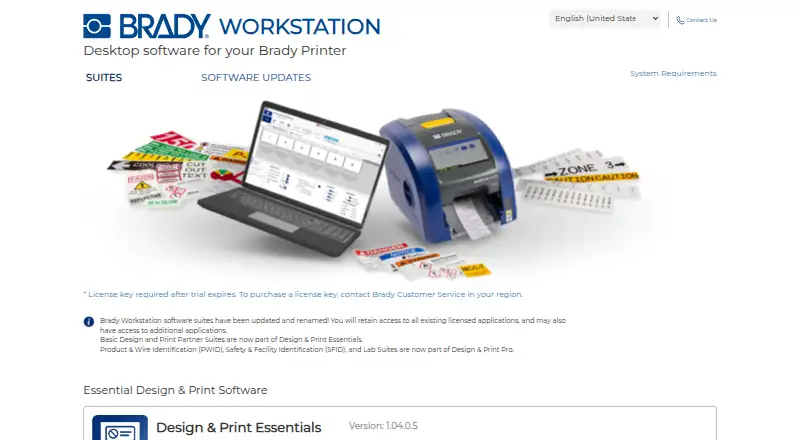
What Brady Workstation is
Brady Workstation is Windows desktop software for designing and printing labels with a Brady printer. Design & Print Essentials lets users create and edit labels, manage printing, work from premade layouts and bring data onto labels through Excel Import and Advanced Import. Design & Print Pro supports safety, facility, product, wire and laboratory labels and signs, with specialized tools for serialization, wire markers, pipemarkers and other identification work.
For repeat or production workflows, Automation Suite automates label printing to help reduce errors and keep layouts and formats consistent. The Scan and Print suite can create production label workflows paired with a barcode scanning device and a Brady printer. Workstation is offered with a free plan and a 30-day trial; a license key is required after the trial expires, and Brady directs customers to regional Customer Service to purchase one. Its stated system requirements include Windows 8, 8.1, 10 or 11, an x86 or x64 processor running at 1.5 GHz or faster, at least 8 GB of RAM, and 500 MB minimum disk space plus app or suite storage. Brady provides regional technical support contacts for the Americas, Europe and Asia-Pacific.
Who it suits
Brady Workstation suits people who design and print labels with a Brady printer, especially when they need to import changing data or create specialized identification labels. It also fits production workflows that use barcode scanning and automated printing.
What it does well
- Essentials includes premade layouts and label data imports.
- Pro covers safety, facility, product, wire and laboratory labels.
- Automation Suite automates printing for more consistent formats.
- Scan and Print can pair workflows with barcode scanning.
- Regional technical support contacts are provided.
What to know first
- The software is limited to Windows.
- A license key is required after the 30-day trial expires.
- A Brady printer is required for its label-printing purpose.
Limits
The trial lasts 30 days, after which a license key is required. A Brady printer is part of the label-printing workflow, and Scan and Print can be paired with a barcode scanning device.
Plans
| Plan | Billed and limits | Price |
|---|---|---|
| Design & Print Essentials | License key required after trial expires; purchase through regional Brady Customer Service | On request |
| Automation Suite | License key required after trial expires; purchase through regional Brady Customer Service | On request |
| Design & Print Pro | License key required after trial expires; purchase through regional Brady Customer Service | On request |
As workstation.bradyid.com lists them, read 8 Oct 2026. The maker's own page has the final word.
Getting started
- Visit the Brady Workstation website.
- Download the software using the product page download option.
- Install it on a computer meeting the stated Windows and hardware requirements.
- Use Design & Print Essentials, Pro, Automation Suite or Scan and Print for the relevant workflow.
- After the 30-day trial, obtain a license key through regional Brady Customer Service.
Verdict
Choose Brady Workstation if you use a Brady printer and need label design, variable data imports or purpose-built identification tools. Automation and scanning options address production workflows. Look elsewhere if you need a non-Windows platform or cannot obtain a license key after the trial.
Questions
What is Brady Workstation used for?
It is desktop software for designing and printing labels with a Brady printer. Its suites cover label design, data import, automated printing and production scanning workflows.
Which operating system does it support?
The listed platform is Windows. Stated supported versions are Windows 8, 8.1, 10 and 11.
Is there a free plan or trial?
A free plan and a 30-day trial are listed. A license key is required after the trial expires.
How do I get a license after the trial?
Brady directs customers to regional Brady Customer Service to purchase a license key.
What computer requirements are listed?
The stated requirements include a 1.5 GHz or faster x86 or x64 processor, at least 8 GB RAM, Windows 8, 8.1, 10 or 11, and 500 MB minimum disk space plus app or suite storage.
Who provides support?
Brady directs Workstation users to regional technical support and lists contacts for the Americas, Europe and Asia-Pacific.
Facts from Brady Workstation's own pages
- Automation
- Automation Suite automates label printing to help reduce errors and maintain consistent layouts and formats. · workstation.bradyid.com, 8 Oct 2026
- Essentials
- Design & Print Essentials creates and edits labels and manages printing, with premade layouts and data import tools. · workstation.bradyid.com, 8 Oct 2026
- Founded
- 1914 · workstation.bradyid.com, 28 Sept 2026
- Headquarters
- Milwaukee, Wisconsin, United States · workstation.bradyid.com, 28 Sept 2026
- Imports
- The Essentials suite includes Excel Import and Advanced Import for bringing data onto labels. · workstation.bradyid.com, 8 Oct 2026
- Pricing availability
- The product pages provide download buttons and trial-license guidance but do not state prices. · workstation.bradyid.com, 8 Oct 2026
- Pro
- Design & Print Pro supports safety, facility, product, wire and laboratory labels and signs. · workstation.bradyid.com, 8 Oct 2026
- Product
- Brady Workstation is desktop software for a Brady printer. · workstation.bradyid.com, 8 Oct 2026
- Pro tools
- Design & Print Pro includes purpose-built tools for serialization, wire markers, pipemarkers, signs and other identification tasks. · workstation.bradyid.com, 8 Oct 2026
- Scanning
- The Scan and Print suite creates production label workflows that can be paired with a barcode scanning device and Brady printer. · workstation.bradyid.com, 8 Oct 2026
- Support
- Brady directs Workstation users to regional technical support and lists support contacts for the Americas, Europe and Asia-Pacific. · workstation.bradyid.com, 8 Oct 2026
- System requirements
- The stated requirements include a 1.5 GHz or faster x86 or x64 processor, at least 8 GB RAM, Windows 8, 8.1, 10 or 11, and 500 MB minimum disk space plus app or suite storage. · workstation.bradyid.com, 8 Oct 2026
- Trial and license
- The maker says a license key is required after the trial expires and directs customers to regional Brady Customer Service to purchase one. · workstation.bradyid.com, 8 Oct 2026
Where Brady Workstation stands on Freedom251
- Barcode Generators#1 of 21
- Label Design Software#4 of 32
- Label Printing Software#3 of 18
- Barcode Labeling Software#6 of 35
- Barcode Printing Software#3 of 17