Freedom251 › Barcode Generators
PrintSpirit
What PrintSpirit is
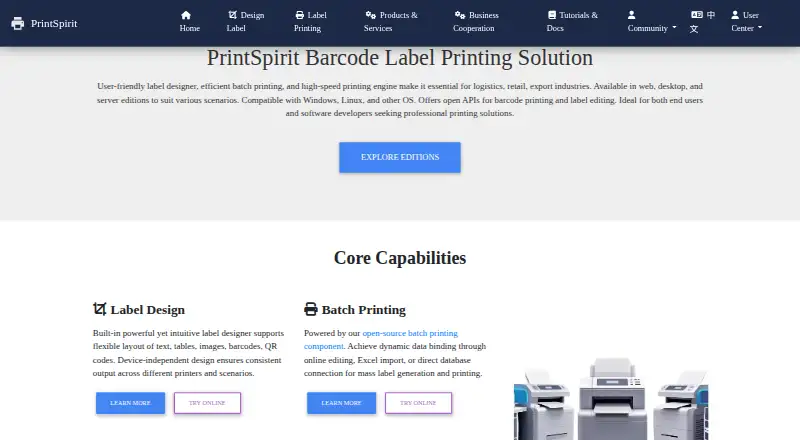
PrintSpirit provides software for designing labels, printing barcodes, and producing print batches for logistics, retail, export, warehouse, and enterprise operations. Its SpiritDesigner editor supports layouts with text, images, tables, barcodes, QR codes, PDF417, and DataMatrix. Batch jobs can use Excel or CSV data and direct SQL queries; automatic sequence values can be set with a starting value and increment. Printing can generate ZPL without a driver or use operating-system drivers. PrintSpirit lists JS API, DLL, and REST API options for connecting label editing and printing to other systems. SpiritCenter supports intranet deployment, centralized print control, JS and Java SDKs, and USB, network, or Bluetooth printers. Android Native and H5/JS SDKs are also listed for mobile printing integrations. SpiritDesktop is described as an offline local design and printing option. The free Web Edition offers cloud-based design, batch printing, storage, and sharing for small-scale use. Gold Membership costs $10 a month and permits up to 1,000 prints daily; Platinum costs $15 a month and lists unlimited daily printing. Enterprise license pricing is not stated.
Who it suits
PrintSpirit suits teams that design and print labels in batches, including logistics, retail, warehouse, and enterprise operations. Its APIs, SDKs, and printer connections may suit organizations integrating label printing into other systems.
What it does well
- Batch data can come from Excel, CSV, or SQL.
- Supports barcode, QR code, PDF417, and DataMatrix elements.
- Offers driverless ZPL generation and operating-system drivers.
- SpiritDesktop provides offline local design and printing.
- Platinum lists unlimited daily printing.
What to know first
- Gold is limited to 1,000 prints per day.
- Enterprise license pricing is not stated.
- SpiritCenter evaluation requires an application.
Plans
| Plan | Billed and limits | Price |
|---|---|---|
| SpiritOnline Web Edition | cloud label design · batch printing · cloud storage and sharing · browser access | Free |
| Web Edition (SpiritOnline) | Free cloud-based designer and batch printing · cloud storage and sharing · small-scale use | Free |
| Temporary VIP | per day · all features · maximum 1,000 prints daily | $1, paid once |
| Gold Membership | monthly · all features · maximum 1,000 prints daily | $10 a month |
| Platinum Membership | monthly · all features · unlimited daily printing | $15 a month |
| Gold Membership | 3 years · all features · maximum 1,000 prints daily | 150 CNY a year |
| Platinum Membership | 3 years · all features · unlimited daily printing | 200 CNY a year |
| SpiritCenter Enterprise Edition | intranet deployment · centralized task management · high-volume printing | On request |
As printspirit.cn lists them, read 14 Oct 2026. The maker's own page has the final word.
Overview
PrintSpirit is a label design and printing toolkit for teams that need barcodes, changing label data, or a connection between printing and business software. It suits operations that range from small cloud-based batches to enterprise printing deployments. Its breadth of integration and deployment options is a strength; choosing the right edition and understanding its print limits are central to the decision.
For broader comparisons, browse Label Design Software and Barcode Labeling Software.
Key features
Design and variable data
SpiritDesigner builds layouts through drag-and-drop and supports text, images, tables, barcodes, QR codes, PDF417, and DataMatrix. That range makes it suitable for labels with more than a simple product code. Batch jobs can use Excel or CSV imports or direct SQL queries, while configurable starting values and increments support sequential barcode and QR code generation. These options are useful when labels need to reflect changing records or numbered runs; they are more than a basic static-label workflow requires.
Printing and integration
The printing engine can generate ZPL directly without a driver or use the operating system's driver mode. PrintSpirit also offers JS API, DLL, and REST API options for integrating label editing and printing into third-party systems. For mobile printing integrations, it provides Android Native and H5/JS SDKs.
Enterprise and offline options
SpiritCenter supports JS and Java SDKs, intranet deployment, centralized print control, and ZPL, CPCL, TSPL, and ESC/POS protocols. It connects to USB, network, and Bluetooth printers, giving organizations several ways to fit printing into an existing environment. SpiritDesktop instead provides local design and printing, with local processing and offline data security. The choice is meaningful: centralized intranet control favors managed deployments, while the desktop option suits work that should remain local.
Pricing
The Web Edition (SpiritOnline) is free. It includes a cloud-based designer, batch printing, cloud storage, and sharing, and is aimed at small-scale use. Its stated scope makes it a practical starting point, but not a substitute for a higher-volume membership when daily print demand exceeds the membership cap.
Temporary VIP costs $1, paid once, billed per day. It includes all features and up to 1,000 prints per day, making it a short-term option for users who need the full feature set without a monthly commitment. Gold Membership costs $10 a month, billed 10元 monthly, 80元 yearly, or 150元 for 3 years. It includes all features and up to 1,000 prints per day. Platinum Membership costs $15 a month, billed 15元 monthly, 120元 yearly, or 200元 for 3 years; it includes all features and unlimited daily printing. Gold fits capped workloads, while Platinum is the relevant step up for users who cannot work within a daily quota. The longer-term rates reduce the stated overall charge relative to paying month by month, but commit users to a longer billing term.
SpiritCenter Enterprise Edition offers intranet deployment, centralized print task management, and high-volume printing, with custom pricing. An evaluation is available by application; applicants provide company and contact details, intended use, operating system, printer count, and required features, and receive a download link and evaluation license certificate. That application process is a reasonable fit for a scoped enterprise evaluation, but less direct than a self-serve membership.
Platforms
PrintSpirit lists Android, API, Linux, macOS, web, and Windows support. Combined with its hybrid deployment approach, offline desktop option, mobile SDKs, and intranet enterprise offering, it can accommodate varied environments. The best fit depends on the specific edition and integration path rather than platform breadth alone.
Who it's for
PrintSpirit is best suited to logistics, retail, export, warehouse, and enterprise teams producing barcode or other variable-data labels. It is particularly compelling where jobs draw from spreadsheets or SQL, where sequences need to be generated automatically, or where printing must connect to existing systems. Small-scale users can start with the Web Edition. Teams that need local offline work, mobile integrations, or centrally managed high-volume printing have more specialized options. It is a weaker fit for someone who only needs a simple, fixed label and has no need for batch data or integration.
Pros and cons
- Pros: Multiple data paths—Excel, CSV, and SQL—support batch work from both files and databases.
- Pros: Driverless ZPL generation and operating-system driver mode offer distinct printing approaches.
- Pros: API and SDK choices span third-party software, Android integrations, and centralized enterprise deployment.
- Cons: Gold is capped at 1,000 prints per day, so it does not suit uncapped daily volume.
- Cons: SpiritCenter evaluation requires an application with operational and company details, and its license uses custom pricing.
- Cons: The free Web Edition is positioned for small-scale use, limiting its appeal for sustained heavy printing.
Alternatives
Choose ZPLab instead if you want a free option across Linux, macOS, self-hosted, web, and Windows platforms. Brother P-touch Editor is a better match for free Windows label design when you use select Brother P-touch and QL models; its stated P-touch Editor 6 plan is free. Consider ZebraDesigner if you use Zebra Link-OS or Link-OS Basic printers and want its free Essentials 3 barcode label and tag design and print features, also priced at $0.
DYMO Label Software is another free option for macOS and Windows. EASYLABEL may suit users seeking a web or Windows option with a free Start plan for any Tharo printer, or a Silver plan at $245, paid once for all available printers and Windows drivers with basic editing. Express Labels Mobile is a free Android and iOS alternative for mobile users. FreeLabels Desktop is worth considering for a free, offline-after-install desktop option on Linux, macOS, or Windows, with no license fee, account, or watermark. Avery Design & Print is a free web option for creating designs for printable Avery products.
Verdict
Choose PrintSpirit if your label work depends on variable data, batch generation, or integrating printing with existing systems. Its strongest case is the combination of multiple data sources, printing modes, and deployment paths, with a free entry point for small-scale use. Look elsewhere if your needs are limited to simpler labels, or if a daily print cap and an application-based enterprise evaluation do not fit your workflow.
Verdict
PrintSpirit covers label layout, variable-data batches, and several printing and integration approaches. The free Web Edition is aimed at small-scale use; membership plans specify daily print limits, while Enterprise license pricing is unstated.
Facts from PrintSpirit's own pages
- Android SDK
- PrintSpirit provides an Android Native SDK and H5/JS SDK for mobile printing integrations. · printspirit.cn, 30 Sept 2026
- APIs
- PrintSpirit documents JavaScript, DLL and REST API integration methods for embedding label editing and printing. · printspirit.cn, 14 Oct 2026
- Apple listing developer
- That App Store listing identifies XIAMEN KAICONG ELECTRONIC TECHNOLOGY CO., LTD as developer and describes Bluetooth printer Wi-Fi setup and network-printer testing. · apps.apple.com, 14 Oct 2026
- Automatic serials
- Template sequences can maintain starting values and increments for bulk barcode and QR-code generation. · printspirit.cn, 14 Oct 2026
- Batch data
- Batch printing can use Excel or CSV imports and direct SQL database queries. · printspirit.cn, 30 Sept 2026
- Batch printing
- SpiritLabel supports variable extraction, Excel or CSV import, SQL data retrieval, sequence values, label imposition and barcode or QR-code PDF generation. · printspirit.cn, 14 Oct 2026
- Company contact
- PrintSpirit publishes the address Room A-504, Tianyi Building, No. 27 Jiangxi Street, Wuhou District, Chengdu, China. · printspirit.cn, 14 Oct 2026
- Company contact email
- The official site gives [email protected] as a contact email. · printspirit.cn, 14 Oct 2026
- Company history signal
- The official footer carries copyright information dated 2018, but no page opened states a legal entity name or incorporation year. · printspirit.cn, 14 Oct 2026
- Context7 listing
- Context7 catalogs SpiritLabel as an open-source PrintSpirit-integrated tool and assigns it a trust score of 3.4. · context7.com, 14 Oct 2026
- C# requirements
- The C# wrapper requires .NET 5 or newer, Windows or Linux native libraries and an installed SpiritDesktop edition. · printspirit.cn, 14 Oct 2026
- Database integrations
- Batch jobs can query SQL databases directly, and the product comparison identifies database connectivity for SpiritDesktop and SpiritCenter. · printspirit.cn, 14 Oct 2026
- Designer
- SpiritDesigner supports drag-and-drop label layouts with text, images, tables, barcodes, QR codes, PDF417, and DataMatrix. · printspirit.cn, 30 Sept 2026
- Driverless printing
- Its driverless engine converts labels to native printer commands, while a driver-based mode supports OS-installed printers. · printspirit.cn, 14 Oct 2026
- Enterprise SDK
- SpiritCenter supports JS and Java SDKs, intranet deployment, centralized print control, and ZPL, CPCL, TSPL, and ESC/POS protocols. · printspirit.cn, 30 Sept 2026
- GitHub project status
- The public spiritlabel repository shows 17 stars, 3 forks, 55 commits and no listed issues. · github.com, 14 Oct 2026
- GitHub runtime requirement
- The spiritlabel repository README says development requires Node.js greater than version 22 and uses npm start or npm run build. · github.com, 14 Oct 2026
- Go and PHP examples
- The third-party integration guide provides a Go SDK and Go/PHP example applications hosted on GitHub. · printspirit.cn, 14 Oct 2026
- Google Play listing
- A Google Play app named 打印精灵 is listed by Xiamen Kaicong Electronic Technology Co., Ltd., shows 1,000-plus downloads and targets configuration of that company's network printers. · play.google.com, 14 Oct 2026
- Headquarters
- Chengdu, Sichuan, China · printspirit.cn, 28 Sept 2026
- Label design
- SpiritDesigner lays out text, tables, images, barcodes and QR codes with device-independent output. · printspirit.cn, 14 Oct 2026
- Label imposition
- The software can place multiple labels on one sheet to reduce paper use and increase throughput. · printspirit.cn, 14 Oct 2026
- Limit: C# deployment dependency
- The documented C# SDK depends on installing SpiritDesktop in addition to the .NET package and native library. · printspirit.cn, 14 Oct 2026
- Limit: Enterprise pricing
- SpiritCenter license pricing is not displayed; the site asks prospective users to apply for an evaluation license. · printspirit.cn, 14 Oct 2026
Where PrintSpirit stands on Freedom251
- Barcode Generators#3 of 21
- Barcode Labeling Software#14 of 35
- Label Design Software#14 of 32