Freedom251 › Photo Scanning Software

NAPS2
What NAPS2 is
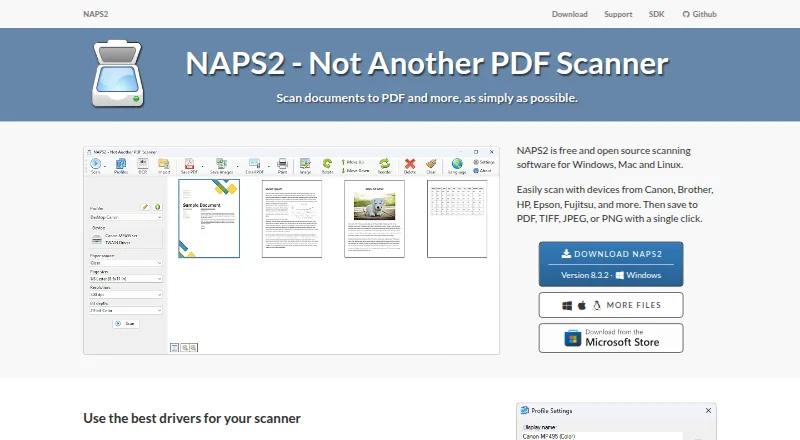
NAPS2 is free, open-source scanning software for Windows, macOS and Linux. It scans documents and saves them as PDF, TIFF, JPEG or PNG using WIA or TWAIN drivers. Scanning options include flatbed scanners and automatic document feeders, including duplex scanning. Afterward, users can reorder, interleave, rotate, crop and deskew pages, as well as adjust brightness and contrast. OCR can make scanned documents searchable, supports more than 100 languages and can be applied to imported PDFs. NAPS2 can share scanners on a local network using ESCL, with compatible Android and iPhone clients. Sharing works only while NAPS2 is running on the server; running it as a service is not currently supported. Other capabilities include sending email through Gmail and Outlook, an optional command-line interface for scripted scanning, and a .NET scanning library for developers. OCR results cannot be saved directly to a text file, but recognized text can be copied from a saved PDF using a PDF viewer.
Who it suits
It suits individuals and businesses looking for free scanning software, including users who need OCR, batch scanning or scripted workflows. Developers can also use its .NET scanning library.
What it does well
- Free for individuals and businesses, with no ads or restrictions.
- Supports flatbed and duplex feeder scanning.
- OCR supports more than 100 languages.
- Exports to PDF, TIFF, JPEG and PNG.
- Offers a command-line interface and .NET library.
What to know first
- Scanner sharing requires NAPS2 to run on the server.
- Service-based scanner sharing is not supported.
- OCR text cannot be saved directly to a text file.
Limits
The Free plan costs nothing and is described as available to individuals and businesses without ads or restrictions. Scanner sharing works only while NAPS2 is running on the server, and OCR text cannot be saved directly to a text file.
Plans
| Plan | Billed and limits | Price |
|---|---|---|
| Free | Free for individuals and businesses · no ads or restrictions | Free |
| NAPS2 | Windows, Mac and Linux desktop · no ads or restrictions · donations optional | Free |
As naps2.com lists them, read 29 Sept 2026. The maker's own page has the final word.
Getting started
- Visit the NAPS2 website.
- Choose the download for Windows, macOS, or Linux.
- On Windows, use the MSI installer for an organization deployment if needed.
- Connect a scanner that uses WIA or TWAIN drivers.
- Scan pages, edit their order or appearance, and save in a supported format.
Overview
NAPS2 is a free, open-source app for scanning paper documents and preparing digital files. It is best for people who want scanner support, page cleanup and searchable PDFs without paying for software. Its broad capabilities are balanced by a practical constraint: network scanner sharing stops when the server app closes.
Key features
Scanning and page cleanup
Support for WIA and TWAIN drivers covers flatbed and automatic document feeder scanners, including duplex jobs. Batch scanning and tools to reorder, interleave, rotate, crop, deskew, and adjust brightness and contrast make NAPS2 useful when a document needs organizing or correction before it is saved. Exports include PDF, TIFF, JPEG and PNG, so it can serve both document and image workflows.
Searchable OCR
OCR makes scanned documents searchable, supports more than 100 languages, and can be applied to imported PDFs. That is useful for turning image-based scans into files whose contents can be found later. The trade-off is that recognized text cannot be exported straight to a text file; it must be copied from a saved PDF in a PDF viewer.
Network sharing and email
NAPS2 can share a scanner over a local network using ESCL, with compatible Android and iPhone apps among the clients. This can help people scan from other devices without moving documents to the scanner computer. But the app must remain running on the server, so it is not a set-and-forget service; running it as a service is not currently supported. Sharing uses HTTPS with an automatically generated self-signed certificate by default, may fall back to HTTP, and can be configured to require HTTPS or use a custom certificate.
Email sending works with Gmail and Outlook. The email address and secure sending token stay on the user's computer and are sent only to the relevant provider. An optional command-line interface supports scripted scanning and saving, while a .NET scanning library gives developers another route to build scanning workflows. Windows organizations can use an MSI installer and application-level configuration for managed deployments. Support tickets can include NAPS2 error logs to help diagnose problems or report bugs.
Pricing
Free: free. The plan is free for individuals and businesses, with no ads or restrictions. That makes it a straightforward choice for personal use, business scanning, and scripted workflows without a paid tier to outgrow. There is no free trial because the software is free.
Platforms
NAPS2 runs on Windows, macOS and Linux. Its platform range suits mixed-computer households and workplaces; the Windows MSI and deployment configuration are particularly relevant to managed Windows installations.
Who it's for
Choose NAPS2 for routine document capture, batch jobs, page correction and searchable PDFs across desktop operating systems, especially if avoiding fees and usage restrictions matters. It is less suitable when network scanning must keep working after the host app closes, or when the workflow needs direct OCR-to-text export.
Pros and cons
- Pros: Free for individuals and businesses with no ads or restrictions, so regular use does not depend on a paid plan.
- Pros: Scanner drivers, duplex and batch scanning, page adjustments, multiple export formats and multilingual OCR cover a complete capture-to-search workflow.
- Pros: Command-line automation, a .NET library and managed Windows deployment options accommodate technical and organizational workflows.
- Cons: Network sharing requires NAPS2 to remain open on the server, limiting unattended availability.
- Cons: OCR text must be copied from a PDF rather than exported directly as a text file.
- Cons: Network sharing can fall back to HTTP unless configured to require HTTPS.
Alternatives
For a narrower label-making task, Brother P-touch Editor is free software for Windows version 6.0 and works with select Brother P-touch and QL models; it is also offered on Android, iOS and macOS.
PaperScan is a Windows alternative with a free edition capped at 10-page batch TWAIN/WIA scanning or importing, plus a Home Edition at $79, paid once for unlimited batch scanning and importing. It fits users willing to pay once to remove that batch cap.
PaperStream Capture is a free Windows download for current fi Series scanners and requires PaperStream IP TWAIN or ISIS drivers, making it the more specific choice for that scanner family.
scanservjs is a free, self-hosted option for Linux hosts or VMs with a SANE-compatible scanner; choose it when that setup fits better than NAPS2's desktop-based sharing.
DocScan is an iOS alternative that is free to download, with PRO features requiring a subscription.
ScanMole is another free option for Linux and API workflows.
EzeScan is a paid alternative for web and Windows.
Dynamic Web TWAIN is a paid alternative for web, desktop and API workflows, with a free trial and custom pricing for unlimited computers.
Explore more options in Document Scanning Software, Scanner Software and Photo Scanning Software.
Verdict
NAPS2 is a strong pick for individuals and businesses that want unrestricted scanning, page cleanup and searchable PDFs across Windows, macOS and Linux. Its breadth and free terms are the main reasons to choose it; look elsewhere if network sharing must run unattended or OCR needs direct text-file output.
Verdict
NAPS2 combines document scanning, page adjustments and searchable OCR across Windows, macOS and Linux, with no ads or restrictions. Note that network sharing depends on the server app staying open, and OCR text must be copied from a PDF rather than exported directly to a text file.
Questions
How much does NAPS2 cost?
The Free plan costs nothing. It is free for individuals and businesses, with no ads or restrictions.
Is NAPS2 open source?
Yes. NAPS2 is open-source scanning software.
Which platforms does NAPS2 support?
NAPS2 supports Windows, macOS, and Linux.
What file formats can it export?
Scans can be saved as PDF, TIFF, JPEG, or PNG.
Can NAPS2 make scanned documents searchable?
Yes. OCR can make scans searchable, supports more than 100 languages, and can add text recognition to imported PDFs.
Can I share a scanner over a network?
Yes, NAPS2 shares scanners across a local network using ESCL, including with compatible Android and iPhone apps. NAPS2 must remain running on the server for sharing to work.
Facts from NAPS2's own pages
- Application license
- The main NAPS2 application is licensed under GPL-2.0-or-later. · github.com, 15 Oct 2026
- Automation and SDK
- NAPS2 offers an optional command-line interface for scanning and saving documents through automation or scripts, and a .NET scanning library for developers. · naps2.com, 29 Sept 2026
- Command line
- Its CLI supports scripted scanning, importing, conversion, OCR, PDF/A, encryption, splitting, interleaving and email operations. · naps2.com, 15 Oct 2026
- Developer SDK
- NAPS2.Sdk is a free C#/.NET 6+ scanning library for Windows, Mac and Linux. · naps2.com, 15 Oct 2026
- Documentation and support
- Official support includes getting-started guides, OCR, batch scanning, troubleshooting, CLI and organization documentation, tickets and forums. · naps2.com, 15 Oct 2026
- Download scale
- The download page reports 16,542,323 total downloads and 165,325 weekly downloads. · naps2.com, 15 Oct 2026
- Editing
- Users can reorder, interleave, rotate, crop, deskew, and adjust the brightness and contrast of scanned pages. · naps2.com, 29 Sept 2026
- Email integrations
- NAPS2 can send email using Gmail and Outlook; the email address and secure sending token are stored on the user's computer and sent only to the corresponding provider. · naps2.com, 29 Sept 2026
- Extensibility
- The project links a naps2-webscan example for browser-based scanning through ESCL. · naps2.com, 15 Oct 2026
- Interface languages
- The application offers more than 40 interface languages. · naps2.com, 15 Oct 2026
- Latest release
- Version 8.5.1, released October 12, 2026, fixed Windows Smart App Control blocking naps2_jpeg.dll. · github.com, 15 Oct 2026
- Library licenses
- NAPS2.Sdk and several related libraries use LGPL-2.1-or-later, while SDK samples use MIT. · github.com, 15 Oct 2026
- Limit: cloud and mobile
- The Digital Project Manager review says NAPS2 has no native cloud storage or sharing, no mobile scanning app and limited file management. · thedigitalprojectmanager.com, 15 Oct 2026
- Limit: image straightening
- PCWorld’s review criticized the lack of image straightening and reported some TWAIN crashes and unreliable grayscale profile behavior. · pcworld.com, 15 Oct 2026
- Limit: scanner compatibility
- A GitHub issue reports heavy text-compression artifacts with Brother wireless ESCL scanning, with commenters attributing the behavior to the scanner protocols. · github.com, 15 Oct 2026
- Limit: TWAIN reliability
- A SnapFiles reviewer reported that the TWAIN module stopped after one scan on a Canon scanner, preventing batch scanning. · snapfiles.com, 15 Oct 2026
- Linux requirements
- Linux builds require GTK 3.20+, glibc and libsane; the site lists modern Ubuntu, Debian, Mint and Fedora versions. · naps2.com, 15 Oct 2026
- Mac requirements
- The current release supports macOS 12 and later; version 7.5.3 is the last release for macOS 10.15 and 11. · naps2.com, 15 Oct 2026
- Maker
- The project identifies Ben Olden-Cooligan as its developer and copyright holder. · naps2.com, 15 Oct 2026
- Maker location
- Ben Olden-Cooligan’s LinkedIn profile lists Vancouver, British Columbia, Canada. · ca.linkedin.com, 15 Oct 2026
- Network scanning
- NAPS2 can share scanners across a local network using ESCL, and compatible clients include Android and iPhone apps. · naps2.com, 29 Sept 2026
- Network sharing
- NAPS2 can share scanners across a local network so another computer or phone can use them. · naps2.com, 15 Oct 2026
- Network sharing limit
- Scanner sharing works only while NAPS2 is running on the server; running it as a service is planned but not currently supported. · naps2.com, 29 Sept 2026
- OCR
- Tesseract-based OCR creates searchable PDFs in more than 100 languages. · naps2.com, 15 Oct 2026
Where NAPS2 stands on Freedom251
- Photo Scanning Software#1 of 29
- Document Scanning Software#2 of 26
- Scanner Software#2 of 22