Freedom251 › Photo Scanning Software

Nostalgia
What Nostalgia is
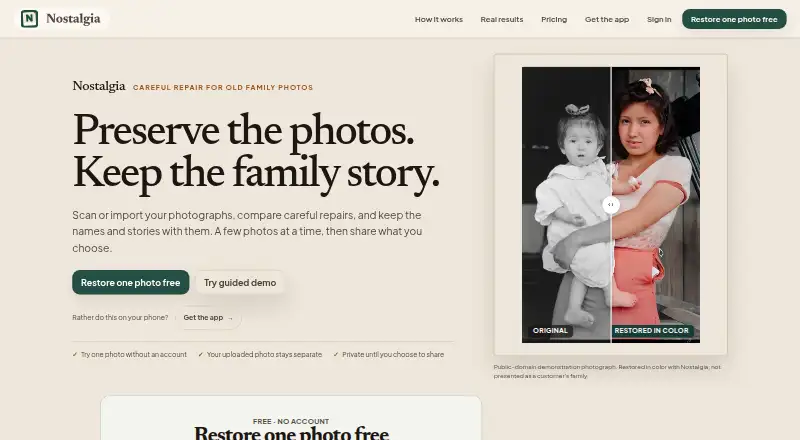
Nostalgia helps families scan, restore, organize, and share old photographs alongside their stories. Its tools include repair, deglare, denoising, enhancement, optional colorization, background removal, and animation. Photo Insight reviews an image and suggests a next restoration step before you apply it. The archive brings source photos and restoration results together with people, captions, notes, dates, and places. Family-tree import can link people in photos to relatives. Relatives can respond to shared photo questions without accounts; the account holder reviews their replies before adding them to the archive. You can scan prints with a phone, and a Mac beta supports compatible flatbed scanners. The free plan offers 10 restores per month, 30 welcome restores, one Family Vault for five members, and space for 50 photos. Each cloud repair pass uses one restore. Family costs $7.99 per month and includes 60 monthly restores, 50 GB storage, and batch restoration for up to 100 photos. Available on web, macOS, iOS, and Android.
Who it suits
Nostalgia suits families looking to preserve old photographs and the stories around them, especially when relatives want to contribute. The free plan may suit smaller archives; larger groups can consider the Family plan.
What it does well
- Photo Insight recommends a next restoration step.
- Archive stores photos with captions, dates, and places.
- Relatives can answer questions without accounts.
- Phone scanning and compatible flatbed scanning are supported.
- Family plan includes batch restore for up to 100 photos.
What to know first
- Free plan allows 10 restores per month.
- Each cloud repair pass uses one restore.
- Mac flatbed-scanner support is in beta.
- Family plan costs $7.99 per month.
Limits
The free plan includes 10 restores per month and 30 welcome restores, one Family Vault, five members, and 50 photos. Each cloud repair pass counts as one restore, so an additional pass uses another restore.
Plans
| Plan | Billed and limits | Price |
|---|---|---|
| Free | USD 0 forever · 10 restores/month · 30 welcome restores · 5 caption/story actions/day · 1 Family Vault, 5 members, 50 photos | Free |
| 200 credits | USD 24.99 one-time · 200 restore credits · never expire | $24.99, paid once |
| 500 credits | USD 49.99 one-time · 500 restore credits · never expire | $49.99, paid once |
| Family (monthly) | USD 7.99/ month · 60 restores/month · 4 animations/month · unlimited caption/story help · unlimited Family Vaults, up to 10 members each · 50 GB storage · batch restore up to 100 photos | $7.99 a month |
| Family (yearly) | USD 79.99/yr · 60 restores/month · 4 animations/month · unlimited caption/story help · unlimited Family Vaults, up to 10 members each · 50 GB storage · batch restore up to 100 photos | $79.99 a year |
| 50 credits | USD 9.99 one-time · 50 restore credits · never expire | $9.99, paid once |
As getnostalgia.ai lists them, read 29 Sept 2026. The maker's own page has the final word.
Getting started
- Visit https://getnostalgia.ai/.
- Choose the free plan or a paid option, including Family or one-time restore credits.
- Use a phone to scan prints, or use a compatible flatbed scanner with the Mac beta.
- Add photos to the archive and use Photo Insight to get a suggested restoration step.
- Invite relatives to answer a shared photo question; review their answers before adding them to the archive.
Overview
Nostalgia is a family-photo service for scanning, restoring, organizing, and privately sharing old pictures. It suits families who want relatives’ memories stored alongside the images, rather than keeping a photo folder on its own. Its strongest case is the combination of restoration and family context; its recurring restore allowance makes the size of a collection worth considering.
Key features
Scanning and restoration
Phone scanning gives families a way to bring prints into the service without separate scanning software. The Mac beta also works with compatible flatbed scanners, though that option is limited to the beta and compatible hardware. Restoration covers repair, glare and noise reduction, optional colorization, enhancement, background removal, and animation. Auto-crop and deskew correction can help prepare scans, while Photo Insight recommends a next restoration step before a restore is used.
Cloud repair runs consume restores one at a time, and another pass on the same photo consumes another. Photo Insight can help guide a choice, but it does not remove the need to budget for repeated repairs.
Archive and family contributions
The archive can keep source images and restored results with people, captions, notes, dates, and places. Family-tree import can connect people in photos with relatives. Shared photo questions let relatives contribute without accounts, while the account holder reviews their answers before adding them. That review step keeps additions controlled, though it means the account holder remains responsible for curating contributions.
PNG is the stated export format. Nostalgia says uploaded photos and restoration outputs are not used to train or fine-tune AI models without separate explicit consent. With in-app disclosure and permission, selected photos are sent to third-party providers for requested AI processing; different providers handle text features, restoration, and Reimagine. The privacy policy says data is encrypted in transit and at rest, with access controls. Users can request exports or account deletion; deletion requests are processed within 30 days, and backups may remain for up to 90 additional days. Support typically replies within one business day and covers restoration, account, billing, and privacy issues.
Pricing
The Free plan costs nothing and includes 10 restores per month, 30 welcome restores, five caption/story actions per day, one Family Vault, five members, and 50 photos. It is a useful way to start a small archive, but the photo cap and daily story-action limit constrain ongoing family use. There is no free trial.
Family (monthly) costs $7.99 a month. It raises the allowance to 60 restores per month and includes four animations per month, unlimited caption/story help, unlimited Family Vaults with up to 10 members each, 50 GB of storage, and batch restore for up to 100 photos. It fits families actively building a shared collection, although repeat repair passes still count against the restore allowance.
Family (yearly) costs $79.99 a year and includes the same stated monthly allowances and features as the monthly plan. It suits users prepared to pay annually for continued family use; the listed terms do not state a renewal policy.
One-time restore-credit packs do not expire: 50 credits cost $9.99, paid once, 200 cost $24.99, paid once, and 500 cost $49.99, paid once. These suit users who want to pay for restores as needed rather than take a Family subscription, but the listed packs do not include Family’s storage, vault, animation, or batch-restore benefits.
Platforms
Nostalgia supports web, macOS, iOS, and Android. Compatible flatbed scanning is supported in the Mac beta.
Who it's for
Nostalgia is best for families who want to repair old photographs and collect the stories and identities attached to them in one shared archive. It is less compelling for someone who only needs basic scanning or has a large restoration backlog but does not want to manage monthly allowances or buy credits.
Pros and cons
- Pros: Source photos, repaired images, and family context can live together, making the archive more useful than a set of uncaptioned scans.
- Pros: Relatives can answer photo questions without accounts, and the account holder can review replies before archiving them.
- Pros: Free access and non-expiring credit packs offer ways to begin or pay for occasional restores without a subscription.
- Cons: Each repair pass uses a restore, so repeated adjustments can quickly reduce a monthly allowance or credit balance.
- Cons: The Free plan is capped at 50 photos and five members, limiting its usefulness for a larger family collection.
- Cons: AI processing sends selected photos to third-party providers after disclosure and permission, which may not suit users who want processing kept within one service.
Alternatives
For a broader comparison of scanning tools, see Photo Scanning Software. Choose FilmLab instead if its film-photography focus and availability across Android, iOS, Linux, macOS, and Windows better suit your workflow; qualifying educators can request free licenses for educational programs teaching film photography.
Brother iPrint&Scan is a free option if you have a supported Brother machine and want scanning or printing features that vary by model. Google Photos is another freemium option for Android, iOS, and web users. MyHeritage Mobile App may suit family-tree users who can work within its Basic plan’s 250 people across family trees and 500 MB of storage.
For free desktop scanning, NAPS2 runs on Linux, macOS, and Windows with no ads or restrictions. GNOME Document Scanner is a free Linux desktop option. On Windows, PaperScan offers a free edition with 10-page batch TWAIN/WIA scanning and import, or a $79, paid once Home Edition with unlimited batch scanning and import. If you want a dedicated photo scanner bundled with software, Epson FastFoto pairs its software with the FF-680W for $629.99, paid once.
Verdict
Choose Nostalgia if your priority is turning old family photos into a repairable, searchable collection enriched by relatives’ memories. Its archive and contribution workflow give restoration a clear family purpose. Look elsewhere if you need unrestricted restoration volume, broad export choices, or scanning without a family-archive subscription or credit system.
Verdict
Nostalgia combines photo repair, archiving, and family contributions in one service. Check the restore allowance and storage included in each plan against the size of your collection.
Questions
How much does Nostalgia cost?
It has a free plan. Family costs $7.99 a month or $79.99 a year. One-time restore credit packs cost 9.99 USD for 50, 24.99 USD for 200, or 49.99 USD for 500.
What does the free plan include?
It includes 10 restores per month, 30 welcome restores, five caption or story actions per day, one Family Vault, five members, and 50 photos.
Is there a free trial?
No. Nostalgia does not offer a free trial.
Which platforms does Nostalgia support?
It is available on the web, macOS, iOS, and Android. Its Mac beta supports compatible flatbed scanners.
Does Nostalgia use uploaded photos to train AI?
The maker says uploaded photos and restoration outputs are not used to train or fine-tune AI models without separate explicit consent.
How does Nostalgia handle AI processing?
After in-app disclosure and permission, selected photos are sent to third-party providers for requested AI processing. Different providers are used for text features, restoration, and Reimagine.
Facts from Nostalgia's own pages
- Data rights
- Users can request data exports and account deletion, with deletion requests processed within 30 days and backups potentially retained for up to 90 additional days. · getnostalgia.ai, 29 Sept 2026
- Family collaboration
- Relatives can answer a shared photo question without creating an account, and the account holder reviews their answers before adding them to the archive. · getnostalgia.ai, 29 Sept 2026
- Family tree import
- Nostalgia lists family-tree import as a way to connect people in photos with relatives. · getnostalgia.ai, 29 Sept 2026
- Limits
- Each cloud repair run counts as one photo restore, and a further repair pass uses another restore. · getnostalgia.ai, 29 Sept 2026
- Photo archive
- The archive can keep sources, restoration results, people, captions, notes, dates, and places together. · getnostalgia.ai, 29 Sept 2026
- Photo Insight
- Photo Insight checks a photo and recommends a next restoration step before a restore is used. · getnostalgia.ai, 29 Sept 2026
- Platforms
- The site says web and iPhone/iPad are available, Android is in Google Play testing, and a Mac beta supports compatible scanners. · getnostalgia.ai, 29 Sept 2026
- Privacy
- The maker says it does not use uploaded photos or restoration outputs to train or fine-tune AI models without separate explicit consent. · getnostalgia.ai, 29 Sept 2026
- Purpose
- Nostalgia helps families scan, restore, organize, and privately share old family photographs with their stories. · getnostalgia.ai, 29 Sept 2026
- Restoration
- Its restoration tools include repair, deglare, denoise, optional colorization, enhancement, background removal, and animation. · getnostalgia.ai, 29 Sept 2026
- Scanning
- Users can scan prints by phone, and the Mac beta supports compatible flatbed scanners. · getnostalgia.ai, 29 Sept 2026
- Security
- The privacy policy says Nostalgia uses encryption in transit (TLS), encryption at rest, and access controls. · getnostalgia.ai, 29 Sept 2026
- Support
- The support page says replies typically arrive within one business day and lists help for restoration, account, billing, and privacy issues. · getnostalgia.ai, 29 Sept 2026
- Third-party AI
- After in-app disclosure and permission, the service sends selected photos to third-party providers for requested AI processing, with different providers used for text features, restoration, and Reimagine. · getnostalgia.ai, 29 Sept 2026
Where Nostalgia stands on Freedom251
- Photo Scanning Software#6 of 29