Freedom251 › Photo Scanning Software
MyHeritage Mobile App
What MyHeritage Mobile App is
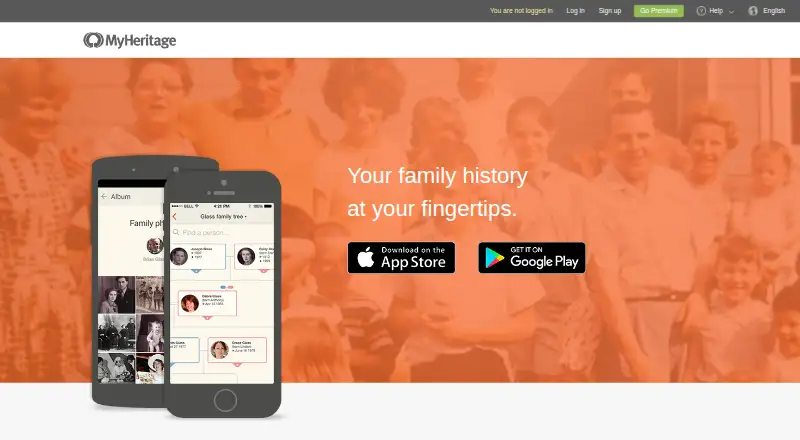
MyHeritage Mobile App helps users research family history, maintain a family tree and share family moments with relatives. Users can add people to a tree and edit family members’ details in the app. It also offers mobile access to MyHeritage’s search engine and billions of records, including family trees, vital records, immigration and military records, censuses and newspapers. Some records can be viewed free; others require a MyHeritage data subscription. Users can upload device photos to their family site, review Smart Matches and Record Matches, and add findings from Instant Discoveries. Basic family sites are free, with a limit of 250 people across the site’s trees and 500 MB of storage. Guests are automatically restricted from viewing sensitive details about living family members, and owners can adjust privacy settings. The app is listed for Android, iOS and web. The newest version supports Android 4.1 and up and iOS 9.0 and up on devices with a touch screen and high-definition display.
Who it suits
It suits people building or researching family trees and sharing photos and discoveries with relatives. Users looking for records should note that some require a data subscription.
What it does well
- Edit family details and add people to trees.
- Search across billions of historical records.
- Review Smart Matches and Record Matches.
- Basic family sites are free.
- Privacy settings restrict guest access to sensitive details.
What to know first
- Basic sites are limited to 250 people.
- Basic sites include 500 MB of storage.
- Some records require a data subscription.
- Supported devices need a touch screen and high-definition display.
Limits
The free Basic plan is limited to 250 people across a family site’s trees and 500 MB of storage. Some historical records require a MyHeritage data subscription.
Plans
| Plan | Billed and limits | Price |
|---|---|---|
| Basic | 250 people across family trees · 500 MB storage | Free |
As myheritage.com lists them, read 2 Oct 2026. The maker's own page has the final word.
Getting started
- Open the MyHeritage mobile website or use the app on Android or iOS.
- Create or use a family site to add people and edit family details.
- Search the records and review available matches and discoveries.
- Upload photos from your device to share them on your family site.
- Check the Basic plan’s 250-person and 500 MB limits before adding more content.
MyHeritage Mobile App combines family-tree editing, historical research, matching tools and family photo sharing in one mobile service. It is best for relatives building a shared genealogy project while staying connected by phone. The free tier is a useful entry point, but its 250-person and 500 MB limits, plus subscription-gated records, matter to serious researchers.
Overview
MyHeritage, founded in 2003 and headquartered in Or Yehuda, Israel, is built around discovering family history, sharing family moments and keeping relatives in touch. The app extends a MyHeritage family site to Android, iOS and the web, so users can maintain a tree and contribute discoveries without being tied to a desktop.
Its strongest case is consolidation: genealogy work, evidence searching, match review and family photos live in the same service. That makes it a better fit for a growing family project than a standalone photo-storage or scanning app. The free account is more suitable for a small tree or a trial run than for an extensive archive.
Key features
Users can add people and edit family-member details directly in the tree. The app also provides access to MyHeritage’s search engine and billions of records, including family trees, vital records, immigration and military records, censuses and newspapers. This range supports research from a phone, but access is uneven: some records can be viewed free, while others require a MyHeritage data subscription.
Smart Matches and Record Matches can be reviewed and confirmed, and Instant Discoveries let users add suggested finds to the tree. These tools can accelerate research by surfacing possible links, while the review step leaves users responsible for deciding whether a suggestion belongs in their documented history.
For family sharing, users can take a photo or choose one already on the device and upload it to the family site. Photo organization, auto-crop, auto-enhancement and OCR support make the image workflow more useful for documents and older pictures, although the app’s organizing purpose remains genealogy rather than dedicated photo restoration.
Family sites automatically restrict guests from seeing sensitive details about living relatives. Owners can adjust privacy settings, giving a shared tree a practical baseline for protecting current family members while still allowing collaboration.
Pricing
MyHeritage uses a freemium model. The Basic plan costs free and allows 250 people across the family site’s trees with 500 MB of storage. That is enough for a small household tree and a modest set of shared images; larger families or substantial photo collections will reach the caps and need a different arrangement. A data subscription is required for some records, so the free plan does not guarantee unrestricted historical research.
There is no paid plan price given beyond the free Basic tier; choose the free account when you want to build a tree, test the matching workflow or share a limited photo set, and budget for a data subscription when the records you need are paywalled.
Platforms
The service runs on Android, iOS and the web. The newest version supports Android 4.1 and up and iOS 9.0 and up, with a touch screen and high-definition display required. The stated mobile photo features are supported on iOS and Android.
Who it's for
This is for people researching ancestors while collaborating with relatives, especially those who want tree editing and record searches alongside family-photo sharing. It is less suitable as a general-purpose photo library, a dedicated scanner, or a large archival home unless the 250-person and 500 MB limits fit your project.
Pros and cons
Pros
- Genealogy in one place: tree editing, record searching, match review and family sharing work within the same family site.
- Broad record coverage: family trees, vital records, immigration and military records, censuses and newspapers support varied research paths.
- Useful photo handling: upload, organization, auto-crop, enhancement and OCR help turn phone images into shareable family material.
- Baseline privacy controls: living relatives’ sensitive details are restricted for guests, with adjustable owner settings.
Cons
- Small free capacity: 250 people and 500 MB can constrain an active, multi-generation project.
- Paywalled evidence: some records require a data subscription, interrupting research on the free tier.
- Device requirements: older or non-touch devices cannot use the stated newest-version support.
Alternatives
For a broader directory of scanning-focused tools, see Photo Scanning Software. Choose FilmLab instead when film-photography workflows and Linux, macOS or Windows support matter more than genealogy. Nostalgia is the better fit for a small family vault with restores, captions and stories, rather than a research tree.
Brother iPrint&Scan suits owners of a supported Brother machine who need free printing and scanning. Pick FilmBox by Photomyne for film-negative scanning, or SlideScan by Photomyne for slide scanning. Google Photos is the alternative when general photo storage and sharing take priority. instax UP! is a free mobile option for Instax users, while NAPS2 is a free desktop scanner application with no ads or restrictions.
Verdict
Choose MyHeritage Mobile App if your priority is a shared family tree that also searches historical records, surfaces matches and accepts family photos from a phone. Its main reason to look elsewhere is scale: the free caps and subscription-required records can limit a large archive or uninterrupted research.
Verdict
MyHeritage Mobile App combines tree editing, record searches, matching tools and family photo sharing. The free basic site has people and storage limits, and some record access requires a subscription.
Questions
Is MyHeritage Mobile App free?
It has a free Basic plan priced at $0. The plan includes a family site limited to 250 people and 500 MB.
Which platforms does it support?
The app is listed for Android and iOS, and the service is also available on the web. The newest version supports Android 4.1 and up and iOS 9.0 and up, on devices with a touch screen and high-definition display.
Do all historical records cost extra?
No. Some records are free to view; others require a MyHeritage data subscription.
Can I share family photos?
Yes. You can take or select photos on your device and upload them to your family site to share with family.
How does it protect details about living family members?
Family sites automatically restrict guests from viewing sensitive details about living family members. Owners can adjust the privacy settings.
Where can I get support?
MyHeritage offers a Help Center, self-service tools, a contact form, and email support. It may offer scheduled outbound phone calls for complex cases.
Facts from MyHeritage Mobile App's own pages
- Device requirements
- The newest version is supported on Android 4.1 and up and iOS 9.0 and up, and the device must have a touch screen and high-definition display. · myheritage.com, 2 Oct 2026
- Family tree
- Users can edit family members’ details and add people to their family tree in the mobile app. · myheritage.com, 2 Oct 2026
- Founded
- 2003 · myheritage.com, 28 Sept 2026
- Free tier limits
- Basic family sites are free and are limited to 250 people across the site’s trees and 500 MB of storage. · myheritage.com, 2 Oct 2026
- Headquarters
- Or Yehuda, Israel · myheritage.com, 28 Sept 2026
- Historical research
- The app provides mobile access to MyHeritage’s search engine and billions of records, including family trees, vital records, immigration and military records, censuses, and newspapers. · myheritage.com, 2 Oct 2026
- Intended users
- The app is designed for people building and researching family trees and sharing family photos and discoveries with relatives. · myheritage.com, 2 Oct 2026
- Matching tools
- Users can review and confirm Smart Matches and Record Matches and add discoveries from Instant Discoveries. · myheritage.com, 2 Oct 2026
- Photos
- Users can take or select photos on their device and upload them to their family site to share with family. · myheritage.com, 2 Oct 2026
- Platforms
- The app is available for iPhone, iPad, iPod touch, and Android devices; users without Apple or Android devices can use MyHeritage on the web. · myheritage.com, 2 Oct 2026
- Privacy
- Family sites automatically restrict guests from viewing sensitive details about living family members, and owners can adjust privacy settings. · myheritage.com, 2 Oct 2026
- Purpose
- The app lets users discover family history, share family moments, and stay in touch. · myheritage.com, 2 Oct 2026
- Record access
- Some records are free to view, while others require a MyHeritage data subscription. · myheritage.com, 2 Oct 2026
- Support
- MyHeritage offers a Help Center, self-service tools, contact form and email support, and may offer scheduled outbound phone calls for complex cases. · myheritage.com, 2 Oct 2026
Where MyHeritage Mobile App stands on Freedom251
- Photo Scanning Software#7 of 29