Freedom251 › Photo Scanning Software
Brother iPrint&Scan
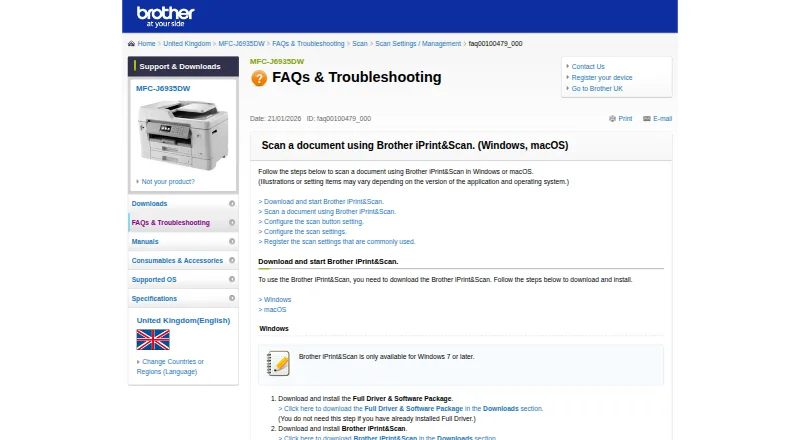
What Brother iPrint&Scan is
Brother iPrint&Scan lets supported mobile devices print to and scan from a Brother machine over Wi-Fi without using a computer. Mobile printing covers photos, documents, and web pages; the Android FAQ also names Gmail and cloud services. Depending on platform, scans can be saved to a device or cloud storage, emailed, or opened in other applications. The iOS listing names Dropbox, OneDrive, and Evernote for printing and iCloud as a scan destination. On supported newer models, mobile functions may include image editing, fax sending and preview, copy preview, and machine status. Windows and macOS versions provide scan controls for size, color, resolution, brightness, contrast, file type, destination, and target application. Desktop users can save scan settings as Workflows. Brother lists Windows 7 or later and macOS 10.10 or later on its support page. The free app is available for Android, iOS, macOS, and Windows, with PDF and JPEG listed as output formats. Printing and scanning are not available on every Brother machine, and mobile devices must use Wi-Fi on the same network as the machine.
Who it suits
The app suits owners of supported Brother printers or all-in-ones who want to print, scan, or use model-dependent copy and fax features from mobile devices or computers.
What it does well
- Prints photos, documents, and web pages from mobile devices.
- Scans can be saved, emailed, or opened in other apps.
- Desktop versions offer detailed scan settings and saved Workflows.
- Available for Android, iOS, macOS, and Windows.
What to know first
- Printing and scanning are not supported on every Brother machine.
- Mobile device must share the machine's Wi-Fi network.
- Some mobile features depend on newer supported models.
Limits
Printing and scanning depend on the Brother machine, and some mobile features are available only on supported newer models. Mobile printing and scanning require the device and machine to use the same Wi-Fi network.
Plans
| Plan | Billed and limits | Price |
|---|---|---|
| Free | Compatible Brother printer, scanner or all-in-one required · Functions vary by model | Free |
As support.brother.com lists them, read 14 Oct 2026. The maker's own page has the final word.
Getting started
- Check whether your Brother machine supports the printing or scanning features you need.
- Install Brother iPrint&Scan on Android, iOS, Windows, or macOS.
- Connect a mobile device to Wi-Fi on the same network as the Brother machine.
- For desktop use, check the listed requirement of Windows 7 or later or macOS 10.10 or later.
- Choose a print or scan destination and configure desktop scan settings as needed.
Overview
Brother iPrint&Scan is a free companion app for owners of supported Brother printers and all-in-one machines. It suits people who want to print or scan from a phone, or configure repeatable scan jobs on a Windows or Mac computer. Its usefulness depends on having a compatible machine and, for mobile jobs, a shared Wi-Fi network.
Key features
Mobile printing and scanning
The app prints photos, documents, and web pages from mobile devices; Android also supports Gmail and cloud services as print sources. Scans can be saved to the device or cloud storage, emailed, or passed to another app, depending on platform. iOS users can print from Dropbox, OneDrive, and Evernote, and send scans to iCloud. PDF and JPEG output, OCR, and ADF support are included, but the machine and platform determine which functions are usable.
Newer supported models add mobile image editing, fax sending and preview, copy preview, and machine status. These extras make the app more useful as a companion to an all-in-one, but should not be a deciding factor until the specific model is confirmed. iOS requires contact access for fax features; location access is optional and supports device search options such as Wi-Fi Direct, Bluetooth, or NFC.
Desktop scan workflows
Windows and macOS versions expose practical controls for scan size, color, resolution, brightness, contrast, file type, destination, and target application. Users can save those settings as Workflows, reducing setup for recurring jobs. This makes the desktop app a better fit than a basic one-off scan utility for people who repeatedly digitize similar documents.
The support page gives minimum desktop versions of Windows 7 and macOS 10.10. Mobile printing and scanning require a Brother machine that supports them, and the mobile device must use Wi-Fi on the same network. These requirements narrow the audience: owners of other brands or unsupported Brother models should look elsewhere.
Pricing
Free: free (billed Free application). The app costs nothing, but requires a supported Brother machine and printing and scanning capabilities vary by model. There are no paid tiers or seat-based terms described; the real trade-off is compatibility rather than a feature upgrade. This is an easy choice for an eligible Brother owner, but not a substitute for acquiring compatible hardware.
Platforms
Brother iPrint&Scan supports Android, iOS, Windows, and macOS. Desktop scan controls and saved Workflows are for Windows and macOS; mobile printing and scanning are for supported phones and tablets. Brother provides a Mobile Print/Scan Guide and customer service for assistance. Google Play says the developer reports that data is encrypted in transit, not shared with third parties, and can be deleted on request.
Who it's for
Choose it if you own a supported Brother printer or all-in-one and want phone-based printing and scanning, or recurring desktop scan settings. It is less suitable if you need a scanner-independent tool, use Linux, or cannot connect the mobile device and machine to the same Wi-Fi network.
Pros and cons
- Pros: Free access to mobile print and scan functions, with PDF and JPEG output, OCR, and ADF support.
- Pros: Windows and macOS offer detailed scan controls and reusable Workflows for repeated jobs.
- Cons: Mobile features depend on the exact Brother model, so compatibility must be checked before relying on them.
- Cons: Mobile operation requires the device and machine to share a Wi-Fi network.
Alternatives
For a broader comparison, see Scanner Software or Photo Scanning Software.
- Epson Scan 2 is the alternative to consider for an Epson scanner or multifunction printer; it is free and supports Linux, macOS, and Windows, with functions varying by scanner.
- NAPS2 is a free Linux, macOS, and Windows option for individuals and businesses, with no ads or restrictions.
- GNOME Document Scanner is a free Linux desktop-only choice.
- PaperScan is a Windows alternative with a free edition capped at 10-page batch TWAIN/WIA scanning or import; its Home Edition costs $79, paid once for unlimited batch scanning or import.
- PaperStream Capture is a free Windows download for current fi Series scanners and requires PaperStream IP TWAIN or ISIS drivers.
- Skanpage is a free Linux scanning application.
- XSane is a free Linux and Windows option for SANE-compatible scanners.
- iCopy - Free Photocopier is a free Windows photocopier application under GNU GPL v3.
Verdict
Brother iPrint&Scan is the right pick for owners of a supported Brother machine who want free mobile printing and scanning plus configurable desktop scan workflows. Its strongest reason to choose it is that combination of mobile access and repeatable desktop controls at no app cost. Look elsewhere if you need cross-brand scanner support, Linux compatibility, or mobile use without a shared Wi-Fi connection.
Verdict
Brother iPrint&Scan offers mobile printing and scanning plus configurable desktop scan workflows. Confirm that the Brother machine supports the needed functions and that mobile devices can use its Wi-Fi network.
Questions
How much does Brother iPrint&Scan cost?
The app is free; the listed Free plan costs nothing.
Which platforms does it support?
Android, iOS, macOS, and Windows. Brother lists Windows 7 or later and macOS 10.10 or later for the desktop app.
What can I print or scan?
Mobile printing includes photos, documents, and web pages. Scans can be saved to a device or cloud storage, emailed, or opened in another application, depending on platform.
Does it work with every Brother machine?
No. Brother says mobile printing or scanning is unavailable on some machines, and features vary by model.
What connection does mobile use require?
The mobile device must use Wi-Fi on the same network as the Brother machine.
What cloud services are named?
The iOS listing names Dropbox, OneDrive, and Evernote for printing, and iCloud as a scan destination.
Facts from Brother iPrint&Scan's own pages
- Advanced functions
- On newer models the app offers image editing, mobile fax sending, fax preview, copy preview and machine-status information. · play.google.com, 14 Oct 2026
- Android requirement
- AppBrain reports Android 7.0 or later as the Android requirement. · appbrain.com, 14 Oct 2026
- Cloud integrations
- The mobile app can print from Dropbox, OneDrive and Evernote. · play.google.com, 14 Oct 2026
- Company founding and size
- LinkedIn lists Brother Industries as founded in 1908 with a 1,001–5,000 employee company-size band. · linkedin.com, 14 Oct 2026
- Desktop requirements
- The referenced Brother support page says the app is available for Windows 7 or later and macOS 10.10 or later. · support.brother.com, 28 Sept 2026
- Desktop scanning
- On Windows and macOS, users can set scan size, color, resolution, brightness, contrast, file type, destination, and target application. · support.brother.com, 28 Sept 2026
- Desktop support
- Brother provides iPrint&Scan downloads for Windows and macOS; supported functions depend on the printer or scanner model. · help.brother-usa.com, 14 Oct 2026
- Developer SDKs
- Brother publishes mobile printing SDK materials and developer samples for Xamarin, SwiftUI, .NET MAUI Android/iOS bindings and React Native. · brothermobilesolutions.com, 14 Oct 2026
- Device discovery
- The app automatically searches for supported Brother devices on the local wireless network. · play.google.com, 14 Oct 2026
- Google Play data safety
- Google Play states that no data is shared with third parties, data in transit is encrypted and users can request deletion, while app activity, app information/performance and device identifiers may be collected. · play.google.com, 14 Oct 2026
- Headquarters
- Nagoya, Japan · support.brother.com, 28 Sept 2026
- iOS capabilities
- The iOS listing supports printing from camera, Open In, clipboard and iTunes File Sharing, scanning to the device, iCloud or email, and cloud printing from Dropbox, OneDrive and Evernote. · apps.apple.com, 14 Oct 2026
- iOS fax and editing
- Newer compatible models can edit previewed images, send faxes and view received faxes from iOS. · apps.apple.com, 14 Oct 2026
- Licence
- Brother’s licence agreement says Brother retains the software copyrights and does not undertake to disclose source code, so the product is proprietary rather than open source. · brother.com, 14 Oct 2026
- Limit: connectivity complaints
- App Store reviewers reported repeated wireless relinking and lost iPhone connections after previously reliable operation. · apps.apple.com, 14 Oct 2026
- Limit: multiple-photo scanning
- Tom’s Guide reported that the software cannot automatically separate multiple photos placed on the scanner glass into individual files. · tomsguide.com, 14 Oct 2026
- Limit: outdated interface
- An App Store reviewer complained that status and toner actions open browser windows that usually fail to connect and called the interface outdated. · apps.apple.com, 14 Oct 2026
- Limit: permissions
- The Android listing says fax uses contact permission and device discovery can request location permission for Wi-Fi Direct, Bluetooth or NFC. · play.google.com, 14 Oct 2026
- Mac processor support
- Brother states that Apple M1 processors are supported by the desktop app. · help.brother-usa.com, 14 Oct 2026
- Maker identity
- The maker is Brother Industries, Ltd., a public Japanese electronics manufacturer headquartered in Mizuho-ku, Nagoya. · linkedin.com, 14 Oct 2026
- Mobile permissions
- The App Store listing says contact access is needed for fax functions, while location access is optional and requested for device search features such as Wi-Fi Direct, Bluetooth, or NFC. · apps.apple.com, 28 Sept 2026
- Mobile printing
- The app can print photos, documents, and web pages from mobile devices; the Android FAQ also lists Gmail and cloud services. · support.brother.com, 28 Sept 2026
- Model limitations
- Brother warns that some listed models lack printing, OCR or fully supported scanning functions and that macOS 11/12 operation may be unsupported. · help.brother-usa.com, 14 Oct 2026
- NFC
- Compatible phones and machines can use NFC for print or scan actions by tapping over the machine NFC mark. · play.google.com, 14 Oct 2026
Where Brother iPrint&Scan stands on Freedom251
- Photo Scanning Software#2 of 29
- Scanner Software#3 of 22