Freedom251 › Photo Scanning Software
instax UP!
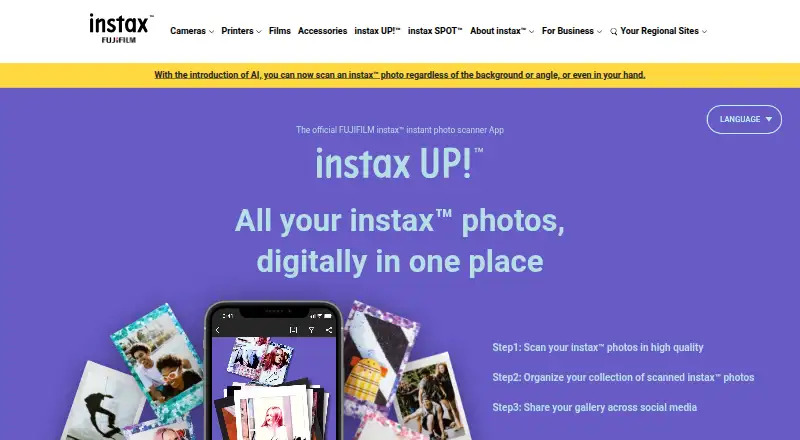
What instax UP! is
instax UP! scans physical instax prints into digital photos that can be collected and shared. It supports mini, SQUARE, and WIDE prints, including decorated photos, and lets users remove reflections and adjust contrast, brightness, saturation, and warmth. Scans can be browsed in Box View or List View and sorted by date and time, location, or keyword. Albums organize pictures by theme, while instax Days displays scans by date on a calendar. The app can import movies shot on a hybrid instax camera, as well as photos and movies from compatible instax Link, mini Evo, and mini LiPlay apps. Collections can be shared through social media and messaging services, and registration is not required. The app is free on Android and iOS, though data usage charges are the user's responsibility. The FAQ lists Android 10.0 or later and iOS 14.0 or later; a notice says version 2.3.0 or later requires iOS 16 or later. Deleting the app also deletes scans and other data, so users should use Data backup and Data transfer when moving to a new phone.
Who it suits
instax UP! suits instax print owners who want digital copies organized into albums or a calendar. It also suits users who want to share their saved collections from a phone.
What it does well
- Scans mini, SQUARE, and WIDE instax prints.
- Includes reflection removal and image adjustments.
- Sorts scans by date, location, or keyword.
- Does not require user registration.
What to know first
- Deleting the app deletes scans and other data.
- Data usage charges are the user's responsibility.
- Version 2.3.0 or later requires iOS 16 or later.
Limits
The app is free, but data usage charges are the user's responsibility. Removing the app deletes scanned photos and other data; use Data backup and Data transfer to move data to a new phone.
Plans
| Plan | Billed and limits | Price |
|---|---|---|
| instax UP! App | Free app; data usage charges are the user's responsibility | Free |
As instax.com lists them, read 4 Oct 2026. The maker's own page has the final word.
Getting started
- Open the instax UP! website for app information.
- Install the app on an Android or iOS device.
- Scan mini, SQUARE, or WIDE instax prints.
- Organize scans in albums or instax Days.
- Use Data backup and Data transfer when moving data to a new phone.
Verdict
instax UP! offers print scanning, photo organization, and sharing without requiring registration. Back up and transfer data before deleting the app or moving to another phone.
Questions
How much does instax UP! cost?
The app is free. Users are responsible for data usage charges.
Which phones are supported?
The FAQ lists Android 10.0 or later and iOS 14.0 or later. A site notice says version 2.3.0 or later requires iOS 16 or later.
Do I need to register?
No. Registration is not required to use the app.
What can it scan and import?
It scans mini, SQUARE, and WIDE instax prints, including decorated photos. It can also import hybrid instax camera movies and media from compatible instax Link, mini Evo, and mini LiPlay apps.
What happens to my photos if I delete the app?
Scanned photos and other data are deleted. Use Data backup and Data transfer to move them to a new phone.
Who makes instax UP!?
FUJIFILM provides an app FAQ and scanning guide on the official site.
Facts from instax UP!'s own pages
- Albums and calendar
- Albums organize photos by theme, and instax Days displays scanned photos by date in a calendar. · instax.com, 4 Oct 2026
- App connections
- The app can import photos and movies from compatible instax Link, mini Evo, and mini LiPlay apps. · instax.com, 4 Oct 2026
- Backup limit
- Deleting the app deletes scanned photos and other data, so users must use Data backup and Data transfer to move data to a new phone. · instax.com, 4 Oct 2026
- Founded
- 2006 · instax.com, 28 Sept 2026
- Headquarters
- Tokyo, Japan · instax.com, 28 Sept 2026
- Photo organization
- Scanned photos can be viewed in Box View or List View and sorted by date/time, location, or keyword. · instax.com, 4 Oct 2026
- Photo scanning
- It can scan mini, SQUARE, and WIDE instax prints, including decorated photos. · instax.com, 4 Oct 2026
- Purpose
- The app scans and saves instax photos digitally so users can collect and share them. · instax.com, 4 Oct 2026
- Registration
- User registration is not required to use the app. · instax.com, 4 Oct 2026
- Scan editing
- Users can remove reflections and adjust contrast, brightness, saturation, and warmth. · instax.com, 4 Oct 2026
- Security information
- The maker's Product Security page links to product security information and a security update support period page. · instax.com, 4 Oct 2026
- Sharing
- Saved collections can be shared to social media and messaging services. · instax.com, 4 Oct 2026
- Support
- FUJIFILM provides an app FAQ and scanning guide on the official site. · instax.com, 4 Oct 2026
- Supported systems
- The FAQ lists Android 10.0 or later and iOS 14.0 or later; a site notice says version 2.3.0 or later requires iOS 16 or later. · instax.com, 4 Oct 2026
- Video import
- Movies shot on a hybrid instax camera can be imported into the app. · instax.com, 4 Oct 2026
Where instax UP! stands on Freedom251
- Photo Scanning Software#8 of 29