Freedom251 › Photo Scanning Software
Epson FastFoto
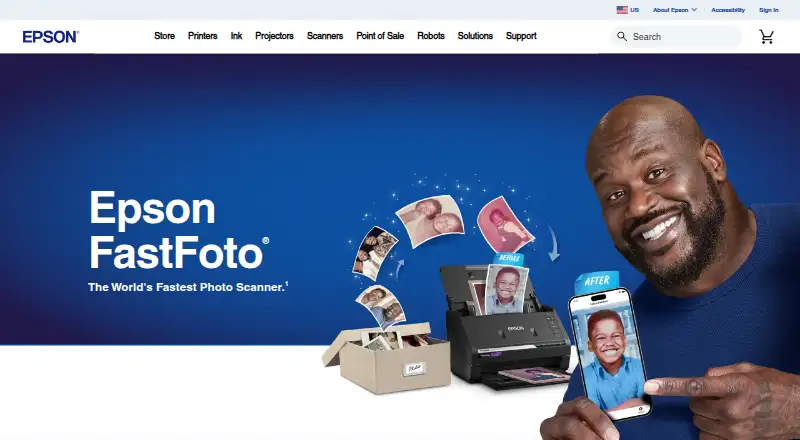
What Epson FastFoto is
Epson FastFoto is a photo and document scanning system built around the FastFoto FF-680W wireless scanner and its included Epson FastFoto and Epson ScanSmart software. It scans photos, postcards, panoramas and documents, including batches of up to 35 photos at a listed speed of up to one photo per second at 300 dpi. Image tools include automatic enhancement, color restoration, red-eye reduction, straightening, cropping and rotation. Single-Step Technology captures the front of a photo and handwritten notes on its back in one scan. SafeTouch Technology is designed for delicate photos; a carrier sheet and microfiber cloth are included.
For documents, Epson ScanSmart includes OCR to turn scanned images into readable text, and the scanner supports documents up to 240 inches long. Scans can be saved as JPEG or TIFF. The Epson FastFoto mobile app for Android and iOS can add voice or text to photos and create slideshows. Users can share or back up scans through Dropbox and Google Drive when they have an internet connection and active accounts. The scanner connects over USB 3.0 or 802.11 b/g/n wireless, and supported platforms include Windows, macOS, iOS and Android.
Who it suits
Epson FastFoto suits people digitizing photo collections alongside documents, especially when they want batch photo scanning and tools for restoring or organizing images. It also fits users who want to add voice or text to photos, make phone slideshows, or save scans through Dropbox or Google Drive.
What it does well
- Batch scans up to 35 photos at a time.
- Listed scanning speed reaches one photo per second at 300 dpi.
- Captures handwritten notes on a photo’s back in the same scan.
- Includes OCR and supports documents up to 240 inches long.
- Saves scans as JPEG or TIFF.
What to know first
- The FF-680W is a paid purchase listed at $629.99, paid once.
- Dropbox and Google Drive require an internet connection and active account.
Plans
| Plan | Billed and limits | Price |
|---|---|---|
| FastFoto FF-680W | FF-680W wireless photo scanner · includes Epson FastFoto and Epson ScanSmart software · 1-year limited warranty in the U.S. and Canada | $629.99, paid once |
As epson.com lists them, read 3 Oct 2026. The maker's own page has the final word.
Getting started
- Visit Epson’s FastFoto product page.
- Choose the FastFoto FF-680W, listed at $629.99, paid once.
- Install the FastFoto utility or combo installer for Windows or macOS from Epson support.
- Install the Epson FastFoto app on Android or iOS for mobile features.
- Connect the scanner by USB 3.0 or 802.11 b/g/n wireless.
Verdict
Choose Epson FastFoto if you want a scanner and included software for digitizing photos and documents, with batch scanning, image correction and OCR. Look elsewhere if the listed one-time price of 629.99 USD does not suit your budget or you need cloud sharing without an internet connection and active account.
Questions
How much does Epson FastFoto cost?
The FastFoto FF-680W is listed at $629.99, paid once.
Which platforms does it support?
Supported platforms are Windows, macOS, iOS and Android.
What file formats can scans use?
Scans can be saved as JPEG or TIFF.
Does it include OCR?
Yes. Included Epson ScanSmart software has OCR to convert scanned images into readable text.
Can it back up scans to cloud services?
Scans can be shared and backed up through Dropbox and Google Drive. An internet connection and active account are required.
What warranty is included?
The scanner includes a one-year limited warranty in the U.S. and Canada.
Facts from Epson FastFoto's own pages
- Cloud integrations
- Scans can be shared and backed up through Dropbox and Google Drive, with an internet connection and active account required. · epson.com, 3 Oct 2026
- Connections
- The scanner offers USB 3.0 and 802.11 b/g/n wireless connectivity. · epson.com, 3 Oct 2026
- Document scanning
- Included Epson ScanSmart software has OCR to convert scanned images into readable text, and the scanner supports documents up to 240 inches long. · epson.com, 3 Oct 2026
- Enhancement
- Its software offers auto enhancement, color restoration, red-eye reduction, de-skew, crop, and rotate. · epson.com, 3 Oct 2026
- Environmental specifications
- The product is ENERGY STAR qualified, RoHS compliant, and described as recyclable. · epson.com, 3 Oct 2026
- File formats
- The product FAQ says scans can be saved in JPEG and TIFF formats. · epson.com, 3 Oct 2026
- Founded
- 1942 · epson.com, 23 Sept 2026
- Headquarters
- Suwa, Nagano, Japan · epson.com, 23 Sept 2026
- Mobile features
- The Epson FastFoto app lets users add voice and text to photos and create slideshows from a smartphone. · epson.com, 3 Oct 2026
- Mobile platforms
- Epson describes the FastFoto app as compatible with Android and iOS. · epson.com, 3 Oct 2026
- Photo safety
- SafeTouch Technology is designed for scanning delicate photos, and a carrier sheet and microfiber cloth are included. · epson.com, 3 Oct 2026
- Photo scanning
- Epson says the scanner scans at up to one photo per second at 300 dpi and can batch-scan up to 35 photos at a time on its product page. · epson.com, 3 Oct 2026
- Purpose
- The FastFoto FF-680W scans, restores, organizes, saves, and shares photos, postcards, panoramas, documents, and other materials. · epson.com, 3 Oct 2026
- Supported desktop systems
- Epson’s support page lists FastFoto downloads for Windows and macOS, including a standalone FastFoto utility and a combo installer with scanner drivers and Epson ScanSmart. · epson.com, 3 Oct 2026
- Two-sided scanning
- Single-Step Technology captures the photo image and handwritten notes on the back in one scan. · epson.com, 3 Oct 2026
- Warranty and support
- The scanner has a one-year limited warranty in the U.S. and Canada, and Epson provides product support with downloads, FAQs, manuals, and contact options. · epson.com, 3 Oct 2026
Where Epson FastFoto stands on Freedom251
- Photo Scanning Software#21 of 29