Freedom251 › Workflow Tracking

MeisterTask
by MeisterTask
What MeisterTask is
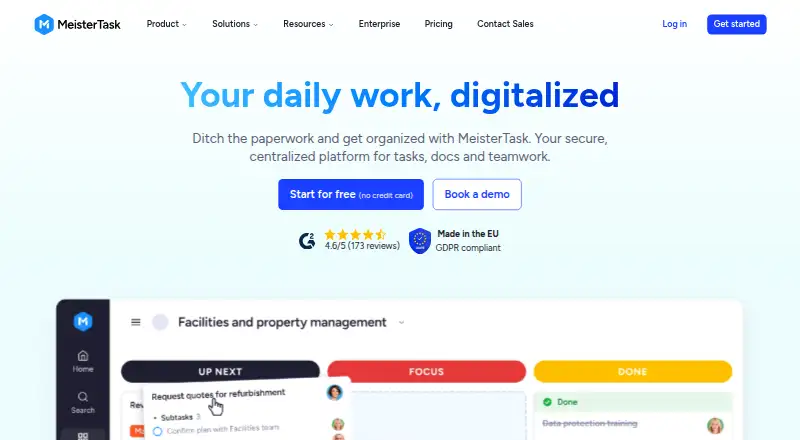
MeisterTask is a work management platform for projects, tasks and documentation, available on Android, iOS, macOS, web and Windows. Each project has a customizable Kanban-style board that displays task status, while a projects overview helps track deadlines, risks and progress across projects. Automations can handle repeat actions, such as assigning an owner when a task enters a board section. Reports can be filtered by task owner, status and due date. Integrations include Slack, Google Calendar, iCal, Gmail, Outlook, Google Drive, Dropbox, OneDrive and Zapier. Basic users can connect two integrations; Pro and Business users have unlimited integrations, and ChatGPT and Claude apps do not count toward Basic's limit. The Free plan costs nothing and includes up to 3 projects. Pro is $12.50 a month and Business is $24 a month. Meister says its servers are in an ISO 27001-certified data center in Germany, and lists security and workspace access controls. The company is based in Vienna, Austria, and was founded in 2006.
Who it suits
MeisterTask suits individuals and teams organizing project work with boards, reports and automations. Its listed plans position Free for individuals, Pro for small teams, Business for teams centralizing workflows and Enterprise for organizations needing advanced security and support.
What it does well
- Customizable boards show task status
- Overview tracks deadlines, risks and progress
- Reports filter by owner, status and due date
- Automations can assign task owners
- Free plan includes up to 3 projects
What to know first
- Basic is limited to two integrations
- Free plan is limited to 3 projects
- Free plan includes 7 days of version history
Plans
| Plan | Billed and limits | Price |
|---|---|---|
| Free | €0 Forever · Unlimited tasks · Up to 3 projects · Up to 5 notes · 5 Content Manager seats · Unlimited team members · 20 Meister AI credits | Free |
| Pro | €12 50 Per User/Month · Unlimited projects · Unlimited notes · External sharing · Integrations · Private projects · Recurring tasks & automations · 75 Meister AI credits | $12.50 a month |
| Business | €24 Per User/Month · Timeline views · Team overview · Subtasks · Roles and permissions · Custom reports · 350 Meister AI credits · Unlimited version history · Priority email & phone support | €24 a month |
| Enterprise | Custom · Workload planner · Portfolios · SSO · Compliance exports · Dedicated CS manager · Personalized onboarding | On request |
As meistertask.com lists them, read 4 Oct 2026. The maker's own page has the final word.
MeisterTask is a project and task management platform built around customizable Kanban boards, with tools for oversight across projects. It is best suited to individuals and teams that want visual workflows alongside reporting and automation, rather than boards alone. Its fit depends on how many projects, integrations and administrative controls a team needs.
Overview
Each project has a board that displays task status, while a separate overview tracks deadlines, risks and progress across projects. That wider view can help teams coordinate work beyond a single board. MeisterTask also includes documentation, reports and automation; the main trade-off is that several useful capabilities and higher limits sit on paid plans.
Founded in 2006, MeisterTask is made by a company headquartered in Vienna, Austria. The maker says its servers are in an ISO 27001-certified data center in Germany. It also says it is certified to ISO 27001:2022 and uses security-by-design practices, third-party testing and internal access controls. Admins can manage workspace access with SAML single sign-on, two-factor authentication and role-based controls. The maker states uptime of up to 99.5%, daily incremental backups and full backups every 30 days.
Key features
- Boards and automation: Customizable Kanban boards show task status, and automation rules can take on routine actions such as assigning an owner when a task enters a section. Pro includes recurring tasks and automations, making that tier more suitable for teams that want repeatable workflows than the free plan.
- Cross-project oversight and reports: The overview tracks deadlines, risks and progress across projects. Reports can be filtered by task owner, status and due date; Business adds custom reports, which may matter to teams that need more tailored reporting.
- Integrations: Connections include Slack, Google Calendar, iCal, Gmail, Outlook, Google Drive, Dropbox, OneDrive and Zapier. Basic is capped at two integrations, while Pro and Business have unlimited integrations. ChatGPT and Claude apps do not count toward Basic’s cap.
- Administration and support: Business adds roles and permissions, unlimited version history, and priority email and phone support. Enterprise adds SSO, compliance exports and a dedicated customer success manager, positioning it for organizations with more advanced security and support needs.
Pricing
MeisterTask has a free plan and paid per-user plans. The listed prices are $12.50 a month for Pro and $24 a month for Business; both are billed per user per month. Enterprise has custom pricing.
- Free — free: Unlimited tasks, up to 3 projects, up to 5 notes, 5 Content Manager seats, unlimited team members and 20 Meister AI credits. It suits individuals or focused workloads, but the project cap and 7-day version history in the plan comparison can be restrictive. Basic users are also limited to two integrations.
- Pro — $12.50 a month: Unlimited projects and notes, external sharing, integrations, private projects, recurring tasks and automations, and 75 Meister AI credits. With 30 days of version history, it fits small teams that have outgrown the free project cap or need broader integrations and recurring workflows.
- Business — $24 a month: Timeline views, team overview, subtasks, roles and permissions, custom reports, 350 Meister AI credits, unlimited version history, and priority email and phone support. It is aimed at teams centralizing workflows, especially those needing more administrative control or longer history.
- Enterprise — custom pricing: Workload planner, portfolios, SSO, compliance exports and a dedicated customer success manager, for organizations needing advanced security and support. It also has unlimited version history.
The free plan’s three-project limit is the clearest reason to upgrade; Pro raises that limit and adds unlimited integrations, while Business adds stronger oversight and administration. MeisterTask offers a free trial, but no trial length or renewal terms are stated.
Platforms
MeisterTask is available on Android, iOS, macOS, web and Windows, giving users a choice of mobile, desktop and browser access.
Who it's for
Choose MeisterTask if your work benefits from visual project boards, a cross-project view and reports that can be filtered by owner, status or due date. The free plan is a reasonable starting point for individuals with no more than three projects. Small teams that need recurring workflows or more integrations have a clearer case for Pro; teams centralizing work and needing permissions, custom reports or priority support should consider Business. Organizations that need SSO, compliance exports or a dedicated success manager should look at Enterprise.
It is less compelling if a team needs unlimited projects without paying, or if it wants to stay on Basic while relying on more than two integrations.
Pros and cons
- Pro: The overview brings deadlines, risks and progress across projects together, extending the product beyond individual task boards.
- Pro: Automations and filterable reports support repeatable workflows and performance reviews without relying only on board status.
- Pro: The free plan includes unlimited tasks and team members, making its three-project cap a manageable starting boundary for focused work.
- Con: Basic is limited to three projects, seven days of version history and two integrations, so growing workspaces may need a paid plan sooner than they expect.
- Con: Longer version history, custom reports and stronger access controls are reserved for higher tiers, which raises the cost for teams that need those capabilities.
Alternatives
For a wider shortlist, browse Kanban Software, Task Management Software or Project Management Software.
- PLANKA is another freemium option, with a free self-hosted Community edition and a Pro Self-Hosted plan at €36 a month.
- WeKan is a free option; its app plan is free and has no admin access, while WeKan Cloud is $50 a year and includes admin access and unlimited everything.
- Doska is a free, open-source option under the MIT license, with no features behind a paywall.
- Flow-e is worth considering if a free personal plan covering up to two email accounts and an unlimited task board suits your needs; its Team plan is free, with team board integration, while Kanbanize is paid.
- Jotform is a freemium option with a free Starter plan that includes 5 forms and 100 monthly submissions.
- Planio offers a Bronze tier with 1 project, 2 users, 10 customers and 1 GB storage; Silver is $25 a month.
- SwiftKanban has a free Team plan for 3 users and up to 2 boards, with standard templates and basic metrics.
- Trello is another freemium choice; its free plan allows up to 10 collaborators and 10 boards per Workspace.
Verdict
MeisterTask is a strong fit for individuals and teams that want Kanban boards with project-wide oversight, reporting and automations in one work management platform. Start with Free for a focused workload, move to Pro when its project or integration caps get in the way, and choose Business or Enterprise for more oversight and administration. Look elsewhere if you need a free workspace with more than three projects or want to avoid paying for higher-tier history and controls.
Verdict
MeisterTask combines project boards with oversight, reporting and automations, with a free option and paid tiers. Basic's integration cap and plan-specific project and version-history limits may affect which tier fits.
Facts from MeisterTask's own pages
- Audience
- The pricing page describes Free for individuals, Pro for small teams, Business for teams centralizing workflows and Enterprise for organizations needing advanced security and support. · meistertask.com, 4 Oct 2026
- Automation
- Automations can handle repetitive actions such as assigning an owner when a task is added to a board section. · meistertask.com, 4 Oct 2026
- Automation rules
- Yes · meistertask.com, 20 Sept 2026
- Backups
- Meister says it makes daily incremental backups and full backups every 30 days. · meistertask.com, 4 Oct 2026
- Boards
- Each project has a customizable Kanban-style board that shows the status of every task. · meistertask.com, 4 Oct 2026
- Founded
- 2006 · meistertask.com, 28 Sept 2026
- Free plan
- Yes · meistertask.com, 20 Sept 2026
- Guest access
- Yes · meistertask.com, 20 Sept 2026
- Headquarters
- Vienna, Austria · meistertask.com, 28 Sept 2026
- Hosting
- Meister says its servers are located in an ISO 27001-certified data center in Germany. · meistertask.com, 4 Oct 2026
- Integration limit
- Basic users are limited to two integrations, while Pro and Business users have unlimited integrations; ChatGPT and Claude apps do not count toward Basic's limit. · support.meistertask.com, 4 Oct 2026
- Integrations
- Integrations include Slack, Google Calendar, iCal, Gmail, Outlook, Google Drive, Dropbox, OneDrive and Zapier. · meistertask.com, 4 Oct 2026
- Plan limits
- The pricing comparison lists Basic at up to 3 projects and 7 days of version history, while Pro has 30 days and Business and Enterprise have unlimited version history. · meistertask.com, 4 Oct 2026
- Privacy controls
- Admins can use SAML single sign-on, two-factor authentication and role-based access controls to manage workspace access. · meistertask.com, 4 Oct 2026
- Product
- MeisterTask is a work management platform for projects, tasks and documentation. · meistertask.com, 4 Oct 2026
- Project oversight
- The product provides a projects overview for tracking deadlines, risks and progress across projects. · meistertask.com, 4 Oct 2026
- Reliability and support
- Meister states it offers up to 99.5% uptime, priority support and a dedicated Success Manager for Enterprise customers. · meistertask.com, 4 Oct 2026
- Reporting
- Reports can track and analyze project performance and be filtered by task owner, status and due date. · meistertask.com, 4 Oct 2026
- Security
- Meister says it is certified to ISO 27001:2022 and uses security-by-design practices, third-party testing and strict internal access management. · meistertask.com, 4 Oct 2026
- Time tracking
- Yes · meistertask.com, 20 Sept 2026
Where MeisterTask stands on Freedom251
- Workflow Tracking#3 of 23
- Project Management Software#36 of 188
- Project management tools#38 of 196
- Task Management Software#15 of 59
- Project Tracking Software#9 of 34
- Google Workspace Project Management Software#8 of 30
- Nonprofit Project Management#10 of 34
- Kanban Software#11 of 29