Freedom251 › Project management tools

Trello
by Trello
What Trello is
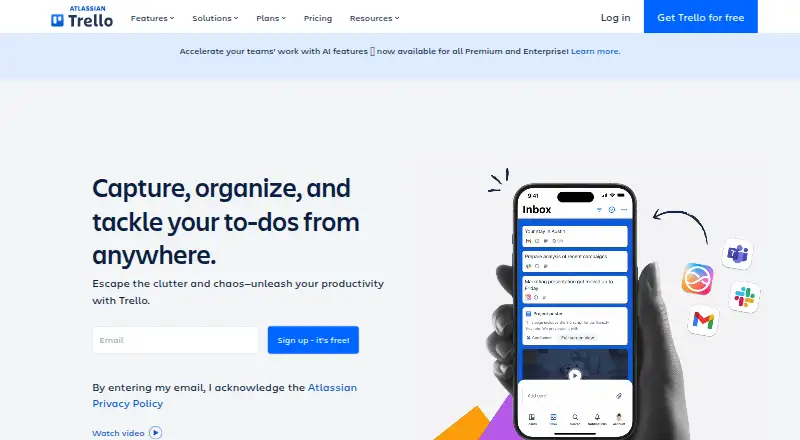
Trello is a work management tool for planning projects, organizing workflows, and tracking tasks visually. Teams arrange work on boards, then use lists and cards to follow projects and individual tasks. Inbox captures details, while Planner syncs calendars and helps set aside focused time. Built-in automation can handle recurring tasks and workflows. Power-Ups connect boards to more than 200 apps and integrations, including Slack, Google Drive, Jira, Salesforce, and Microsoft Teams; developers can also create Power-Ups through the API. Trello is cloud-only, with access through web, desktop, and mobile apps. The free plan permits up to 10 collaborators and 10 boards per Workspace, with 10MB per file and 250 Workspace command runs each month. A Workspace can try Premium for 14 days at no charge. Paid plans start at $5 per user per month when billed annually. Trello lists encryption in transit and at rest, plus SOC 2 Type 2, FedRAMP authorization, ISO/IEC 27001, and ISO/IEC 27018.
Who it suits
Trello may suit individuals and teams that want a visual way to organize projects and track tasks. Its plans also address enterprise teams and administrators.
What it does well
- Boards, lists, and cards organize projects visually.
- Inbox captures details; Planner syncs calendars.
- Built-in automation handles tasks and workflows.
- Power-Ups connect boards to more than 200 apps.
- Available on web, desktop, Android, and iOS.
What to know first
- Free plan limits Workspaces to 10 boards.
- Free plan allows 10MB per file.
- Free plan includes 250 monthly command runs.
Limits
The Free plan allows up to 10 collaborators and 10 boards per Workspace, 10MB per file, and 250 Workspace command runs per month. Standard costs $5/user/mo when billed annually and allows 250MB per file and 1,000 monthly command runs; Premium costs $10/user/mo when billed annually and includes unlimited boards, automations, and Workspace command runs.
Plans
| Plan | Billed and limits | Price |
|---|---|---|
| Free | Up to 10 collaborators per Workspace | Free |
| Premium | per user/month if billed annually; $12.50 billed monthly · Unlimited boards and automations · Timeline, Table, Calendar and Dashboard views · data export · 250MB/file storage · priority support | $10 a month |
| Enterprise | per user/month billed annually ($210 annual price per user) · Unlimited Workspaces · organization-wide permissions · Atlassian Guard Standard · 24/7 Enterprise Admin support | $17.50 a month |
| Standard | per user/month if billed annually; $6 billed monthly · Unlimited boards · custom fields · AI features · advanced Planner · advanced checklists | $5 a month |
As trello.com lists them, read 15 Oct 2026. The maker's own page has the final word.
Getting started
- Open trello.com in a browser or use the Android or iOS app.
- Start with the Free plan or select a paid plan.
- Create a Workspace and organize work with boards, lists, and cards.
- Use Inbox to capture details and Planner to sync calendars and allocate focused time.
- Connect apps through Power-Ups or use the API to build a Power-Up.
- Enroll a Workspace in the free 14-day Premium trial if you want to try Premium.
Verdict
Trello combines visual task organization with calendar planning, automation, and app connections. Check the Free plan's collaborator, board, file, and command-run limits against your needs.
Questions
Is Trello free?
Yes. The Free plan costs nothing and supports up to 10 collaborators and 10 boards per Workspace.
How much does Trello cost?
Standard starts at $5/user/mo when billed annually, or $6 per user per month when billed monthly. Premium is $10 per user per month billed annually, and Enterprise is $17.50 per user per month billed annually.
Does Trello offer a free trial?
Yes. Any user can enroll a Workspace in a free 14-day Trello Premium trial.
Which platforms support Trello?
Trello is available on the web, Android, and iOS, with desktop access also offered.
Can Trello connect to other apps?
Yes. Power-Ups connect boards to more than 200 apps and integrations, including Slack, Google Drive, Jira, Salesforce, and Microsoft Teams.
Who makes Trello?
Trello is made by Trello. The maker was founded in 2011 and is headquartered at 55 Broadway, 25th Floor, New York, NY 10006, USA.
Facts from Trello's own pages
- API
- Trello exposes a REST API covering boards, lists, cards, actions, webhooks, search and other resources. · developer.atlassian.com, 15 Oct 2026
- Audience
- Trello positions its plans for individuals, small teams, teams managing multiple projects, and enterprise teams and administrators. · trello.com, 28 Sept 2026
- Automation
- Trello provides automation for repetitive board and workflow actions. · trello.com, 15 Oct 2026
- Automation rules
- Yes · trello.com, 20 Sept 2026
- Boards and cards
- Users organize work on customizable Kanban boards and cards that can contain due dates, comments, checklists, descriptions and files. · apps.apple.com, 15 Oct 2026
- Cloud model
- Trello is a cloud-only product and offers access through web, desktop, and mobile apps. · trello.com, 28 Sept 2026
- Company founded and headquarters
- Independent company records identify Trello as founded in 2011 and headquartered in New York, New York. · cbinsights.com, 15 Oct 2026
- Company history
- Trello launched from Fog Creek in 2011, became Trello, Inc. in 2014, raised a $10.3 million Series A and was acquired by Atlassian in early 2017. · trello.com, 15 Oct 2026
- Company legal name
- Crunchbase lists the legal name as Trello, Inc., a subsidiary of Atlassian. · crunchbase.com, 15 Oct 2026
- Company size
- LinkedIn lists Trello at 201–500 employees. · linkedin.com, 15 Oct 2026
- Core structure
- Trello organizes work with boards, lists, and cards that teams use to track projects and tasks. · trello.com, 28 Sept 2026
- Desktop offline limitation
- The macOS and Windows desktop applications require an active internet connection and do not support offline synchronization. · support.atlassian.com, 15 Oct 2026
- Developer platform
- Trello says developers can build their own Power-Ups with its API. · trello.com, 28 Sept 2026
- Documentation
- Atlassian provides REST API reference pages, guides, examples, client.js documentation, Power-Up tutorials and a developer community. · developer.atlassian.com, 15 Oct 2026
- Founded
- 2011 · trello.com, 23 Sept 2026
- Free plan
- Yes · trello.com, 20 Sept 2026
- Free-plan limits
- The Free plan allows up to 10 collaborators and 10 boards per Workspace, with 10MB/file storage and 250 Workspace command runs per month. · trello.com, 28 Sept 2026
- Funding and ownership
- Crunchbase lists one Series A round with Spark Capital and Index Ventures and records Atlassian as the acquirer. · crunchbase.com, 15 Oct 2026
- Guest access
- Yes · trello.com, 20 Sept 2026
- Identity and backups
- Trello states that SAML 2.0 SSO is available to Enterprise and Guard customers and that encrypted full backups run every 24 hours. · trello.com, 15 Oct 2026
- Identity security
- SAML 2.0 single sign-on is available for Enterprise and Atlassian Guard customers. · trello.com, 28 Sept 2026
- Inbox
- Trello Inbox captures tasks and messages from email, Slack and other sources into cards for later organization. · trello.com, 15 Oct 2026
- Inbox and Planner
- Trello includes Inbox for capturing details and Planner for syncing calendars and allocating focused time slots. · trello.com, 28 Sept 2026
- Integrations
- The integrations directory lists 234 integrations, including Slack, Jira Cloud, Miro, Microsoft Teams, Gmail, Telegram and Make. · trello.com, 15 Oct 2026
Where Trello stands on Freedom251
- Project management tools#11 of 196
- Workflow Tracking#8 of 23
- Project Management Software#85 of 188
- Web App#17 of 32
- Game Project Management Software#18 of 32
- Browser Based#21 of 34
- Project Tracking Software#21 of 34
- Kanban Software#18 of 29
- Task Management Software#39 of 59
- Google Workspace Project Management Software#20 of 30
- Nonprofit Project Management#23 of 34
- Free Tools#23 of 31