Freedom251 › Project Management Software

Basecamp
What Basecamp is
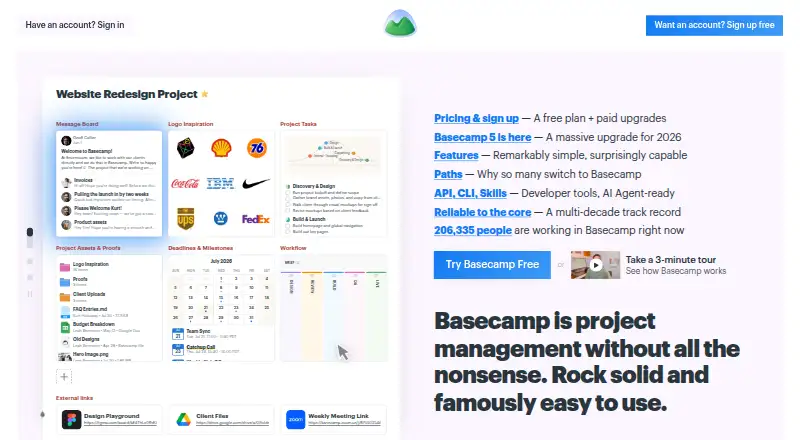
Basecamp is project management software for organizing work, discussions, decisions, files, deadlines, and project delivery. Each project has a dedicated page with tools such as to-do lists, message boards, chat, a calendar, and card tables. To-dos can have assignees, due dates, attachments, and subtasks; Hill Charts show progress, while Card Tables move work through stages. Calendars cover deadlines, milestones, events, and meetings, with subscriptions available in Outlook, Google Calendar, and HEY Calendar. Client mode lets teams control what clients can see for each project. Basecamp offers apps for Android, iOS, Mac, and Windows, as well as web access, an API, and a CLI. It includes time tracking, guest access, and integrations such as Zapier, Clockify, Harvest, and Unito. The free plan costs nothing for one project, 1 GB of storage, and up to five users. Paid plans include Freelancer at $25 a month, Studio at $59 a month, and Pro at $99 a month. Unlimited costs $299 a month, billed annually.
Who it suits
Basecamp suits teams that want project-specific spaces for tasks, discussion, schedules, and client collaboration. The free plan is limited to one project and five users, while larger teams can consider paid plans.
What it does well
- Project spaces include to-dos, chat, calendars, and card tables
- To-dos support assignments, due dates, and subtasks
- Client visibility can be set project by project
- Available on mobile, desktop, and web
- Free plan supports up to five users
What to know first
- Free plan is limited to one project
- Free plan includes 1 GB storage
- Maker says it does not support SSO or SAML
- Application databases are generally not encrypted at rest
Limits
The free plan allows one project, 1 GB of storage, and a maximum of five users. Freelancer permits up to three active projects, 5 GB of storage, and 20 users; its 30-day free trial is listed with the plan.
Plans
| Plan | Billed and limits | Price |
|---|---|---|
| Free | 1 project · 1 GB storage · 5 users max | Free |
| Freelancer | Up to 3 active projects · 5 GB storage · 20 users max · 30-day free trial | $25 a month |
| Studio | Up to 10 active projects · 25 GB storage · unlimited users and tools per project · 30-day free trial | $59 a month |
| Pro | Up to 25 active projects · 100 GB storage · unlimited users and tools per project · 30-day free trial | $99 a month |
| Unlimited | billed annually · Unlimited projects, users, and tools per project · 1000 GB storage · 45-day free trial | $299 a month |
As basecamp.com lists them, read 3 Oct 2026. The maker's own page has the final word.
Getting started
- Visit the Basecamp website.
- Choose the free plan or a paid plan.
- Start with one project and add the tools your team needs.
- Invite team members or use client mode to set client visibility.
- Use Basecamp on the web or install an app for Android, iOS, Mac, or Windows.
Basecamp is project management software organized around project workspaces, combining task lists, communication, schedules, and client collaboration. It best suits teams coordinating delivery with clients or contributors in one shared place. Its project-specific tools are a strength, but capped plans and the absence of automation and single sign-on narrow its fit.
Overview
Each project has its own page, where teams can add to-do lists, message boards, chat, calendars, and card tables. This structure keeps project discussions alongside the work they concern, a practical choice for teams that want a shared project hub rather than separate spaces for communication and task tracking. Basecamp also supports time tracking and guest access, while its lack of automation rules makes it a weaker choice for teams that want routine workflow steps automated.
Key features
To-do lists support assignments, due dates, attachments, and subtasks, providing a useful foundation for dividing work and tracking responsibility. Hill Charts show project progress, and Card Tables let teams move work through stages. These tools offer distinct ways to follow delivery, though teams that rely on automated routing or status changes will need another approach.
Calendars cover deadlines, milestones, events, and meetings, and can be subscribed to in Outlook, Google Calendar, and HEY Calendar. Client mode lets teams choose what clients can see for each project, which is a meaningful advantage when external collaborators need access without seeing the same project view as the internal team.
The integrations directory includes services such as Zapier, Clockify, Harvest, and Unito. Basecamp also offers an API and CLI; ChatGPT and Claude connectors and full MCP support are coming soon. Its apps cover iOS, Android, Mac, and Windows, alongside web and command-line access.
37signals says data in transit uses HTTPS, uploaded files are encrypted at rest, and database backups use AES-256 encryption at rest. Application databases are generally not encrypted at rest. The company has not completed a SOC audit; its hosting provider's SOC 2 Type II report covers datacenter physical and environmental controls. Basecamp does not support SSO or SAML-based sign-on, an important limitation for organizations that require those controls.
Pricing
Basecamp has a free plan and a 30-day free trial on Freelancer, Studio, and Pro; Unlimited has a 45-day free trial. The plans differ substantially in project and storage capacity, so the right choice depends on how many active projects a team runs and how much material it keeps in Basecamp.
| Plan | Price | Limits and fit |
|---|---|---|
| Free | free | 1 project, 1 GB storage, 5 users maximum. A small team can try a single project at no cost, but the project and seat caps make it unsuitable for broader use. |
| Freelancer | $25 a month | Up to 3 active projects, 5 GB storage, 20 users maximum. A freelancer or small client-facing team can work within the modest caps, but larger groups or portfolios will outgrow it. |
| Studio | $59 a month | Up to 10 active projects, 25 GB storage, unlimited users and tools per project. This is a stronger fit for teams adding collaborators, though the project and storage ceilings remain. |
| Pro | $99 a month | Up to 25 active projects, 100 GB storage, unlimited users and tools per project. It suits teams with a larger active portfolio and more storage needs without unlimited projects. |
| Unlimited | $299 a month, billed annually | Unlimited projects, users, and tools per project, with 1000 GB storage. It is the plan for organizations that need to remove the project and seat caps; the annual billing term is a significant commitment. |
Freelancer, Studio, and Pro also have 30-day free trials; Unlimited has a 45-day trial. Free has a five-user cap and only one project, so it is best treated as a small-scale starting point rather than a durable plan for a growing team.
Platforms
Basecamp is available on the web, iOS, Android, Mac, and Windows, and also offers API and command-line access. That range accommodates desktop and mobile use, with developer access for teams that need to connect or work with the platform programmatically.
Who it's for
Basecamp is a good fit for teams that want project discussions, task tracking, scheduling, and selective client access grouped by project. Small teams can start on the five-user free plan, while teams with more collaborators can move to plans with unlimited users. It is a poor fit for organizations that require SSO or SAML, need automation rules, or cannot work within the active-project and storage caps of the lower paid plans.
Pros and cons
- Project work and conversation share a workspace: each project can bring together to-dos, discussions, chat, calendars, and card tables.
- Client visibility is configurable by project: teams can choose what clients see rather than giving every external collaborator the same view.
- Several progress tools are built in: Hill Charts and Card Tables complement assigned to-dos and calendars.
- Lower plans have tight capacity limits: Free allows one project and five users; Freelancer allows three active projects and 20 users, with storage capped at 5 GB.
- No automation rules: teams cannot rely on Basecamp itself to automate workflow steps.
- No SSO or SAML sign-on: this excludes organizations that require either sign-on standard.
- Application databases are generally not encrypted at rest: this may not meet every organization's security requirements.
Alternatives
Consider Airtable instead if a freemium option with a free plan and free trial is preferable; its Team plan is $20 a month, billed annually, and includes 50,000 records per base, 100,000 API calls per workspace per month, and 20 GB of attachments.
Asana is another freemium option with a free plan; its Personal plan is free forever for one or two people managing personal projects, with two users and a 100 MB maximum per file.
Choose ClickUp if its free plan's unlimited tasks and unlimited free-plan members better match your needs; the plan includes 60 MB storage and one form.
Linear may suit teams looking for a free plan with unlimited members, two teams, 250 issues, and its Agent platform and Linear Agent.
Wrike is an alternative with a free plan for unlimited users, 2 GB storage per account, and 200 active tasks per account.
YouTrack offers a free Cloud plan for up to 10 users with 30 GB storage, making it a candidate when those limits are a better fit.
Teamwork.com is another freemium option; its Free plan has five projects, five users, and 100 automations.
monday.com may fit a very small team looking for a free plan capped at two seats, three boards, three Docs, 200 items, and 500 MB storage.
Browse Game Project Management Software, Work Management Software, Team Collaboration Software, or Project Management Software to compare more options by category.
Verdict
Choose Basecamp if your team wants a project-centered home for tasks, conversations, schedules, and controlled client access. Its clearest appeal is bringing that coordination into each project's workspace. Look elsewhere if automation or SSO/SAML is essential, or if lower-plan project, user, or storage limits would force an early upgrade.
Verdict
Basecamp combines task tracking, project communication, scheduling, and client access. Compare plan project and storage limits, and note the stated security and sign-on limitations.
Questions
Is there a free plan?
Yes. It includes one project, 1 GB of storage, and up to five users.
What does Basecamp cost?
The pricing note lists paid plans from $25/mo (annual). Other listed plans are Studio at $59 a month, Pro at $99 a month, and Unlimited at $299 a month, billed annually.
Which platforms does Basecamp support?
Basecamp lists Android, iOS, Mac, Windows, and web access, as well as an API and CLI.
Can clients work with a team in Basecamp?
Yes. Client mode lets teams choose what clients can see on a project-by-project basis, and guest access is available.
Does Basecamp support single sign-on?
No. Basecamp does not support SSO or SAML-based single sign-on.
What security information does Basecamp provide?
Data in transit uses HTTPS, uploaded files are encrypted at rest, and database backups are encrypted at rest with AES-256. Application databases are generally not encrypted at rest.
Facts from Basecamp's own pages
- Apps
- Basecamp lists apps for iOS, Android, Mac, and Windows, plus access on the web and command line. · basecamp.com, 3 Oct 2026
- Authentication limit
- The maker's security assessment states Basecamp does not support SSO or SAML-based single sign-on. · 37signals.com, 3 Oct 2026
- Automation rules
- No · basecamp.com, 20 Sept 2026
- Client collaboration
- Client mode lets teams choose what clients can see on a project-by-project basis. · basecamp.com, 3 Oct 2026
- Developer and AI tools
- Basecamp offers an API and CLI, and its pricing page says ChatGPT and Claude connectors and full MCP support are coming soon. · basecamp.com, 3 Oct 2026
- Free plan
- Yes · basecamp.com, 20 Sept 2026
- Guest access
- Yes · basecamp.com, 20 Sept 2026
- Integrations
- The integrations directory lists third-party services including Zapier, Clockify, Harvest, and Unito. · basecamp.com, 3 Oct 2026
- Free-plan user limit
- 5 · basecamp.com, 20 Sept 2026
- Progress tracking
- Hill Charts show project progress, while Card Tables let teams move work through stages. · basecamp.com, 3 Oct 2026
- Project workspace
- Each project has its own page where teams can add tools such as to-dos, message boards, chat, a calendar, and card tables. · basecamp.com, 3 Oct 2026
- Purpose
- Basecamp describes itself as project management software for organizing work, discussions, decisions, files, deadlines, and project delivery. · basecamp.com, 3 Oct 2026
- Scheduling
- Project calendars track deadlines, milestones, events, and meetings, and can be subscribed to in Outlook, Google Calendar, and HEY Calendar. · basecamp.com, 3 Oct 2026
- Security
- 37signals says data in transit uses HTTPS, uploaded files are encrypted at rest, and database backups are encrypted at rest with AES-256; application databases are generally not encrypted at rest. · 37signals.com, 3 Oct 2026
- Security limitation
- 37signals' security overview says the company itself has not completed a SOC audit; its hosting provider's SOC 2 Type II report covers datacenter physical and environmental controls. · 37signals.com, 3 Oct 2026
- Support
- Basecamp says its team reads and responds to every support message, though response times may be longer than usual; paid plans list 24/7/365 support. · basecamp.com, 3 Oct 2026
- Task tracking
- To-do lists support assignments, due dates, file attachments, and subtasks. · basecamp.com, 3 Oct 2026
- Time tracking
- Yes · basecamp.com, 20 Sept 2026
Where Basecamp stands on Freedom251
- Project Management Software#10 of 188
- Work Management Software#3 of 51
- Project Tracking Software#2 of 34
- Project management tools#13 of 196
- Remote Work Software#2 of 26
- Project Planning Software#2 of 25
- Nonprofit Project Management#3 of 34
- Web App#3 of 32
- Google Workspace Project Management Software#3 of 30
- Team Collaboration Software#3 of 25
- Game Project Management Software#4 of 32
- Remote Working software#3 of 22