Freedom251 › Project management tools

ClickUp
by ClickUp
What ClickUp is
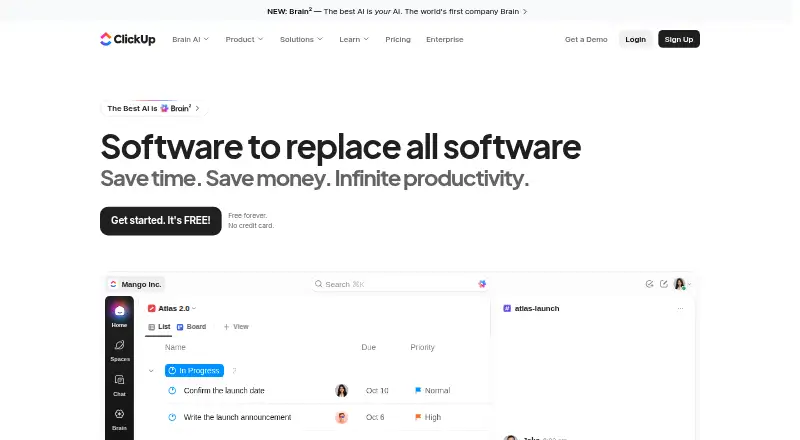
ClickUp is a work-management platform for organizing tasks, projects, and team activity. It offers List, Board, Calendar, Team, and Gantt views, along with automation rules, time tracking, and guest access. Apps are available for Android, iOS, macOS, and Windows. Its Free Forever plan includes unlimited tasks and members, 60MB of file storage, and one form, and does not require a credit card. Free users also receive 24/7 support. ClickUp lists more than 50 native integrations, including Slack, HubSpot, Google Drive, Salesforce, Zapier, and Dropbox. Free-plan guests have full create and edit permissions that cannot be adjusted; paid plans offer limited external guest seats and unlimited read-only guests. Automation execution allowances vary by plan, from 100 to 250,000. ClickUp lists SOC 2 and ISO 27001 certifications, as well as GDPR and HIPAA compliance. Unlimited is listed at $10 a month billed yearly, while the pricing note gives a starting rate of $7 per user per month annually. Each Workspace is billed separately.
Who it suits
ClickUp suits teams that want multiple ways to view work, automate tasks, and track time across desktop and mobile apps. Its free plan includes unlimited tasks and members, with a 60MB storage limit.
What it does well
- Free plan has unlimited tasks and members.
- Free Forever does not require a credit card.
- Views include List, Board, Calendar, Team, and Gantt.
- More than 50 native integrations are listed.
- Free plan includes 24/7 support.
What to know first
- Free storage is limited to 60MB.
- Free guest create and edit permissions cannot be changed.
- Each Workspace is billed separately.
- Automation limits vary by plan.
Limits
The Free Forever plan includes 60MB of file storage and one form. Automation allowances differ by plan, ranging from 100 to 250,000 executions. Free-plan guests have full create and edit permissions that cannot be modified.
Plans
| Plan | Billed and limits | Price |
|---|---|---|
| Free Forever | 60MB storage · Unlimited tasks · Unlimited free plan members · 1 form | Free |
| Unlimited | Billed yearly · Unlimited storage · Unlimited Gantt charts · Unlimited integrations · Unlimited custom fields | $10 a month |
| Business | Billed yearly · 5,000 automations per month · Unlimited dashboards · Unlimited activity views · Unlimited timeline views | $19 a month |
| Enterprise | 250,000 automations per month · Unlimited custom roles | On request |
| Brain AI | $9 per user/month | $9 a month |
| AI Free Forever | — | On request |
As clickup.com lists them, read 27 Sept 2026. The maker's own page has the final word.
Getting started
- Visit the ClickUp website.
- Choose the Free Forever plan or review the paid plans.
- Start with Free Forever without a credit card, or choose a paid plan.
- Install the app for Android, iOS, macOS, or Windows.
Overview
ClickUp is a work-management platform that brings task planning, time tracking, automation and integrations into a Workspace. It suits teams that want multiple ways to organize work and a free starting point with unlimited tasks and members. Its breadth is appealing, but the free plan’s 60MB storage and fixed guest permissions are meaningful constraints.
ClickUp was founded in 2017 and is headquartered in San Diego, California. It offers apps for Android, iOS, macOS and Windows, and lists SOC 2 and ISO 27001 certifications alongside GDPR and HIPAA compliance.
Key features
Views and workflow tools
List, Board, Calendar, Team and Gantt views let teams choose how to review and organize tasks. Time tracking and automation rules broaden its use beyond basic task lists. Automation capacity varies by plan, from 100 to 250,000 executions, so teams with heavier workflows should compare their expected volume with the plan limit.
Integrations and guests
ClickUp lists more than 50 native integrations, including Slack, HubSpot, Google Drive, Salesforce, Zapier and Dropbox. That range can help teams connect work to familiar services. Guest access is available, but Free-plan guests have full create and edit permissions that cannot be changed. Paid plans include limited external guest seats and unlimited read-only guests, a more controlled arrangement for teams that share work externally.
Free-plan support is available 24/7. ClickUp also advertises a 100% money-back guarantee.
Pricing
ClickUp uses a freemium model. Its Free Forever plan costs nothing, requires no credit card and includes unlimited tasks and members, 60MB of storage and one form. That is a generous way to start coordinating work, but the small storage allowance and inflexible guest permissions may make it a poor fit for teams handling many files or collaborating with external users.
Unlimited is $10 a month, billed yearly. It adds unlimited storage, Gantt charts, integrations and custom fields, making it a step up for teams that need more room and configuration. Business is $19 a month, billed yearly, and includes 5,000 automations per month plus unlimited dashboards, activity views and timeline views; it is better suited to teams that need greater workflow capacity and reporting views.
Enterprise has custom pricing through sales and includes 250,000 automations per month and unlimited custom roles. It is the fit for organizations that need that scale or role flexibility, though the price requires a sales conversation. Brain AI costs $9 per user/month and includes unlimited Brain Assistant and AI chat. AI Free Forever is a free AI plan with trial access to advanced AI features.
ClickUp’s pricing note gives a paid starting price of $7/user/mo (annual), while the plan prices above are shown separately. Payment is charged separately for each Workspace, so teams operating multiple Workspaces should account for each one independently.
Platforms
ClickUp has apps for Android, iOS, macOS and Windows, supporting teams that need access across mobile and desktop devices.
Who it's for
ClickUp is a strong candidate for teams that want several task views, integrated time tracking and automation, with a free plan that does not cap tasks or members. It is less suitable for file-heavy work on the free tier or for teams that need to restrict what free guests can edit. Organizations with greater automation needs should check plan limits before committing.
Pros and cons
- Pros: Unlimited tasks and members on the free plan make it possible to start without a seat cap.
- Pros: Five task views, time tracking, automation and 50+ native integrations cover a broad set of work-management needs.
- Pros: Free-plan 24/7 support, plus published security certifications and compliance standards, may matter to teams assessing support and governance.
- Cons: Free storage is limited to 60MB, which can constrain teams that attach files to work.
- Cons: Free guests receive full create and edit permissions that cannot be modified, limiting access control for external collaboration.
- Cons: Workspace billing is separate, so costs can multiply for teams maintaining multiple Workspaces.
Alternatives
For teams focused on channel partnerships rather than broad work management, Airstride offers a free plan with basic partner management, deal management, account mapping and CRM integration, subject to a limit of three partners.
Budibase is another freemium option, with API, self-hosted and web platforms; consider it if those deployment choices are central to your decision.
Dock has a free plan with limits including 10 workspaces, 25 CMS assets, one slide and one playbook, making it a narrower free starting point for teams whose needs match those materials.
Pricekeel offers a free design-partner diagnostic for one retrospective covering the last four quarters of closed deals; it is a more focused option for that specific review task.
Sanka Flow has a free plan, with API and web platforms, for readers considering a separate workflow option.
Workato Agent Studio offers a no-cost plan with 50,000 one-time credits and AI and agentic capabilities, a different starting point for readers seeking those capabilities.
Zapier has a free plan capped at 100 tasks per month and offers a free trial of its Professional and Team plans; it is worth considering when that task allowance and web platform suit the need.
airSlate WorkFlow (now altaFlow) has a free plan with 10 credits per month for readers comparing workflow products.
Verdict
Choose ClickUp if your team wants flexible task views, time tracking, automation and integrations in one work-management platform, especially if unlimited free tasks and members are useful. Look elsewhere if the free storage allowance or fixed guest permissions will get in the way; teams with multiple Workspaces should also weigh the separate billing.
Verdict
ClickUp offers task views, integrations, time tracking, and automation, with a free plan for unlimited tasks and members. Consider the free storage and guest-permission limits, and note that Workspace billing is separate.
Questions
Is ClickUp free?
Yes. Free Forever costs nothing and is available without a credit card. It includes unlimited tasks and members, 60MB of storage, and one form.
What does ClickUp cost?
The pricing note lists paid plans from $7/user/mo (annual). Unlimited is $10 a month billed yearly, and Business is $19 a month billed yearly.
Which platforms does ClickUp support?
ClickUp offers apps for Android, iOS, macOS, and Windows.
Does ClickUp have integrations?
Yes. It lists 50+ native integrations, including Slack, HubSpot, Google Drive, Salesforce, Zapier, and Dropbox.
What limits apply to free-plan guests?
Free-plan guests have full create and edit permissions, and those permissions cannot be modified. Paid plans include limited external guest seats and unlimited read-only guests.
What security and compliance credentials does ClickUp list?
ClickUp lists SOC 2 and ISO 27001 certifications, and GDPR and HIPAA compliance.
Facts from ClickUp's own pages
- Automation limits
- Automation limits vary by plan, from 100 executions to 250,000 executions. · clickup.com, 27 Sept 2026
- Automation rules
- Yes · clickup.com, 20 Sept 2026
- Copyright year
- The page displays a 2026 copyright notice for ClickUp. · clickup.com, 27 Sept 2026
- Compliance standards
- The page lists GDPR and HIPAA compliance. · clickup.com, 27 Sept 2026
- Founded
- 2017 · clickup.com, 23 Sept 2026
- Free members
- The Free plan includes unlimited members. · clickup.com, 27 Sept 2026
- Free tier
- Free Forever is available without a credit card. · clickup.com, 27 Sept 2026
- Free storage
- The Free plan includes 60MB of file storage. · clickup.com, 27 Sept 2026
- Free tasks
- The Free plan includes unlimited tasks. · clickup.com, 27 Sept 2026
- Guest access
- Yes · clickup.com, 20 Sept 2026
- Guest permissions
- Free-plan guests have full create and edit permissions that cannot be modified. · clickup.com, 27 Sept 2026
- Headquarters
- San Diego, California, United States · clickup.com, 23 Sept 2026
- Integration examples
- Examples include Slack, HubSpot, Google Drive, Salesforce, Zapier, and Dropbox. · clickup.com, 27 Sept 2026
- Native integrations
- The page lists 50+ native integrations. · clickup.com, 27 Sept 2026
- Money-back guarantee
- ClickUp advertises a 100% money-back guarantee. · clickup.com, 27 Sept 2026
- Paid guest access
- Paid plans include limited external guest seats and unlimited read-only guests. · clickup.com, 27 Sept 2026
- Supported platforms
- ClickUp offers iOS, Android, Mac, and Windows apps. · clickup.com, 27 Sept 2026
- Security certifications
- The page lists SOC 2 and ISO 27001 certifications. · clickup.com, 27 Sept 2026
- Paid from
- 7 · clickup.com, 20 Sept 2026
- Customer support
- The Free plan includes 24/7 support. · clickup.com, 27 Sept 2026
- Task views
- Available views include List, Board, Calendar, Team, and Gantt. · clickup.com, 27 Sept 2026
- Time tracking
- Yes · clickup.com, 20 Sept 2026
- Workspace billing
- Payment is charged separately for each Workspace. · clickup.com, 27 Sept 2026
Where ClickUp stands on Freedom251
- Project management tools#5 of 196
- Project Management Software#11 of 188
- AI Project Management Software#2 of 27
- Work Management Software#4 of 51
- Project Tracking Software#3 of 34
- Browser Based#3 of 34
- Deal Desk Software#4 of 41
- Content Marketing Platforms#2 of 20
- Marketing Planning Software#2 of 20
- Task Management Software#6 of 59
- IT Project Management Software#3 of 28
- Creative Portfolio Management Software#2 of 18
- Nonprofit Project Management#4 of 34
- Web App#4 of 32
- Google Workspace Project Management Software#4 of 30
- Game Project Management Software#5 of 32