Freedom251 › Customer Onboarding Software
Dock
What Dock is
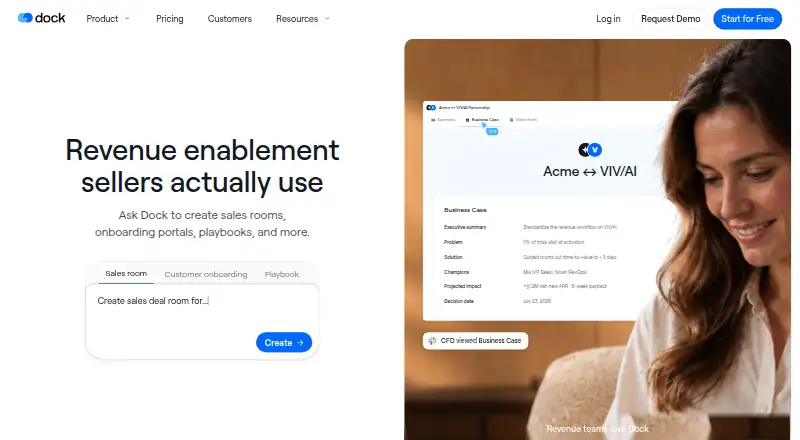
Dock is a revenue enablement platform for sales, customer success, and marketing teams. Its shared sales rooms bring buyer-facing materials, discussions, and next steps together in a workspace. Teams can use Dock AI to create customer workspaces, slides, order forms, playbooks, and training courses. Workspace engagement views show visitors, time spent, and actions by person, page, or asset. Dock also supports pricing proposals, order forms, approval rules, and signatures. Salesforce and HubSpot connections sync account and deal context with sales workflows; other listed integrations include Gong, Zoom, Microsoft Teams, Slack, Google Drive, SharePoint, Notion, and Confluence. A Chrome extension makes Dock content and its AI assistant available in Gmail, LinkedIn, a CRM, or elsewhere in the browser. Dock is available via web, API, and extension. A free plan is available, while paid plans start at $350/mo. Dock states that it is GDPR compliant and SOC 2 Type II certified.
Who it suits
Dock suits sales, customer success, and marketing teams that want shared buyer workspaces, engagement information, and sales content tools. External collaborators can access workspaces without charge; internal team members are billable.
What it does well
- AI creates workspaces, slides, order forms, playbooks, and courses.
- Tracks visitor activity by person, page, or asset.
- Connects with Salesforce and HubSpot.
- External collaborators have free access.
- Free plan includes 10 workspaces.
What to know first
- Free plan limits AI usage.
- Free plan includes only one slide, playbook, course, and order form.
- Standard starts at $350/mo.
- Premium is listed at $1,000/mo, billed annually.
Limits
The Free plan includes 10 workspaces, 25 CMS assets, one slide, one playbook, one course, and one order form, with limited AI usage. Standard costs $350 a month and includes five users, 100 CMS assets, five playbooks, and one course; additional seats cost $50/mo.
Plans
| Plan | Billed and limits | Price |
|---|---|---|
| Free | forever · 10 workspaces · 25 CMS assets · 1 slide · 1 playbook · 1 course · 1 order form · limited AI usage | Free |
| Premium | per month, billed annually · 10 users · additional seats $50/mo · unlimited workspaces · 250 CMS assets · unlimited playbooks and courses · unlimited order forms | $1,000 a month |
| Standard | per month · 5 users · additional seats $50/mo · unlimited workspaces · 100 CMS assets · 5 playbooks · 1 course · unlimited order forms | $350 a month |
| Enterprise | Custom annual contract · 25+ users · unlimited workspaces and CMS assets · API · SCIM provisioning · dedicated CSM · managed implementation | On request |
As dock.us lists them, read 2 Oct 2026. The maker's own page has the final word.
Getting started
- Visit dock.us.
- Choose the Free plan, Standard, Premium, or Enterprise plan.
- Use Dock on the web or through its extension or API.
- Add internal team members; external collaborators have free access.
Dock is a revenue-enablement platform for sales, customer success, and marketing teams. It suits teams that want to coordinate buyer-facing content, follow-up, and order paperwork in a shared workspace. Its combination of engagement signals and sales workflows is compelling, but the paid plans make it a substantial investment.
Overview
Dock sales rooms put buyer-facing content, conversations, and next steps together. That gives teams a place to coordinate the sales process rather than simply send files. Person-, page-, and asset-level engagement data can help salespeople decide what to follow up on; teams that only need basic file sharing may not benefit from the broader workflow.
Key features
Teams can see who visited a workspace, what they viewed, how long they spent, and which actions they took. Dock AI can create workspaces, slides, order forms, playbooks, and training courses, though usage scales by plan and is subject to fair-use protections. The free plan's limited AI usage is a poor fit for teams expecting to depend on AI day to day.
Pricing proposals and order forms, approval rules, and signatures are handled within Dock. Salesforce and HubSpot connect account and deal context with sales workflows. Other integrations include Gong, Zoom, Microsoft Teams, Chorus, Fathom, Avoma, Slack, Google Drive, SharePoint, Notion, and Confluence. The Chrome extension brings Dock content, workspaces, and its AI assistant into Gmail, LinkedIn, a CRM, or elsewhere in the browser.
Dock says it is GDPR compliant and SOC 2 Type II certified. Its stated security practices include annual penetration tests, employee security-awareness training, encryption in transit and at rest, and required SSO and MFA for its systems. External collaborators have free access; charges apply only to internal team members, which can help keep buyer participation from increasing seat costs.
Pricing
The Free plan costs nothing, billed forever. It allows 10 workspaces and 25 CMS assets, but caps slides, playbooks, courses, and order forms at one each, with limited AI usage. It is useful for a small-scale introduction, not a full-featured operating plan.
Standard costs $350 a month, billed per month, and includes five users, unlimited workspaces, 100 CMS assets, five playbooks, one course, and unlimited order forms. Additional seats cost $50/mo. It fits a team that needs the core buyer-facing and order-form workflow but can work within the course and playbook limits.
Premium costs $1,000 a month, billed annually. It includes 10 users, unlimited workspaces and order forms, 250 CMS assets, and unlimited playbooks and courses; additional seats cost $50/mo. It is the more suitable paid tier for teams producing playbooks and courses at scale, though the annual billing term and higher price make the commitment more consequential.
Enterprise uses custom pricing under a custom annual contract. It includes 25+ users, unlimited workspaces and CMS assets, API access, SCIM provisioning, a dedicated CSM, and managed implementation. Those additions are aimed at larger organizations needing provisioning and implementation support.
Platforms
Dock is available on the web, through an extension, and via API. Request intake, work tracking, file sharing, custom domains, and single sign-on are supported.
Who it's for
Dock is best suited to sales and customer-facing teams that want buyer workspaces tied to engagement tracking, CRM context, and order-form workflows. Its free external-collaborator access is useful when many buyers need to participate. It is less suitable for teams seeking an inexpensive, simple file-sharing tool or those unable to justify the paid-plan costs.
Pros and cons
- Pros: Shared workspaces combine buyer content, conversations, and next steps, while engagement tracking gives teams signals at the person, page, and asset level.
- Pros: Order forms, approval rules, and signatures sit alongside Salesforce and HubSpot sales context.
- Pros: External collaborators have free access, and the Chrome extension works across common browser contexts such as Gmail, LinkedIn, and CRMs.
- Cons: The free plan limits AI and allows just one slide, playbook, course, and order form, so it is restrictive for ongoing work.
- Cons: Standard starts at $350 a month for five users, with additional seats at $50/mo; Premium costs $1,000 a month and is billed annually.
Alternatives
For a broader range of client portal options, browse Customer Portal Software. Teams prioritizing sales approvals and order paperwork can compare Deal Desk Software, while buyer-facing sales workspaces are covered by Digital Sales Rooms.
If organizing and distributing sales materials is the main need, consider Sales Content Management Software; for customer transition workflows, see Customer Onboarding Software. Teams focused on creating presentations can explore Sales Presentation Software.
FuseBase offers a free plan with one client portal and one workspace, alongside a free trial and broad platform support. ProjectSend is a free, self-hosted, GPL v2 option with client accounts, uploads, and custom branding. Plutio has a free plan and trial; its Core plan is $19 a month, billed monthly, and includes nine active clients.
Assembly is a freemium option with an Empower plan priced at $36 a year per user, billed annually. Assembly's legal client portal is another freemium option. Clio for Clients offers a freemium plan with contact, matter, and document management, time and expense tracking, and online client payments. Client Hub is a paid option with a free trial; its Solopreneur plan costs $49 a month on annual billing and is limited to single-user solo firms.
Clinked is a paid option with a free trial and a Start Up plan at $11 a month, with 200 GB of storage and 1–25 users shown.
Verdict
Choose Dock if your sales or customer-facing team needs shared buyer workspaces, engagement signals, and order forms in one workflow, especially when external collaborators should not add seat costs. Look elsewhere if you need a low-cost tool: the free plan is tightly capped, and meaningful paid use starts at $350 a month.
Verdict
Dock combines buyer-facing workspaces with content creation, engagement tracking, and order-form workflows. Its free plan has usage limits, and the listed paid plans start at $350/mo.
Questions
Is there a free plan?
Yes. Free costs nothing, billed forever, with limited AI usage and specified workspace, asset, and creation allowances.
How much do paid plans cost?
Standard is $350 a month. Premium is $1,000 a month, billed annually; Enterprise has a custom annual contract.
Which platforms are supported?
Dock is available as an API, extension, and web service. Its Chrome extension works in Gmail, LinkedIn, a CRM, or elsewhere in the browser.
Which CRMs does Dock connect with?
Dock connects with Salesforce and HubSpot to sync account and deal context with sales workflows.
Are external collaborators billed?
Dock says it charges for internal team members only; external collaborators have free access.
What security certifications does Dock state?
Dock says it is GDPR compliant and SOC 2 Type II certified.
Facts from Dock's own pages
- AI creation
- Dock AI can create customer workspaces, slides, order forms, playbooks, and training courses. · dock.us, 2 Oct 2026
- AI usage limits
- Dock says AI usage scales with each plan, with fair-use protections to prevent abuse and ensure reliability. · dock.us, 2 Oct 2026
- Buyer engagement
- Dock lets teams see workspace visitors, views, time spent, and actions by person, page, or asset. · dock.us, 2 Oct 2026
- Chrome extension
- The Chrome extension provides access to Dock content, workspaces, and its AI assistant in Gmail, LinkedIn, a CRM, or elsewhere in the browser. · dock.us, 2 Oct 2026
- Company founding
- Dock says its founders left Lattice in 2021 to build the company. · dock.us, 2 Oct 2026
- CRM integrations
- Dock connects with Salesforce and HubSpot to sync account and deal context with sales workflows. · dock.us, 2 Oct 2026
- External collaborators
- Dock says it charges only for internal team members and that external collaborators have free access. · dock.us, 2 Oct 2026
- Founded
- 2021 · dock.us, 28 Sept 2026
- Order forms
- Dock supports pricing proposals and order forms, approval rules, and signatures within Dock. · dock.us, 2 Oct 2026
- Other integrations
- Listed integrations include Gong, Zoom, Microsoft Teams, Chorus, Fathom, Avoma, Slack, Google Drive, SharePoint, Notion, and Confluence. · dock.us, 2 Oct 2026
- Product
- Dock describes itself as a revenue enablement platform for sales, customer success, and marketing teams. · dock.us, 2 Oct 2026
- Security certifications
- Dock states that it is GDPR compliant and SOC 2 Type II certified. · dock.us, 2 Oct 2026
- Security practices
- Dock says it conducts annual penetration tests, trains employees in security awareness, encrypts data in transit and at rest, and requires SSO and MFA for its systems. · dock.us, 2 Oct 2026
- Shared sales workspaces
- Dock sales rooms bring buyer-facing content, conversations, and next steps into one shared workspace. · dock.us, 2 Oct 2026
Where Dock stands on Freedom251
- Customer Onboarding Software#1 of 31
- Client Management software#1 of 27
- Sales Presentation Software#2 of 36
- Digital Sales Rooms#2 of 27
- Customer Portal Software#3 of 31
- Sales Content Management Software#4 of 26
- Gtm Tools#3 of 19
- Deal Desk Software#8 of 41