Freedom251 › Legal Client Portal Software

Assembly
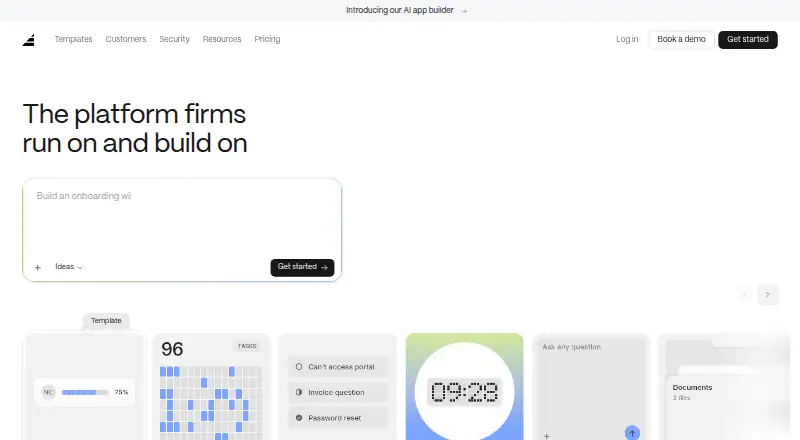
What Assembly is
Assembly is a work platform for handling incoming requests, tracking work, and sharing files. Its listed tools bring those tasks together, with support for up to 50 client users. Teams can use a custom domain and single sign-on alongside the core work features. Assembly runs on the web, Windows, and macOS. It offers a free plan, with paid plans starting at $29/mo (annual). For teams that need to organize client requests and follow related work, Assembly combines intake, tracking, and file sharing in one platform. The custom-domain option lets teams use their own domain, while single sign-on provides an additional way to manage access.
Who it suits
Assembly may suit teams that need to collect requests, track work, and share files with up to 50 client users. Its web, Windows, and macOS support gives teams several platform options.
What it does well
- Free plan available
- Request intake, work tracking, and file sharing
- Supports up to 50 client users
- Custom domain and single sign-on
- Available on web, Windows, and macOS
What to know first
- Paid plans start at $29/mo (annual)
Limits
The Free plan allows 1 internal user, 5 active contacts, 50 build credits per month, and 3 apps. HIPAA support with a BAA is available on Advanced, while AI features are not covered by that support.
Plans
| Plan | Billed and limits | Price |
|---|---|---|
| Free | Free forever · 5 active contacts · 1 internal user · 50 build credits/month · CRM · client experience · app builder · 30+ pre-made apps · messaging · billing/payments · community support | Free |
| Starter | Billed annually; $49/month billed monthly · 50 active contacts · 1 internal user · 200 build credits/month · API & MCP connector · add-on credits · email support | $29 a month |
| Advanced | Billed annually · Unlimited active contacts · 5 internal users · 200 build credits/month · audit log · client access permissions · enforced MFA · HIPAA compliance with BAA · priority email and phone support · personalized onboarding | $499 a month |
| Professional | Billed annually · 500 active contacts · 3 internal users · 200 build credits/month · custom domains · remove Assembly badge · app visibility · automation builder · AI model selection · priority email support | $99 a month |
| Enterprise | Contact sales · Unlimited users, contacts and apps · custom SSO · volume-based build credits · dedicated architect and success manager | On request |
As assembly.com lists them, read 15 Oct 2026. The maker's own page has the final word.
Getting started
- Open Assembly on the web or download the desktop app for macOS or Windows.
- Choose the Free plan or a paid plan; paid plans start at $29/mo (annual).
- Describe the app you want to build in plain language.
- Review the proposed plan, then publish and refine the app through conversation.
- Connect third-party services by authenticating the tool or entering an API key.
Assembly is an AI app builder for teams creating authenticated client workflows and internal tools. It is best suited to organizations that want branded client access and platform-managed permissions without building an app from scratch. Its strongest case is combining app creation with a shared client workspace; its limits on contacts, users, and apps make plan choice important.
Overview
Users describe an app in plain language, review Assembly’s proposed plan, publish it, and refine it through conversation. More than 30 templates cover work such as document collection, project tracking, proposals, and client support, giving teams starting points for common workflows. Apps can connect to third-party services through authentication or an API key, and the MCP connector supports workspace analysis and actions through tools including ChatGPT and Claude.
Published apps appear in a branded client experience. Assembly handles client authentication, roles, permissions, and client data scoping at the platform level, rather than leaving those controls to AI-generated apps. The company says its platform is SOC 2 Type II certified, stores customer data in the United States, encrypts it in transit with TLS and at rest with AES-256, and does not use workspace or client data to train AI models. HIPAA support with a BAA is on Advanced, but does not cover AI features.
Assembly is built for authenticated experiences, not public-facing websites, directories, or consumer apps. Teams planning an open-access product should look elsewhere.
Key features
- Conversational app building: Describe a workflow, review a proposed build, then publish and refine it through conversation. This suits teams shaping client processes, though the product’s stated boundary rules out public apps.
- Templates and integrations: More than 30 templates address recurring client and operational tasks. Connections to outside services use authentication or API keys; the MCP connector adds a route for ChatGPT and Claude to analyze the workspace and perform actions.
- Branded client workspace: Clients get a branded experience with published apps grouped in a sidebar, rather than separate unconnected app entry points.
- Platform-managed access: Authentication, roles, permissions, and client data scoping are handled by Assembly. That is a practical advantage for teams managing client information, while teams needing public access are a poor fit.
Pricing
Assembly has a free plan and four paid tiers. The caps on active contacts, internal users, and apps matter as much as the headline price: a growing team may need to move up even if its app-building needs stay the same.
| Plan | Price and terms | Limits and included points |
|---|---|---|
| Free | free; free forever | 5 active contacts, 1 internal user, 50 build credits/month, 3 apps; community support |
| Starter | $29 a month, billed annually; $49 billed monthly | 50 active contacts, 1 internal user, 200 build credits/month, 5 apps; email support |
| Professional | $99 a month, billed annually | 500 active contacts, 3 internal users, 200 build credits/month, 5 apps, custom domains; priority email support |
| Advanced | $499 a month, billed annually | Unlimited active contacts, 5 internal users, 200 build credits/month, 5 apps; audit log, enforced MFA, HIPAA compliance (BAA), priority call support |
| Enterprise | Custom pricing; book a demo | Unlimited users, contacts, and apps; custom SSO, volume-based build credits, dedicated architect and success manager |
Free is a low-commitment way for one internal user to build up to three apps, but five active contacts sharply constrain client use. Starter raises those caps and adds email support, though it still allows only one internal user and five apps; its $29 a month price requires annual billing, while monthly billing is $49. Professional is the more plausible fit for a small team serving up to 500 active contacts: it allows three internal users and custom domains, but retains the five-app and 200-credit limits. Advanced removes the contact cap and adds controls and HIPAA support, yet still caps the plan at five internal users and five apps. Enterprise is the option for teams needing unlimited users and apps or custom SSO, at custom pricing.
Platforms
Assembly is available on the web, macOS, and Windows. Its desktop app supports Apple silicon and Intel Macs, plus Windows 10 or later 64-bit. Support varies by plan, from community support on Free to email on Starter, priority email on Professional and Advanced, and priority call support on Advanced.
Who it's for
Assembly suits organizations that need authenticated client workflows alongside internal tools, especially when a branded client workspace and platform-level access controls are priorities. It is less compelling for teams that need more than five apps or more internal users than their chosen plan allows, unless Enterprise fits. It is not the right builder for public websites or consumer-facing apps.
Pros and cons
- Pro: Platform-managed authentication, permissions, roles, and client data scoping reduce reliance on AI-generated access controls.
- Pro: Templates, conversational building, and a shared branded client experience bring app creation and client access together.
- Pro: Professional adds custom domains, while Advanced adds an audit log, enforced MFA, and HIPAA support with a BAA.
- Con: Free supports only 5 active contacts and 1 internal user, limiting its usefulness for a live client operation.
- Con: Starter requires annual billing for its $29 a month price; monthly billing is $49.
- Con: Professional and Advanced still cap usage at 5 apps, and AI features are outside HIPAA support.
- Con: The authenticated-product focus excludes public sites, directories, and consumer apps.
Alternatives
- Legal Client Portal Software is a category directory for comparing legal client portal options.
- Customer Portal Software is a category directory for comparing customer portal options.
- 8am MyCase is worth considering for legal case and contact management with time entry, invoicing, and trust-account tools. Its MyCase Basic plan is $50 a month billed annually.
- LawConnect is a better fit for consumers seeking free AI legal information, with lawyer fees potentially applying if they hire a lawyer.
- Filevine suits teams seeking custom-built matter management, document management, billing, and optional intake or other packages, with custom pricing.
- SimpleLaw Document Automation offers a free Law Firm plan to connect with potential leads, and a plan for up to 39 users at $59 a month with annual pricing.
- Jursu has a free plan for 1 team member and 100 MB of document storage, a more constrained starting point for small teams.
- INSZoom is another paid option for teams considering an immigration-focused software product.
- Litify is another paid legal software option.
- Quilia is another paid legal software option.
Verdict
Choose Assembly if your organization wants to build authenticated client apps and internal tools in a branded workspace, with the platform handling access controls. Its templates, integrations, and conversational build flow make that combination compelling, but low contact and user caps can force an upgrade, and the five-app ceiling persists on paid tiers through Advanced. Look elsewhere for public-facing products or if your workflows require more scale than those plans allow.
Verdict
Assembly combines request intake, work tracking, and file sharing, with options for custom domains and single sign-on. A free plan is available, and paid plans start at $29/mo (annual).
Questions
Is there a free plan?
Yes. Free is listed as free forever and includes 5 active contacts, 1 internal user, 50 build credits per month, and 3 apps.
How much do paid plans cost?
Starter is $29/mo billed annually, or $49 billed monthly. Professional is $99/mo billed annually, and Advanced is $499/mo billed annually. Enterprise pricing is available through a demo.
Which platforms can I use?
Assembly is available on the web, macOS, and Windows. Its desktop app supports macOS on Apple silicon and Intel, and Windows 10 or later 64-bit.
Does Assembly support public websites or consumer apps?
No. Assembly says it is not suited to public-facing websites, public directories, or consumer apps because it builds authenticated experiences.
Does Assembly offer HIPAA support?
HIPAA support with a BAA is available on the Advanced plan. AI features are not covered by that support.
Can Assembly connect to other services and AI tools?
Apps can connect to third-party services using authentication or an API key. The MCP connector can connect the workspace to AI tools including ChatGPT and Claude.
Facts from Assembly's own pages
- Accounting integration
- The QuickBooks integration syncs Assembly invoices, customers, changes and payments one way into QuickBooks Online. · assembly.com, 15 Oct 2026
- AI app builder
- Users describe an app in plain English, answer a short question flow, approve a plan and receive a deployed app in their workspace. · assembly.com, 15 Oct 2026
- AI data use
- Assembly says it does not use workspace or client data to train AI models. · assembly.com, 7 Oct 2026
- AI integrations
- Assembly’s MCP connector can connect the workspace to AI tools including ChatGPT and Claude for analysis and workspace actions. · assembly.com, 7 Oct 2026
- App templates
- Assembly offers 30+ app templates covering workflows such as document collection, project tracking, proposals, and client support. · assembly.com, 7 Oct 2026
- Billing
- Payments support invoices, subscriptions, payment links, stores and credit-card or ACH collection. · assembly.com, 15 Oct 2026
- Builder limits
- The builder does not create public websites, native mobile or desktop apps, streaming experiences or heavy-compute workloads. · assembly.com, 15 Oct 2026
- Builder scope
- Generated apps can be client-facing or internal, use Assembly CRM/auth/notifications/branding, keep their own database and call external APIs. · assembly.com, 15 Oct 2026
- Built-in client experience
- Workspaces include a branded client experience, and published apps appear together in its sidebar. · assembly.com, 7 Oct 2026
- Client portal
- The portal centralizes client messaging, file sharing, e-signature contracts, invoices, forms and tasks under the firm's branding. · assembly.com, 15 Oct 2026
- Company size
- LinkedIn lists Assembly as a privately held software-development company with 11–50 employees. · linkedin.com, 15 Oct 2026
- Compliance
- Assembly says its platform is SOC 2 Type II certified and offers HIPAA support with a BAA on the Advanced plan; AI features are not covered by HIPAA support. · assembly.com, 7 Oct 2026
- Connected services
- Apps can connect to third-party services by authenticating the tool or providing an API key during setup. · assembly.com, 7 Oct 2026
- Contracts
- The platform includes professional agreements with built-in electronic signatures. · assembly.com, 15 Oct 2026
- CRM
- Contacts and companies are maintained in one CRM with client context available across apps. · assembly.com, 15 Oct 2026
- Data protection
- Assembly says customer data is encrypted in transit with TLS and at rest with AES-256, and workspace data is not used to train AI models. · assembly.com, 15 Oct 2026
- Desktop app
- Assembly offers a desktop app for macOS on Apple silicon and Intel, and Windows 10 or later 64-bit; the site also links to its web app. · assembly.com, 7 Oct 2026
- Developer extensibility
- Custom apps can be embedded for internal users or clients and can use Assembly's REST API plus webhook URLs. · github.com, 15 Oct 2026
- Developer requirements
- The public custom-app starter expects modern web development with Node.js 22 or newer, React, Next.js and Yarn or another package manager. · github.com, 15 Oct 2026
- Documentation
- The documentation includes getting-started guides, built-in app references, custom-app building, API reference, MCP and support sections. · assembly.com, 15 Oct 2026
- Founded and headquarters
- LinkedIn lists Assembly as founded in 2020 and headquartered in New York, New York. · linkedin.com, 15 Oct 2026
- Funding
- Assembly announced a $10 million Series A in January 2023 led by YC Continuity and Lachy Groom; TechCrunch reported $13 million raised to date. · techcrunch.com, 15 Oct 2026
- How it builds
- Users describe an app in plain language, review a proposed plan, publish it, and refine it through conversation. · assembly.com, 7 Oct 2026
- Integrations
- Assembly supports embedded third-party tools and connects to more than 1,000 apps through Zapier, Make and similar no-code services. · assembly.com, 15 Oct 2026
Where Assembly stands on Freedom251
- Legal Client Portal Software#1 of 42
- Customer Portal Software#1 of 31