Freedom251 › Project management tools
Trac
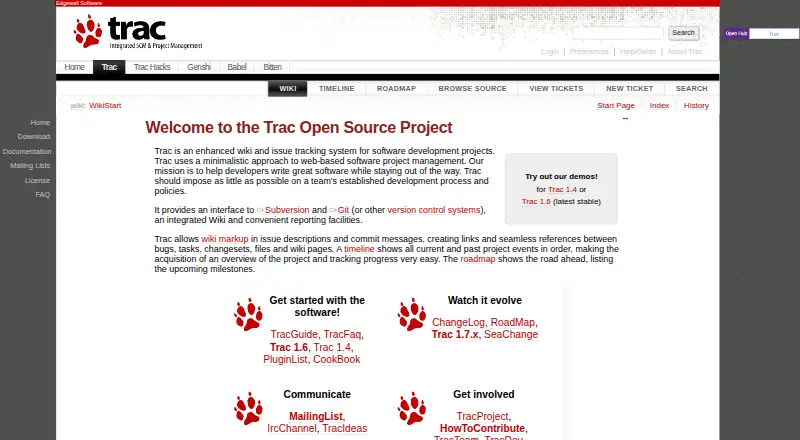
What Trac is
Trac is a free, self-hosted issue-tracking and wiki system for software development projects. It takes a minimal approach to web-based project management and provides an interface to Subversion, Git, and other version-control systems. Its wiki markup can be used across wiki pages, tickets, comments, version-control log messages, milestones, and reports, linking bugs, tasks, changesets, files, and pages. A chronological timeline displays project events, while a roadmap lists upcoming milestones. Plugins are among the project’s resources for customizing a setup. Trac supports custom workflows and workflow automation, and its documentation describes permissions that may depend on administrator policy. It runs as a Python web application served through WSGI and a web server such as Apache. Authentication can be configured through web-server mechanisms including Basic and Digest authentication. The project homepage identifies version 1.6 as the latest stable release. The free plan is listed as free; platforms include Linux, macOS, Windows, web, and self-hosted deployment.
Who it suits
Trac may suit software teams looking for a self-hosted wiki and issue tracker with version-control connections. It fits teams comfortable deploying a Python web application and managing permissions through local policy.
What it does well
- Free, open-source project software.
- Links bugs, tasks, changesets, files, and wiki pages.
- Timeline and roadmap show project events and milestones.
- Interfaces with Subversion and Git.
- Supports custom workflows and automation.
What to know first
- Self-hosted deployment requires a web application setup.
- Wiki editing may depend on administrator policy.
- Time tracking is not available.
Plans
| Plan | Billed and limits | Price |
|---|---|---|
| Trac | Open-source project software · self-hosted | Free |
As trac.edgewall.org lists them, read 4 Oct 2026. The maker's own page has the final word.
Getting started
- Open the Trac project website.
- Deploy Trac as a Python web application through WSGI and a web server such as Apache.
- Configure authentication through web-server mechanisms such as Basic or Digest authentication.
- Set permissions according to local administrator policy.
- Use the project site's plugins and community resources for further customization and communication.
Trac is a free, open-source project environment for software teams that want issue tracking, documentation and code-change context in one place. It suits technically capable groups comfortable running a Python web application themselves. The strongest case is a focused, link-rich workspace; the main cost is taking responsibility for hosting, authentication and permissions.
Overview
Trac keeps project management deliberately minimal rather than trying to become a full work suite. Tickets, wiki content, milestones, reports and version-control activity share a common context, so developers can move between a task and the files or changesets related to it. That focus is useful for engineering teams that value traceability and a low-overhead interface.
It is less suitable for organizations seeking a hosted service, broad business planning features or built-in time recording. Trac has no time tracking, and self-hosting makes infrastructure and administration part of the product decision.
Key features
Tickets, wiki and code history
The wiki markup works in wiki pages, ticket descriptions and comments, version-control log messages, milestone descriptions and reports. Users can link bugs, tasks, changesets, files and wiki pages, keeping implementation discussion near the work it explains. Trac provides interfaces to Subversion, Git and other version-control systems, a practical advantage for teams already organized around those repositories.
Timeline and roadmap
The timeline presents current and past project events in chronological order, giving a compact activity history. The roadmap lists upcoming milestones, which helps teams communicate planned delivery without adopting a larger planning suite. These views improve project awareness, but they do not add the capacity planning or time accounting some managers expect.
Workflow and extension
Custom workflows and workflow automation allow teams to adapt ticket handling to their own process. Plugins are part of Trac's customization path, so the platform can be extended when its core model is not enough. Extension also increases the amount of configuration an administrator must maintain.
Permissions and security
Administrators control permissions, and whether users can edit may depend on local policy. Deployment uses Trac as a Python web application served through WSGI and a web server such as Apache. Authentication can be configured through web-server mechanisms including Basic and Digest authentication. That flexibility suits organizations with infrastructure expertise, while teams wanting managed identity and operations should consider a hosted alternative.
Pricing
Trac costs free under its free, open-source plan. The Trac plan is self-hosted project software, so there are no subscription seats or hosted quotas stated here; your organization supplies the server, maintenance and operational work. This is compelling for teams that can run their own stack, but the software price does not remove hosting and administration responsibilities.
Platforms
Trac runs on Linux, macOS and Windows, and is delivered through the web. Self-hosted deployment is central to its model, with the application served via WSGI and a web server. It is therefore accessible across supported desktop environments without requiring a separate native client, but availability depends on how your team operates its server.
Who it's for
Choose Trac if you are a software team that wants tickets, project documentation and Git or Subversion activity connected through shared links, and you have the skills to administer a self-hosted Python application. Its minimalistic approach is a good fit when a general project-management suite would add unwanted bulk.
Look elsewhere if you need hosted operations, time tracking or a product designed for nontechnical teams with little administrator involvement. Permission policy, authentication setup and deployment remain your responsibility.
Pros and cons
- Pro: Wiki markup links tickets, code changes, files, milestones and reports, preserving technical context across project records.
- Pro: Git and Subversion interfaces, timeline and roadmap cover the core visibility needs of software projects.
- Pro: Free, open-source self-hosting avoids per-user subscription charges and supports custom workflows and automation.
- Con: Self-hosted deployment requires your team to operate the Python application, web server and authentication setup.
- Con: No time tracking, so teams needing effort or billable-hour records need another tool or process.
- Con: Editing access can depend on administrator policy, making governance and permissions an operational concern.
Alternatives
Linear is the better choice for teams wanting a hosted, cross-platform service with a free plan for unlimited members, two teams and 250 issues, plus its Agent platform.
YouTrack fits teams that prefer hosted or self-managed issue tracking and a free cloud tier for up to 10 users with 30 GB of storage.
Backlog is suited to teams wanting a hosted free-forever plan for 10 users and one project, with 100 MB storage and Git and Subversion support.
Bugzilla is another free, open-source bug tracker with self-hosted and web deployment options.
MantisBT is a free, self-hosted open-source bug tracker.
Launchpad is a free platform aimed at open-source projects.
Redmine is a free, GPLv2 open-source self-hosted project tool.
Roundup is a free, MIT-licensed issue tracker with self-hosted deployment.
For broader comparisons, see Issue Tracking Software, Project Management Software and Game Bug Tracking Software.
Verdict
Trac is a strong choice for software teams that want a no-license-cost, self-hosted hub connecting tickets, documentation and version-control history. Pick it for that focused traceability and workflow control; look elsewhere if you want managed hosting, built-in time tracking or less administrator-dependent setup.
Verdict
Trac combines project documentation and issue tracking with version-control links, timelines, and a roadmap. Its self-hosted deployment and administrator-dependent permissions are important setup considerations.
Questions
Is Trac free?
Yes. The listed Trac plan is free and describes open-source project software that is self-hosted.
Is Trac open source?
The listed plan describes Trac as open-source project software.
Where can Trac run?
Listed platforms are Linux, macOS, web, and Windows, and the deployment model is self-hosted. Its documentation describes serving it as a Python web application through WSGI and a web server such as Apache.
Which version-control systems does Trac integrate with?
Trac explicitly names Subversion and Git as integrations. It also provides an interface to other version-control systems.
Does Trac support time tracking?
No. The listed time-tracking fact is “No.”
How can teams get support or communicate with the project?
The project site lists mailing lists, an IRC channel, and TracIdeas. The Trac Team page names Jun Omae, Peter Suter, and Ryan Ollos as developers currently working on Trac.
Facts from Trac's own pages
- API documentation
- The published API reference covers administration, database backends, tickets, wiki, timeline, permissions, web handling and version control modules. · trac.readthedocs.io, 15 Oct 2026
- Cross-linking
- Wiki markup links bugs, tasks, changesets, files and wiki pages so related project information can be navigated together. · fedoraproject.org, 15 Oct 2026
- Customization
- The project site lists plugins among the resources for getting started with Trac. · trac.edgewall.org, 4 Oct 2026
- Design approach
- The project describes Trac as a minimalistic tool intended to fit an established development process with little ceremony. · fedoraproject.org, 15 Oct 2026
- Documentation and support
- The user guide covers installation, upgrades, administration, backups, logging, permissions, wiki, tickets, reports, timeline, RSS and notifications; mailing lists are presented as a support channel. · tracos.org, 15 Oct 2026
- Free plan
- Yes · trac.edgewall.org, 20 Sept 2026
- Hosting model
- The Trac documentation describes deployment as a Python web application served through WSGI and a web server such as Apache. · trac.edgewall.org, 4 Oct 2026
- Integrations
- Trac's homepage explicitly names Subversion and Git as version-control integrations. · trac.edgewall.org, 4 Oct 2026
- Latest stable release
- Wikipedia lists Trac 1.6 as the stable release dated September 23, 2023. · en.wikipedia.org, 15 Oct 2026
- Licence
- Trac is distributed under a modified BSD licence, identified in package metadata as BSD. · trac.gateworks.com, 15 Oct 2026
- Limit: basic bug model
- An Open Hub reviewer said Trac's bug tracking is less detailed than Bugzilla and lacks advanced relationships such as dependencies and duplicate-of links. · openhub.net, 15 Oct 2026
- Limit: dated experience
- G2 reviewers described the bug tracker or overall product as somewhat out of date. · g2.com, 15 Oct 2026
- Maintainers
- The Trac Team page names Jun Omae, Peter Suter and Ryan Ollos as developers currently working on Trac. · trac.edgewall.org, 4 Oct 2026
- Maker founding history
- The Trac history page says Edgewall Software developers began writing the predecessor svntrac in August 2003. · en.wikipedia.org, 15 Oct 2026
- Maker headquarters
- G2 lists Edgewall Software's headquarters location as Seattle, Washington. · g2.com, 15 Oct 2026
- Multiple repositories
- A Trac environment can work with multiple version-control repositories. · en.wikipedia.org, 15 Oct 2026
- Permissions
- Trac includes fine-grained permissions for controlling access to project resources. · en.wikipedia.org, 15 Oct 2026
- Plugin architecture
- Trac's component model lets components implement interfaces and expose or consume extension points. · trac.readthedocs.io, 15 Oct 2026
- Praise: extensibility
- Open Hub reviewers repeatedly praised the large plugin ecosystem, active community channels and ability to extend the core. · openhub.net, 15 Oct 2026
- Praise: integrations
- A G2 reviewer praised Trac's external integrations, Subversion or Git modules and wiki component. · g2.com, 15 Oct 2026
- Praise: lightweight deployment
- A G2 reviewer said setup was quick, resource use was low and multiple instances could run on one small server. · g2.com, 15 Oct 2026
- Project management
- Trac describes its approach to web-based software project management as minimalistic and intended to stay out of a team's way. · trac.edgewall.org, 4 Oct 2026
- Purpose
- Trac is an enhanced wiki and issue-tracking system for software development projects. · trac.edgewall.org, 4 Oct 2026
- Python support
- Trac 1.6 supports Python 3.5 and later and drops Python 2 support. · fossies.org, 15 Oct 2026
Where Trac stands on Freedom251
- Project management tools#2 of 196
- Project Management Software#4 of 188
- Issue Tracking Software#2 of 40
- Bug Tracking Software#2 of 26
- Game Bug Tracking Software#2 of 26