Freedom251 › Issue Tracking Software
MantisBT
What MantisBT is
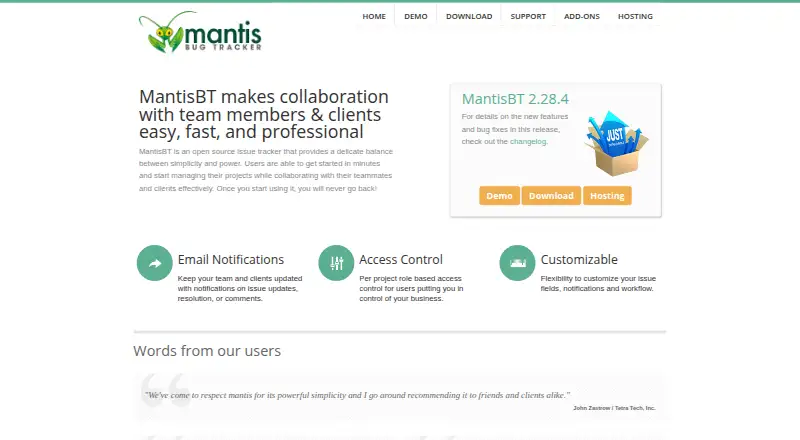
MantisBT is a free, open-source bug tracking system built with PHP for installation on a web server. It requires PHP and a supported database; the current repository README lists PHP 8.1.0 or later and a web server such as Apache or IIS. Supported server platforms include Linux, Windows, and macOS, and supported databases include MySQL, MS SQL, and PostgreSQL. Project management features include change logs, roadmaps, time tracking, and reporting. Teams can set workflow transitions and access thresholds, and email notifications can cover issue changes and notes, including custom fields and issue details. A plugin system accepts officially maintained and third-party extensions. The bundled REST API is the primary route for web-service integrations, with API tokens, web UI cookie sessions, and optionally anonymous access available for authentication. MantisBT is released under the GNU General Public License. Free community resources include documentation, forums, a wiki, the bug tracker, and chat. The site also presents MantisHub as a separate hosted service.
Who it suits
MantisBT suits teams that can install and maintain a PHP application on a web server. Its Admin Guide is aimed at people evaluating, installing, and maintaining the system in a company.
What it does well
- Free, open-source self-hosted bug tracker.
- Supports roadmaps, time tracking, and reporting.
- Plugins extend the system.
- REST API supports web-service integration.
- Community resources include documentation, forums, and chat.
What to know first
- Requires PHP and a supported database.
- Requires installation on a web server.
- Hybrid authentication scenarios are not supported.
Plans
| Plan | Billed and limits | Price |
|---|---|---|
| MantisBT | Open-source bug tracker · self-hosted installation | Free |
As mantisbt.org lists them, read 7 Oct 2026. The maker's own page has the final word.
Getting started
- Prepare a server on Linux, Windows, or macOS with PHP 8.1.0 or later and a web server such as Apache or IIS.
- Set up a supported MySQL, MS SQL, or PostgreSQL database.
- Install MantisBT on the web server.
- Use the free community support resources if you need installation guidance.
- For hosted service, visit the MantisHub hosting page and start its free trial without a credit card.
MantisBT is an open-source issue tracker for teams that want to manage bugs on their own web server. Its project tools and integrations make it more than a bug list, but self-hosting is a real operational commitment.
Overview
Released under the GNU General Public License, MantisBT combines issue tracking with roadmaps, change logs, time tracking, and reporting. That mix suits organizations that want project context alongside bugs without a software fee. It is less suited to teams looking for a ready-to-use hosted tracker they do not have to install and maintain.
Installation requires a web server, PHP, and a supported database. Current requirements call for PHP 8.1.0 or later and a web server such as Apache or IIS. Server platforms include Linux, Windows, and macOS; supported databases are MySQL, MS SQL, and PostgreSQL. Compatible browsers include Chrome, Firefox, Safari, Opera, and Edge.
Key features
Issue workflows and notifications
Configurable workflow transitions and access thresholds let administrators tailor how issues advance and who can act on them. Email notifications can cover issue changes and notes, including custom fields and issue details. This gives teams useful control over process and updates, provided someone is prepared to configure the workflow and notification behavior.
Project tracking and plugins
Roadmaps, change logs, time tracking, and reporting help teams follow work beyond individual bug reports. The plugin system supports officially maintained and third-party extensions, adding flexibility for organizations that need to adapt the tracker. That flexibility also makes MantisBT a better fit for teams willing to take responsibility for their installation than for buyers who want a managed product.
API and authentication
The bundled REST API is the primary way to integrate MantisBT through web services. It supports API tokens, web UI cookie sessions, and anonymous access when enabled; the MantisBT team also distributes a Postman collection. Several authentication methods are supported out of the box, but hybrid authentication scenarios are not yet supported. Organizations that require a mix of authentication approaches should weigh that constraint before choosing it.
Pricing
MantisBT — free. The plan is an open-source bug tracker with a self-hosted installation. There is no software fee, but the team must supply and maintain the web server, PHP environment, and database. A free license therefore does not mean a hosted service or a hands-off deployment.
Free community support includes documentation, forums, the bug tracker, a wiki, and chat. Teams that prefer a hosted option can consider MantisHub, which is presented separately from MantisBT and offers backups, upgrades, support, data migration, and add-ons. Its hosting page offers a free trial with no credit card required; customers can cancel anytime and take their data with them.
Platforms
MantisBT is a web application installed on a server, with Linux, Windows, and macOS supported on the server side. It is compatible with Chrome, Firefox, Safari, Opera, and Edge. The REST API also provides a route for web-service integrations. This is a server-centered product, not a substitute for a hosted service when the organization does not want to manage deployment.
Who it's for
MantisBT is aimed at people evaluating, installing, and maintaining a tracker for a company. It fits organizations that want configurable issue handling, project tracking, and extensibility without a software charge, and have the operational capacity to host it. Teams seeking managed hosting can look to MantisHub instead; teams with hybrid authentication requirements should consider another option.
Pros and cons
- Pros: No software fee, with roadmaps, change logs, time tracking, reporting, and configurable workflows in one tracker.
- Pros: A plugin system and REST API provide options for extending the product and connecting web services.
- Cons: Self-hosting requires a web server, PHP, and a supported database, so the organization must handle installation and upkeep.
- Cons: Hybrid authentication scenarios are not supported, which can rule it out for organizations that need them.
Alternatives
Linear is worth considering for teams that want a free plan with unlimited members, two teams, 250 issues, an agent platform, and Linear Agent, across web, desktop, and mobile platforms.
YouTrack may suit small teams preferring a hosted free tier: its Cloud Free plan covers up to 10 users and 30 GB of storage, while its Cloud plan is $5.40 a month.
Backlog offers a free plan capped at 10 users, one project, and 100 MB of storage, with Git and Subversion and a board; it is an alternative for teams comfortable with those limits.
Bugzilla is another free, open-source bug tracking option.
Trac is another free, self-hosted project software option.
Launchpad offers a free plan for open-source software projects, which makes it an option to consider for that audience.
Redmine is another free, self-hosted open-source option released under GNU GPL v2.
Roundup is another free software option, MIT-licensed except for noted bundled components.
Game Bug Tracking Software and Issue Tracking Software provide broader category lists for comparing options.
Verdict
Choose MantisBT if your organization wants a free, extensible issue tracker with project-management tools and can host and maintain it. Its strongest reason to choose it is the combination of configurable workflows, project tracking, and plugin support without a software fee. Look elsewhere if you need managed hosting or hybrid authentication.
Verdict
MantisBT offers issue and project management features for organizations prepared to host it themselves. MantisHub is presented as a separate hosted option, with a free trial that requires no credit card.
Questions
How much does MantisBT cost?
The listed MantisBT plan costs nothing. It is an open-source bug tracker for self-hosted installation.
Is MantisBT open source?
Yes. It is released under the GNU General Public License (GPL).
Can I use MantisBT without hosting it myself?
The site presents MantisHub as a hosted service with backups, upgrades, support, data migration, and add-ons. Its free trial does not require a credit card.
Which server platforms and databases are supported?
Supported server platforms are Linux, Windows, and macOS. Supported databases are MySQL, MS SQL, and PostgreSQL.
Can MantisBT connect to other services?
Its REST API is the primary web-services integration route. Authentication can use API tokens, web UI cookie sessions, or anonymous access when enabled.
Does MantisBT support hybrid authentication?
No. The Administration Guide says hybrid authentication scenarios are not yet supported.
Facts from MantisBT's own pages
- API authentication
- The REST API supports API tokens, anonymous access when enabled, and web UI cookie sessions. · github.com, 7 Oct 2026
- Audience
- The Admin Guide targets people responsible for evaluating, installing, and maintaining MantisBT in a company. · mantisbt.org, 7 Oct 2026
- Authentication methods
- The Administration Guide says MantisBT supports several authentication methods out of the box. · mantisbt.org, 7 Oct 2026
- Browser compatibility
- The site lists compatibility with Chrome, Firefox, Safari, Opera, and Edge. · mantisbt.org, 7 Oct 2026
- Community support
- Free community support resources include documentation, forums, the bug tracker, a wiki, and chat. · mantisbt.org, 7 Oct 2026
- Database support
- The Admin Guide says MantisBT supports MySQL, MS SQL, and PostgreSQL. · mantisbt.org, 7 Oct 2026
- Email notifications
- MantisBT can send email notifications about issue changes and notes. · github.com, 7 Oct 2026
- Extensibility
- MantisBT's plugin system supports officially maintained and third-party plugins. · mantisbt.org, 7 Oct 2026
- Hosted service terms
- The hosting page says customers can cancel anytime and take their data with them. · mantisbt.org, 7 Oct 2026
- Hosted trial
- The MantisHub hosting page offers a free trial and says no credit card is required. · mantisbt.org, 7 Oct 2026
- Hosting
- MantisBT's site presents MantisHub as a hosted service with backups, upgrades, support, data migration, and add-ons. · mantisbt.org, 7 Oct 2026
- Hybrid authentication limit
- The Administration Guide states MantisBT does not yet support hybrid authentication scenarios. · mantisbt.org, 7 Oct 2026
- Installation
- MantisBT is installed on a web server and requires PHP and a supported database. · github.com, 7 Oct 2026
- Issue fields
- Issue email notifications can include custom fields and issue details. · github.com, 7 Oct 2026
- Issue management
- The Admin Guide describes project management features including change logs, roadmaps, time tracking, and reporting. · mantisbt.org, 7 Oct 2026
- License
- MantisBT is released under the GNU General Public License (GPL). · mantisbt.org, 7 Oct 2026
- Postman
- The MantisBT team uses Postman to share API definitions, and a Postman collection is distributed with MantisBT. · github.com, 7 Oct 2026
- Purpose
- MantisBT is a bug tracking system. · github.com, 7 Oct 2026
- Requirements
- The current repository README lists PHP 8.1.0+ and a web server such as Apache or IIS as requirements. · github.com, 7 Oct 2026
- REST API
- The bundled REST API is the primary means of integrating with MantisBT through web services. · github.com, 7 Oct 2026
- Server platforms
- MantisBT supports Linux, Windows, and macOS on the server side. · mantisbt.org, 7 Oct 2026
- Workflow
- MantisBT supports configurable workflow transitions and access thresholds. · github.com, 7 Oct 2026
Where MantisBT stands on Freedom251
- Issue Tracking Software#11 of 40
- Bug Tracking Software#9 of 26
- Game Bug Tracking Software#9 of 26