Freedom251 › Project Management Software

Backlog
by Backlog
What Backlog is
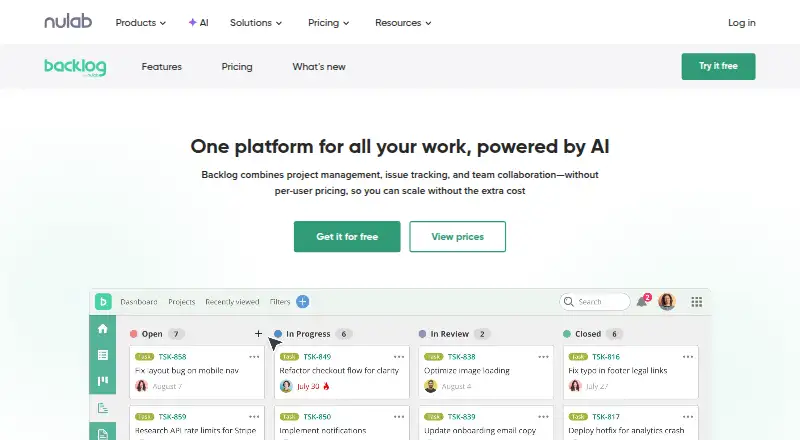
Backlog combines project management, issue tracking, and team collaboration without per-user pricing. Teams can organize work with issues and Kanban-style boards, while plan-dependent tools include subtasks, Gantt charts, burndown charts, and issue templates. Built-in Git repositories and Subversion support provide code-management options. Backlog works in a browser and on iOS and Android, and its open API supports custom integrations. Listed connections include Cacoo, Slack, Jenkins, Microsoft Teams, Google Drive, Dropbox, and iCal Sync. The Free plan allows 10 users, one project, and 100 MB of storage. Starter costs $35 a month, Standard costs $100 a month, and Premium costs $175 a month. Paid plans include a 30-day trial without a credit card, but plans cannot be changed during the trial. Enterprise adds SAML single sign-on, SCIM provisioning, audit logs, centralized user and access management, and private-server installation. Backlog is headquartered in Fukuoka, Japan, and was founded in 2004.
Who it suits
Backlog suits teams that want project and issue tracking alongside code management. Its free tier may fit small teams, while private hosting and centralized security controls are listed for Enterprise.
What it does well
- Free plan supports 10 users and one project.
- Built-in Git and Subversion support.
- Available through browser, iOS, and Android.
- Paid plans include a 30-day trial.
- Enterprise supports private-server installation.
What to know first
- Free plan is limited to one project.
- No time tracking or automation rules.
- Plans cannot be switched during the trial.
Plans
| Plan | Billed and limits | Price |
|---|---|---|
| Free | Free forever · 10 users · 1 project · 100 MB storage · Git & Subversion · Board | Free |
| Starter | billed monthly · 30 users · 5 projects · 1 GB storage · Git & Subversion · Board · Subtasking | $35 a month |
| Standard | billed monthly · Unlimited users · 100 projects · 30 GB storage · Gantt charts (6 months view) · Burndown chart · Issue templates | $100 a month |
| Premium | billed monthly · Unlimited users · Unlimited projects · 100 GB storage · AI Assistant · 3rd level subtasks · Unlimited Gantt view · Custom fields · Dedicated support | $175 a month |
| Enterprise | Contact · Unlimited users · SAML SSO · SCIM provisioning · Audit logs · Advanced security and compliance · Private server installation | On request |
As nulab.com lists them, read 30 Sept 2026. The maker's own page has the final word.
Backlog suits software teams that want project planning, issue tracking and Git or Subversion repositories in one service. Its breadth is useful, but the free plan is tightly capped and the paid tiers differ substantially in storage and planning features.
It is a stronger fit for teams organizing development work than for those that depend on built-in automation or time tracking, which Backlog does not offer.
Overview
Backlog brings project management, issue tracking and team collaboration together, with Kanban-style boards, custom workflows, roadmaps and guest access. Built-in Git repositories and Subversion support make it possible to manage code alongside project work rather than treating Backlog solely as a tracker.
Its open API supports custom integrations, and its connections include Slack, Microsoft Teams, Jenkins, Google Drive, Dropbox, Cacoo and iCal Sync. Redmine and Jira importers may help teams move existing work into Backlog. The main functional omission is automation rules; time tracking is also absent, which may matter to teams that need either as part of their workflow.
Key features
Project and issue tracking
Boards handle day-to-day task flow, while subtasks add structure to larger pieces of work. Standard introduces issue templates, burndown charts and Gantt charts with a six-month view. Those additions give teams more ways to organize and follow progress than a board alone, though the Standard Gantt horizon may be restrictive for longer-range planning. Premium removes that view limit and adds third-level subtasks and custom fields.
Code management and integrations
Git repositories and Subversion support sit alongside issue tracking, a practical combination for teams that want their code and work planning in the same platform. The API and named integrations extend that setup, though teams requiring automation rules will need another solution for that part of their process.
AI and enterprise controls
Premium and Enterprise include an AI Assistant with 2,000 monthly credits each. Enterprise adds SAML single sign-on, SCIM provisioning, audit logs, centralized user and access management, and security integrations. It can also be installed on a private server, giving organizations control over data, users, security settings, updates and permissions. These controls make Enterprise the relevant tier for organizations with stronger hosting and identity requirements, rather than a straightforward extension of a small-team plan.
Pricing
Backlog is freemium. Paid plans have a 30-day free trial with no credit card required, but plans cannot be switched during the trial. Email support is provided across plans; Premium adds dedicated support, and Enterprise includes an Enterprise Customer Success Manager.
| Plan | Price | Limits and features |
|---|---|---|
| Free | free | Free forever; 10 users, 1 project, 100 MB storage, Git and Subversion, and a board. |
| Starter | $35 a month | Billed monthly; 30 users, 5 projects, 1 GB storage, Git and Subversion, a board, and subtasks. |
| Standard | $100 a month | Billed monthly; unlimited users, 100 projects, 30 GB storage, Gantt charts with a six-month view, burndown charts, and issue templates. |
| Premium | $175 a month | Billed monthly; unlimited users and projects, 100 GB storage, AI Assistant, third-level subtasks, unlimited Gantt view, custom fields, and dedicated support. |
| Enterprise | Custom pricing | Unlimited users, enterprise security features and private-server installation. |
Free is a credible starting point for a small team, but one project and 100 MB of storage leave little room for multiple concurrent projects or substantial repository use. Starter raises the caps to 30 users and five projects, while retaining only 1 GB of storage and omitting the planning features introduced at Standard. Standard removes the user cap and expands storage to 30 GB, but still limits projects to 100 and Gantt viewing to six months. Premium is the tier for unlimited projects and Gantt view, higher storage, custom fields and dedicated support; its monthly price is a material step up from Standard. Enterprise has custom pricing, so teams needing its controls should weigh that separately against the published tiers.
Platforms
Backlog is accessible on the web and on iOS and Android devices. It also supports API access and self-hosted deployment, with private-server installation available on Enterprise.
Who it's for
Backlog is best suited to software teams that value project tracking and code management together, and can choose a tier around their project, user and storage needs. Free suits a team testing the fit within one project; Starter fits a modest team needing more projects and subtasks. Standard and Premium are more appropriate as project volume or planning requirements grow. Organizations that require centralized identity controls or private hosting should consider Enterprise. Teams for whom automation rules or time tracking are essential should look elsewhere.
Pros and cons
- Pro: Git and Subversion support sit alongside project and issue tracking, keeping code management and work planning in one service.
- Pro: Plans scale from a free 10-user tier to unlimited users, with higher tiers adding planning tools, storage and project capacity.
- Pro: Enterprise offers private-server deployment and security controls including SAML SSO, SCIM and audit logs.
- Con: The free plan permits just one project and 100 MB of storage, limiting its usefulness beyond a small trial workload.
- Con: Automation rules and time tracking are not included, leaving gaps for teams that rely on either capability.
- Con: Standard limits Gantt charts to a six-month view, while unlimited Gantt viewing requires the more expensive Premium tier.
Alternatives
- Linear is worth considering if an unlimited-member free plan matters more than Backlog's stated repository support; its free plan is capped at two teams and 250 issues.
- YouTrack may suit teams that want a free plan for up to 10 users with 30 GB of storage, rather than Backlog's one-project, 100 MB free allowance.
- Bugzilla is a free alternative.
- MantisBT is a free, self-hosted alternative.
- Trac is free project software with self-hosted deployment.
- Launchpad offers a free plan for open-source projects.
- Buildtable has a free plan for one game and two team members, with Bug Center and Tasks.
- Shortcut is another option with a free plan for teams of up to 10 users.
Verdict
Choose Backlog if your development team wants project planning, issue tracking and Git or Subversion support together, and its tier limits match your workload. Its key advantage is that combination; its strongest reasons to look elsewhere are the absence of automation rules and time tracking, or the cost of reaching higher project, storage and planning limits.
Verdict
Backlog combines work tracking and code-management tools, with plan limits and features that scale across its tiers. Check the project, user, and storage allowances against your team's needs before choosing a plan.
Facts from Backlog's own pages
- AI Assistant
- The AI Assistant is included with Premium and Enterprise, which each include 2,000 credits monthly. · nulab.com, 30 Sept 2026
- API
- Backlog supports custom integrations through its open API and links to API documentation for developers. · nulab.com, 30 Sept 2026
- Automation rules
- No · nulab.com, 22 Sept 2026
- Code management
- Backlog provides built-in Git repositories and Subversion support. · nulab.com, 30 Sept 2026
- Founded
- 2004 · nulab.com, 28 Sept 2026
- Free plan
- Yes · nulab.com, 22 Sept 2026
- Guest access
- Yes · nulab.com, 22 Sept 2026
- Headquarters
- Fukuoka, Japan · nulab.com, 28 Sept 2026
- Integrations
- Listed integrations include Cacoo, Slack, Redmine and Jira importers, Jenkins, Microsoft Teams, Google Drive, Dropbox, and iCal Sync. · nulab.com, 30 Sept 2026
- Maker
- Nulab, Inc. was established in 2004 with headquarters in Fukuoka, Japan. · nulab.com, 30 Sept 2026
- Free-plan user limit
- 10 · nulab.com, 22 Sept 2026
- Pricing limits
- The Free plan allows 10 users and one project, while Starter allows 30 users; Standard, Premium, and Enterprise allow unlimited users. · nulab.com, 30 Sept 2026
- Private hosting
- The Enterprise plan can be installed on a private server, with control over data, users, security settings, updates, and permissions. · nulab.com, 30 Sept 2026
- Purpose
- Backlog combines project management, issue tracking, and team collaboration in one platform without per-user pricing. · nulab.com, 30 Sept 2026
- Security
- Enterprise security features include SAML single sign-on, SCIM user provisioning, audit logs, centralized user and access management, and security integrations. · nulab.com, 30 Sept 2026
- Support
- The pricing page lists email support across plans, dedicated support on Premium, and an Enterprise Customer Success Manager on Enterprise. · nulab.com, 30 Sept 2026
- Supported access
- Backlog is accessible in a browser and on iOS and Android mobile devices. · nulab.com, 30 Sept 2026
- Task and project tools
- Its plans include issue tracking, Kanban-style boards, and features such as subtasks, Gantt charts, burndown charts, and issue templates. · nulab.com, 30 Sept 2026
- Time tracking
- No · nulab.com, 22 Sept 2026
- Trial
- Paid plans have a 30-day free trial with no credit card required, and plans cannot be switched during the trial. · nulab.com, 30 Sept 2026
Where Backlog stands on Freedom251
- Project Management Software#9 of 188
- Issue Tracking Software#3 of 40
- Bug Tracking Software#3 of 26
- Game Bug Tracking Software#3 of 26
- Project management tools#28 of 196