
Doska
What Doska is
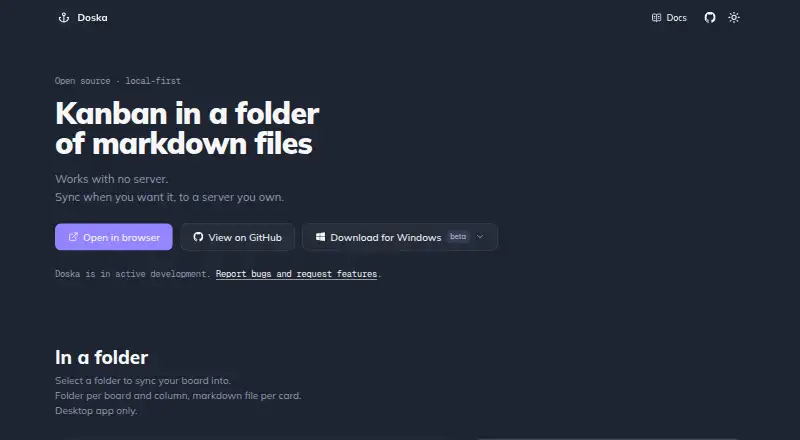
Doska is a local-first Kanban board that stores cards as Markdown files. Boards stay on the device and work offline, with synchronization available when configured. Card text supports GitHub-flavored Markdown, task lists, links between cards, deadlines, and priorities. Board tools include row view, sortable deadlines and priorities, search, sidebar folders, and undo for deleted cards. The desktop app can synchronize boards both ways with a local folder, representing columns as folders and cards as Markdown files. Cross-device synchronization and shared boards require a self-hosted server running with Docker and Docker Compose. On that server, admins create accounts; board owners can share boards or publish read-only links. Attachments also require a sync server and may be stored there or in an S3-compatible bucket, with a default single-file upload limit of 25 MiB. Doska is free, MIT licensed, and has no features behind a paywall. It is in active development, and the maker directs users to GitHub for bug reports and feature requests.
Who it suits
Doska suits people who want an offline Kanban board with Markdown-based cards and local-folder synchronization. Teams needing shared boards, cross-device sync, or attachments should be prepared to run a self-hosted server with Docker and Docker Compose.
What it does well
- Boards work offline and are stored locally.
- Cards support task lists, deadlines, and priorities.
- Desktop app can sync with a local folder.
- Free and MIT licensed, with no paywalled features.
What to know first
- Shared boards and cross-device sync require a self-hosted server.
- Attachments require a sync server.
- Default single-file upload limit is 25 MiB.
- The project is in active development.
Limits
The plan is free, with no features behind a paywall. Cross-device sync, shared boards, and attachments require a self-hosted sync server; the default single-file attachment limit is 25 MiB.
Plans
| Plan | Billed and limits | Price |
|---|---|---|
| Doska | Open source · MIT licensed · no features behind a paywall | Free |
As doska.sh lists them, read 4 Oct 2026. The maker's own page has the final word.
Getting started
- Visit the Doska website.
- Choose a listed platform: Android, iOS, Linux, macOS, web, or Windows.
- Use the board offline, or configure synchronization when needed.
- For cross-device sync or sharing, run a self-hosted server with Docker and Docker Compose.
- Have a server admin create accounts before sharing boards.
Doska is a Kanban app built around Markdown cards and boards stored on your device. It suits individuals who want offline access and file-based portability; teams should first decide whether they are prepared to run a server for collaboration.
Its appeal is a free, MIT-licensed board with no paid feature tiers. The trade-off is that shared boards, cross-device sync and attachments all depend on self-hosting.
Overview
Boards stay local and work offline, with sync added when configured. That makes Doska a sensible choice for a personal workflow that should remain usable without a network connection. Cards support GitHub-flavored Markdown, including task lists, links to other cards, deadlines and priorities, so the board can hold more than short status notes.
Doska is in active development, and its maker directs users to GitHub to report bugs and request features. The security policy describes a one-person project and targets a response to private security reports within a week. Organizations that need established support or continuity should weigh that alongside the product's no-cost license.
Key features
Row view, sortable deadlines and priorities, search, sidebar folders and undo for deleted cards cover practical ways to organize and recover work. The desktop app can sync boards both ways with a local folder, representing columns as folders and cards as Markdown files. That is useful for file-oriented workflows, but the capability is tied to the desktop app.
Collaboration is possible, but not turnkey: cross-device sync and shared boards require a self-hosted server running with Docker and Docker Compose. Server admins create accounts; board owners can share boards or publish read-only links. Self-hosted single sign-on works with OpenID Connect providers, including Authentik, Keycloak, Pocket ID and Google. These options make Doska more viable for technically capable teams, while the server requirement is a substantial hurdle for anyone seeking hosted, ready-to-use teamwork.
An MCP endpoint lets connected agents search and manage boards and cards. OAuth protects access, and an agent can see only boards belonging to the signed-in account. Attachments also require a sync server; files can live on the server or in an S3-compatible bucket, with a default single-file upload limit of 25 MiB. That makes attachments a poor fit for a server-free setup.
The installer backs up existing data before redeployment, and the backup guide covers the bundled database and local files volume. This is a useful safeguard for self-hosters, not a substitute for managing backups of their own installation.
Pricing
Doska costs nothing. The Doska plan is open source under the MIT license and has no features behind a paywall; there is no free trial because the product is free. There are no paid Doska tiers or plan quotas in the supplied plan terms. The key cost is operational rather than subscription-based: teams need to run the server for cross-device sync, sharing and attachments.
Platforms
Doska supports Android, iOS, Linux, macOS, Windows, web, API and self-hosted use. Its desktop app also provides two-way local-folder sync, while the server is required for cross-device synchronization and shared boards.
Who it's for
Choose Doska for personal Kanban if you value offline availability, Markdown cards and access to board data as ordinary files. It can also suit teams comfortable operating Docker and Docker Compose who want to host collaboration themselves. Look elsewhere if you need shared boards without managing infrastructure, or if you depend on attachments but do not want a sync server.
Pros and cons
- Pro: Local boards work offline, so a network connection is not necessary for day-to-day individual use.
- Pro: Markdown cards and desktop local-folder sync make board content accessible in a file-based workflow.
- Pro: The free MIT-licensed plan has no features behind a paywall.
- Pro: Self-hosted sharing, OpenID Connect sign-on and an OAuth-protected MCP endpoint offer useful control for teams willing to operate a server.
- Con: Shared boards and cross-device sync require Docker and Docker Compose, adding setup and maintenance work.
- Con: Attachments require a sync server and have a default 25 MiB single-file limit.
- Con: The maker describes Doska as a one-person project in active development, which may concern organizations seeking established support and continuity.
Alternatives
For other options, see Kanban Software. PLANKA is another self-hosted Kanban option, with a free Community edition and a Pro Self-Hosted plan at €36 a month; pick it if you prefer its separate paid self-hosted tier. WeKan has a free app plan with no admin access and a WeKan Cloud plan at $50 a year with admin access and unlimited everything; it is worth considering if admin access through its cloud plan matters to you.
MeisterTask has a free plan capped at three projects, five notes and five Content Manager seats, so consider it if those project and seat limits fit your needs. Jotform offers a free Starter plan with five forms and 100 monthly submissions, making it a more relevant option when forms and submission limits match the work. Planio offers a Bronze plan with one project, two users, ten customers and 1 GB storage, and a Silver plan at $25 a month; choose it if those project and user limits suit your team.
SwiftKanban has a free Team plan limited to three users and two boards, a fit if those caps work for a small team. Trello allows up to ten collaborators and ten boards per Workspace on its free plan, with a 10MB file limit; consider it if those workspace limits suit your workflow. Collattice offers a free self-hosted edition as a single executable with embedded SQLite, an alternative if that form of deployment better fits your setup.
Verdict
Doska is a strong fit for individuals who want a free, offline Kanban board with Markdown cards they can sync to a local folder. Its main reason to choose it is that local-first workflow without paid feature gates. Look elsewhere if you need collaboration or attachments without running and maintaining a self-hosted server.
Verdict
Doska provides a free offline board with Markdown cards and local-folder synchronization. Its shared and attachment features depend on self-hosting, so consider that setup requirement first.
Questions
How much does Doska cost?
The Doska plan is free. It is open source under the MIT license, with no features behind a paywall.
Can I use Doska offline?
Yes. Boards are stored locally and work offline; synchronization can be configured on top.
Which platforms does Doska support?
Doska lists Android, API, iOS, Linux, macOS, self-hosted, web, and Windows.
Do shared boards and cross-device sync need a server?
Yes. Both require a self-hosted server running with Docker and Docker Compose.
Can I add attachments?
Attachments require a sync server and can be stored on the server or in an S3-compatible bucket. The default single-file limit is 25 MiB.
Is Doska open source?
Yes. Doska is MIT licensed.
Facts from Doska's own pages
- AI agent integration
- An MCP endpoint lets connected agents read and edit boards, with tools for board and card management and search. · doska.sh, 4 Oct 2026
- Attachments
- Attachments require a sync server and can be stored on the server or in an S3-compatible bucket; the default single-file upload limit is 25 MiB. · doska.sh, 4 Oct 2026
- Backups
- The installer backs up existing data before redeploying; the backup guide covers the bundled database and local files volume. · doska.sh, 4 Oct 2026
- Board tools
- Features include a row view, sortable deadlines and priorities, search, sidebar folders and undo for deleted cards. · doska.sh, 4 Oct 2026
- Development status
- Doska is in active development, and the maker directs users to GitHub to report bugs and request features. · doska.sh, 4 Oct 2026
- File sync
- The desktop app can sync boards both ways with a local folder, using folders for columns and Markdown files for cards. · doska.sh, 4 Oct 2026
- Integrations
- Self-hosted single sign-on supports any OpenID Connect provider, including Authentik, Keycloak, Pocket ID and Google. · doska.sh, 4 Oct 2026
- Markdown cards
- Card bodies support GitHub-flavored Markdown, task lists, card links, deadlines and priorities. · doska.sh, 4 Oct 2026
- Offline use
- Boards are stored locally and the app works offline; sync runs on top when configured. · doska.sh, 4 Oct 2026
- Platforms
- Doska runs in a browser or as a phone PWA; desktop builds are available for macOS, Windows beta and Linux beta. · doska.sh, 4 Oct 2026
- Product
- Doska is a local-first Kanban board whose cards are Markdown files. · doska.sh, 4 Oct 2026
- Security
- MCP access is protected by OAuth, and the agent only sees boards belonging to the signed-in account. · doska.sh, 4 Oct 2026
- Security support
- The security policy says this is a one-person project and reports are handled privately, with a response target of within a week. · github.com, 4 Oct 2026
- Server sync
- Cross-device sync and shared boards require a self-hosted server running with Docker and Docker Compose. · doska.sh, 4 Oct 2026
- Sharing
- On a self-hosted server, admins create accounts and board owners can share boards or publish read-only links. · doska.sh, 4 Oct 2026
Where Doska stands on Freedom251
- Kanban Software#2 of 29