Freedom251 › Workflow Tracking

KanbanFlow
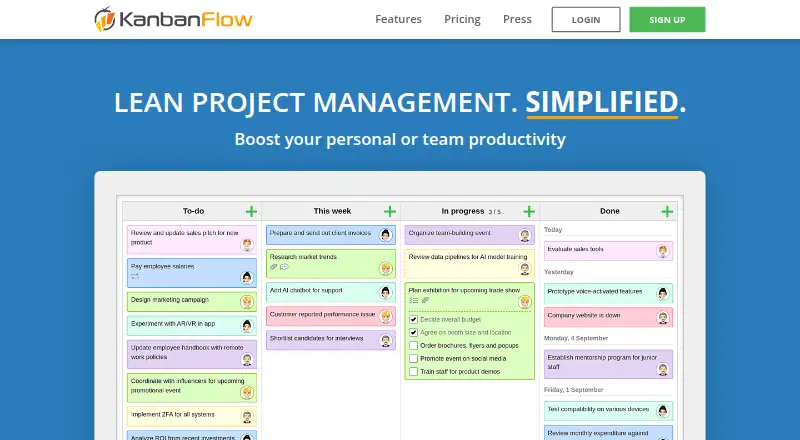
What KanbanFlow is
KanbanFlow is a lean project management tool for personal or team productivity. Its boards offer customizable columns, work-in-progress limits, subtasks, swimlanes, filters, recurring tasks, and task relations. Users can record task time with a Pomodoro timer, stopwatch, or manual logging. Reports include cumulative flow, burndown, throughput, cycle and lead time charts, and Monte Carlo forecasting. The service supports Excel and CSV import, Excel, CSV, XML, and JSON export, email task creation, a REST API, webhooks, and Zapier. Premium users can attach files from Dropbox, Google Drive, OneDrive, and Box, although KanbanFlow stores links and metadata rather than file contents. A free plan with no time limit includes a Kanban board and standard support. Premium costs $5 a month, with a 10% discount when paying per year, and includes priority support plus features such as API and webhooks, integrations, two-factor authentication, and custom permission roles. KanbanFlow offers mobile web access and links to iPhone and Android apps.
Who it suits
KanbanFlow can suit individuals and teams organizing work on boards, tracking task time, and reviewing project flow. Premium is an option for users seeking features such as API access, integrations, or two-factor authentication.
What it does well
- Free plan has no time limit.
- Boards include WIP limits and task relations.
- Time tracking offers three methods.
- Reports include Monte Carlo forecasting.
What to know first
- File attachments store links and metadata, not file contents.
- Two-factor authentication is a Premium feature.
- Terms do not guarantee service availability.
Limits
The free plan costs nothing with no time limit and includes a Kanban board and standard support. The listed Premium plan costs $5 a month and includes priority support; annual payment has a 10% discount.
Plans
| Plan | Billed and limits | Price |
|---|---|---|
| Free | No time limit · Kanban board · Standard support | Free |
| Premium | 10% discount when paying per year · Unlimited boards · Unlimited tasks · WIP limits · Subtasks · Swimlanes · Attachments · Custom fields · Timeline/Gantt · Time tracking · Analytics · Calendar · API/webhooks · Zapier · Cloud-file integrations · Two-factor authentication · Custom roles · Priority support | $5 a month |
As kanbanflow.com lists them, read 15 Oct 2026. The maker's own page has the final word.
Getting started
- Visit https://kanbanflow.com/.
- Start with the free plan, or use the 14-day trial before choosing Premium.
- Create a board and set up its columns, WIP limits, and other board features.
- Add tasks and track time with the Pomodoro timer, stopwatch, or manual logging.
- Import tasks from Excel or CSV, or create tasks by email.
- Invite teammates to a Premium team subscription; one subscriber pays for the team.
- Use mobile web access on a phone, or follow the site’s links to iPhone and Android apps.
Verdict
KanbanFlow combines configurable boards, time tracking, and project reports with a no-time-limit free plan. Premium adds integrations, security options, and priority support for $5 a month.
Questions
What does KanbanFlow cost?
The Free plan costs nothing with no time limit. Premium is $5 a month, with a 10% discount when paying per year.
Is there a free trial?
Yes. The pricing note lists a 14-day trial.
Which platforms are listed?
The listed platforms are Android, iOS, web, and API. Phone access is also available through a mobile web app, and the site links to iPhone and Android apps.
What does Premium add?
Premium features include API and webhooks, integrations, two-factor authentication, and custom permission roles. Premium also includes priority support.
Can teams share a subscription?
Yes. One person signs up for Premium, invites the others, and pays for the team.
Who makes KanbanFlow?
The site identifies CodeKick AB as the company behind KanbanFlow.
Facts from KanbanFlow's own pages
- Account security
- Two-factor authentication is available in the Premium version. · kanbanflow.com, 29 Sept 2026
- Analytics
- Reports include cumulative-flow, cycle/lead-time, burndown, throughput, calendar, dashboards, Monte Carlo forecasts and history logs. · learn.kanbanflow.com, 15 Oct 2026
- API authentication
- API requests use bearer tokens created from a Premium board's API and Webhooks settings. · api.kanbanflow.com, 15 Oct 2026
- API scope
- The public REST API documents board, task, user, custom-field, comment, attachment, relation and time-entry operations plus webhooks and rate limiting. · kanbanflow.com, 15 Oct 2026
- Attachments
- Tasks can hold files from a computer or from Dropbox, Google Drive, OneDrive and Box. · kanbanflow.com, 15 Oct 2026
- Automation rules
- Yes · kanbanflow.com, 20 Sept 2026
- Availability
- Premium users can access a geographically separated backup system if the normal site is down; the terms do not guarantee service availability. · kanbanflow.com, 29 Sept 2026
- Availability design
- Premium users receive a geographically separated backup system with real-time replication, although availability is not guaranteed. · learn.kanbanflow.com, 15 Oct 2026
- Board features
- Boards support customizable columns, work-in-progress limits, subtasks, swimlanes, filters, recurring tasks, and task relations. · kanbanflow.com, 29 Sept 2026
- Company
- The site identifies CodeKick AB as the company behind KanbanFlow. · kanbanflow.com, 29 Sept 2026
- Company size
- LinkedIn lists CodeKick AB as having 2–10 employees and headquarters in Masthugget, Västra Götaland. · linkedin.com, 15 Oct 2026
- Custom fields
- Custom task fields can be displayed on boards and used for filtering and reports. · kanbanflow.com, 15 Oct 2026
- File storage integrations
- Premium users can attach files from Dropbox, Google Drive, OneDrive, and Box; KanbanFlow stores links and metadata rather than the file contents for those attachments. · kanbanflow.com, 29 Sept 2026
- Founded
- CodeKick says KanbanFlow launched in 2011. · codekick.com, 15 Oct 2026
- Free plan
- Yes · kanbanflow.com, 20 Sept 2026
- Guest access
- Yes · kanbanflow.com, 20 Sept 2026
- Headquarters
- CodeKick describes itself as based in Gothenburg, Sweden. · codekick.com, 15 Oct 2026
- Integrations
- Supported integration methods include Excel/CSV/XML/JSON transfer, email task creation, calendar feeds, Zapier, REST API and webhooks. · learn.kanbanflow.com, 15 Oct 2026
- Kanban boards
- Boards use customizable columns to show the current state of work. · kanbanflow.com, 15 Oct 2026
- Licence
- The terms reserve copyright in the service source code and prohibit reverse engineering, indicating proprietary software rather than open source. · learn.kanbanflow.com, 15 Oct 2026
- Limit: aesthetics and calendar needs
- Software Advice reviewers criticize the visual appearance and request calendar synchronization for tasks. · softwareadvice.com, 15 Oct 2026
- Limit: customization and polish
- G2 reviewers report wanting more customization, richer design and additional features, with some saying the interface looks less attractive than competitors. · g2.com, 15 Oct 2026
- Limit: dated interface and recurring tasks
- GetApp's review summary says some users consider the interface outdated and want better handling of recurring tasks. · getapp.com, 15 Oct 2026
- Limit: mobile synchronization
- A Capterra reviewer reports that desktop/mobile synchronization was sometimes poor and the mobile site lagged, influencing them to stop using the product. · capterra.com, 15 Oct 2026
Where KanbanFlow stands on Freedom251
- Workflow Tracking#1 of 23
- Project Management Software#29 of 188
- Kanban Software#6 of 29
- Project management tools#79 of 196