Freedom251 › Agile Project Management Software
Kanban Tool
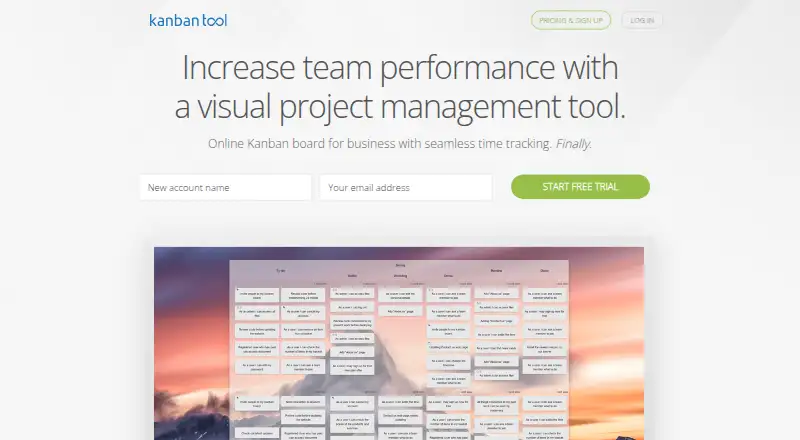
What Kanban Tool is
Kanban Tool is visual management software for mapping workflows, tracking project progress, and reviewing business processes. Boards use task cards, horizontal swimlanes, drag-and-drop, configurable workflows, and work-in-progress limits. Teams can assign tasks, comment, receive email notifications, view real-time updates, and control access to boards and folders. Analytics include cumulative flow diagrams, cycle time comparisons, breakdown charts, and time reports, with Excel or CSV export. A built-in timer follows workflow start and pause stages. Integrations include Zapier, Google Drive, Box, Dropbox, OneDrive, Outlook and Google Calendar, Chromecast, email task creation, and an API. The service supports kanban, backlog management, agile reporting, and a roadmap view, but not Scrum or sprint planning. Android and iOS apps are available, along with web, extension, API, and self-hosted options. The free plan is limited to two boards, two users, and no file attachments. Team is $6 a month per user; Enterprise is $11 a month per user and adds time tracking and reporting, among other features. A 14-day trial is available.
Who it suits
Kanban Tool suits individuals, teams, and organizations managing work through visual workflows and backlogs. It may fit teams that want kanban boards and reporting rather than Scrum or sprint planning.
What it does well
- Boards include configurable workflows and work-in-progress limits.
- Real-time updates support team collaboration.
- Analytics include cycle time and cumulative flow.
- Integrations include common cloud storage and calendars.
- Android and iOS apps are available.
What to know first
- Free plan is limited to two boards and two users.
- Free plan does not include file attachments.
- Scrum support and sprint planning are not included.
- On-Site excludes internet-based integrations and cloud file hosting.
Limits
The Free plan is limited to 2 boards and 2 users and does not include file attachments. Team costs $6 per user per month; Enterprise at $11 per user per month adds time tracking and reporting, user groups management, and process automation. On-Site starts at $720 a year for 10+ users and does not include internet-based integrations such as Zapier or cloud file hosting.
Plans
| Plan | Billed and limits | Price |
|---|---|---|
| Free | per user / month · 2 boards · 2 users for free · No file attachments | Free |
| Enterprise | per user / month · Unlimited boards · File attachments · Time tracking and reporting · User groups management · Process automation | $11 a month |
| Team | per user / month · Unlimited boards · File attachments | $6 a month |
| Kanban Tool On-Site | Starting at $720 per year · Self-hosted · 10+ users · Annual billing · Contact Sales for current pricing | $720 a year |
As kanbantool.com lists them, read 4 Oct 2026. The maker's own page has the final word.
Getting started
- Visit https://kanbantool.com/.
- Start with the Free plan or begin the 14-day trial.
- Create boards and configure workflows, swimlanes, and work-in-progress limits.
- Choose Team or Enterprise for paid features such as file attachments.
- Choose On-Site for self-hosted deployment, starting at $720 a year for 10+ users.
- Use the Android or iOS app, browser, extension, API, or self-hosted option.
Kanban Tool is a visual work-management service for teams that want to map work onto configurable boards and monitor how it flows. It suits teams working in continuous delivery or operations; teams that plan in Scrum sprints will need a different fit.
Overview
Founded in 2008 and based in Katowice, Poland, Kanban Tool combines workflow boards with analytics and process-improvement features. Backlog management, agile reporting and a roadmap view broaden its use beyond simple task cards, but the lack of Scrum support and sprint planning is a meaningful constraint for teams whose work is organized around those practices.
Key features
Boards and collaboration
Task cards, horizontal swimlanes, configurable workflows, drag-and-drop and work-in-progress limits let teams shape boards around their process and expose overloaded stages. Real-time updates, assignments, comments and email notifications help coordinate shared work, while board and folder access controls provide a way to manage access. This is a strong set of controls for ongoing workflows, not a substitute for sprint planning.
Analytics and time tracking
Cumulative flow diagrams, cycle-time comparisons, breakdown charts and time reports give teams several ways to examine throughput and time spent. Excel and CSV exports make the data easier to use elsewhere. The built-in timer follows workflow start and pause stages and supports reports by project and task, but time tracking and reporting are included in Enterprise rather than Team, so teams needing that capability must account for the higher per-user price.
Integrations, security and reliability
Integrations include Zapier, Google Drive, Box, Dropbox, OneDrive, Outlook and Google Calendar, Chromecast, email task creation and an API. Android and iOS apps extend board access to phones and tablets. HTTPS encryption, SAML 2.0 single sign-on and optional two-factor authentication address access security; the company reports 99.99% uptime over the past year and daily full off-site backups. Support is available by feedback form or email, with a stated aim to respond within a few business days.
Pricing
The Free plan costs nothing, billed per user per month, and is capped at 2 boards and 2 users with no file attachments. It is useful for a small trial or tightly bounded workflow, but the board and seat ceilings make it a limited basis for a growing team.
Team costs $6 a month, billed per user per month, and adds unlimited boards and file attachments. It is the lower-cost paid option for teams that have outgrown the free caps, but it does not include the time tracking and reporting, user groups management or process automation included in Enterprise. Enterprise costs $11 a month, billed per user per month, and includes those capabilities alongside unlimited boards and attachments; it is the better fit when time reporting or process automation is central to the workflow.
Kanban Tool also offers a 14-day trial. Kanban Tool On-Site is self-hosted, starts at $720 a year for 10+ users, and is sold in annual 10-user license packs; contact Sales for current pricing. It does not include internet-based integrations such as Zapier or cloud file hosting, a material trade-off for organizations choosing self-hosting.
Platforms
Kanban Tool is available on the web, Android and iOS, and offers an API, an extension and a self-hosted option. On-Site can suit organizations that want a self-hosted deployment, provided its integration and cloud file-hosting exclusions are acceptable.
Who it's for
The service is intended for individuals, teams and organizations working in a business-to-business model. It is best suited to teams that want to visualize ongoing work, set flow limits and use analytics to improve a process. It is a weaker match for teams that require Scrum support or built-in sprint planning.
Pros and cons
- Pros: Configurable boards, swimlanes and work-in-progress limits help teams make workflow stages and bottlenecks visible.
- Pros: Flow analytics, exports and Enterprise time reports support process review beyond basic task tracking.
- Pros: Real-time collaboration, access controls, mobile apps and a broad set of integrations support distributed team workflows.
- Cons: The free plan's 2-board, 2-user limit and lack of attachments constrain sustained team use.
- Cons: Time tracking and reporting require Enterprise, which costs more per user than Team.
- Cons: No Scrum support or sprint planning makes it a poor fit for sprint-based teams; On-Site also omits internet-based integrations and cloud file hosting.
Alternatives
Linear is worth considering when its free plan's unlimited members, 2 teams and 250 issues better match a team's scale and issue-based work needs.
YouTrack may suit teams looking for a free cloud plan for up to 10 users with 30 GB storage, rather than Kanban Tool's 2-user free ceiling.
OpenProject is an alternative for organizations that prefer a self-hosted option or a free community plan with no minimum users.
Plane is an alternative with a free plan for 12 users, which may be a better starting point than Kanban Tool's two-user free plan.
Acunote is another freemium project-management option.
iceScrum is an alternative with self-hosted availability and an open-source codebase.
Kanboard is a free, open-source, self-hosted option for teams that want an MIT-licensed tool.
Ora is another freemium alternative.
For more choices, see Kanban Software and Agile Project Management Software.
Verdict
Choose Kanban Tool if your team wants configurable Kanban workflows and useful flow analytics, with time reporting available at Enterprise. Look elsewhere if Scrum and sprint planning are core requirements, or if the free plan's two-user cap is too restrictive for evaluating the product with your team.
Verdict
Kanban Tool centers on visual workflows, with analytics, collaboration, and integrations for tracking work. The free plan has limits on boards, users, and attachments; paid plans start at $6/user/mo.
Questions
Does Kanban Tool have a free plan?
Yes. The Free plan costs nothing per month and includes 2 boards and 2 users, with no file attachments.
What are the paid plan prices?
Team costs $6 per user per month and Enterprise costs $11 per user per month. On-Site starts at $720 a year for 10+ users.
Is there a free trial?
Yes. Kanban Tool offers a 14-day trial.
Which platforms are available?
Kanban Tool lists Android, iOS, web, extension, API, and self-hosted options.
Does it support Scrum and sprint planning?
No. Kanban Tool does not support Scrum or sprint planning.
What integrations are available?
Integrations include Zapier, Google Drive, Box, Dropbox, OneDrive, Outlook and Google Calendar, Chromecast, email task creation, and an API.
Facts from Kanban Tool's own pages
- Analytics
- Analytics include cumulative flow diagrams, cycle time comparisons, breakdown charts, time reports, and Excel or CSV data export. · kanbantool.com, 4 Oct 2026
- Boards
- Boards support task cards, horizontal swimlanes, drag-and-drop, configurable workflows, and work-in-progress limits. · kanbantool.com, 4 Oct 2026
- Collaboration
- Teams can collaborate with real-time board updates, task assignments, comments, email notifications, and board or folder access controls. · kanbantool.com, 4 Oct 2026
- Founded
- 2008 · kanbantool.com, 23 Sept 2026
- Headquarters
- Katowice, Poland · kanbantool.com, 23 Sept 2026
- Integrations
- Integrations include Zapier, Google Drive, Box, Dropbox, OneDrive, Outlook and Google Calendar, Chromecast, email task creation, and an API. · kanbantool.com, 4 Oct 2026
- Intended users
- The Terms of Service describe the service as intended for individuals, teams, and organizations using it in a business-to-business model. · kanbantool.com, 4 Oct 2026
- Mobile apps
- Kanban Tool offers mobile apps for Android and iOS, including iPhone and iPad. · kanbantool.com, 4 Oct 2026
- Purpose
- Kanban Tool is a visual management solution for visualizing workflows, tracking project progress, and analyzing and improving business processes. · kanbantool.com, 4 Oct 2026
- Reliability
- Kanban Tool reports 99.99% uptime over the past year and says it performs daily full off-site backups. · kanbantool.com, 4 Oct 2026
- Security
- The service supports HTTPS encryption, single sign-on using SAML 2.0, and optional two-factor authentication. · kanbantool.com, 4 Oct 2026
- Self-hosted limits
- On-Site is sold in annual 10-user license packs and does not include internet-based integrations such as Zapier or cloud file hosting. · kanbantool.com, 4 Oct 2026
- Support
- Support is available through a feedback form or email, and the company says it aims to respond within a few business days. · kanbantool.com, 4 Oct 2026
- Time tracking
- The built-in timer follows workflow start and pause stages, and the product provides reports of time spent on projects and tasks. · kanbantool.com, 4 Oct 2026
Where Kanban Tool stands on Freedom251
- Agile Project Management Software#2 of 41
- Workflow Tracking#2 of 23
- Agile Tools#2 of 19
- Project Tracking Software#6 of 34
- Nonprofit Project Management#8 of 34
- Kanban Software#7 of 29