Freedom251 › Daily Planner Apps

FlowSavvy
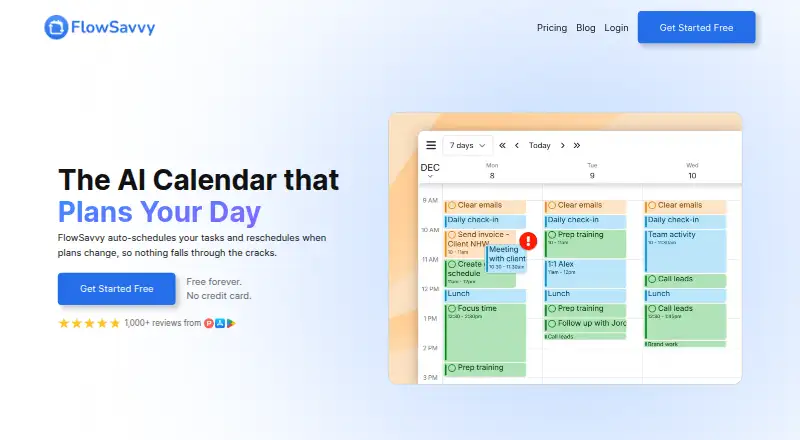
What FlowSavvy is
FlowSavvy automatically schedules tasks into a calendar and moves them when plans change. It syncs with Google Calendar, Outlook Calendar, and iCloud Calendar, and says it leaves calendar events alone, changing only tasks with Auto-Schedule enabled. Users can drag and drop scheduled tasks to lock them in place, and configure scheduling hours, dependencies, priorities, and due dates. Recurring tasks are supported, with integrations including Todoist, Claude, MCP, API, and Zapier. The public API is available only on Pro. FlowSavvy runs on Android, iOS, and the web; supported browsers can install it as a standalone desktop app. The free Basic plan has limits on scheduling-hours profiles, repeating tasks, task lists, and scheduling range. Pro costs $14 a month billed monthly, and includes an eight-week scheduling range and unlimited profiles, repeating tasks, and lists. The service requires an internet connection and has no offline mode, and it does not currently provide month or year calendar views. FlowSavvy says it works best for busy individuals who do not need team or enterprise features.
Who it suits
FlowSavvy suits busy individuals who want tasks automatically placed and rescheduled in a calendar without team or enterprise features. It is available on Android, iOS, and the web, including installable desktop use in supported browsers.
What it does well
- Reschedules auto-scheduled tasks when plans change.
- Users can lock tasks in place by dragging them.
- Supports recurring tasks and task dependencies.
- Syncs with Google, Outlook, and iCloud calendars.
- Free plan is available.
What to know first
- Requires an internet connection; no offline mode.
- Month and year calendar views are not available.
- Public API is available only on Pro.
- Basic plan limits profiles, repeating tasks, lists, and range.
Limits
Plan Basic is listed with one scheduling-hours profile, three repeating auto-scheduled tasks, five task lists, and a two-week scheduling range. Pro provides eight-week auto-scheduling and unlimited scheduling-hours profiles, repeating auto-scheduled tasks, and task lists; its listed monthly price is $14 a month billed monthly.
Plans
| Plan | Billed and limits | Price |
|---|---|---|
| Pro | per month, billed monthly · 8-week auto-scheduling · unlimited scheduling-hours profiles · unlimited repeating auto-scheduled tasks · unlimited task lists · priorities · task dependencies · API/MCP/Zapier | $14 a month |
| Basic | free forever · unlimited auto-reschedules · 2-week auto-scheduling · 1 scheduling-hours set · 3 repeating auto-scheduled tasks · 5 task lists | Free |
| Pro | $120.00 per year (= $10.00/month, billed annually) · 8-week auto-scheduling · unlimited scheduling-hours profiles · unlimited repeating auto-scheduled tasks · unlimited task lists · priorities · task dependencies · API/MCP/Zapier | $120 a year |
As flowsavvy.app lists them, read 1 Oct 2026. The maker's own page has the final word.
Getting started
- Open https://flowsavvy.app/.
- Use FlowSavvy on Android, iOS, or the web.
- Install it as a standalone desktop app through a supported browser, if preferred.
- Choose the free plan or a paid option; a 7-day trial is listed.
- Connect a supported calendar and enable Auto-Schedule for tasks you want scheduled.
FlowSavvy is a task planner that automatically fits enabled tasks into a calendar and reschedules them as plans change. It is best for busy individuals who want flexible scheduling rather than team or enterprise tools. Its standout is adjustable automation; its narrower calendar views and online-only access make it less suitable as a complete calendar replacement.
Overview
FlowSavvy schedules tasks around a changing workload while leaving calendar events untouched. Only tasks with Auto-Schedule enabled are moved, so existing appointments stay outside the scheduler’s control. You can shape the schedule with hours, due dates, priorities and dependencies, then drag a scheduled task to lock it in place. That mix of automation and manual control is useful when some work can move but other commitments need a fixed slot.
Calendar sync supports Google Calendar, Outlook Calendar and iCloud Calendar. Task and automation connections include Todoist, Claude, MCP, an API and Zapier. The public API is available only on Pro. FlowSavvy is a Progressive Web App that can be installed as a standalone desktop app in supported browsers, alongside its Android, iOS and web access.
Key features
Scheduling that can adapt
FlowSavvy automatically places tasks in the calendar and reschedules them when plans change. Scheduling-hour profiles let users define when work can be placed; priorities, due dates and dependencies add control over what should take precedence and what relies on something else. Dragging a task locks it in place. This is a strong fit for people whose task plans shift during the week, though the app does not offer month or year calendar views.
Recurring work and connections
Recurring tasks are supported, and FlowSavvy can connect calendar, task and automation services. The breadth of connections gives users ways to bring existing tools into a planning workflow; however, API, MCP and Zapier access is a Pro feature, so lower tiers are less suitable for custom automations.
Privacy and support
FlowSavvy says it encrypts data in transit and at rest, uses strict access controls and regularly updates its systems. It says it collects only data needed to provide the service, does not sell personal information and does not use it to train AI models. Free users get help articles; Pro adds 24/7 AI assistant support plus email and chat.
Pricing
FlowSavvy has a free plan, a Basic plan with no published price, and Pro at $14 a month, billed monthly. A 7-day trial is available. The starting paid price is also described as $10/user/mo (annual), a different term and rate from Pro’s monthly price.
| Plan | What it includes | Who it suits |
|---|---|---|
| Free | Help articles for support; the free plan has stated limits. | People who want to try the core scheduling approach before paying, provided the free caps fit their workload. |
| Basic | One scheduling-hours profile, 3 repeating auto-scheduled tasks, 5 task lists and a 2-week scheduling range. | Individuals with a modest, repeatable workload. The caps on profiles, recurring tasks and lists will constrain people managing several projects or routines. |
| Pro | 8-week scheduling, unlimited scheduling-hours profiles, repeating auto-scheduled tasks and task lists, plus priorities, dependencies and API/MCP/Zapier. | People who need a longer planning horizon, more control, or custom automations. |
The Basic plan keeps the essential limits tight, especially for recurring work and planning range. Pro removes those listed caps and adds advanced controls and integrations, but its 14.00 USD monthly billing is distinct from the $10/user/mo annual starting price. No seat allowance is stated for these plans, so team suitability is not established; FlowSavvy positions itself for individuals, not team or enterprise use.
Platforms
FlowSavvy is available on Android, iOS and the web. Its Progressive Web App can be installed as a standalone desktop app in supported browsers. An internet connection is required, with no offline mode, so it is a poor fit for work that must continue without connectivity.
Who it's for
Choose FlowSavvy if you are an individual with a changing task load and want work automatically arranged around calendar events without letting the app move those events. Its adjustable hours, task dependencies and lock-in control suit users who want automation with some say over the result. Look elsewhere if you need offline planning, broad month or year calendar views, or team and enterprise features.
Pros and cons
- Pros: Automatically reschedules enabled tasks when plans change, reducing the need to rebuild a task schedule by hand.
- Pros: Leaves calendar events untouched and lets users lock selected tasks in place, balancing automation with control.
- Pros: Syncs with three major calendar services and supports recurring tasks.
- Cons: No offline mode means an internet connection is necessary to use the service.
- Cons: No month or year views limits its usefulness for longer-range calendar review.
- Cons: Basic’s 3 repeating tasks and 2-week range may be restrictive; API, MCP and Zapier require Pro.
Alternatives
Routine is another freemium option, with Android, iOS, Linux, macOS, web and Windows apps; its Free plan includes 3 integrations, 3 custom databases and 250 AI credits. Consider it if those databases or broader platform coverage matter more than FlowSavvy’s automatic rescheduling.
Tiimo has a free plan with selected planning tools and iOS and Android apps, but excludes its web app. Choose it if mobile-only access fits better than FlowSavvy’s web-based availability.
Reclaim AI offers a free Lite tier for one user with a 1-week scheduling range, one calendar sync, one scheduling link and five AI agents. Its narrower free scheduling range may suit someone who wants to start with a single-user setup; FlowSavvy Basic provides a 2-week range.
TimeFinder has a free plan with core features and supports web, Windows, macOS, iOS and Android. It is an alternative for readers prioritizing that platform spread over FlowSavvy’s task auto-scheduling approach.
Week Plan offers a free Lite tier with basic planner features and High Impact Tasks, plus Ultimate at $8.67 a month billed annually. Choose it if a weekly planner and annual-billed Ultimate plan better match your needs.
Ellie Planner has a free plan with unlimited tasks, Brain Dump and iPhone, iPad and web access; Pro costs $9.99 a month. It is worth considering if those task-capture features and its stated price suit you better than automatic rescheduling.
Taskito offers timeline planning and sync across up to 2 active devices on its free plan, with limits including 3 projects, 3 repeating tasks and one reminder per task. Choose it if timeline planning and device sync matter more than FlowSavvy’s calendar-based auto-scheduling.
dayGLANCE has a free web app with no sign-up required and self-hosting available. Consider it if those access options are a priority.
For broader category browsing, see Daily Planner Apps, AI Calendar Assistants, Time Blocking Apps, Time Management Apps and Calendar apps.
Verdict
FlowSavvy is a strong choice for busy individuals who want a task schedule that can adapt automatically while preserving calendar events and selected task slots. Its principal advantage is the balance between rescheduling and user control; its chief drawbacks are internet dependence, missing month and year views, and tight lower-tier limits. Choose Pro when its longer horizon, advanced controls or automation connections justify the monthly price; look elsewhere for offline use, broader calendar views or team tools.
Verdict
FlowSavvy is centered on automatically scheduling tasks while leaving calendar events untouched. Its free plan has stated limits, and the service requires internet access without month or year calendar views.
Questions
Is FlowSavvy free?
Yes. FlowSavvy has a free plan. The pricing note says paid plans start at $10/user/mo billed annually and include a 7-day trial.
How much does Pro cost?
Pro is listed at $14 a month, billed monthly.
Which platforms does FlowSavvy support?
FlowSavvy is available on Android, iOS, and the web. Supported browsers can install it as a standalone desktop app.
Which calendars and integrations are supported?
Calendar sync includes Google Calendar, Outlook Calendar, and iCloud Calendar. Other listed integrations include Todoist, Claude, MCP, an API, and Zapier.
Does FlowSavvy change calendar events?
No. It schedules only tasks with Auto-Schedule enabled and says it never changes calendar events.
Does FlowSavvy have an offline mode?
No. FlowSavvy requires an internet connection.
Facts from FlowSavvy's own pages
- API availability
- FlowSavvy offers a public API for custom automations, and the API is available only on the Pro plan. · help.flowsavvy.app, 1 Oct 2026
- Audience
- FlowSavvy says it works best for busy individuals who want powerful auto-scheduling without team or enterprise features. · flowsavvy.app, 1 Oct 2026
- Calendar sync
- FlowSavvy syncs with Google, Outlook.com, and iCloud calendars. · flowsavvy.app, 1 Oct 2026
- Calendar-view limitation
- FlowSavvy does not currently provide month or year views. · help.flowsavvy.app, 1 Oct 2026
- Desktop app
- FlowSavvy is a Progressive Web App that can be installed as a standalone desktop app in supported browsers. · help.flowsavvy.app, 1 Oct 2026
- Events behavior
- FlowSavvy says it never touches calendar events and only auto-schedules tasks with Auto-Schedule enabled. · flowsavvy.app, 1 Oct 2026
- Free plan
- Yes · flowsavvy.app, 22 Sept 2026
- Integrations
- Supported integrations include Google Calendar, Outlook Calendar, iCloud Calendar, Todoist, Claude, MCP, API, and Zapier. · help.flowsavvy.app, 1 Oct 2026
- Mobile platforms
- both · flowsavvy.app, 22 Sept 2026
- Offline limitation
- FlowSavvy requires an internet connection and does not have an offline mode. · help.flowsavvy.app, 1 Oct 2026
- Planning method
- hybrid · flowsavvy.app, 22 Sept 2026
- Privacy
- FlowSavvy says it is not in the business of selling customers' personal information and collects only data necessary to provide its services. · flowsavvy.app, 1 Oct 2026
- Recurring tasks
- FlowSavvy intelligently schedules time for habits and recurring tasks. · flowsavvy.app, 1 Oct 2026
- Scheduling controls
- Users can drag and drop auto-scheduled tasks to lock them in place and configure scheduling hours, dependencies, priorities, and due dates. · flowsavvy.app, 1 Oct 2026
- Security
- FlowSavvy says it uses encryption in transit and at rest, strict access controls, and regularly updated systems, and does not sell information or use it to train AI models. · flowsavvy.app, 1 Oct 2026
- Paid from
- 10 · flowsavvy.app, 22 Sept 2026
- Support
- Pro includes 24/7 AI assistant support plus email and chat support, while the Free plan includes help articles. · flowsavvy.app, 1 Oct 2026
- What it does
- FlowSavvy auto-schedules tasks into a calendar and reschedules them when plans change. · flowsavvy.app, 1 Oct 2026
Where FlowSavvy stands on Freedom251
- Daily Planner Apps#11 of 137
- Time Management Apps#3 of 35
- Calendar apps#17 of 194
- AI Calendar Assistants#4 of 27
- Time Blocking Apps#6 of 31