Freedom251 › Daily Planner Apps
dayGLANCE
What dayGLANCE is
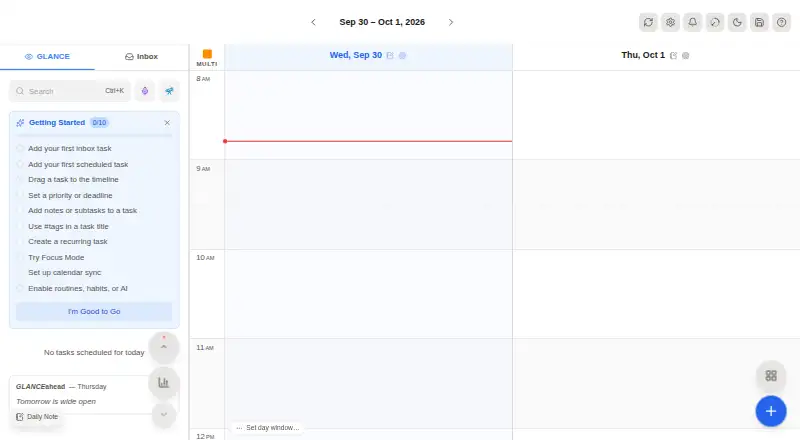
dayGLANCE is a day planner built around a 24-hour drag-and-drop timeline for time blocking. Schedule tasks on the timeline or leave unscheduled items in the inbox; the app also includes task management, habits, focus mode, recurring tasks, and calendar sync. The hosted web app requires no account, stores data in the browser by default, and works fully offline. Optional cloud sync adds backup and cross-device access. It can import calendars and sync tasks in both directions with CalDAV task lists. Users can also sync tasks and notes through their own Nextcloud or WebDAV server, or connect Obsidian to read and write vault tasks and daily notes. dayGLANCE is available on Android, iOS, Linux, macOS, Windows, and the web, and can be self-hosted as a Docker image on a compatible machine. The Android app includes a home-screen widget, background notifications, and optional Health Connect integration. The web app can send a day snapshot to a TRMNL e-ink display. Optional AI features use the user's own API key. dayGLANCE is MIT-licensed, with source code on GitHub. The free plan costs nothing; Pro access is paid through the App Store, and the App Store listing describes a 14-day trial before subscription or lifetime-unlock options.
Who it suits
dayGLANCE suits people who want to organize tasks visually across a full day, with habits, focus sessions, recurring tasks, and calendar sync in one planner. Its offline operation, local browser storage, self-hosting, and open-source license also suit users who want control over where their planner data is kept.
What it does well
- Schedules tasks on a 24-hour drag-and-drop timeline.
- Hosted web app needs no account and stores data locally by default.
- Works fully offline, with optional cloud sync.
- Supports calendar imports and bidirectional CalDAV task syncing.
- MIT-licensed, with source code available on GitHub.
- Can self-host as a Docker image.
What to know first
- Self-hosted instances cannot be served from a subpath.
- TRMNL integration is available only in the web app.
- Pro access is paid through the App Store.
Limits
The Free plan provides web app access and self-hosting. For self-hosted instances, serving from a subpath is unsupported; the documentation recommends a domain root or subdomain.
Plans
| Plan | Billed and limits | Price |
|---|---|---|
| Free | Web app access · No sign-up required · Self-hosting available | Free |
| Hosted web app | No account required · data stored locally in browser | Free |
| dayGLANCE Pro | 14-day free trial · one purchase covers iPhone, iPad, and Mac | $79.99, paid once |
As dayglance.app lists them, read 20 Sept 2026. The maker's own page has the final word.
Getting started
- Open the dayGLANCE website to use the hosted web app without an account.
- Choose self-hosting and run the Docker image on a machine that supports Docker, if preferred.
- Install the app on a supported platform: Android, iOS, Linux, macOS, or Windows.
- Use the 14-day App Store trial before choosing a subscription or lifetime-unlock option, if using the App Store listing.
Verdict
Pick dayGLANCE if you want a time-blocking planner that works offline and offers local storage, calendar sync, and self-hosting. Look elsewhere if your self-hosted setup needs a subpath or you need the TRMNL integration outside the web app.
Questions
Is dayGLANCE free?
Yes. The Free plan costs nothing and includes web app access and self-hosting. The hosted web app requires no account.
What does the App Store trial include?
The App Store listing describes a 14-day free trial before subscription or lifetime-unlock options.
Which platforms are supported?
The listed platforms are Android, iOS, Linux, macOS, self-hosted, web, and Windows. The TRMNL integration is available only in the web app.
Is dayGLANCE open source?
Yes. It is MIT-licensed, and its source code is available on GitHub.
How does it handle data and offline use?
The hosted app stores data locally in the browser by default and works fully offline. Optional cloud sync provides backup and cross-device access.
What integrations does it support?
It imports calendars and supports bidirectional syncing with CalDAV task lists. It also supports Nextcloud or WebDAV sync, Obsidian vault tasks and daily notes, and a web-only TRMNL integration.
Facts from dayGLANCE's own pages
- AI
- AI features for task creation, scheduling, and reflection are optional and use the user's own API key. · docs.dayglance.app, 11 Oct 2026
- Android
- The Android app offers a home-screen widget, background notifications, and optional Health Connect integration. · docs.dayglance.app, 11 Oct 2026
- Calendar integration
- It imports calendars and supports bidirectional task syncing with CalDAV task lists. · docs.dayglance.app, 11 Oct 2026
- Calendar sync
- Yes · github.com, 20 Sept 2026
- Device purchases
- The App Store listing says one purchase covers iPhone, iPad, and Mac, and includes a 14-day free trial before subscription or lifetime-unlock options. · apps.apple.com, 11 Oct 2026
- Focus sessions
- Yes · github.com, 20 Sept 2026
- Free plan
- Yes · github.com, 20 Sept 2026
- Local data
- The hosted app requires no account and stores data locally in the browser, with nothing sent to a server by default. · docs.dayglance.app, 11 Oct 2026
- Mobile platforms
- both · github.com, 20 Sept 2026
- Obsidian
- The Obsidian integration can read and write vault tasks and daily notes directly. · docs.dayglance.app, 11 Oct 2026
- Offline use
- The app works fully offline, and cloud sync is an optional backup and cross-device layer. · docs.dayglance.app, 11 Oct 2026
- Open source
- dayGLANCE is MIT-licensed and its source code is available on GitHub. · docs.dayglance.app, 11 Oct 2026
- Planning
- Its 24-hour drag-and-drop timeline lets users schedule tasks, while an inbox holds tasks that have not yet been scheduled. · docs.dayglance.app, 11 Oct 2026
- Planning method
- time blocking · github.com, 20 Sept 2026
- Product
- dayGLANCE is a privacy-first day planner with visual time-blocking, task management, habits, focus mode, and calendar sync. · docs.dayglance.app, 11 Oct 2026
- Recurring tasks
- Yes · github.com, 20 Sept 2026
- Self-hosting
- dayGLANCE can run as a Docker image on a machine that supports Docker, including a VPS, home server, Raspberry Pi, NAS, or spare laptop. · docs.dayglance.app, 11 Oct 2026
- Self-hosting limit
- Serving a self-hosted instance from a subpath is unsupported; the documentation recommends serving it from a domain root or subdomain. · docs.dayglance.app, 11 Oct 2026
- TRMNL
- The TRMNL integration sends a snapshot of the day to an e-ink display and is available in the web app only. · docs.dayglance.app, 11 Oct 2026
- WebDAV sync
- Users can sync tasks and notes across devices through their own Nextcloud or WebDAV server. · docs.dayglance.app, 11 Oct 2026
Where dayGLANCE stands on Freedom251
- Daily Planner Apps#13 of 137