Freedom251 › Daily Planner Apps

Ellie Planner
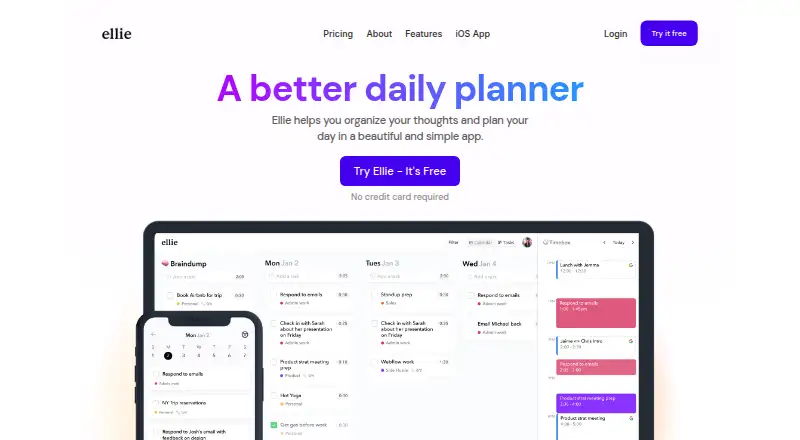
What Ellie Planner is
Ellie Planner is a daily planner for collecting tasks and organizing a day. Its Brain Dump feature lets users offload tasks and turn them into a daily plan. Tasks can be dragged from a Kanban view into a calendar to visualize and timebox the day, while a built-in time tracker and analytics help users see how they spend their time. The product also lists recurring tasks and focus sessions. It is available on iOS, macOS, web, and Windows. Optional integrations include Google, Apple, and Outlook calendars, plus Notion, Zapier, and Siri shortcuts. The free plan costs nothing and includes unlimited tasks, Brain Dump, and iPhone, iPad, and web access. Pro costs $9.99 a month and adds timebox mode, Google and Apple Calendar, recurring tasks, labels, subtasks, due dates, reminders, and an AI assistant. Ellie also lists a Lifetime option at $299.99 a month, described as one payment with no recurring bill. Ellie says it does not sell user data or run ads, and users can export data or delete their accounts.
Who it suits
Ellie suits people who want a simple planner with a Brain Dump and daily Kanban workflow, or who want a native iOS app. It also fits users who want to visualize time use with tracking and analytics.
What it does well
- Brain Dump can be converted into a daily plan.
- Kanban tasks can be dragged into a calendar.
- Includes a built-in time tracker and analytics.
- Users can export data or delete accounts.
What to know first
- Timebox mode requires Pro.
- Google and Apple Calendar are listed with Pro.
- Free access is listed for iPhone, iPad, and web.
Limits
The Free plan includes unlimited tasks, Brain Dump, and iPhone, iPad, and web access. Timebox mode, Google and Apple Calendar, recurring tasks, labels, subtasks, due dates, reminders, and the AI Assistant are listed with Pro at $9.99 a month.
Plans
| Plan | Billed and limits | Price |
|---|---|---|
| Free | forever · Unlimited tasks · Brain Dump · iPhone, iPad & web | Free |
| Pro | /mo · Everything in Free · Timebox mode · Google & Apple Calendar · Recurring tasks · Labels & subtasks · Due dates & reminders · AI Assistant | $9.99 a month |
| Lifetime | once · Everything in Pro · One payment · Yours to keep | $299.99, paid once |
As ellieplanner.com lists them, read 3 Oct 2026. The maker's own page has the final word.
Getting started
- Visit https://ellieplanner.com/.
- Start with the Free plan or choose Pro or Lifetime.
- Use the web app or access Ellie Planner on iPhone or iPad; macOS and Windows are also listed platforms.
- Add tasks to Brain Dump and organize them into a daily plan.
- Connect an optional calendar or other listed integration if needed.
Ellie Planner is a daily planning app for turning loose tasks into scheduled work. It suits people who want a focused planner with a native iOS experience, time blocking, and lightweight time tracking. Its strongest case is a visual day-planning workflow; readers who need broad device coverage or deeper collaboration should look elsewhere.
Overview
Ellie combines a Brain Dump with a daily Kanban board, letting you capture thoughts first and shape them into a practical plan. Dragging tasks from the Kanban into the calendar gives timeboxing a concrete, visual form instead of leaving priorities as an unscheduled list. That approach fits users who plan around specific blocks of time and want to see how the day is allocated.
Built-in analytics and a time tracker add an accountability layer: you can compare planned work with how you actually spend time. Recurring tasks, focus sessions, due dates, reminders, labels, and subtasks support more structured routines, although several of those controls require Pro.
Key features
Brain Dump and daily Kanban
Brain Dump is useful when tasks arrive faster than you can organize them. Moving those items into a daily Kanban plan keeps capture separate from scheduling, making Ellie a better fit for people who need a repeatable planning ritual than for users seeking a minimal checkbox list.
Calendar timeboxing
Timebox mode turns tasks into calendar commitments by dragging them into available slots. Google and Apple calendar connections are included with Pro, while the maker also lists Outlook integration. This is valuable for calendar-led work; users who do not plan by time may find the workflow more structure than they need.
Tracking, integrations, and privacy
Analytics and the built-in tracker show where time goes, supporting review of planned versus spent time. Optional integrations include Google, Apple, and Outlook calendars, Notion, Zapier, and Siri shortcuts. Ellie says it does not sell user data or run ads, and it supports data export and account deletion from web and mobile apps. Google connection is optional; enabled calendar features process calendar data under Google’s Limited Use requirements. Stored data is protected by commercially acceptable safeguards against loss, theft, unauthorized access, disclosure, copying, use, or modification.
Pricing
| Plan | Price | What you get |
|---|---|---|
| Free | free, billed forever | Unlimited tasks, Brain Dump, iPhone, iPad, and web access |
| Pro | $9.99 a month | Everything in Free, plus Timebox mode, Google and Apple Calendar, recurring tasks, labels and subtasks, due dates and reminders, and AI Assistant |
| Lifetime | $299.99 a month, one payment | Pro features forever with no recurring bill |
The Free plan is a credible starting point for capture and basic planning, but it omits the calendar and task-structure features that make Ellie most distinctive. Pro is for users who depend on recurring schedules, reminders, and calendar timeboxing. Lifetime removes recurring billing for long-term users, though its one-payment price demands sustained use to make sense.
Platforms
Ellie runs on iOS, macOS, web, and Windows. The free plan specifically includes iPhone, iPad, and web access. The native iOS option is a central reason to consider it; Android users are not covered by the listed platforms.
Who it's for
Choose Ellie if you want a simple daily planner, a Brain Dump-to-Kanban process, or a native iOS app centered on time blocking. It is less suitable if Android support is essential or if your planning does not involve assigning work to calendar slots.
Pros and cons
Pros
- Unlimited tasks and Brain Dump on the free plan make low-risk adoption practical.
- Kanban-to-calendar dragging gives time blocking a clear daily workflow.
- Recurring tasks, reminders, labels, subtasks, analytics, and tracking support structured routines on Pro.
- Calendar, Notion, Zapier, and Siri connections broaden the planning workflow.
- No ads or sale of user data, plus export and deletion controls, strengthen privacy ownership.
Cons
- Core calendar planning and recurring-task features are paywalled behind Pro.
- The listed mobile platform is iOS, leaving Android users without a native option.
- The Lifetime plan requires a substantial one-time payment.
Alternatives
For a wider time-blocking comparison, see Time Blocking Apps; for broader daily-planning choices, browse Daily Planner Apps. Readers focused on task lists can compare To-do list apps, while calendar-first workflows are covered in Calendar apps.
- Pomodoist is the better pick if you need Android, Linux, browser-extension coverage, or open-source AGPL-3.0-only software.
- Routine suits users wanting broad desktop and mobile coverage with a free tier that includes three integrations, three custom databases, and 250 AI credits.
- Dainvo is an option for users who want Android and desktop apps plus a seven-day Pro trial.
- Open Sunsama is worth considering when free personal use, self-hosting, or an API matters.
- TimeFinder offers a free core tier and a premium lifetime option.
- FlowSavvy is aimed at auto-scheduling, with Android, iOS, and web support.
- Sorted³ fits Apple users seeking iOS and macOS planning with a free tier and Pro option.
- SuperPlanner is an Apple-only alternative with monthly and yearly Pro plans and free trials.
Verdict
Ellie Planner is a strong choice for iOS-oriented users who want to turn an inbox of thoughts into a timeboxed day and review where their hours go. The free tier makes that workflow easy to sample, while Pro supplies the calendar and recurring-planning controls serious users will want. Look elsewhere if Android support, self-hosting, or a primarily list-based workflow is more important than visual time blocking.
Verdict
Ellie combines task capture, calendar-based timeboxing, and time tracking in a daily planner. Its free plan includes unlimited tasks and Brain Dump, while several calendar and planning features are part of Pro.
Questions
Is Ellie Planner free?
Yes. The Free plan costs nothing, billed forever, and includes unlimited tasks, Brain Dump, and iPhone, iPad, and web access.
What does Pro cost?
Pro costs $9.99 a month.
What does Pro add?
Pro adds Timebox mode, Google and Apple Calendar, recurring tasks, labels, subtasks, due dates, reminders, and an AI Assistant.
Which platforms are listed?
Ellie Planner lists iOS, macOS, web, and Windows. Its Free plan specifically includes iPhone, iPad, and web.
What integrations does Ellie Planner list?
Optional integrations include Google, Apple, and Outlook calendars, Notion, Zapier, and Siri shortcuts.
Is there a Lifetime plan?
Yes. It is listed at $299.99 a month, described as one payment with no recurring bill, and includes Pro features forever.
Facts from Ellie Planner's own pages
- Analytics and tracking
- Ellie combines analytics with a built-in time tracker to help users visualize how they spend time. · ellieplanner.com, 3 Oct 2026
- Brain dump
- The Brain Dump feature lets users offload tasks and turn them into a daily plan. · ellieplanner.com, 3 Oct 2026
- Calendar sync
- Yes · ellieplanner.com, 22 Sept 2026
- Focus sessions
- Yes · ellieplanner.com, 22 Sept 2026
- Free plan
- Yes · ellieplanner.com, 22 Sept 2026
- Google data handling
- Connecting Google is optional; Ellie says it processes calendar data for enabled features and follows the Google API Services User Data Policy, including Limited Use requirements. · ellieplanner.com, 3 Oct 2026
- Headquarters
- Dallas, TX · ellieplanner.com, 28 Sept 2026
- Integrations
- The maker lists optional Google, Apple, and Outlook calendar integrations, plus Notion and Zapier integrations and Siri shortcuts. · ellieplanner.com, 3 Oct 2026
- Intended users
- The maker describes Ellie as a fit for people who want a simple app, the Brain Dump plus Daily Kanban planning system, or a native iOS app. · ellieplanner.com, 3 Oct 2026
- Maker
- Chris Raroque says he built Ellie and handles its development, marketing, and customer support as a one-person team. · ellieplanner.com, 3 Oct 2026
- Mobile platforms
- ios · ellieplanner.com, 22 Sept 2026
- Planning method
- time blocking · ellieplanner.com, 22 Sept 2026
- Platforms
- Ellie is available on Mac, Windows, the web, iPhone, and iPad; the pricing FAQ says there is no Android app right now. · ellieplanner.com, 3 Oct 2026
- Privacy
- Ellie says it does not sell user data or run ads, and users can export their data or delete their account from the web and mobile apps. · ellieplanner.com, 3 Oct 2026
- Purpose
- Ellie is a daily planner for organizing thoughts and planning the day. · ellieplanner.com, 3 Oct 2026
- Recurring tasks
- Ellie supports recurring tasks for routines and other rituals. · ellieplanner.com, 3 Oct 2026
- Security
- The privacy policy says stored data is protected using commercially acceptable means against loss, theft, and unauthorized access, disclosure, copying, use, or modification. · ellieplanner.com, 3 Oct 2026
- Support
- The maker lists [email protected] for support and contact. · ellieplanner.com, 3 Oct 2026
- Timeboxing
- Users can drag tasks from the Kanban into their calendar to visualize and timebox the day. · ellieplanner.com, 3 Oct 2026
Where Ellie Planner stands on Freedom251
- Daily Planner Apps#9 of 137
- Time Blocking Apps#4 of 31
- To-do list apps#26 of 150
- Calendar apps#34 of 194