Freedom251 › Time Blocking Apps

Dainvo
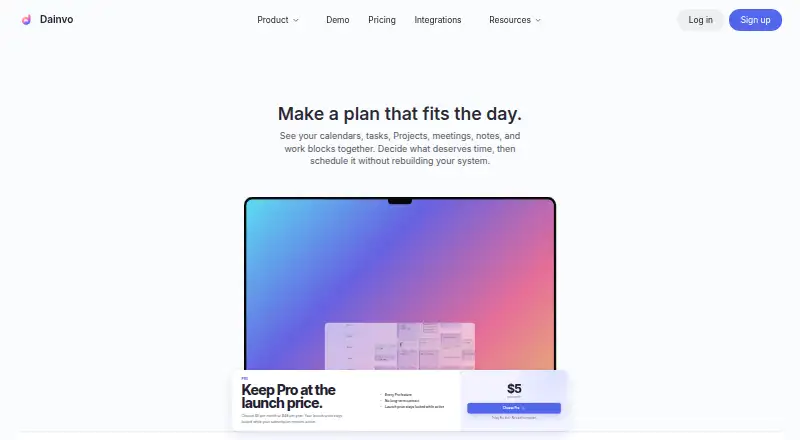
What Dainvo is
Dainvo is a local-first planning workspace for calendars, tasks, Projects, meetings, notes, and focused work. Its calendar offers day, week, month, year, and list views, with weather and time zones. It connects to Google, Outlook, Apple, CalDAV, and local Dainvo calendars; task integrations include Todoist, Microsoft To Do, Google Tasks, TickTick, monday.com, and Obsidian. Users can schedule individual tasks, group them into Buckets, and plan work sessions for Projects. Projects can contain ordered tasks, a deadline, one level of subprojects, notes, file links, and multiple calendar blocks. Meeting links support Google Meet, Zoom, Webex, and Microsoft Teams. Supported desktop packages include built-in ChatGPT and Claude, while external ChatGPT, Codex, or Claude clients can connect through MCP; Dainvo asks before changes. Its local SQLite store is encrypted, with its key protected by operating-system secure storage. Connected events and tasks sync with their providers, while Project Notes and local file links stay on the computer. Dainvo has a Free plan and Pro at $5 USD per month or $48/year. Mobile apps are listed as Early Access.
Who it suits
Dainvo suits people who want calendars, tasks, meetings, and project planning in one workspace. Its local-first data handling may appeal to users who want Project Notes and local file links to stay on their computer.
What it does well
- Calendar has five views, weather, and time zones.
- Connects to several calendar and task services.
- Projects support ordered tasks and calendar blocks.
- Local SQLite store is encrypted.
- Free plan is available.
What to know first
- Mobile apps are listed as Early Access.
- Free plan limits active synced Dainvo Tasks to 100.
- Free plan limits integrations on Windows and macOS.
Limits
After the 7-day Pro trial, Free allows up to four active integrations on Windows and macOS and up to 100 active synced Dainvo Tasks. Linux has unlimited active integrations on Free. Pro includes unlimited integrations and active synced Dainvo Tasks.
Plans
| Plan | Billed and limits | Price |
|---|---|---|
| Free | 7-day Pro trial · 1 non-Linux desktop and 1 active mobile device · up to 4 active integrations on Windows and macOS; unlimited on Linux · up to 100 active synced Dainvo Tasks | Free |
| Pro — Launch Price (yearly) | $48/year · Everything in Free · Projects and Project blocks · unlimited integrations and active synced Dainvo Tasks · My Day and desktop Inbox | $48 a year |
| Pro — Launch Price (monthly) | $5 USD·/ per Month · Everything in Free · Projects and Project blocks · unlimited integrations and active synced Dainvo Tasks · My Day and desktop Inbox | $5 a month |
As dainvo.com lists them, read 7 Oct 2026. The maker's own page has the final word.
Getting started
- Visit the Dainvo website.
- Choose Free or a Pro monthly or yearly plan; Free includes a 7-day Pro trial.
- Install Dainvo on a listed desktop or mobile platform.
- Connect a calendar or task provider, or use a local Dainvo calendar.
- Add tasks, group them into Buckets, or create a Project.
Dainvo is a planning workspace for people who want calendars, task services, and project work in one place. It is best suited to desktop users coordinating several providers while keeping project notes and file links on their computer. Its breadth is useful, but the Free plan has firm caps and its mobile apps remain in Early Access.
Overview
Dainvo combines calendar planning, task scheduling, meeting links, and project organization. Connected calendar events and tasks sync with their respective providers, while Project Notes and local file links stay on the user's computer. Its local SQLite store is encrypted, with the key protected by operating-system secure storage. This is a useful balance for people who want provider sync without putting project notes and file references in the same connected services; it is not an entirely local system.
Support is available through problem reporting in app settings and a contact form. Dainvo is owned and operated by Intagri Technologies LLC, registered in Delaware, with Canadian and Irish ownership.
Key features
Calendar views include day, week, month, year, and list, alongside weather and time-zone information. Dainvo connects Google, Outlook, Apple, CalDAV, and local calendars. That range makes it a practical hub for people already using more than one calendar provider, though the benefit depends on those services being part of the user's routine.
Task integrations cover Todoist, Microsoft To Do, Google Tasks, TickTick, monday.com, and Obsidian. Users can schedule individual tasks, group them into Buckets, and plan work sessions for Projects. Projects add ordered tasks, deadlines, one level of subprojects, notes, file links, and multiple calendar blocks. This structure can connect task lists to scheduled project time, but the single subproject level may be limiting for work that needs deeper hierarchies.
Meeting links are supported for Google Meet, Zoom, Webex, and Microsoft Teams. Supported desktop packages also include ChatGPT and Claude, and external ChatGPT, Codex, or Claude clients can connect through MCP. Dainvo asks before making changes, a useful safeguard for users who want AI assistance without automatic edits.
Pricing
Dainvo is freemium, with a 7-day Pro trial. Free costs nothing and includes one non-Linux desktop and one active mobile device. After the trial, Windows and macOS users can keep up to four active integrations and 100 active synced Dainvo Tasks; Linux allows unlimited integrations. Those caps make Free a reasonable way to try a focused setup, but users with larger task backlogs or several connected services may outgrow it.
Pro — Launch Price (monthly) costs $5 a month, billed $5 USD per month. Pro — Launch Price (yearly) costs $48 a year, billed $48/year. Both include everything in Free plus Projects and Project blocks, unlimited integrations and active synced Dainvo Tasks, My Day, and a desktop Inbox. The monthly plan suits users who want flexibility; the yearly plan costs less over twelve months at the stated prices, in exchange for an annual commitment. Both are aimed at people whose work exceeds Free's integration or task limits, or who need project planning.
Platforms
Dainvo lists apps for Android, iOS, Linux, macOS, and Windows. Desktop apps are part of its offering, while Android, iPhone, and iPad apps are marked Early Access. That status makes mobile access less compelling for anyone who needs a mature mobile workflow; desktop-first users have the clearer fit.
Who it's for
Dainvo is a strong candidate for people who coordinate calendars and task services across providers, schedule focused work, and want project notes and file links kept on their own computer. It is less suitable for users who need an all-local system, a deep project hierarchy, or dependable mobile apps as the center of their workflow.
Pros and cons
- Pros: Multiple calendar and task integrations bring provider-based planning into one workspace.
- Pros: Project blocks, ordered tasks, deadlines, notes, and file links connect project planning with calendar time.
- Pros: Project Notes and local file links remain on the user's computer, and the local SQLite store is encrypted.
- Cons: Free is capped at four active integrations on Windows and macOS and 100 active synced Dainvo Tasks after the trial.
- Cons: Mobile apps are in Early Access, so users who depend on a polished phone or tablet workflow should look elsewhere.
- Cons: Connected events and tasks still sync with their providers, and Projects support only one level of subprojects.
Alternatives
For a broader set of options, browse Time Blocking Apps.
- Pomodoist is worth considering if open-source software is a priority; it is licensed under AGPL-3.0-only and supports desktop, mobile, web, and browser-extension platforms.
- Routine is another freemium option, with a Free plan that includes three integrations, three custom databases, and 250 AI credits.
- Open Sunsama offers free personal use and can be hosted or self-hosted, making it the alternative to consider when self-hosting matters.
- Ellie Planner has a Free plan with unlimited tasks and Brain Dump on iPhone, iPad, and web, a fit for users who want those specific free-plan features.
- FlowSavvy may suit users looking for automatic scheduling, with its Basic plan covering three repeating auto-scheduled tasks and a two-week scheduling range.
- TimeFinder is a freemium alternative with a free core-feature tier and support across mobile, desktop, and web.
- Sorted³ is a narrower platform choice for iOS and macOS users, with a free iOS tier and a Pro option that includes Auto Schedule and iCloud Sync.
- SuperPlanner is another iOS and macOS option, with monthly and yearly Pro plans that include free trials.
Verdict
Choose Dainvo if you want provider-connected calendars and tasks alongside scheduled project work, while keeping project notes and file links on your computer. Its combination of integrations and project blocks is the main reason to pick it. Look elsewhere if you need a mature mobile app, a fully local workflow, or more than one level of project subprojects.
Verdict
Dainvo brings task scheduling, calendar connections, and project planning together, with local storage for project notes and file links. Review the Free limits and Early Access status of its mobile apps if those matter to your workflow.
Questions
Does Dainvo have a free plan and trial?
Yes. Free includes a 7-day Pro trial. After the trial, Free has limits on active integrations and active synced Dainvo Tasks.
How much does Pro cost?
Pro is $5 USD per month or $48 per year at the listed launch prices.
Which platforms are listed?
Dainvo is listed for Android, iOS, Linux, macOS, and Windows. Its About page labels the Android, iPhone, and iPad apps Early Access.
Which calendars and task apps can it connect to?
Calendar integrations include Google, Outlook, Apple, CalDAV, and Dainvo calendars. Task integrations include Todoist, Microsoft To Do, Google Tasks, TickTick, monday.com, and Obsidian.
What does Free include after the trial?
Free allows one non-Linux desktop and one active mobile device, up to four active integrations on Windows and macOS, and up to 100 active synced Dainvo Tasks. Integrations are unlimited on Linux.
Where does Dainvo keep notes and files?
Connected calendar events and tasks sync with their providers. Project Notes and local file links stay on the user's computer.
Facts from Dainvo's own pages
- AI
- Supported desktop packages offer built-in ChatGPT and Claude, and external ChatGPT, Codex, or Claude clients can connect through MCP; Dainvo asks before changes. · dainvo.com, 7 Oct 2026
- Calendar integrations
- Dainvo supports Google, Outlook, Apple, CalDAV, and local Dainvo calendars. · dainvo.com, 7 Oct 2026
- Calendar views
- The calendar offers day, week, month, year, and list views, with weather and time zones. · dainvo.com, 7 Oct 2026
- Company
- Dainvo is owned and operated by Intagri Technologies LLC, registered in Delaware, United States, with Canadian and Irish ownership. · dainvo.com, 7 Oct 2026
- Data handling
- Connected calendar events and tasks sync with their providers, while Project Notes and local file links stay on the user's computer. · dainvo.com, 7 Oct 2026
- Free-plan limits
- After the trial, Free allows up to four active integrations on Windows and macOS and up to 100 active synced Dainvo Tasks. · dainvo.com, 7 Oct 2026
- Headquarters
- Newark, Delaware, United States · dainvo.com, 28 Sept 2026
- Meeting tools
- Dainvo supports meeting links for Google Meet, Zoom, Webex, and Microsoft Teams. · dainvo.com, 7 Oct 2026
- Mobile
- Android, iPhone, and iPad apps are listed as Early Access on the About page. · dainvo.com, 7 Oct 2026
- Planning features
- Users can schedule individual tasks, group tasks into Buckets, and plan work sessions for Projects. · dainvo.com, 7 Oct 2026
- Product
- Dainvo is a local-first planning workspace for calendars, tasks, Projects, meetings, notes, and focused work. · dainvo.com, 7 Oct 2026
- Projects
- Projects can contain ordered tasks, a deadline, one level of subprojects, notes, file links, and multiple calendar blocks. · dainvo.com, 7 Oct 2026
- Security
- The security whitepaper says the local SQLite store is encrypted for all users, with its key wrapped by operating-system secure storage. · dainvo.com, 7 Oct 2026
- Support
- Users can report a problem from desktop or mobile settings, and the support page provides a contact form. · dainvo.com, 7 Oct 2026
- Task integrations
- Task integrations include Todoist, Microsoft To Do, Google Tasks, TickTick, monday.com, and Obsidian. · dainvo.com, 7 Oct 2026
Where Dainvo stands on Freedom251
- Time Blocking Apps#2 of 31