Freedom251 › Daily Planner Apps
TimeFinder
by TimeFinder
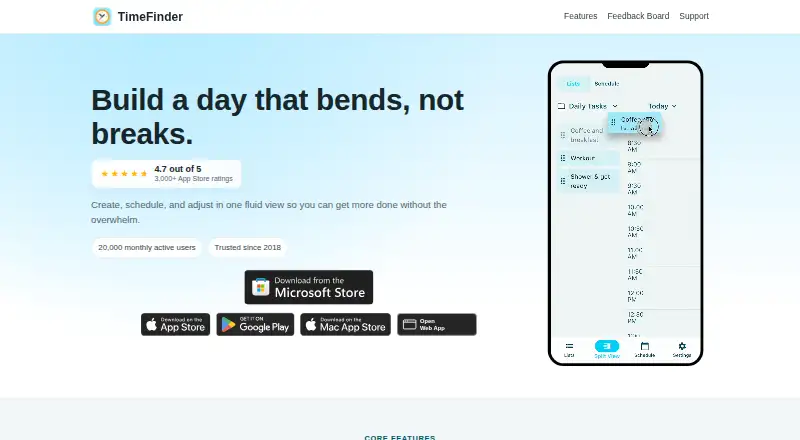
What TimeFinder is
TimeFinder is a personal productivity app for time blocking and daily planning. Its split view lets users drag tasks from lists into time slots to shape a schedule, and calendar sync helps coordinate that plan. Task labels remember their selected colors, while schedule templates let users reuse routines and task rollover moves unfinished tasks into available slots. Focus sessions are also included. Optional integrations connect Google Tasks, Todoist, TickTick, Zapier, and device calendars. The optional AI Assistant can help with scheduling, task organization, and productivity questions. It sends data to an AI provider only when a user enables the assistant and submits a request. TimeFinder is available on the web, Windows, macOS, iOS, and Android. The free plan costs nothing and includes core features. A Premium Lifetime purchase is listed in the US App Store for $119.99, paid once, and a free 7-day trial is offered there; its duration and conditions are shown before starting. The maker, TimeFinder, was founded in 2018 and is headquartered in the United States. Users can export their data in the app at any time. The maker says it does not sell personal data or share it for marketing, and users can turn off analytics in the app.
Who it suits
TimeFinder suits people who plan their personal work by assigning tasks to blocks of time and want routines, rollover, and focus sessions in one app. It is also relevant to users who want calendar sync, optional task integrations, or access across desktop and mobile platforms.
What it does well
- Drag tasks into time slots in a split view.
- Templates save routines and rollover carries unfinished tasks forward.
- Calendar sync and focus sessions are included.
- Optional integrations include Google Tasks, Todoist, TickTick, and Zapier.
- Users can export their data from within the app.
What to know first
- The free plan is described as providing core features.
- The listed Premium Lifetime purchase costs $119.99, paid once.
- The 7-day trial is offered through the US App Store listing.
Limits
The Free plan includes core features. The Free tier is described as having limited functionality without an account; the listed US App Store trial lasts 7 days, with conditions shown before starting.
Plans
| Plan | Billed and limits | Price |
|---|---|---|
| Premium Lifetime | Premium features | On request |
| Free tier | Core features; limited functionality without an account | Free |
| Free | Core features · some features require Premium | Free |
| TimeFinder Premium Lifetime | Lifetime purchase listed in the US App Store · Premium features; subscription lasts for the lifetime of the product | $119.99, paid once |
| TimeFinder Premium | Lifetime access | $119.99, paid once |
As timefinder.app lists them, read 21 Sept 2026. The maker's own page has the final word.
Getting started
- Open https://timefinder.app/ or choose the web, Windows, macOS, iOS, or Android version.
- Choose the Free plan for core features, or review the Premium Lifetime option.
- The US App Store listing offers a free 7-day trial; review its duration and conditions before starting.
- Create task lists and drag tasks into time slots to build a schedule.
- Optionally connect a calendar or one of the listed integrations.
TimeFinder is a personal planning app built around placing tasks into scheduled time slots. It suits people who want a repeatable daily structure and a way to account for unfinished work. Its strongest case is the combination of time blocking, calendar sync, templates, and rollover; it is a less natural fit for anyone seeking a general-purpose team planner.
Overview
A split view lets users drag tasks from lists into time slots, keeping task selection and scheduling in the same workflow. Calendar sync helps fit that plan around existing commitments, while focus sessions give dedicated work periods a place in the day. The approach is useful when a calendar should guide task execution, not merely record appointments.
Labels retain their chosen colors, which can make a busy schedule easier to scan. Templates save routines for reuse, and rollover carries unfinished tasks into available slots. These features reduce repeated setup, but rollover cannot resolve a day with more work than open time; users still need to decide what gets moved or dropped.
Key features
- Time blocking and calendar sync: Place tasks directly into time slots and sync calendars. This suits people planning around appointments, but may be unnecessary for those who only want a simple task list.
- Templates and rollover: Reuse saved schedules and carry unfinished tasks into open slots. That helps recurring routines survive day-to-day changes, without automating prioritization.
- Integrations: Optional connections include Google Tasks, Todoist, TickTick, Zapier, and device calendars. The range can help users bring existing tasks into their planning workflow.
- Optional AI Assistant: It can help with scheduling, task organization, and productivity questions. It sends data to an AI provider only after the user enables it and submits a request, so use remains opt-in.
- Privacy and portability: The maker says it does not sell personal data or share it for marketing; analytics can be turned off. User-created content in Google Cloud Firestore and Storage is encrypted at rest and in transit, and users can export their data from the app at any time.
Pricing
TimeFinder uses a freemium model, with a free plan at no cost for core features. A separate free-tier description says functionality is limited without an account, so users who want to try the workflow without signing in should expect a narrower experience.
The Premium Lifetime plan includes premium features. The US App Store lists TimeFinder Premium Lifetime at $119.99, paid once, with the purchase lasting for the lifetime of the product. This is a substantial one-time commitment suited to users who expect to keep using the app and want premium features without a recurring subscription. A 7-day free trial is offered through the US App Store; trial duration and conditions are shown before starting. Another Premium Lifetime plan has custom pricing.
Platforms
TimeFinder is available on Android, iOS, macOS, web, and Windows. Support across mobile, desktop, and browser platforms makes it practical for people who plan on one device and check their schedule on another.
Who it's for
TimeFinder is best for individuals who want to shape a day around scheduled tasks, reuse regular routines, and move unfinished work into open time. Its personal-productivity focus makes it a poor match for buyers looking for a team-oriented planning system. People who prefer flexible task capture without assigning time slots may also find its central workflow too structured.
Pros and cons
- Pro: Drag-and-drop scheduling, calendar sync, templates, and rollover address the full cycle from planning a day to adjusting it when tasks remain unfinished.
- Pro: Optional integrations cover several task services, and data export gives users a way to take their information out of the app.
- Pro: The assistant is opt-in, and analytics can be disabled.
- Con: Rollover only uses available time; users must still make trade-offs when tasks exceed the day’s capacity.
- Con: The free plan is limited to core features, while premium access may require a $119.99 as a one-time purchase.
- Con: Its stated intended use is personal productivity, limiting its fit for team planning.
Alternatives
For more ways to compare options, browse Daily Planner Apps, Time Blocking Apps, and Calendar apps.
- Routine is worth considering if its free plan’s 3 integrations, 3 custom databases, and 250 AI credits suit your needs; it supports Android, iOS, Linux, macOS, web, and Windows.
- FlowSavvy may fit users seeking auto-scheduling, with its Basic plan allowing 3 repeating auto-scheduled tasks and a 2-week scheduling range; it supports Android, iOS, and web.
- Tiimo is an alternative for people who want selected planning tools at no cost on iOS or Android and do not need the web app on its free plan.
- Reclaim AI is another freemium option for users who want calendar scheduling through a web app or extension.
- Week Plan is an option for people who want a weekly planner organized around basic planning features and High Impact Tasks.
- Griply may suit users who want goals and habits alongside tasks; its free plan includes 2 goals, 2 habits, and unlimited tasks.
- Amie is another freemium option, available on iOS, macOS, and Windows.
- Ellie Planner may suit users who want unlimited tasks and a Brain Dump on its free plan, with iPhone, iPad, and web access.
Verdict
Choose TimeFinder if you want a personal planner that turns tasks into calendar-shaped days and makes recurring routines easier to maintain. Its combination of templates, rollover, and calendar sync is the main reason to choose it; the main reason to look elsewhere is that it is geared to individual planning, and premium access carries a $119.99 as a one-time price.
Verdict
Pick TimeFinder if you want a personal time-blocking planner with reusable schedules, rollover, calendar sync, and focus sessions. Its free plan offers core features, while users seeking premium features can consider the $119.99, paid once Lifetime purchase listed in the US App Store.
Questions
Is TimeFinder free?
Yes. The Free plan costs nothing and includes core features. The Free tier is described as limited without an account.
How much is TimeFinder Premium?
The US App Store lists TimeFinder Premium Lifetime for $119.99, paid once. The terms describe the purchase as lasting for the lifetime of the product.
Which platforms does TimeFinder support?
TimeFinder is available on web, Windows, macOS, iOS, and Android.
Does TimeFinder offer a free trial?
The US App Store listing offers a free 7-day trial. The trial duration and conditions are shown before starting.
Who makes TimeFinder?
TimeFinder is made by TimeFinder, founded in 2018 and headquartered in the United States.
What integrations does TimeFinder offer?
Optional integrations include Google Tasks, Todoist, TickTick, Zapier, and device calendars.
Facts from TimeFinder's own pages
- AI assistant
- An optional AI Assistant can help with scheduling and task organization, using only a provider the user selects. · timefinder.app, 14 Oct 2026
- API and SDKs
- The official terms prohibit automated bots or scripts without permission, and no public API or SDK documentation is provided on the cited official pages. · timefinder.app, 14 Oct 2026
- Calendar integrations
- Calendar sync can import events and export the TimeFinder schedule, including Apple, Google, and Outlook calendars. · apps.apple.com, 14 Oct 2026
- Calendar sync
- Yes · timefinder.app, 21 Sept 2026
- Color organization
- Users can apply palettes, create custom palettes, and have task labels remember chosen colors. · timefinder.app, 14 Oct 2026
- Company facts
- LinkedIn lists TimeFinder as a self-owned software-development company founded in 2018, headquartered in New York, with 2–10 employees. · linkedin.com, 14 Oct 2026
- Data controls
- Users can export data, delete accounts, disable analytics, and disconnect integrations from the app. · timefinder.app, 14 Oct 2026
- Data export
- Users can export their data from within the app at any time. · timefinder.app, 8 Oct 2026
- Data security
- The privacy policy states that user-created content stored in Google Cloud Firestore and Storage is encrypted at rest and in transit. · timefinder.app, 8 Oct 2026
- Drag-and-drop scheduling
- Users can drag tasks from lists directly into schedule time slots and move them back. · timefinder.app, 14 Oct 2026
- Flexible time blocks
- The app supports 5-, 10-, 15-, 30-, and 60-minute planning increments. · play.google.com, 14 Oct 2026
- Focus mode
- Focus Mode provides a guided timer that works through planned tasks one by one. · apps.apple.com, 14 Oct 2026
- Focus sessions
- Yes · timefinder.app, 21 Sept 2026
- Founded
- 2018 · timefinder.app, 28 Sept 2026
- Free plan
- Yes · timefinder.app, 21 Sept 2026
- Headquarters
- United States · timefinder.app, 28 Sept 2026
- Integrations
- Optional integrations include Google Tasks, Todoist, TickTick, Zapier, and device calendars. · timefinder.app, 8 Oct 2026
- Intended use
- The terms describe TimeFinder as intended for personal productivity use. · timefinder.app, 8 Oct 2026
- Legal owner
- The service identifies TimeFinder, LLC as its owner and operator. · timefinder.app, 14 Oct 2026
- Licence
- TimeFinder software and documentation are proprietary; the terms grant personal use rights and explicitly withhold source-code rights. · timefinder.app, 14 Oct 2026
- Limit: interface bugs
- Reviewers report twitchy drag-and-drop behavior, accidental task movement, crashes, frozen screens, and occasional synchronization problems. · apps.apple.com, 14 Oct 2026
- Limit: signup and pricing friction
- Some Google Play and App Store reviewers complain about needing an account or trial setup before evaluating the app and about premium pricing or upgrade prompts. · play.google.com, 14 Oct 2026
- Mobile platforms
- both · timefinder.app, 21 Sept 2026
- Notable news
- Version 9.7.0 added Zapier integration, optional end-to-end encryption, an improved AI Assistant, and customizable split-view positioning. · apps.apple.com, 14 Oct 2026
Where TimeFinder stands on Freedom251
- Daily Planner Apps#4 of 137
- Calendar apps#9 of 194
- Time Blocking Apps#14 of 31