Freedom251 › Daily Planner Apps

Power Planner
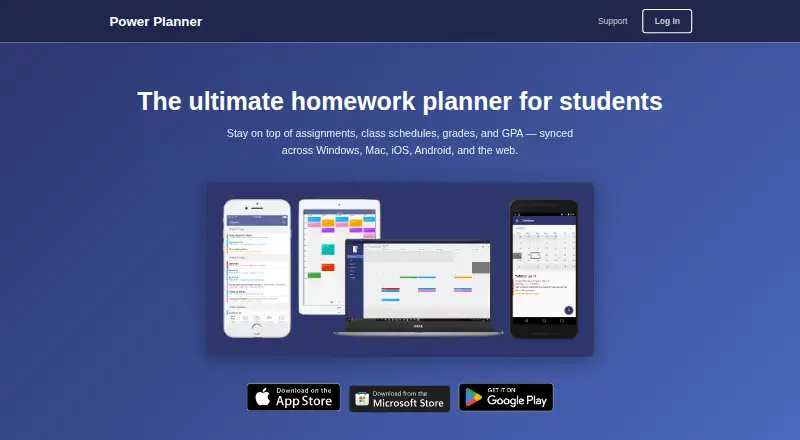
What Power Planner is
Power Planner is a homework planner for students that syncs assignments, class schedules, grades, and GPA across devices. Users can add homework and exams with due dates and receive automatic reminders, then enter class times and room locations to view a weekly schedule. It tracks grades by class, calculates GPA across semesters, and has a “What If?” mode for planning ahead. Classes and homework can appear in Google Calendar. The app supports standard and rotating A/B week schedules, but not fully custom non-A/B class schedules. It is available on Android, iOS, Windows, Mac, and web browsers; web is marked beta. An online account is optional, and local-account data stays on the user's device. The Free plan is listed as free and is limited to one semester, five grades per class, one repeating bulk task or event entry, and one photo attachment per item. Premium is a one-time lifetime purchase listed at $4.99 a month, with unlimited semesters and more than five grades per class.
Who it suits
Power Planner is built for students managing school schedules, assignments, grades, and GPA. It may suit students who want a weekly schedule alongside homework reminders and grade tracking.
What it does well
- Tracks assignments and exams with reminders.
- Calculates GPA across semesters.
- Can show classes and homework in Google Calendar.
- Online account is optional.
What to know first
- Does not support fully custom non-A/B schedules.
- Web version is marked beta.
- Free plan covers only one semester.
- No Canvas or Blackboard integration.
Limits
The free plan allows one semester, five grades per class, one repeating bulk task or event entry, and one photo attachment per item. Premium includes unlimited semesters and more than five grades per class.
Plans
| Plan | Billed and limits | Price |
|---|---|---|
| Free | No charge · 1 semester · 5 grades per class · 1 repeating bulk task/event entry · 1 photo attachment per item | Free |
| Premium | One-time, lifetime purchase · Unlocks additional features; premium syncs across your account and devices | $4.99, paid once |
| Premium (Lifetime) | One-time lifetime purchase · Unlimited semesters · more than 5 grades per class · unlocks across account devices | $4.99, paid once |
As powerplanner.net lists them, read 14 Oct 2026. The maker's own page has the final word.
Getting started
- Visit https://powerplanner.net/.
- Choose Android, iOS, Windows, Mac, or the web version; web is marked beta.
- Create an online account if you want one; an account is optional.
- Start with the free plan, or choose Premium, listed at $4.99 per month and billed as a one-time lifetime purchase.
- Add classes, assignments, and exams; connect Google Calendar if you want classes and homework shown there.
Overview
Power Planner is an academic organizer for students who want grades and day-to-day schoolwork in the same planning routine. It is strongest for a conventional semester timetable; complex rotating schedules or a need to connect schoolwork systems make it a less suitable fit.
Its useful distinction is that planning extends beyond deadlines: students can track class grades, calculate GPA across semesters, and consider possible outcomes with “What If?” mode. The free tier is a bounded introduction, while Premium removes the semester cap for students who need a longer record.
Key features
- Assignments and exams: Add homework and exams with due dates and receive automatic reminders. That makes Power Planner practical for keeping upcoming work visible, although it does not offer revision scheduling.
- Grades and GPA: Grades are tracked per class, with GPA calculated across semesters. “What If?” mode helps students think through possible grade outcomes, a meaningful advantage over a planner focused only on tasks.
- Weekly schedules: Class entries can include times and room locations, then appear in a weekly view. Standard and rotating A/B schedules are supported, but fully custom non-A/B class schedules are not; students whose school uses a more unusual rotation should look elsewhere.
- Calendar and study routines: Classes and homework can appear in Google Calendar, and recurring study sessions are supported. The app has no Canvas or Blackboard integration, so students relying on either platform will need another way to coordinate coursework.
Pricing
The Free plan costs nothing. It covers one semester, up to five grades per class, one repeating bulk task or event entry, and one photo attachment per item. That is enough to try the core workflow, but the semester and grade limits quickly constrain a student maintaining a fuller academic history.
Premium costs $4.99 a month (billed One-time, lifetime purchase). It removes the semester limit and allows more than five grades per class, making it the better fit for students who want ongoing records. The stated plan terms describe a one-time lifetime purchase, rather than a recurring subscription.
Platforms
Power Planner supports Android, iOS, Windows 10+, Mac, and web browsers; web is marked beta. Its cross-device sync suits students switching between phone and computer, though the web experience is still identified as beta.
Who it's for
This is a focused choice for students who want assignments, exams, class schedules, and grade planning together, especially those with standard or A/B schedules. Students with non-A/B custom timetables or who need Canvas or Blackboard connections should choose a planner that better matches those requirements.
An online account is optional. The privacy policy says local-account data remains on the user’s device; online-account information is stored in a database, with basic telemetry collected through Microsoft Application Insights. User-provided data is stored on Microsoft Azure servers, with access limited to BareBones Dev and trusted contractors. Linking Google Calendar requires read/write calendar permission, and Power Planner says it does not store or access information from the Google account.
Support is by email. The app is maintained by one developer without dedicated support staff, so replies may take several days; students who need prompt help should factor that into their choice.
Pros and cons
- Pro: Grade tracking, cross-semester GPA calculations, and “What If?” planning sit alongside deadlines, making it more useful for academic progress than a task list alone.
- Pro: Google Calendar can display classes and homework, and recurring study sessions help support a regular routine.
- Con: The free plan stops at one semester and five grades per class, so students keeping longer records will need Premium.
- Con: Fully custom non-A/B schedules and Canvas or Blackboard integration are not supported, limiting the fit for some school setups.
- Con: Email support may take several days to reply, which is a drawback when a planning issue is time-sensitive.
Alternatives
For a broader shortlist of academic organizers, browse Study Planner Apps; for general day planning beyond school, see Daily Planner Apps.
- Adapt is another freemium option for Android, iOS, and web.
- Fasti is a freemium option for Android, iOS, and web, with a free allowance of up to 30 events and recurring blocks.
- MyStudyLife offers a freemium planner on Android, iOS, and web, with a free tier capped at five tasks at a time.
- Save My Exams is a freemium option for Android, iOS, and web, with free-trial access to premium resources.
- Helium is a free, open-source option for Android, iOS, web, and self-hosting.
- Study-Track is a freemium option for macOS, web, and Windows.
- Altitask is a freemium web and browser-extension option with a free tier capped by task and project counts.
- MyStudyPlanner is a web-based freemium option with calendar, timetable, task, and study-planning tools.
Verdict
Choose Power Planner if you are a student with a conventional or A/B timetable who wants deadlines and grade planning in one academic organizer. Its grade and GPA tools are the strongest reason to choose it; the one-semester free cap, schedule limitation, and lack of learning-management integrations are the clearest reasons to look elsewhere.
Verdict
Power Planner combines homework reminders, weekly schedules, and grade tracking, with Google Calendar support. Students with custom non-A/B schedules or who need more than one semester should review the stated limitations and plan details.
Questions
Is Power Planner free?
Yes. Its free plan includes one semester, five grades per class, one repeating bulk task or event entry, and one photo attachment per item.
How much does Premium cost?
Premium is listed at $4.99 per month, billed as a one-time lifetime purchase.
Which platforms does Power Planner support?
It is available on Android, iOS, Windows 10+, Mac, and web browsers. The web version is marked beta.
Does Power Planner connect to Google Calendar?
Yes. It can show classes and homework in Google Calendar. Linking requires read/write calendar permission.
Does it integrate with Canvas or Blackboard?
No. Power Planner has no Canvas or Blackboard integration.
Do I need an account, and who makes Power Planner?
An online account is optional. Power Planner is made by Power Planner, based in Redmond, Washington, United States.
Facts from Power Planner's own pages
- Account privacy
- Creating an online account is optional; the privacy policy says local-account data stays on the user’s device. · powerplanner.net, 30 Sept 2026
- Alternating schedules
- Week A/B scheduling is supported with configurable current week and switch day. · support.powerplanner.net, 14 Oct 2026
- API and SDK evidence
- The shared repository provides C# object models for REST request and response payloads, but no hosted public API documentation is described. · github.com, 14 Oct 2026
- Assignments
- Users can add homework assignments and exams with due dates and receive automatic reminders. · powerplanner.net, 30 Sept 2026
- Assignments and exams
- Users can record homework and exams with due dates. · powerplanner.net, 14 Oct 2026
- Automatic reminders
- Default reminders are sent the day before and one hour before an item is due. · support.powerplanner.net, 14 Oct 2026
- Calendar integration
- Power Planner can show classes and homework in Google Calendar. · powerplanner.net, 30 Sept 2026
- Calendar sync
- Yes · support.powerplanner.net, 20 Sept 2026
- Checklists
- Tasks and events can contain unlimited checklist items on supported recent app versions. · support.powerplanner.net, 14 Oct 2026
- Class schedules
- Schedules include class times, room locations and weekly views. · powerplanner.net, 14 Oct 2026
- Company history
- A trademark record for POWER PLANNER lists first commercial use on December 11, 2011 and Andrew T. Bares as original registrant. · trademarks.justia.com, 14 Oct 2026
- Company legal name and address
- Google Play identifies the developer as BAREBONES DEV, LLC at 10615 169th Ave NE, Redmond, Washington, United States. · play.google.com, 14 Oct 2026
- Custom reminders limitation
- The support documentation says users cannot create custom reminder times. · support.powerplanner.net, 14 Oct 2026
- Dark mode
- The iOS, Android and Windows apps follow operating-system dark-theme settings. · support.powerplanner.net, 14 Oct 2026
- Data handling
- For online accounts, the privacy policy says user-added information is stored in an online database and basic telemetry is collected using Microsoft Application Insights. · powerplanner.net, 30 Sept 2026
- Developer documentation depth
- The mobile repository includes build instructions, Visual Studio/Xamarin prerequisites and known iOS provisioning and debugging issues. · github.com, 14 Oct 2026
- Free plan
- Yes · support.powerplanner.net, 20 Sept 2026
- Google Calendar integration
- Power Planner can publish its classes, tasks and events into Google Calendar. · powerplanner.net, 14 Oct 2026
- Google permissions
- Google Calendar linking requests read/write calendar permission and the policy says Google account data is not stored or accessed. · powerplanner.net, 14 Oct 2026
- Grade calculator
- The app calculates weighted grades and GPA across multiple semesters and includes a What If mode. · powerplanner.net, 14 Oct 2026
- Grades and GPA
- The app tracks grades per class, calculates GPA across semesters, and includes a “What If?” mode for planning ahead. · powerplanner.net, 30 Sept 2026
- Headquarters
- Redmond, Washington, United States · powerplanner.net, 28 Sept 2026
- Intended users
- The maker describes Power Planner as built specifically for students to manage school schedules, assignments, grades, and GPA. · powerplanner.net, 30 Sept 2026
- Limit: scheduling and task workflow
- Reviewers request rotation schedules, assignment search, annual recurrence, priority flags, easier task entry and more flexible grade categorization. · apps.apple.com, 14 Oct 2026
Where Power Planner stands on Freedom251
- Daily Planner Apps#1 of 137
- Study Planner Apps#1 of 38