Freedom251 › Meeting Notes Software
Acta
What Acta is
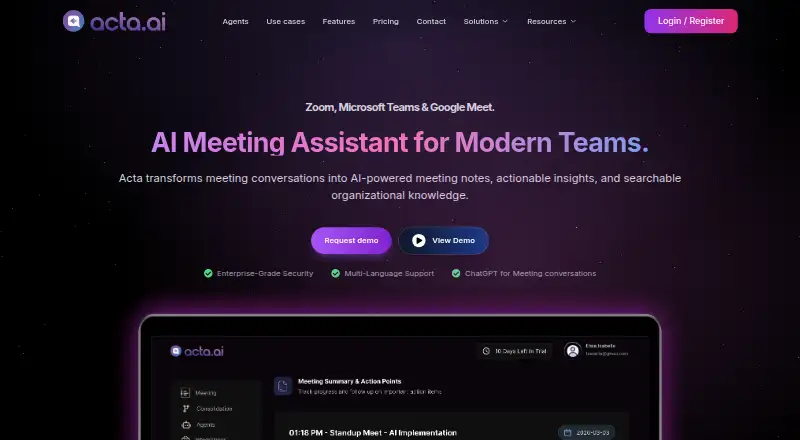
Acta records meetings on Zoom, Google Meet and Microsoft Teams, then creates transcripts, summaries and action items. Meetings can be captured by a bot, or the desktop app and Chrome extension can record from your computer without a notetaker joining. Ask Acta searches selected transcripts and answers questions across those meetings. Role-specific templates can produce sales reports, interview scorecards, product requirements, tickets and clinical notes. Listed integrations include Google Calendar, Microsoft Outlook, Jira, Asana, ClickUp, Monday.com and Gmail. Acta says recordings and notes remain in your account unless you share them, and meeting data is encrypted in transit and at rest. The Free plan lists 600 minutes of storage and limited AI summaries and action points. Pro lists unlimited transcription, AI summaries and storage, while Enterprise lists on-premise deployment, SSO, APIs, private storage and custom data retention. Pricing is on request, with a 15-day trial. The service is available on Android, iOS, macOS, Windows and the web, among other listed platforms.
Who it suits
Acta may suit teams that need meeting records and follow-up outputs, including sales, product, engineering, recruiting, finance and customer support teams. Its Enterprise controls may be relevant to organizations seeking on-premise deployment or custom data retention.
What it does well
- Records meetings on three listed video platforms.
- Can record without a notetaker joining.
- Searches selected transcripts with Ask Acta.
- Offers role-specific output templates.
- Enterprise lists on-premise deployment and SSO.
What to know first
- Free plan storage is limited to 600 minutes.
- Free plan has limited AI summaries and action points.
- Paid pricing is available on request.
Limits
The Free plan includes 600 minutes of storage and limited AI summaries and action points. Pro lists unlimited transcription, AI summaries, and storage; Enterprise adds deployment, identity, storage, and retention options.
Plans
| Plan | Billed and limits | Price |
|---|---|---|
| Free | 600 mins of storage | Free |
| Pro | per seat/month; billed monthly or annually · unlimited transcription, AI summaries and storage · unlimited integrations | On request |
| Free (15 days) | 15 days · 600 mins of storage · limited AI summarization & action points · unlimited recordings & transcriptions | Free |
| Enterprise | priced on request · on-premise deployment · SSO · APIs · private storage · custom data retention · dedicated account manager | On request |
As acta.ai lists them, read 21 Sept 2026. The maker's own page has the final word.
Getting started
- Visit Acta's website and choose the free plan or 15-day trial.
- Connect a meeting platform such as Zoom, Google Meet, or Microsoft Teams.
- Use bot capture, or record from your computer with the desktop app or Chrome extension.
- Use the resulting transcript, summary, and action items, or search selected transcripts with Ask Acta.
- Connect listed calendar, productivity, or email integrations as needed.
Overview
Acta is a meeting assistant for teams that need transcripts and role-specific outputs, with recordings from major video meeting platforms or directly from a computer. It suits people who want to turn meetings into searchable material and work-ready notes. Its mix of capture methods and integrations is appealing, though the free storage cap and custom-priced paid plans make the cost decision less straightforward.
Key features
Acta can join Google Meet, Zoom and Microsoft Teams as a bot, then create transcripts, summaries and action items. For meetings where a bot is unwelcome, its desktop app and Chrome extension can record from the user's computer instead. That choice makes Acta useful across different meeting norms, though the two capture approaches may not fit every device or workflow.
Ask Acta searches selected transcripts and answers questions across those meetings, which can help teams retrieve context without rereading full conversations. Templates generate outputs such as sales reports, interview scorecards, product requirements, tickets and clinical notes. This role-specific approach is more useful than a generic recap when teams need meeting content shaped for distinct work.
Integrations include Google Calendar and Microsoft Outlook, alongside Zoom, Google Meet, Microsoft Teams, Jira, Asana, ClickUp, Monday.com and Gmail. Acta says recordings and notes stay within the user's account unless shared, and that meeting data is encrypted in transit and at rest. Enterprise adds on-premise deployment, SSO, APIs, private storage and custom data retention for organizations with more demanding deployment and control needs.
Pricing
Acta has no ongoing free plan, but its Free plan is priced at $0 and includes 600 mins of storage with limited AI summaries and action points. That cap makes it a constrained way to assess the service, rather than a generous long-term option for teams recording regularly.
A separate Free (15 days) plan is priced at $0. It includes unlimited recordings and transcriptions during the 15-day period, 600 mins of storage, and limited AI summarization and action points. This trial offers broader recording access for evaluation, but the storage and AI limits still apply.
Pro is billed per seat/month, monthly or annually, with unlimited transcription, AI summaries, storage and integrations. Its price is custom pricing, so teams should weigh the unlimited quotas against a cost they will need to establish before committing. Enterprise also has custom pricing and adds on-premise deployment, white-label solutions, APIs, SSO, private storage and custom data retention; it is the more relevant tier for organizations that need those controls. Users can change or cancel a plan from the dashboard at any time, and Enterprise includes a dedicated account manager.
Platforms
Acta is listed for Android, iOS, macOS, Windows and web, as well as an extension, API and self-hosted deployment. This broad range suits teams working across desktop and mobile environments, while self-hosting is specifically relevant to organizations considering Enterprise controls.
Who it's for
Acta is a strong fit for sales, product, engineering, recruiting, finance and customer-support teams that need meeting records converted into role-specific outputs. Its search across selected transcripts also suits people revisiting decisions or details from multiple meetings. Teams seeking a durable free tier, or needing a clear paid price before evaluating, may prefer another option.
Pros and cons
- Pros: Bot and no-bot recording options accommodate different meeting preferences.
- Pros: Role-specific templates can turn conversations into deliverables such as interview scorecards, tickets and clinical notes.
- Pros: Calendar and project-work integrations connect meeting capture with a range of common tools.
- Cons: The free plan's 600-minute storage allowance and limited AI outputs constrain ongoing use.
- Cons: Pro and Enterprise use custom pricing, making seat costs harder to assess upfront.
Alternatives
Choose Fellow if a free plan with 5 AI notes (lifetime) per user better suits a light start; it also offers a free trial and apps across mobile, desktop, web and extension platforms.
Circleback is another freemium option, with free AI meeting notes and action items for online and in-person meetings, plus limited automations.
Pick Notta if a defined free allowance of 120 transcription minutes/month for one seat is preferable to Acta's storage-based free cap.
VOMO offers 60 free minutes at signup, with a 30-minute limit per audio file.
Hedy may suit users who value a free monthly allowance of five hours and 30 minutes of real-time insights per session.
Laxis offers a free Basic plan with 300 transcription minutes per month, 30 days of conversation history and a 45-minute maximum per recording.
Mem Agent is another freemium alternative.
OLVA is a paid alternative with a free trial and Basic and Plus plans.
For broader comparisons, browse Meeting Intelligence Software, Meeting Notes Software or AI Meeting Assistants.
Verdict
Acta is best for teams that need flexible meeting capture and want transcripts turned into searchable, role-specific work products. Its templates, integrations and Enterprise controls give it a clear workplace focus. Look elsewhere if you need a substantial free plan or an upfront paid price; the 600-minute storage cap and custom pricing are the main trade-offs.
Verdict
Acta combines meeting capture, searchable transcripts and role-specific summaries with integrations for calendars and work tools. The free storage and AI limits, plus on-request paid pricing, are worth considering before choosing a plan.
Questions
Does Acta have a free plan?
Yes. The Free plan is listed as free and includes 600 minutes of storage.
Is there a free trial?
Yes. A 15-day trial is listed, with 600 minutes of storage, unlimited recordings and transcriptions, and limited AI summarization and action points.
Which meeting platforms does Acta support?
It records meetings in Google Meet, Zoom, and Microsoft Teams.
What does Acta produce from meetings?
It creates transcripts, summaries, and action items. Templates can also produce role-specific outputs such as interview scorecards and product requirements.
How much do the paid plans cost?
Paid pricing is available on request. Pro is billed per seat monthly or annually; no price is listed.
What does Enterprise include?
Listed features include on-premise deployment, white-label solutions, APIs, SSO, private storage, and custom data retention.
Facts from Acta's own pages
- Ask Acta
- Ask Acta searches selected meeting transcripts and answers questions across those meetings. · acta.ai, 11 Oct 2026
- Calendar integrations
- Yes · acta.ai, 21 Sept 2026
- Company location
- Acta identifies its location as T-Hub, Knowledge City, Hyderabad, Telangana, India. · acta.ai, 11 Oct 2026
- Encryption
- Acta says meeting data is encrypted in transit and at rest. · acta.ai, 11 Oct 2026
- Enterprise controls
- The Enterprise plan lists on-premise deployment, SSO, APIs, private storage and custom data retention. · acta.ai, 11 Oct 2026
- Free plan
- No · acta.ai, 21 Sept 2026
- Integrations
- The site lists Zoom, Google Meet, Microsoft Teams, Google Calendar, Microsoft Outlook, Jira, Asana, ClickUp, Monday.com and Gmail. · acta.ai, 11 Oct 2026
- Intended teams
- Acta describes templates and solutions for teams including sales, product, engineering, recruiting, finance and customer support. · acta.ai, 11 Oct 2026
- Meeting capture
- bot · acta.ai, 21 Sept 2026
- Meeting platforms
- Google Meet,Zoom,Microsoft Teams · acta.ai, 21 Sept 2026
- No-bot recording
- The desktop app and Chrome extension can record from the user's computer without a notetaker joining the meeting. · acta.ai, 11 Oct 2026
- Plan limits
- The Free plan includes 600 minutes of storage and limited AI summaries and action points; Pro lists unlimited storage and AI summaries. · acta.ai, 11 Oct 2026
- Privacy
- Acta says recordings and notes belong to the user's account and are shared only if the user shares them. · acta.ai, 11 Oct 2026
- Role-specific templates
- Templates produce role-specific outputs such as sales reports, interview scorecards, product requirements, tickets and clinical notes. · acta.ai, 11 Oct 2026
- Summaries and action items
- Yes · acta.ai, 21 Sept 2026
- Support
- The pricing page says users can change or cancel their plan from the dashboard at any time and lists a dedicated account manager for Enterprise. · acta.ai, 11 Oct 2026
- Transcription
- Yes · acta.ai, 21 Sept 2026
- What it does
- Acta records Zoom, Google Meet and Microsoft Teams meetings and creates transcripts, summaries and action items. · acta.ai, 11 Oct 2026
Where Acta stands on Freedom251
- Meeting Notes Software#71 of 112
- Meeting Intelligence Software#24 of 33
- AI Meeting Assistants#66 of 82