Freedom251 › AI Voice Dictation Software
VOMO
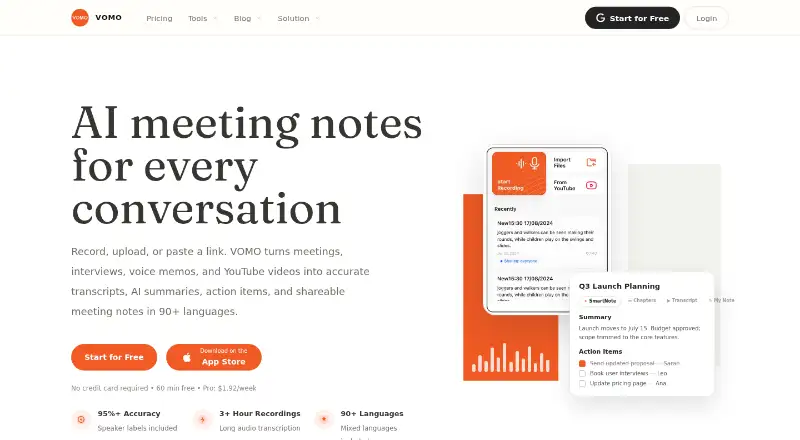
What VOMO is
VOMO turns uploaded meetings, interviews, voice memos, and YouTube videos into transcripts, AI summaries, action items, and shareable notes. Meeting capture is by upload, and the listed meeting platforms are Zoom, Google Meet, Microsoft Teams, and Webex. It supports transcription in 90 languages. Smart Notes can include key takeaways, chapters, and decisions; users can edit notes and make custom templates. Notes and transcripts can be shared by public link or exported as PDF, HTML, or TXT.
VOMO is available on the web, iOS, and Android. Its CLI can connect notes to Claude Code, Codex, OpenCode, and MCP clients such as Claude Desktop and Cursor. The CLI is read-only and only accesses the signed-in user's notes; dependable listing is about 50 notes at a time. Free provides 60 minutes at signup and a 30-minute per-file limit. Pro is $1.92 a month, with weekly pricing shown, and includes unlimited transcription minutes with a three-hour file limit. YouTube transcription requires captions to be available. VOMO says recordings and transcripts are encrypted in transit and at rest; deleted notes and related content are retained for 30 days before clearing from archives and backups.
Who it suits
VOMO may suit individuals or teams turning voice and video into structured notes, summaries, and action items. It is also relevant to users who want to export transcripts or connect notes to supported CLI clients.
What it does well
- Transcribes in 90 languages.
- Smart Notes can include summaries, actions, and decisions.
- Notes and transcripts can be exported as PDF, HTML, or TXT.
- Free plan includes 60 minutes at signup.
- Recordings and transcripts are encrypted in transit and at rest.
What to know first
- Free transcription is limited to 60 minutes at signup.
- Free files are limited to 30 minutes each.
- YouTube transcription requires captions.
- Calendar integrations are not available.
Limits
The Free plan includes 60 minutes at signup and allows up to 30 minutes per audio file. Pro includes unlimited transcription minutes, with a three-hour maximum per file.
Plans
| Plan | Billed and limits | Price |
|---|---|---|
| Free | 60 free minutes at signup · 30-minute audio file limit · web, iOS and Android | Free |
| Pro | Billed $99.99 USD every year · Unlimited transcription minutes · 3 hours per file | $99.99 a year |
As vomo.ai lists them, read 15 Oct 2026. The maker's own page has the final word.
Getting started
- Visit the VOMO website.
- Choose the Free plan or Pro plan.
- Use VOMO on the web, iOS, or Android.
- Upload audio or video files; YouTube videos need available captions.
- Review and edit the generated Smart Notes, then share a link or export a file.
Overview
VOMO is a transcription and note-making tool for people working with recorded meetings, interviews, voice memos, and videos. It is best for users who can upload recordings and want structured, editable follow-up; teams that need calendar-connected or live meeting capture should look elsewhere.
Its strongest case is the path from recording to shareable notes, with templates and exports to shape the result. The free plan's 30-minute per-file cap and Pro's weekly billing terms are important trade-offs.
Key features
VOMO transcribes in 90 languages and can turn recordings into Smart Notes containing summaries, key takeaways, action items, chapters, and decisions. Users can edit the notes and create custom templates, making it more adaptable than a fixed transcript-and-summary output. That is useful for teams seeking a consistent follow-up format, though the workflow still depends on supplying recordings.
Meeting capture is upload-based. VOMO supports recordings from Zoom, Google Meet, Microsoft Teams, and Webex, but has no calendar integrations. It accepts up to 10 audio or video files in one upload, which can help with batches of recordings; YouTube transcription requires captions, so it will not cover every video.
Users can share notes and transcripts through public links or export them as PDF, HTML, or TXT. The VOMO CLI connects notes to Claude Code, Codex, OpenCode, and MCP clients such as Claude Desktop and Cursor. It is read-only and limited to the signed-in user's notes; dependable listing extends to about 50 notes at a time. This suits users who want to reference notes from coding tools, not those expecting to edit or manage them there.
VOMO says recordings and transcripts are encrypted in transit and at rest, and recordings can be deleted at any time. Deleted notes and associated content remain in retained archives and corresponding backups for 30 days before being cleared.
Pricing
| Plan | Price | Allowance |
|---|---|---|
| Free | free | 60 free minutes at signup; 30 minutes per audio file |
| Pro | $1.92 a month, billed weekly | Unlimited transcription minutes; 3 hours per file |
Free is a sensible way to try short recordings, but 60 minutes total and a 30-minute file ceiling restrict its usefulness for longer sessions. Pro raises the file limit to three hours and removes the transcription-minute allowance, making it the better fit for frequent or lengthy recordings. Its displayed $1.92 monthly price is billed weekly, so the billing cadence matters when comparing the cost; the page also displays “Save 75%.”
Platforms
VOMO is available on web, iOS, and Android. Its download page says a dedicated Mac desktop app is coming soon. The CLI instructions cover macOS, Linux, and Windows and require Node.js 18 or later; CLI support does not mean a dedicated desktop app is available on those systems.
Who it's for
VOMO suits individuals and teams that already have recordings and want multilingual transcription, editable structured notes, and straightforward sharing or export. It can also fit workflows that connect notes to supported coding tools through its read-only CLI. It is a weaker match for teams that depend on calendar integrations or want an assistant to capture meetings directly.
Pros and cons
- Pros: Smart Notes combine summaries, takeaways, action items, chapters, and decisions, while editing and templates let users tailor the result.
- Pros: Transcription supports 90 languages, and public links plus PDF, HTML, and TXT exports give users several ways to share results.
- Pros: Pro includes unlimited transcription minutes and a three-hour file limit, addressing the Free plan's short-recording constraint.
- Cons: Upload-based capture and the absence of calendar integrations make it a poor fit for teams seeking automatic meeting capture.
- Cons: Free provides only 60 minutes at signup and caps each audio file at 30 minutes.
- Cons: Pro is billed weekly despite its monthly price display, and deleted notes and related content remain in archives and backups for 30 days.
Alternatives
Fellow is worth considering if a free starting plan with five lifetime AI notes per user suits better than VOMO's 60-minute signup allowance.
Acta may suit readers who want a free trial or need a self-hosted platform option; its Pro plan uses per-seat monthly billing.
Circleback is another freemium option with AI meeting notes, action items, and limited automations on its free plan.
Notta may be a better fit for a defined recurring free allowance: its free plan includes one seat and 120 transcription minutes per month.
Hedy offers a free plan with five hours per month, 30+ languages, and 30 minutes of real-time insights per session, making it an option for readers who value those limits and live insights.
Laxis has a free Basic plan with 300 transcription minutes per month, 30 days of conversation history, and a 45-minute maximum per recording.
Mem Agent is an alternative to consider.
OLVA is another option to consider.
Browse Meeting Intelligence Software and AI Meeting Assistants for more options.
Verdict
Choose VOMO if your work starts with uploaded recordings and you want editable, structured notes alongside transcription, especially if you need long files or unlimited transcription minutes on Pro. Look elsewhere if meetings need to be captured through calendar-connected automation, or if weekly billing and the Free plan's short limits do not fit your workflow.
Verdict
VOMO combines transcription with editable notes, summaries, and action items, with uploads as its meeting-capture method. Compare the Free allowance and per-file limits with Pro's longer file limit and unlimited transcription minutes.
Questions
Is there a free plan?
Yes. Free includes 60 minutes at signup, with a 30-minute limit per audio file.
What does Pro cost?
Pro is listed at $1.92 a month, with weekly pricing shown on the pricing page.
Which platforms can I use?
VOMO is available on the web, iOS, and Android. Its CLI instructions cover macOS, Linux, and Windows and require Node.js 18 or later.
Which meeting services are listed?
The listed meeting platforms are Zoom, Google Meet, Microsoft Teams, and Webex. Meeting capture works through uploads.
Can I share or export notes?
Yes. You can create public links and export notes or transcripts in PDF, HTML, and TXT formats.
What does the CLI connect to?
It can connect notes to Claude Code, Codex, OpenCode, and MCP clients such as Claude Desktop and Cursor. It is read-only and accesses only the signed-in user's notes.
Facts from VOMO's own pages
- Agent extensibility
- The VOMO CLI connects notes to Claude Code, Codex, OpenCode and other shell-based workflows. · vomo.ai, 15 Oct 2026
- Ask AI
- Ask AI answers questions from a transcript or Smart Note and can save the response back into the note. · vomo.ai, 15 Oct 2026
- Audience
- VOMO describes itself as helping teams turn voice and video into structured, actionable notes. · vomo.ai, 9 Oct 2026
- Audio transcription
- The service transcribes recordings with speaker labels, timestamps and a claimed accuracy of 95% or more. · vomo.ai, 15 Oct 2026
- Calendar integrations
- No · vomo.ai, 20 Sept 2026
- CLI installation
- The documented installation is npm install -g @vomoai/cli followed by VOMO authentication commands. · vomo.ai, 15 Oct 2026
- CLI limitations
- The CLI is read-only, has no shared team library, lacks bulk-export pagination and is dependable for roughly 50 notes per listing. · vomo.ai, 15 Oct 2026
- CLI limits
- The CLI accesses only the signed-in user's notes, is read-only, and listing is dependable up to about 50 notes at a time. · vomo.ai, 9 Oct 2026
- CLI requirements
- The CLI requires a VOMO account, Node.js 18 or later and a terminal, and is documented for macOS, Linux and Windows. · vomo.ai, 15 Oct 2026
- Company headquarters
- The Google Play developer listing gives EverGrow Tech Inc.'s address as 710 Lakeway Dr Ste 138, Sunnyvale, California 94085-4013, United States. · play.google.com, 15 Oct 2026
- Company legal name
- The maker identifies itself as EverGrow Tech Inc. · vomo.ai, 15 Oct 2026
- Company size
- Crunchbase lists EverGrow Tech as a private company with 1–10 employees. · crunchbase.com, 15 Oct 2026
- Desktop availability
- A dedicated Mac application is listed as coming soon; the current desktop access is through the web app or CLI. · vomo.ai, 15 Oct 2026
- Documentation depth
- The CLI page includes installation, MCP configuration, command examples, filtering, authentication, privacy behavior and troubleshooting guidance. · vomo.ai, 15 Oct 2026
- File handling
- The homepage says users can upload up to 10 audio or video files at once and supports formats such as MP3, WAV, M4A and MP4. · vomo.ai, 15 Oct 2026
- Founder
- A July 6, 2026 PR Newswire release identifies Zhuang Wang as VOMO's founder. · prnewswire.com, 15 Oct 2026
- Free plan
- No · vomo.ai, 20 Sept 2026
- Input limits
- Users can upload up to 10 audio or video files at once, and YouTube transcription requires captions to be available. · vomo.ai, 9 Oct 2026
- Input methods
- Users can record live, upload audio or video files, or submit YouTube links. · vomo.ai, 15 Oct 2026
- Integrations
- The VOMO CLI can connect notes to Claude Code, Codex, OpenCode, and MCP clients such as Claude Desktop and Cursor. · vomo.ai, 9 Oct 2026
- Transcription languages
- 90 · vomo.ai, 20 Sept 2026
- Language support
- VOMO advertises transcription in more than 90 languages, including mixed-language meetings. · vomo.ai, 15 Oct 2026
- Licence
- The terms grant only a limited, revocable, non-transferable licence for personal, non-commercial use and prohibit reverse engineering. · vomo.ai, 15 Oct 2026
- Limit: AI output quality
- The tl;dv tester found some summaries generic or contextually wrong and described Ask AI answers as sometimes vague. · tldv.io, 15 Oct 2026
Where VOMO stands on Freedom251
- AI Voice Dictation Software#12 of 22
- AI Meeting Assistants#48 of 82
- Meeting Intelligence Software#21 of 33