Freedom251 › Hardware Diagnostic Software
stress-ng
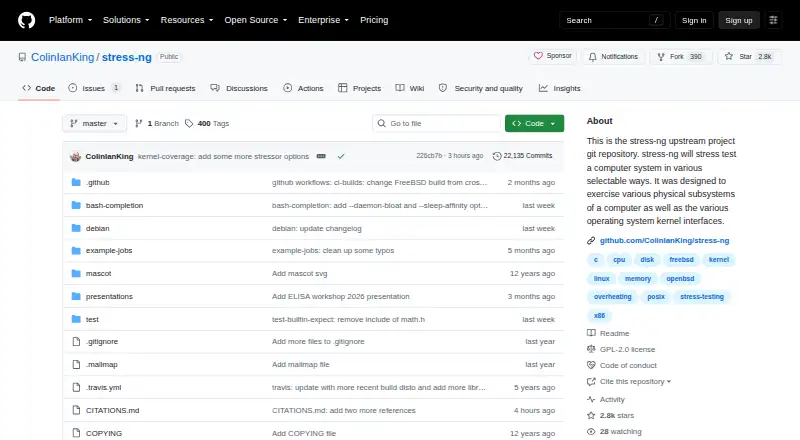
What stress-ng is
stress-ng is a free tool for exercising computer hardware and operating system interfaces under load. The project lists more than 390 stress tests, including tests for CPU, virtual memory, filesystems, and memory or CPU caches. CPU tests cover floating-point, integer, bit-manipulation and control-flow operations, and listed architecture coverage includes ARM, x86-64, RISC-V, MIPS, Power, SPARC and s390x. The project originally aimed to expose hardware problems such as overheating under load and operating system bugs. stress-ng can report test throughput to help observe changes across operating system releases or hardware types, but it is not intended as a precise benchmark suite. Use requires care: some tests can heat poorly designed hardware or cause system thrashing that is difficult to stop. On Linux, running as root changes out-of-memory settings so stressors may become unkillable when memory is low; the project advises judicious use. The tool is licensed under GPL-2.0. The project documents running a recent snapshot in Docker and installing recent Ubuntu versions through its PPA.
Who it suits
stress-ng suits users who need to exercise hardware or kernel interfaces under load, or investigate hardware and operating system issues. Its throughput measurements may help observe changes across system releases or hardware types, but it is not a precise benchmark suite.
What it does well
- Lists more than 390 stress tests.
- Covers CPU, virtual memory, filesystems and caches.
- Lists support for ARM, x86-64, RISC-V and other architectures.
- Free to use under GPL-2.0.
What to know first
- Some tests can overheat poorly designed hardware.
- Heavy tests may cause difficult-to-stop system thrashing.
- Root use on Linux can make stressors unkillable under low memory.
- Not intended as a precise benchmark suite.
Limits
Some tests can make poorly designed hardware run hot or produce excessive system thrashing that may be difficult to stop. On Linux, running as root adjusts out-of-memory settings so stressors can be unkillable in low-memory situations.
Plans
| Plan | Billed and limits | Price |
|---|---|---|
| Free | stress-ng is free and will always be free | Free |
As github.com lists them, read 3 Oct 2026. The maker's own page has the final word.
Getting started
- Visit the stress-ng GitHub repository.
- Choose an available route for your system; the README documents Docker snapshots and recent Ubuntu installation through the project’s PPA.
- Build or install the tool, noting that optional library dependencies can affect available functionality.
- Select stress tests suited to the subsystem you want to exercise.
- Use caution with heavy loads, especially on poorly designed hardware or when running as root on Linux.
stress-ng is a free stress-testing utility for administrators, developers, and others who need to see how systems behave under heavy load. Its broad coverage suits investigations across hardware and kernel interfaces better than precise performance comparisons or narrowly targeted diagnostics.
Overview
stress-ng was built to expose problems that surface under pressure, including thermal overruns and operating-system bugs. It can also report throughput to help track changes across hardware types or operating-system releases, but those readings are not precise benchmark results. Choose it to probe behavior, not to produce definitive performance rankings.
Key features
- Wide workload selection: The project lists more than 390 stress tests, including over 100 CPU, 60 virtual-memory, 80 filesystem, and 50 memory or CPU-cache tests. That range gives users room to investigate different subsystems, but choosing useful workloads still calls for a clear diagnostic question.
- Varied processor workloads: CPU tests exercise floating-point and integer operations, bit manipulation, and control flow. This makes stress-ng useful when a single kind of processor load would not be enough to probe a system.
- Multiple architectures: Documented test coverage includes ARM, x86-64, RISC-V, MIPS, Power, SPARC, and s390x. The project also supports Android, Linux, macOS, self-hosted, and Windows environments, making it relevant to varied systems.
- Flexible packaging and builds: The README documents running the latest snapshot in Docker and installing recent Ubuntu versions from the project’s PPA. Builds detect optional library dependencies and may disable functionality when support libraries are absent, so missing dependencies can limit what a particular build offers.
- Open-source project: The repository uses the GPL-2.0 license and invites patches by email or merge request through GitHub. This suits users comfortable with community-maintained software and contributing through those channels.
Pricing
The Free plan costs nothing, and stress-ng is free and intended to remain so. There is no free trial because there is no paid entry tier to evaluate. The published plan includes stress testing, memory testing, disk health checks, and diagnostic reports; the multi-platform support broadens its potential reach.
Platforms
stress-ng supports Android, Linux, macOS, self-hosted, and Windows platforms. Its documented architecture coverage spans ARM, x86-64, RISC-V, MIPS, Power, SPARC, and s390x. Linux users also have documented Docker and Ubuntu PPA installation routes; optional library dependencies can affect functionality in a build.
Who it's for
System administrators and developers investigating hardware behavior or operating-system interfaces under heavy load are the clearest fit. Users comparing throughput across releases or hardware can use the measurements as a directional observation, not as a precise benchmark. Those seeking a focused diagnostic or a controlled, exact performance score should look elsewhere.
Pros and cons
- Pro: More than 390 stress tests cover processor, memory, cache, filesystem, and virtual-memory workloads, supporting investigations beyond CPU load alone.
- Pro: Documented coverage across multiple architectures and platforms makes the tool relevant to a broad range of systems.
- Pro: It is free, with no paid plan required to access the listed stress-testing capabilities.
- Con: Throughput readings are not precise benchmark results, limiting their value for definitive comparisons.
- Con: Some tests can overheat poorly designed hardware or cause system thrashing that is difficult to stop, so use requires care.
- Con: On Linux, root use changes out-of-memory settings so stressors can be unkillable under low-memory conditions; the project advises judicious use.
Alternatives
For a wider hardware diagnostic software shortlist, consider the specific focus each option brings. Choose MemTest86 when a dedicated memory tester is a better match: its free edition has no usage restrictions, while its Pro Download is $116, paid once and includes free upgrades for 12 months. MemTest86+ is another free and open-source stand-alone memory tester, licensed for private or commercial use.
smartmontools is a free option when the need is specifically its smartctl and smartd utilities. Hard Disk Sentinel may suit a reader comparing disk-focused options; its Linux version is free. Prime95 is another free alternative to consider. PC-Doctor Toolbox offers free personal use for up to five systems, with a Toolbox Remote account required and opt-in data sharing. Blackwire Drive Eraser & Sanitizer is a Windows alternative whose free plan is limited to personal, noncommercial use and two drives at once. HDAT2 is a free Windows option provided as-is without warranty.
Verdict
Choose stress-ng if you need a free, broad toolkit for loading hardware subsystems and operating-system interfaces across varied platforms and architectures. Its range is the main reason to choose it; the risk of hard-to-stop tests and the limits of its throughput readings are the reasons to look elsewhere for safer, focused diagnostics or precise benchmarking.
Verdict
stress-ng offers extensive ways to load-test computer subsystems and operating system interfaces across many architectures. Its own cautions matter: some tests can strain hardware, and root use on Linux can make stressors difficult to stop when memory is low.
Questions
Does stress-ng cost anything?
The Free plan costs nothing, and the project says stress-ng will always be free.
What does stress-ng test?
It exercises physical system subsystems and operating system kernel interfaces. The project lists CPU, virtual memory, filesystem, and memory or CPU cache tests among its coverage.
Which architectures are covered?
The README lists ARM, x86-64, RISC-V, MIPS, Power, SPARC, and s390x among the architectures with test coverage.
Is stress-ng a benchmarking suite?
It can measure test throughput to observe changes across hardware types or operating system releases. The project says it is not a precise benchmark suite.
What license does stress-ng use?
The repository identifies the license as GPL-2.0.
How can it be installed or run?
The README documents running the latest snapshot in a Docker container and installing recent Ubuntu versions through the project’s PPA.
Facts from stress-ng's own pages
- Architectures
- The README lists test coverage across architectures including ARM, x86-64, RISC-V, MIPS, Power, SPARC, and s390x. · github.com, 3 Oct 2026
- Build dependencies
- The build detects optional library dependencies and can disable functionality when support libraries are missing. · github.com, 3 Oct 2026
- CPU coverage
- CPU stress tests exercise floating point, integer, bit manipulation, and control flow operations. · github.com, 3 Oct 2026
- License
- The repository identifies its license as GPL-2.0. · github.com, 3 Oct 2026
- Packaging
- The README documents running the latest snapshot in a Docker container and installing recent Ubuntu versions from the project’s PPA. · github.com, 3 Oct 2026
- Platforms
- The README lists Linux, Solaris, BSD variants, Minix, Android, MacOS X, Serenity OS, GNU/Hurd, Haiku, WSL, Cygwin, and SunOS/Dilos among supported or tested systems. · github.com, 3 Oct 2026
- Privileges
- When run as root on Linux, stress-ng adjusts out-of-memory settings so stressors are unkillable in low-memory situations; the README advises judicious use. · github.com, 3 Oct 2026
- Purpose
- stress-ng stress tests computer systems by exercising physical subsystems and operating system kernel interfaces. · github.com, 3 Oct 2026
- Stress tests
- The project lists 390+ stress tests, including 100+ CPU, 60+ virtual memory, 80+ filesystem, and 50+ memory or CPU cache tests. · github.com, 3 Oct 2026
- Support and contributions
- The README invites patches by email or merge requests through the stress-ng GitHub repository. · github.com, 3 Oct 2026
- Throughput metrics
- stress-ng can measure test throughput to observe performance changes across operating system releases or hardware types, but the project says it is not a precise benchmark suite. · github.com, 3 Oct 2026
- Usage caution
- Some tests can make poorly designed hardware run hot and cause excessive system thrashing that may be difficult to stop. · github.com, 3 Oct 2026
- Use cases
- The project says it was originally intended to expose hardware issues such as thermal overruns and operating system bugs that occur under heavy load. · github.com, 3 Oct 2026
Where stress-ng stands on Freedom251
- Hardware Diagnostic Software#11 of 26