Freedom251 › Hardware Diagnostic Software
MemTest86+
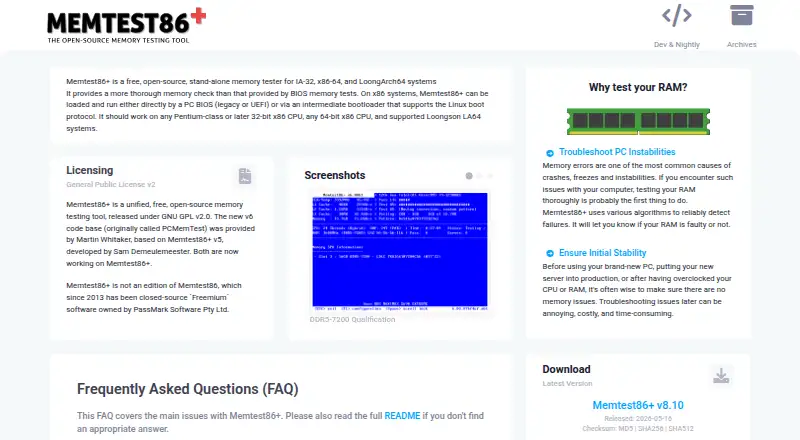
What MemTest86+ is
MemTest86+ is a free, open-source stand-alone memory tester for x86, x86-64, ARM AArch64, and LoongArch64 computers. It runs outside the operating system, allowing it to reach almost all computer memory without operating-system memory or UEFI library restrictions. Its test algorithms, including moving inversions and Modulo-20, are intended to find memory failures that may be behind crashes, freezes, or system instability. It can start from legacy or UEFI BIOS, use Linux boot protocols, or run from a FAT32 USB drive, CD-ROM, or network boot. Testing continues indefinitely, with a pass counter advancing after each full set of selected tests. The software is free under GNU GPL version 2, with no additional restrictions on private or commercial use. Stable and nightly binaries are available, but nightly builds are automatically generated, untested, and unsupported. The binary is not signed by Microsoft, so Secure Boot must be temporarily disabled; USB device support is still a work in progress.
Who it suits
It suits users diagnosing memory-related crashes, freezes, or instability on supported systems. It is also an option for people who want a bootable memory test rather than an operating-system application.
What it does well
- Free and open-source under GNU GPL version 2.
- Tests can access almost all computer memory.
- Boots from BIOS, USB, CD-ROM, or PXE.
- Includes moving inversions and Modulo-20 tests.
What to know first
- Secure Boot must be temporarily disabled.
- USB drivers do not support every device.
- Nightly builds are untested and unsupported.
Limits
USB drivers are still in progress, so some USB devices are unsupported. Nightly builds are automatically generated, untested, and unsupported.
Plans
| Plan | Billed and limits | Price |
|---|---|---|
| Free and open-source | stand-alone memory tester · GPLv2 · private or commercial use | Free |
As memtest.org lists them, read 1 Oct 2026. The maker's own page has the final word.
Getting started
- Visit https://www.memtest.org/ and obtain a stable binary.
- Choose a supported boot route: legacy or UEFI BIOS, Linux boot protocols, FAT32 USB flash drive, CD-ROM, or PXE.
- For PXE, use memtest.bin with BIOS PXE or memtest.efi with UEFI PXE as an iPXE or PXELINUX payload.
- Temporarily disable Secure Boot before running the unsigned binary.
- Run the selected tests; the pass counter advances after each complete set of selected tests.
Overview
MemTest86+ is a free, open-source utility for diagnosing system memory by booting outside the operating system. It is best suited to people tracking down crashes, freezes, or instability who are comfortable starting a PC from removable media or a network.
Its ability to inspect nearly all memory without depending on the operating system is a meaningful advantage for troubleshooting, though Secure Boot and unfinished USB support can make setup less straightforward.
Key features
Focused memory diagnosis
MemTest86+ uses algorithms including moving inversions and Modulo-20 testing to find memory failures. It runs indefinitely, with the pass counter advancing after all selected tests complete. That gives users a way to track completed cycles without imposing a fixed test duration, but someone must decide when enough testing has been done.
It is a specialist tool: memory and stress testing are supported, while disk health checks and GPU testing are not. Choose a broader diagnostic suite if you need to investigate those components as well.
Boot and architecture support
It can start from legacy or UEFI BIOS, or through Linux boot protocols, and can run from a FAT32 USB flash drive, CD-ROM, or PXE network boot. PXE setups use memtest.bin for BIOS and memtest.efi for UEFI as an iPXE or PXELINUX payload. These options suit both local troubleshooting and machines already configured for network boot.
The README describes support for x86, x86-64, ARM AArch64, and LoongArch64 systems. Although the USB route is convenient, the project's USB drivers remain a work in progress and do not support every device. The binary is not signed by Microsoft, so Secure Boot must be disabled temporarily to run it.
Release and licensing
The GNU GPL version 2 permits private and commercial use without restrictions beyond the license. Stable and nightly binaries are available, but nightly builds are automatically generated, untested, and unsupported; most users should prefer a stable build. The project asks users to submit bug reports through its official GitHub page with hardware and reproduction details.
Pricing
Free and open-source — free. The plan includes a stand-alone memory tester under GPLv2 for private or commercial use. There is no paid tier to weigh against it, making MemTest86+ a practical choice when a focused memory check is all that is needed.
Platforms
MemTest86+ is categorized as multi-platform and supports Linux, macOS, and Windows systems. It is not a conventional desktop application: it runs as bootable diagnostic media or through supported boot protocols. Its documented architectures are x86, x86-64, ARM AArch64, and LoongArch64.
Who it's for
Choose MemTest86+ when you need to investigate possible memory faults independently of the installed operating system, especially if you can boot from USB, CD-ROM, or PXE. It is a poor fit if you need one tool for memory, graphics, and disk diagnostics, or if disabling Secure Boot or finding a compatible USB device is not acceptable.
Pros and cons
- Pros: Accesses almost all computer memory without relying on operating-system memory or UEFI libraries, useful when diagnosing system instability.
- Pros: Supports several boot routes and four documented architecture families, including PXE for configured network environments.
- Pros: Free for private and commercial use under GPLv2.
- Cons: Requires booting separately from the operating system, rather than launching as a regular desktop diagnostic.
- Cons: Secure Boot must be temporarily disabled, and not all USB devices are supported.
- Cons: Testing runs indefinitely, and the utility does not check disk health or GPUs.
Alternatives
For another memory-testing option, HCI MemTest has a free Windows plan and a $5, paid once MemTest Pro plan; consider it if you want a Windows program rather than a bootable standalone tester.
MemTest86 offers a free edition with no usage restrictions and a $116, paid once Pro Download plan; compare it if you want to assess another product specifically named for memory testing.
OCCT has a free personal-use plan and a Supporter plan at €4.50 a month. It is an option to consider if you want a broader hardware-testing product and are comfortable comparing its personal and paid plans.
Prime95 is a free alternative to consider if you are looking beyond a dedicated memory tester.
RyzenAdj is a free alternative to consider if you are comparing other system utilities.
y-cruncher offers free non-commercial and academic use; consider it if those licensing terms suit your intended use.
ASUS GPU Tweak III is another free option to consider.
Intel VTune Profiler is a free standalone tool or part of the Intel oneAPI Toolkit, with commercial and non-commercial use permitted; consider it if that profiling-tool format better matches your needs.
For wider discovery, browse Hardware Diagnostic Software or PC Overclocking Software.
Verdict
MemTest86+ is a strong choice for anyone who needs a free, focused memory diagnostic that can run outside the operating system, particularly when a bootable or PXE workflow fits the machine. Look elsewhere if you need disk or GPU checks, or if Secure Boot and USB compatibility make its boot process impractical.
Verdict
MemTest86+ offers a focused way to test system memory outside the operating system. Check Secure Boot and USB compatibility before choosing how to boot it.
Questions
Is MemTest86+ free?
Yes. It is free and open source under GNU GPL version 2, with no added restrictions on private or commercial use.
Which computer architectures does it support?
It supports x86, x86-64, ARM AArch64, and LoongArch64 computers.
How can it be booted?
It can run from legacy or UEFI BIOS, Linux boot protocols, a FAT32 USB flash drive, CD-ROM, or PXE network boot.
Does it require Secure Boot to be turned off?
Yes. Secure Boot must be temporarily disabled because the binary is not signed by Microsoft.
Does it test disks or GPUs?
No. It supports memory testing and stress testing, but not disk health checks or GPU testing.
What license does it use?
MemTest86+ is released under GNU GPL version 2.
Facts from MemTest86+'s own pages
- Algorithms
- Its documented algorithms include moving inversions and Modulo-20 testing. · memtest.org, 1 Oct 2026
- Architectures
- The README says it supports x86, x86-64, ARM AArch64, and LoongArch64 computers. · memtest.org, 1 Oct 2026
- Boot modes
- It can run directly from legacy or UEFI BIOS or through Linux boot protocols. · memtest.org, 1 Oct 2026
- Build environment
- The build is tested on Linux and uses the GNU toolchain, including GCC, binutils, and make. · memtest.org, 1 Oct 2026
- Execution
- Memtest86+ executes indefinitely, and the pass counter increments after all selected tests have run. · memtest.org, 1 Oct 2026
- License
- Memtest86+ is released under GNU GPL version 2 with no restrictions beyond the GPL for private or commercial use. · memtest.org, 1 Oct 2026
- Memory access
- It can access almost all computer memory without being restricted by operating-system memory or UEFI libraries. · memtest.org, 1 Oct 2026
- Network boot
- For PXE, memtest.bin can be used with BIOS PXE and memtest.efi with UEFI PXE as an iPXE or PXELINUX payload. · memtest.org, 1 Oct 2026
- Purpose
- Memtest86+ is a free, open-source, stand-alone memory tester for IA-32, x86-64, and LoongArch64 systems. · memtest.org, 1 Oct 2026
- Release support
- Stable and nightly binaries are available, but nightly builds are automatically generated, fully untested, and unsupported. · memtest.org, 1 Oct 2026
- Secure Boot
- The binary is not signed by Microsoft, so Secure Boot must be temporarily disabled. · memtest.org, 1 Oct 2026
- Support channel
- The project asks users to submit bug reports on its official GitHub page with hardware and reproduction details. · memtest.org, 1 Oct 2026
- Supported media
- It can run from a FAT32 USB flash drive, CD-ROM, or network boot using PXE. · memtest.org, 1 Oct 2026
- Testing purpose
- It uses various algorithms to detect memory failures and troubleshoot crashes, freezes, and system instability. · memtest.org, 1 Oct 2026
- USB limitation
- The USB drivers are still work in progress and not all USB devices are supported. · memtest.org, 1 Oct 2026
Where MemTest86+ stands on Freedom251
- Hardware Diagnostic Software#8 of 26
- PC Overclocking Software#10 of 31