Freedom251 › PC Overclocking Software
HCI MemTest
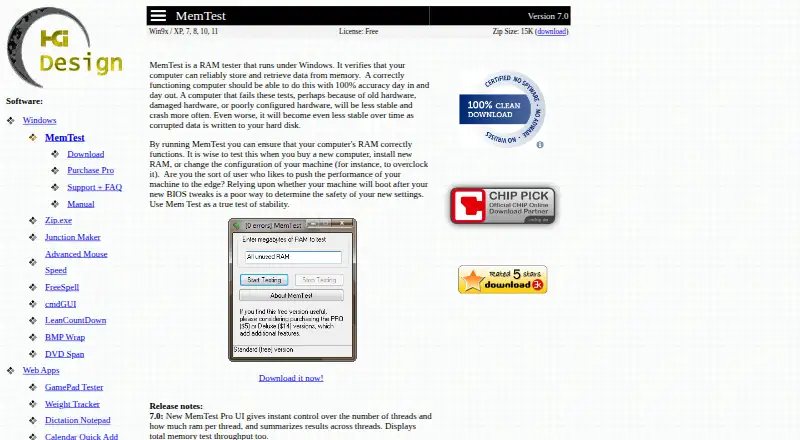
What HCI MemTest is
HCI MemTest checks whether a computer can reliably store and retrieve data from memory. Its maker recommends running it after buying a computer, installing RAM, or changing system settings such as overclocking. The free download is MemTest Version 7.0 for Windows 9x, XP, 7, 8, 10, and 11. The Pro edition adds control over thread count and RAM allocation per thread, summaries of results and throughput, command-line automation, disk error logs, and a mode for testing in the background during normal use. Deluxe includes Pro and adds a 64-bit bootable CD or USB version that can access all RAM without loading an operating system. That boot option requires CSM or legacy BIOS support. The maker says 100% coverage should catch errors except intermittent failures, for which it recommends testing to around 400%. The software cannot reliably identify the failing physical memory chip; testing modules individually may help isolate a faulty board. The free download can be unpacked into a folder and removed by deleting its contents.
Who it suits
MemTest suits people checking memory after a computer purchase, a RAM installation, or a system configuration change. Pro and Deluxe add automation and bootable testing options for users who need those controls.
What it does well
- Free Windows download is available.
- Pro supports command-line automated testing.
- Pro logs errors to disk.
- Deluxe can test all RAM from bootable media.
- Free download is removed by deleting its folder.
What to know first
- Deluxe boot mode requires CSM or legacy BIOS.
- Software cannot reliably pinpoint the failing physical chip.
- Pro costs $5.00 per once.
- Deluxe costs $14.00 per once.
Limits
The free plan costs nothing and is the Windows Version 7.0 download. Pro adds advanced controls and automation; Deluxe adds bootable testing, which requires CSM or legacy BIOS support. The maker says intermittent failures may require testing to around 400% coverage.
Plans
| Plan | Billed and limits | Price |
|---|---|---|
| MemTest Free | RAM reliability testing · No advertisements | Free |
| MemTest (free) | Windows; Version 7.0; 15K ZIP download | Free |
| MemTest | Windows program · Version 7.0 · 15K ZIP · free/no ads | Free |
| MemTest Deluxe | delivered via email · Includes Pro · bootable CD/USB · 64-bit tester · CSM/legacy BIOS required · tests all RAM · memory-speed benchmark | $14, paid once |
| MemTest Pro | delivered via email · Advanced UI · command-line control · disk error logs · background “nice” mode · home and commercial use | $5, paid once |
As hcidesign.com lists them, read 20 Sept 2026. The maker's own page has the final word.
Getting started
- Open the HCI MemTest website.
- Download the free version and unzip it into a folder, or select Pro or Deluxe.
- Run the Windows program for a memory check.
- For Pro, configure thread count and RAM per thread or use its command-line controls.
- For Deluxe boot testing, prepare the CD or USB route and use a PC with CSM or legacy BIOS boot support.
- Delete the free download’s folder contents to remove it.
HCI MemTest checks whether a computer can reliably store and retrieve data from memory. It suits PC owners verifying new RAM or a changed configuration, and power users who want automated or bootable checks. Its free Windows test covers the basics; paid editions add useful controls, but Deluxe depends on older-style boot support.
Overview
Memory errors can undermine a system even when it appears to work normally. HCI MemTest gives users a way to check RAM after buying a computer, installing memory, or changing settings such as an overclock. The maker recommends reaching 100% coverage to catch errors, and around 400% when looking for intermittent failures.
This is a memory tester, not a tuning utility: it offers no CPU tuning, memory tuning, motherboard controls, or automatic overclocking. It can reveal errors, but software cannot reliably identify the physical chip at fault. Testing modules one at a time can help isolate a faulty board.
Key features
Choose how to run a test
The free edition is a Windows program. MemTest Pro adds control over thread count and RAM per thread, with results summarized across threads and as total test throughput. For repeatable checks, its command-line controls allow automated or periodic testing.
Pro also writes error logs to disk. That can help preserve a record after a crash or shutdown, or provide an error report to a RAM seller. Its “nice” mode runs tests in the background while the computer is in normal use, trading a dedicated test session for convenience.
Test without loading Windows
Deluxe includes the Windows Pro features and adds a 64-bit version that boots from CD or USB, bypasses the operating system, and can directly access all RAM. That is useful when a Windows session is unsuitable for the check, but the bootable version requires a PC with CSM or legacy BIOS support. Without that compatibility, the defining Deluxe extra is unavailable.
The free download comes as a ZIP to unpack into a folder; it does not modify other files or the registry, and removal means deleting that folder. An online manual and FAQ provide usage help.
Pricing
| Plan | Price | What it includes |
|---|---|---|
| MemTest (free) | free | Windows Version 7.0; 15K ZIP download. |
| MemTest Pro | $5, paid once | Windows program for home and commercial/professional use; thread and RAM controls, command-line automation, error logs, and background testing. |
| MemTest Deluxe | $14, paid once | Includes Windows Pro and adds bootable CD/USB testing, subject to CSM or legacy BIOS support. |
Both paid plans are one-time purchases delivered via email. The free plan is the straightforward choice for occasional Windows checks; it gives up Pro’s controls, automation, and logging. Pro is the better fit for recurring tests or users who need records. Deluxe costs more for operating-system-independent access to RAM, but only makes sense on compatible hardware. There is no free trial.
Platforms
The product is described as running under Windows, and Version 7.0 is listed for Windows 9x, XP, 7, 8, 10, and 11. The platform listing also includes Linux, but the paid Windows program and the bootable Deluxe version are the specific operating modes described. Deluxe’s boot restriction is a practical compatibility check to make before buying.
Who it's for
HCI MemTest is a sensible pick for people checking new or changed memory, especially those who want a simple Windows download with no broader system changes. Pro suits technicians and power users who need repeatable runs, per-thread control, or logs. Deluxe is for users who need to test outside Windows and have CSM or legacy BIOS boot available.
Look elsewhere if the goal is to adjust processor or memory settings, control a motherboard, or automatically overclock; HCI MemTest does none of those jobs. It also cannot name the failing physical chip, so pinpointing a fault still takes module-by-module isolation.
Pros and cons
- Pros: The free ZIP download is self-contained and removable by deleting its folder, making an occasional Windows check low-commitment.
- Pros: Pro combines command-line automation, background testing, and disk logs, which helps users run recurring checks and retain error evidence.
- Pros: Deluxe can test directly against all RAM without loading an operating system.
- Cons: Deluxe booting requires CSM or legacy BIOS support, excluding incompatible PCs from its main extra.
- Cons: Error detection does not identify the physical memory chip; isolating a faulty board can require testing modules individually.
- Cons: The described Windows application does not tune or overclock hardware, so it is not an all-purpose PC performance tool.
Alternatives
For another standalone memory tester, MemTest86+ is free and open source under GPLv2, with Linux, macOS, and Windows platform listings; choose it if those broader platform options matter. OCCT is another freemium option for Linux and Windows, with a free personal-use plan and a Supporter plan at €4.50 a month. For broader overclocking-software choices, browse PC Overclocking Software.
RyzenAdj is a free, LGPL-3.0 command-line tool. Argus Monitor is a Windows alternative with a 1-year license priced at $16.45 a year. ASUS GPU Tweak III is a free Windows option. Intel VTune Profiler is a free download for Linux, Windows, and self-hosted use. Quick CPU is a freemium Windows option. Saku Overclock is a free, open-source Windows option distributed under GPL-v3.0.
Verdict
Choose HCI MemTest for a focused memory check, particularly if Pro’s repeatable testing and error logs matter or the free Windows edition covers an occasional check. Deluxe is worth considering only when bootable testing is needed and the PC supports CSM or legacy BIOS. If you need to tune hardware or want software to pinpoint the failed chip, this is not the right tool.
Verdict
HCI MemTest offers a free memory check, with paid Pro and Deluxe editions adding automation, logging, and bootable testing. Choose Deluxe only if the PC supports CSM or legacy BIOS boot.
Questions
How much does HCI MemTest cost?
The free plan costs nothing. MemTest Pro is $5, paid once, and MemTest Deluxe is $14, paid once.
Which platforms are supported?
The free Version 7.0 download is listed for Windows 9x, XP, 7, 8, 10, and 11.
What does Pro add?
Pro adds controls for thread count and RAM per thread, result summaries, command-line automation, disk error logs, and background testing.
What does Deluxe add?
Deluxe includes Windows Pro and a 64-bit bootable CD or USB version that can access all RAM without loading an operating system. Booting this version requires CSM or legacy BIOS support.
Is there a free trial?
No free trial is listed. A free plan is available.
Can MemTest identify the exact failing memory chip?
The FAQ says software cannot reliably pinpoint the physical memory chip that is failing. Testing modules one at a time can help isolate a faulty board.
Facts from HCI MemTest's own pages
- Allocation behavior
- The FAQ warns that allocating more RAM than Windows can provide without swapping can make coverage progress very slow. · hcidesign.com, 15 Oct 2026
- Automation
- Pro offers full command-line control for automated or periodic testing. · hcidesign.com, 29 Sept 2026
- Background mode
- Pro includes a “nice” mode intended to test memory while the computer is being used normally. · hcidesign.com, 15 Oct 2026
- Background testing
- Pro includes a “nice” mode for testing RAM in the background during normal computer use. · hcidesign.com, 29 Sept 2026
- Benchmark feature
- Deluxe reports memory-checking rate as a basic speed benchmark for comparing BIOS settings. · hcidesign.com, 15 Oct 2026
- Boot requirement
- The Deluxe bootable tester requires a PC supporting CSM or legacy BIOS boot. · hcidesign.com, 15 Oct 2026
- Chip identification limit
- HCI Design says software cannot reliably identify the failing physical memory chip; users must isolate modules by testing them separately. · hcidesign.com, 15 Oct 2026
- Command-line automation
- Pro provides full command-line control for automated or scheduled testing. · hcidesign.com, 15 Oct 2026
- Compatibility limit
- The Deluxe bootable version requires a PC that supports CSM or legacy BIOS boot. · hcidesign.com, 29 Sept 2026
- Continuous error testing
- Pro can continue after errors instead of pausing, allowing correlation with temperature or GPU workload. · hcidesign.com, 15 Oct 2026
- Coverage guidance
- The FAQ says 100% coverage should catch non-intermittent errors and recommends about 400% for intermittent failures. · hcidesign.com, 15 Oct 2026
- Deluxe boot mode
- Deluxe adds a 64-bit version that runs from bootable CD or USB without loading an operating system and can directly access all RAM. · hcidesign.com, 29 Sept 2026
- Diagnostic limit
- The FAQ says software cannot reliably pinpoint the physical memory chip that is failing; it suggests testing modules one at a time to isolate a faulty board. · hcidesign.com, 29 Sept 2026
- Documentation
- The maker supplies an online manual, an included manual, and an FAQ page, with technical support by email. · hcidesign.com, 15 Oct 2026
- Error logs
- Pro logs errors to disk so users can send an error report to the RAM seller or review what happened after a crash or shutdown. · hcidesign.com, 29 Sept 2026
- Error meaning
- The maker treats even one reported memory error as evidence of a RAM or configuration problem. · hcidesign.com, 15 Oct 2026
- Independent boot-testing view
- A Tom’s Hardware forum moderator said boot media provides the most complete memory test. · forums.tomshardware.com, 15 Oct 2026
- Independent download listing
- Heise lists MemTest 7.0 as a Windows memory-defect detector made by HCI Design. · heise.de, 15 Oct 2026
- Independent OS limitation
- A Tom’s Hardware forum participant argued that an operating-system test cannot access memory regions reserved by Windows and therefore cannot fully test the configuration. · forums.tomshardware.com, 15 Oct 2026
- Installation and removal
- The free download can be unzipped into a folder, does not modify files elsewhere or the registry, and can be removed by deleting its folder contents. · hcidesign.com, 29 Sept 2026
- Limit: allocation ceiling
- The HCI-Launcher project documents a maximum allocation of 3548MB for one thread. · github.com, 15 Oct 2026
- Limit: manual parallelism
- Tom’s Hardware says users generally need one instance per processor thread, making large-thread-count testing cumbersome. · tomshardware.com, 15 Oct 2026
- Limit: manual setup
- The HCI-Launcher README says users still must manually enter memory amounts and start each launched test instance. · github.com, 15 Oct 2026
- Limit: per-instance memory
- Tom’s Hardware reports that the basic edition can test only about 2GB to 3.5GB per instance, which complicates large-memory or many-thread systems. · tomshardware.com, 15 Oct 2026
Where HCI MemTest stands on Freedom251
- PC Overclocking Software#8 of 31