Freedom251 › PC Overclocking Software

Saku Overclock
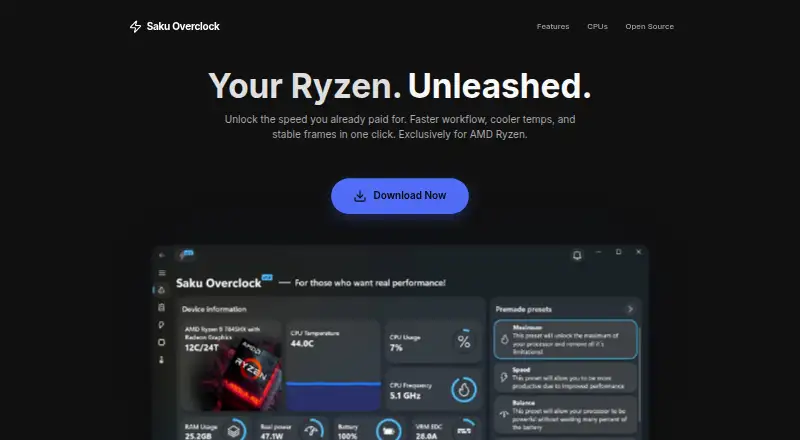
What Saku Overclock is
Saku Overclock is a free, open-source utility for tuning AMD Ryzen laptops on Windows 10 and Windows 11. Users can create and edit presets, then switch between configurations for different workloads. Its live dashboard monitors CPU, GPU, RAM, battery, and thermal data. Temperature controls include fan management and custom cooling curves, and integration with RivaTuner Statistics Server can show selected system metrics in a game overlay. The maker lists support for AMD Ryzen generations 1000–9000+ and AMD A-Series models including Bristol Ridge and Stoney Ridge. Intel Core processors are not supported; the product is engineered for AMD architecture. The project says its tuning interface limits values to safe ranges and offers hardware-based suggestions. It also warns that incorrect AMD SMU commands can permanently damage a processor, and recommends standard overclocking options unless users have extensive experience. Saku Overclock is distributed under GPL-v3.0. The project directs users to its Discord community and provides an email address for questions and suggestions.
Who it suits
Saku Overclock is intended for enthusiasts seeking more performance from AMD Ryzen laptop hardware. It is not suitable for users with Intel Core processors, and advanced users should heed the warning about AMD SMU commands.
What it does well
- Free, open-source software with no premium tiers.
- Switchable presets for different workloads.
- Monitors CPU, GPU, RAM, battery, and thermals.
- Includes fan control and custom cooling curves.
- Supports Windows 10 and Windows 11.
What to know first
- Intel Core processors are not supported.
- Incorrect AMD SMU commands can permanently damage a processor.
Limits
The free plan is available forever and has no paywalls or premium tiers, but it is limited to AMD Ryzen hardware. Intel Core processors are not supported, and the project warns that incorrect AMD SMU commands can permanently damage a processor.
Plans
| Plan | Billed and limits | Price |
|---|---|---|
| Free | forever · No paywalls · no premium tiers · AMD Ryzen only | Free |
As sakuoverclock.vercel.app lists them, read 30 Sept 2026. The maker's own page has the final word.
Getting started
- Open the Saku Overclock project website.
- Confirm that the laptop uses a listed AMD Ryzen generation or AMD A-Series model.
- Confirm that the system runs Windows 10 or Windows 11.
- Use the free plan; the project lists no paywalls or premium tiers.
- For questions or suggestions, contact the project through its Discord community or email.
Verdict
Saku Overclock combines presets, live monitoring, thermal controls, and a game-overlay integration for supported AMD laptop hardware. Its maker warns of potentially permanent processor damage from incorrect AMD SMU commands, so users without extensive experience are advised to stick to standard overclocking options.
Questions
How much does Saku Overclock cost?
The Free plan costs nothing, billed forever. The plan has no paywalls or premium tiers.
Which systems does it support?
It supports Windows 10 and Windows 11. The project lists AMD Ryzen generations 1000–9000+ and AMD A-Series models including Bristol Ridge and Stoney Ridge.
Does it support Intel processors?
No. The maker says Intel Core processors are not supported because the product is engineered exclusively for AMD architecture.
Is Saku Overclock open source?
Yes. The project repository identifies it as free and open-source software distributed under GPL-v3.0.
What hardware can it monitor and control?
Its dashboard monitors CPU, GPU, RAM, battery, and thermal data. The project also describes temperature management, fan control, custom cooling curves, and CPU tuning.
What safety guidance does the project give?
The project says the tuning interface restricts values to safe ranges and offers hardware-based suggestions. It warns that incorrect AMD SMU commands can permanently damage a processor and recommends standard overclocking options unless users have extensive experience.
Facts from Saku Overclock's own pages
- Advanced-use caution
- The project warns that incorrect AMD SMU commands can permanently damage a processor and recommends standard overclocking options unless users have extensive experience. · github.com, 30 Sept 2026
- Hardware limits
- The maker’s site says Intel Core processors are not supported and the product is engineered exclusively for AMD architecture. · sakuoverclock.vercel.app, 30 Sept 2026
- Intended users
- The project describes the software as designed for enthusiasts who want more performance from AMD Ryzen laptop hardware. · github.com, 30 Sept 2026
- Live monitoring
- Its dashboard monitors CPU, GPU, RAM, battery, and thermal data in real time. · github.com, 30 Sept 2026
- Open source
- The project repository identifies Saku Overclock as free and open-source software distributed under GPL-v3.0. · github.com, 30 Sept 2026
- Overlay integration
- The app integrates with RivaTuner Statistics Server to show selected system metrics in a game overlay. · github.com, 30 Sept 2026
- Preset tuning
- Users can create and edit presets, then switch configurations for different workloads. · github.com, 30 Sept 2026
- Purpose
- Saku Overclock is an overclocking utility for AMD Ryzen laptops. · github.com, 30 Sept 2026
- Safety controls
- The project says its tuning interface restricts values to safe ranges and offers hardware-based suggestions. · github.com, 30 Sept 2026
- Support
- The project directs users to its Discord community and provides an email address for questions and suggestions. · github.com, 30 Sept 2026
- Supported AMD families
- The site lists AMD Ryzen generations 1000–9000+ and AMD A-Series models including Bristol Ridge and Stoney Ridge. · sakuoverclock.vercel.app, 30 Sept 2026
- Thermal controls
- The project describes temperature management, fan control, and custom cooling curves. · github.com, 30 Sept 2026
- Windows support
- The site lists Windows 10 and Windows 11 compatibility. · sakuoverclock.vercel.app, 30 Sept 2026
Where Saku Overclock stands on Freedom251
- PC Overclocking Software#20 of 31