Freedom251 › PC Overclocking Software
RyzenAdj
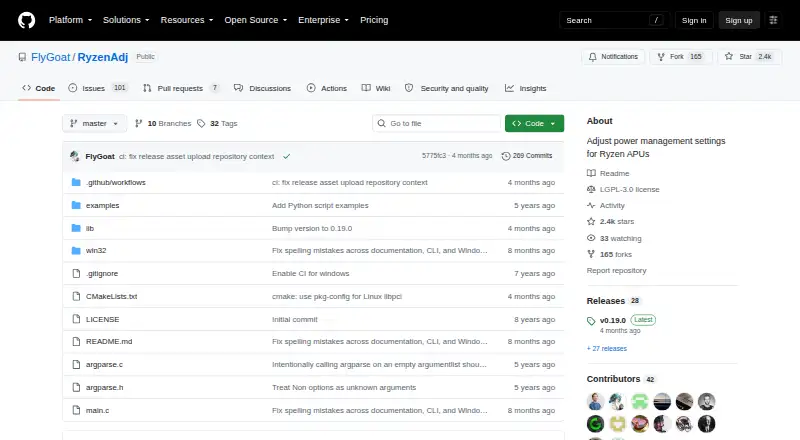
What RyzenAdj is
RyzenAdj is a free command-line tool for adjusting power-management settings on Ryzen mobile processors. It runs on Windows and Linux and uses the same command-line interface on Windows and Unix-like systems. Users can set sustained, fast, and slow power limits in milliwatts, adjust the Tctl temperature limit in degrees Celsius, and control minimum and maximum clocks for SoC, FCLK, VCN, LCLK, and GFX. The `--info` option displays information and key power metrics after adjustment; `--dump-table` presents the full power-metric table before and after. Shell scripts or Windows batch files can automate its use. It requires Administrator privileges on Windows or root access on Linux. Device power-management features can overwrite settings, so values may need to be applied again regularly. Linux users must build it from source, and Linux use requires elevated access to the northbridge configuration space through libpci and `/dev/mem` or the ryzen_smu kernel module. Support and limitations differ across Ryzen families.
Who it suits
RyzenAdj suits users who want command-line control of power settings on supported Ryzen mobile processors and are comfortable running it with elevated privileges. Linux users should be prepared to build from source.
What it does well
- Free command-line tool
- Power limits adjustable in milliwatts
- Tctl temperature limit control
- Can be automated with shell scripts or batch files
What to know first
- Settings may need regular reapplication
- Linux requires building from source
- Elevated privileges required
Limits
The tool is free. Linux users must build it from source and provide elevated access to the northbridge configuration space; settings may also need regular reapplication when device power-management features overwrite them.
Plans
| Plan | Billed and limits | Price |
|---|---|---|
| RyzenAdj | LGPL-3.0 licensed · command-line tool | Free |
As github.com lists them, read 1 Oct 2026. The maker's own page has the final word.
Getting started
- Open the RyzenAdj project website.
- Choose the Windows or Linux route for your platform.
- On Linux, build the project from source and provide the required elevated northbridge access.
- Run the command-line tool as Administrator on Windows or root on Linux.
- Use its power, temperature, or clock controls, then inspect metrics with `--info` or `--dump-table`.
- Reapply settings when device power-management features overwrite them.
RyzenAdj is a free command-line utility for adjusting power management on AMD Ryzen mobile processors. It best suits technically confident users who work with scripts and elevated system access and want direct processor controls rather than a graphical suite. Its focused tuning is valuable, but it is not a set-and-forget solution when firmware power management can replace applied values.
Overview
RyzenAdj concentrates on CPU tuning. The same command-line interface works on Windows and Unix-like systems, so a workflow can move between those platforms without learning separate front ends. That consistency comes with a steeper operating model: Windows use requires Administrator access, while Linux use requires root privileges and access to low-level northbridge configuration interfaces.
This is a specialist utility, not a complete overclocking package. It does not offer memory tuning, motherboard controls or automatic overclocking. Users should also check the supported-models matrix, which distinguishes support and limitations across Ryzen families including Raven, Picasso, Dali, Renoir, Lucienne, Cezanne and Rembrandt.
Key features
Power and thermal limits
You can set sustained, fast and slow power limits in milliwatts and define the Tctl temperature limit in degrees Celsius. These controls are useful when balancing performance, heat and power consumption on a compatible mobile Ryzen system. They are low-level settings, however, so the model matrix and a clear recovery plan matter more than broad claims of compatibility.
Clock controls
RyzenAdj provides minimum and maximum controls for SoC, FCLK, VCN, LCLK and GFX clocks. That range supports targeted adjustment of processor-related clocks rather than one blunt performance switch. It remains hardware-dependent, and the tool does not turn those controls into automatic overclocking.
Monitoring and automation
The --info option reports information and important power metrics after an adjustment. --dump-table shows the full power-metric table before and after a change, giving script-oriented users a fuller record of what the command affected. Shell scripts and Windows batch files can automate repeatable commands, although automation does not prevent firmware or device power-management features from overwriting settings; values may need to be applied again regularly.
Developer access
Applications that need RyzenAdj functionality can use the separate libryzenadj library, as directed by the project documentation. The repository is licensed under the GNU Lesser General Public License version 3, and GitHub lists v0.19.0 as the latest release.
Pricing
RyzenAdj costs free under its RyzenAdj plan. The plan is an LGPL-3.0-licensed command-line tool, with no paid tier or trial terms to weigh. That makes it suitable for individual enthusiasts, developers and technical support workflows that need direct Ryzen mobile CPU controls without a software charge. The trade-off is that the price does not include a graphical interface, packaged Linux installer or hands-off persistence.
Platforms
RyzenAdj supports Windows and Linux. Its command syntax is identical on Windows and Unix-like operating systems. Linux users must build it from source because the project does not provide precompiled distribution packages. Linux operation also requires elevated access to northbridge configuration through libpci and /dev/mem or the ryzen_smu kernel module. Windows builds support Visual Studio with MSVC or Clang with Nmake; MinGW-gcc is currently unsupported.
Who it's for
Choose RyzenAdj if you own a supported AMD Ryzen mobile processor and are comfortable with command-line work, administrator or root privileges, and potentially reapplying settings. It is particularly appropriate for people who want scriptable power, thermal and clock limits across Windows and Linux, or developers embedding its capabilities through libryzenadj.
Look elsewhere if you need a graphical control panel, broad system tuning, memory or motherboard adjustment, automatic overclocking, or a Linux package that installs without a source build. It is also a poor fit for unattended tuning when your device routinely resets power-management values.
Pros and cons
- Pros: Free and LGPL-3.0 licensed; identical command-line behavior across Windows and Unix-like systems; granular power, thermal and multiple clock controls; before-and-after metric reporting; shell and batch automation; libryzenadj support for developers.
- Cons: Requires Administrator or root access; Linux needs a source build and low-level northbridge access; MinGW-gcc is unsupported for Windows builds; device power management can overwrite settings; compatibility and limitations vary by Ryzen family; no memory tuning, motherboard controls or automatic overclocking.
Alternatives
For a broader starting point, browse PC Overclocking Software.
HCI MemTest is a freemium Windows/Linux memory tester, so pick it when validating RAM rather than changing Ryzen power controls. MemTest86 is another freemium memory-testing option spanning Linux, macOS, self-hosted and Windows, with a free edition and a paid Pro Download. MemTest86+ is free and open-source for stand-alone memory testing on Linux, macOS and Windows.
OCCT suits users seeking a broader freemium testing utility on Linux or Windows, with a free Personal plan and a paid Supporter tier. Prime95 is a free cross-platform stress-testing alternative. y-cruncher is freemium and fits non-commercial or academic computational testing. ASUS GPU Tweak III is a free Windows utility for users focused on GPU adjustment. Fan Control is free Windows software when fan management, rather than Ryzen CPU limits, is the priority.
Verdict
RyzenAdj is a strong choice for technically capable Ryzen mobile owners who need precise, scriptable power, thermal and clock controls at no cost. Choose it for cross-platform command-line control and metric visibility; look elsewhere for a graphical, broader or persistent tuning experience.
Verdict
RyzenAdj exposes power and clock controls alongside commands for viewing metrics. Users should account for its elevated-access requirements and the possibility that device power management will overwrite settings.
Questions
How much does RyzenAdj cost?
It is free, under the LGPL-3.0 license.
Which platforms does it support?
Windows and Linux.
Does it tune memory or motherboards?
Memory tuning and motherboard controls are listed as unsupported.
Does it offer automatic overclocking?
No. Automatic overclocking is listed as unsupported.
What privileges does it need?
Run it as Administrator on Windows or root on Linux.
Can developers use its functions in their programs?
The project directs developers to libryzenadj for using RyzenAdj functions in programs.
Facts from RyzenAdj's own pages
- API
- The README directs developers who want to use RyzenAdj functions in their programs to libryzenadj. · github.com, 1 Oct 2026
- Automation
- The project can be automated with shell scripts or Windows batch files. · github.com, 1 Oct 2026
- Clock controls
- It provides minimum and maximum SoC, FCLK, VCN, LCLK and GFX clock controls. · github.com, 1 Oct 2026
- Compatibility
- The supported-models matrix marks support and limitations separately for Ryzen families including Raven, Picasso, Dali, Renoir, Lucienne, Cezanne and Rembrandt. · github.com, 1 Oct 2026
- Interface
- The command-line interface is identical on Windows and Unix-like operating systems. · github.com, 1 Oct 2026
- License
- The repository is distributed under the GNU Lesser General Public License version 3. · github.com, 1 Oct 2026
- Linux access
- Linux operation requires elevated access to the northbridge configuration space through libpci and /dev/mem or the ryzen_smu kernel module. · github.com, 1 Oct 2026
- Linux installation
- The project does not provide precompiled distribution packages for Linux and instructs users to build it from source. · github.com, 1 Oct 2026
- Monitoring
- The --info option shows information and important power metrics after adjustment, while --dump-table shows the full power metric table before and after adjustment. · github.com, 1 Oct 2026
- Persistence limitation
- Device power-management features can overwrite settings, requiring values to be applied again regularly. · github.com, 1 Oct 2026
- Power limits
- It exposes sustained, fast and slow power-limit settings in milliwatts. · github.com, 1 Oct 2026
- Privileges
- RyzenAdj should be run as Administrator on Windows or as root on Linux. · github.com, 1 Oct 2026
- Purpose
- RyzenAdj adjusts power-management settings for Ryzen mobile processors. · github.com, 1 Oct 2026
- Release
- The GitHub releases page lists v0.19.0 as the latest release. · github.com, 1 Oct 2026
- Thermal control
- It supports setting the Tctl temperature limit in degrees Celsius. · github.com, 1 Oct 2026
- Windows build
- Windows builds support Visual Studio with MSVC or Clang with Nmake, while MinGW-gcc is currently unsupported. · github.com, 1 Oct 2026
Where RyzenAdj stands on Freedom251
- PC Overclocking Software#17 of 31