Freedom251 › Graphics optimisers
Intel VTune Profiler
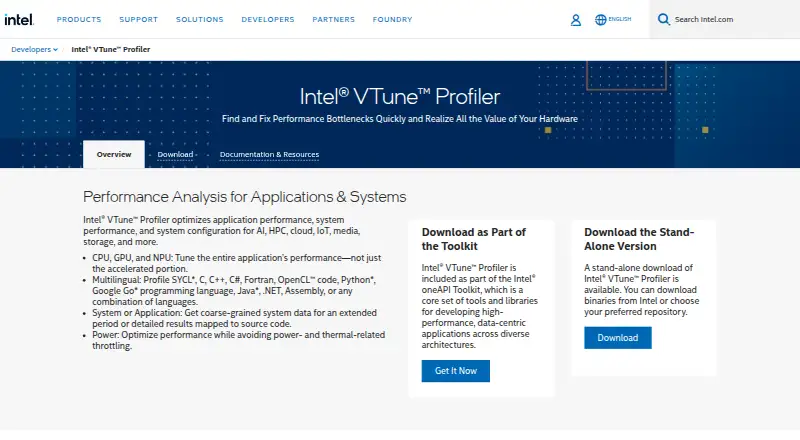
What Intel VTune Profiler is
Intel VTune Profiler analyzes application and system performance to help locate bottlenecks in AI, HPC, cloud, IoT, media, and storage workloads. It profiles CPUs, GPUs, and NPUs, with a unified XPU Offload Analysis view. Hotspot tools locate time-consuming code, and Flame Graphs show the paths through hot code. Microarchitecture exploration examines hardware performance, while memory analysis can identify cache misses and bandwidth problems.
Intel lists support for SYCL, C, C++, C#, Fortran, OpenCL, Python, Go, Java, .NET, and Assembly, including mixed-language applications. The profiler is available as a standalone download or through the oneAPI Toolkit, with integrations for Visual Studio and Eclipse. The listed 2026.4 release supports 64-bit Windows and Linux hosts. Its Linux-only AI Assistant can run collections, report analyses, and suggest optimizations using a user’s own LLM access; Intel cautions that suggestions may be inaccurate. Some analyses require administrator or root privileges. It is free for commercial and non-commercial use.
Who it suits
It suits developers and performance engineers investigating code and hardware behavior across supported CPU, GPU, and NPU workloads. Linux users who want the AI Assistant need to account for its Linux-only availability and the possibility of inaccurate suggestions.
What it does well
- Analyzes CPU, GPU, and NPU performance.
- Flame Graphs visualize hot code paths.
- Supports a broad set of programming languages.
- Available free as a standalone tool or in oneAPI.
- Integrates with Visual Studio and Eclipse.
What to know first
- Some analyses require administrator or root privileges.
- The AI Assistant is Linux-only and may give inaccurate suggestions.
- Platform Profiler receives no further feature or security fixes.
Limits
The tool is free to download, install and use, and Intel says the latest release is publicly available. Older versions require purchased Priority Support; some analyses require administrator or root privileges.
Plans
| Plan | Billed and limits | Price |
|---|---|---|
| Free download | Available as a standalone tool or through the Intel oneAPI Toolkit · Commercial and non-commercial use permitted · Community support available | Free |
| Intel VTune Profiler | Free download; Intel says oneAPI Toolkit components require no license for download, installation, or use. · Latest release publicly available · Older versions require purchased Priority Support | Free |
As intel.com lists them, read 20 Sept 2026. The maker's own page has the final word.
Getting started
- Visit the Intel VTune Profiler website.
- Download VTune as a standalone tool or through the Intel oneAPI Toolkit.
- Install it on a supported 64-bit Windows or Linux host.
- Optionally use the documented Microsoft Visual Studio or Eclipse integration.
- Use administrator or root privileges for analyses that require them.
Intel VTune Profiler is a desktop tool for diagnosing application and system performance across modern processor types. It best serves developers working on demanding, performance-sensitive software in multiple languages. Its breadth and zero purchase price are compelling, while privilege requirements and a cautious AI-assistant design make it less suitable for casual tuning.
Overview
VTune analyzes workloads in AI, high-performance computing, cloud, IoT, media, and storage. You can install it as a standalone download or obtain it through the Intel oneAPI Toolkit. The toolkit components require no license for download, installation, or use, making this a genuinely free tool rather than a short trial.
The 2026.4 release, dated August 6, 2026, supports 64-bit Windows and Linux hosts. Analysis spans CPUs, GPUs, and NPUs, with a unified XPU Offload Analysis view for workloads that move between processor types. That cross-device scope is valuable for heterogeneous applications, but VTune is a profiler rather than a general graphics-card tuning or overclocking package.
Key features
Hotspots, threads, and hardware behavior
VTune identifies time-consuming code hotspots and presents hot paths through Flame Graphs, giving developers a way to move from a slow result to the code consuming time. CPU, memory, and thread profiling are supported. Microarchitecture exploration connects software behavior to processor performance issues, while memory analysis can expose cache misses and bandwidth problems. These views are most useful when ordinary timing points to a symptom and you need hardware-level evidence for the cause.
Broad language coverage
Profiling support covers SYCL, C, C++, C#, Fortran, OpenCL, Python, Go, Java, .NET, and Assembly, including mixed-language applications. That range favors teams combining native code with managed or scripting components, and reduces the need to switch profilers when a project crosses language boundaries.
Integrations and assistant
Intel documents integrations with Microsoft Visual Studio and Eclipse, including an Eclipse option during Linux installation. Linux users on release 2026.4 also get an AI Assistant that can run collections, report analyses, and suggest bottleneck optimizations using their own LLM access. Intel warns that those recommendations may be inaccurate, so the assistant is a starting point for investigation rather than an authority.
Security and maintenance considerations
Some analyses require administrator or root privileges. Intel advises restricting access to the Linux sampling driver because collected system metrics can reveal sensitive information. For VTune Profiler Server deployments, network traffic is encrypted and an appropriate authentication scheme should be selected. Platform Profiler reached its final release in VTune 2025.0 and will receive no further feature improvements or security fixes, a material reason to avoid relying on that component for a long-term workflow.
Pricing
| Plan | Price | What it includes |
|---|---|---|
| Free download | free | Standalone tool or Intel oneAPI Toolkit access, commercial and non-commercial use, and community support. |
| Intel VTune Profiler | free | Latest publicly available release; oneAPI Toolkit components need no license for download, installation, or use. Older versions require purchased Priority Support. |
There are no paid seats, usage quotas, renewal terms, or trial deadlines attached to these free plans. The distinction matters mainly to organizations that need older releases or formal assistance: active oneAPI Priority Support customers can open a toolkit support ticket, while the free offer includes community support. Choose the standalone download for a focused installation; use the toolkit when you want VTune alongside other oneAPI components.
Platforms
VTune is a desktop deployment for Windows and Linux, including self-hosted use. The current release targets 64-bit host operating systems. The AI Assistant is Linux-only, so Windows users do not receive that feature.
Who it's for
Choose VTune for engineering teams, researchers, and independent developers who need to explain bottlenecks across CPU, GPU, and NPU work, especially in mixed-language or accelerator-heavy applications. It is also a practical choice when budget rules out commercial profilers. Look elsewhere if you primarily want automatic driver maintenance, consumer GPU tuning, or a simple overclocking interface; VTune's purpose is measurement and diagnosis.
Pros and cons
- Pro: CPU, GPU, and NPU analysis with a unified XPU Offload Analysis view helps investigate heterogeneous workloads in one profiler.
- Pro: Hotspot, Flame Graph, microarchitecture, cache, bandwidth, and thread views support root-cause investigation rather than a single timing number.
- Pro: Support for SYCL, C, C++, C#, Fortran, OpenCL, Python, Go, Java, .NET, and Assembly fits mixed-language projects.
- Pro: Commercial and non-commercial use costs 0.00 USD, with standalone and toolkit distribution options.
- Con: Administrator or root privileges are required for some analyses, and Linux sampling-driver access needs careful restriction.
- Con: The Linux-only AI Assistant can be inaccurate, so suggested optimizations require human verification.
- Con: Platform Profiler is frozen at its final VTune 2025.0 release without future feature or security fixes.
Alternatives
For driver-focused maintenance rather than code profiling, consider DriverHub, which provides Windows driver search, downloads, installation, updates, and restore-point creation in its free plan. DriverFinder is another Windows driver utility, with paid one-PC and three-PC access plans. DriverMax suits readers seeking scheduled driver-install subscriptions rather than performance analysis.
DriverPack Solution is a free Windows driver package with online and offline options. For AMD-specific Windows graphics or chipset detection, AMD Auto-Detect and Install Tool is the more targeted choice. Auslogics Driver Updater fits users wanting a one-driver-at-a-time free mode or a paid three-PC subscription. IObit Uninstaller addresses Windows application removal and leftover cleanup, not profiling. AVG Secure Browser is for browsing privacy and protection. The GPU Tuning Software, GPU Overclocking Software, PC Overclocking Software, Game Graphics Optimization Software, Game Driver Updaters, and Driver Updater Software lists are better starting points for those respective consumer tasks.
Verdict
Intel VTune Profiler is the right choice for developers who need deep, cross-processor bottleneck analysis without a license fee. Its strongest reasons to choose it are hardware-aware diagnostics and unusually broad language coverage. Look elsewhere when you need consumer-oriented tuning, driver management, or a fully reliable automated optimization adviser.
Verdict
VTune Profiler brings code hotspots, hardware analysis, and memory investigation into a free profiling tool. Its broad language and processor coverage is useful, but some analyses need elevated privileges and the AI Assistant has stated limitations.
Questions
How much does Intel VTune Profiler cost?
The listed download and profiler plans are free. Intel says oneAPI Toolkit components require no license for download, installation or use.
Is there a free plan?
Yes. VTune is available as a free standalone download or through the Intel oneAPI Toolkit, for commercial and non-commercial use.
Which operating systems does it support?
The listed 2026.4 release supports 64-bit host operating systems on Windows and Linux.
Which programming languages can it profile?
Intel lists SYCL, C, C++, C#, Fortran, OpenCL, Python, Go, Java, .NET and Assembly, including mixed-language applications.
Does VTune integrate with development environments?
Intel documents integrations with Microsoft Visual Studio and Eclipse. Linux installation also offers an Eclipse integration option.
What support is available?
Intel directs users to product documentation, forums and support resources. Active oneAPI Priority Support customers can open a toolkit support ticket.
Facts from Intel VTune Profiler's own pages
- AI assistant
- The 2026.4 Linux-only AI Assistant can run collections, report analyses, and suggest bottleneck optimizations using the user’s own LLM access; Intel cautions that its recommendations may be inaccurate. · intel.com, 29 Sept 2026
- CPU, GPU, and NPU
- It provides performance analysis across CPUs, GPUs, and NPUs, including a unified XPU Offload Analysis view. · intel.com, 29 Sept 2026
- Current release
- Intel’s release notes list VTune Profiler 2026.4, released August 6, 2026, and state that it supports 64-bit host operating systems on Windows and Linux. · intel.com, 29 Sept 2026
- Distribution
- VTune Profiler is available as a standalone download or as part of the Intel oneAPI Toolkit. · intel.com, 29 Sept 2026
- Free plan
- Yes · intel.com, 20 Sept 2026
- Hotspots
- The profiler locates time-consuming code hotspots and visualizes hot code paths with Flame Graphs. · intel.com, 29 Sept 2026
- Integrations
- Intel documents integrations with Microsoft Visual Studio and Eclipse; Linux installation also offers an Eclipse integration option. · intel.com, 29 Sept 2026
- Language support
- Intel lists support for profiling SYCL, C, C++, C#, Fortran, OpenCL, Python, Go, Java, .NET, and Assembly code, including mixed-language applications. · intel.com, 29 Sept 2026
- Memory analysis
- Microarchitecture exploration identifies hardware performance issues, while memory analysis can pinpoint cache misses and bandwidth problems. · intel.com, 29 Sept 2026
- Notable limitation
- Intel states that Platform Profiler reached its final release in VTune 2025.0 and will receive no further feature improvements or security fixes. · intel.com, 29 Sept 2026
- Purpose
- VTune Profiler analyzes application and system performance to help find bottlenecks across AI, HPC, cloud, IoT, media, and storage workloads. · intel.com, 29 Sept 2026
- Security
- Some analyses require administrator or root privileges, and Intel advises limiting access to the Linux sampling driver because collected system metrics may expose sensitive information. · intel.com, 29 Sept 2026
- Server security
- Intel says VTune Profiler Server network traffic is encrypted and recommends choosing an appropriate authentication scheme for the deployment. · intel.com, 29 Sept 2026
- Support
- Intel directs users to product documentation, forums, and support resources; active oneAPI Priority Support customers can open a support ticket for the toolkit. · intel.com, 29 Sept 2026
Where Intel VTune Profiler stands on Freedom251
- Graphics optimisers#2 of 35
- PC benchmark tools#5 of 70
- Game Graphics Optimization Software#4 of 34
- PC Overclocking Software#6 of 31
- Game Driver Updaters#5 of 23
- Hardware Diagnostic Software#6 of 26
- Driver updaters#9 of 37
- Driver Updater Software#7 of 28
- GPU Overclocking Software#5 of 19
- Profiling Software#8 of 29
- PC Benchmark Software#21 of 73
- GPU Tuning Software#6 of 16