Freedom251 › Graphics optimisers

NVIDIA ShadowPlay
What NVIDIA ShadowPlay is
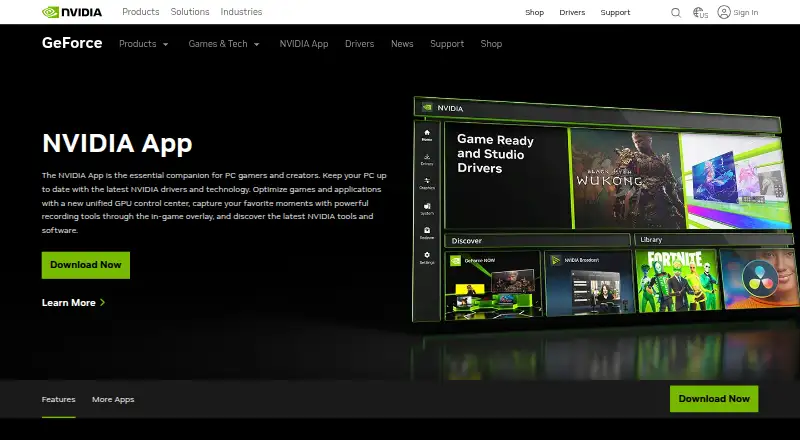
NVIDIA ShadowPlay is a free Windows companion app for PC gamers and creators. It combines driver updates and game and application optimization with recording tools in an in-game overlay. Manual recording supports up to 8K HDR at 30 fps or 4K HDR at 120 fps; NVIDIA describes the performance impact as minimal. Automatic Highlights captures key gameplay moments, while overlay metrics include FPS, GPU and CPU use, FPS 1% Low and system latency. Owners of GeForce RTX 40-series GPUs can record in AV1. The app also provides graphics settings and GPU tuning controls, Freestyle filters for supported games, and ways to find and launch GeForce NOW, Project G-Assist, NVIDIA Broadcast and NVIDIA RTX Remix. It requires Windows 10 or 11, a GeForce RTX 20, 30, 40 or 50 Series GPU, driver 551.52 or later, 2 GB of system memory and 600 MB of disk space. Login is optional.
Who it suits
ShadowPlay suits PC gamers and creators who want gameplay recording, overlay metrics and graphics controls on a supported Windows system. AV1 recording is listed for GeForce RTX 40-series GPU owners.
What it does well
- Free app with optional login.
- Manual recording supports up to 8K HDR at 30 fps.
- Automatic Highlights captures key moments.
- Overlay displays performance and system latency metrics.
What to know first
- Requires Windows 10 or 11.
- Requires a GeForce RTX 20, 30, 40 or 50 Series GPU.
- Requires driver 551.52 or later.
Limits
The free plan requires Windows 10 or 11, a supported GeForce RTX 20, 30, 40, or 50 Series GPU, and GeForce driver 551.52 or later. AV1 recording is limited to GeForce RTX 40-series GPU owners.
Plans
| Plan | Billed and limits | Price |
|---|---|---|
| NVIDIA App | Windows 10 or 11 · GeForce 551.52 driver or later · Supported GPU required | Free |
As nvidia.com lists them, read 29 Sept 2026. The maker's own page has the final word.
Getting started
- Open the NVIDIA App website.
- Use a PC running Windows 10 or Windows 11.
- Make sure the PC has a GeForce RTX 20, 30, 40, or 50 Series GPU.
- Install GeForce driver 551.52 or later.
- Install the app; the listed requirements include 2 GB system memory and 600 MB disk space.
- Sign in optionally to redeem GPU bundles and rewards.
NVIDIA ShadowPlay is a recording and performance overlay within NVIDIA’s companion app for PC gamers and creators. It is best for Windows players with a supported GeForce RTX GPU who want capture, system metrics and graphics controls together. The strongest reason to choose it is that breadth; the main drawback is its narrow hardware and operating-system fit.
Overview
ShadowPlay sits in an app that also updates drivers and optimizes games and applications. Its overlay combines recording with performance monitoring, while a GPU control center adds graphics settings and tuning. That is a practical bundle for users already on supported NVIDIA hardware, but it is not a general-purpose capture tool for every PC.
Login is optional; signing in enables redemption of GPU bundles and rewards. NVIDIA also says it evaluates reported security concerns, provides corrective actions, and publishes security bulletins and notices.
Key features
Manual recording supports up to 8K HDR at 30 fps or 4K HDR at 120 fps. NVIDIA describes the performance impact as minimal. These high ceilings suit creators who need detailed footage, though they are unnecessary for many routine clips. GeForce RTX 40-series owners can record in AV1, which NVIDIA says offers higher fidelity while using less disk space.
Instant replay preserves recent gameplay, and NVIDIA Highlights automatically captures key moments such as clutch kills and match-winning plays. These modes are useful when recording every session is impractical. The overlay also reports FPS, FPS 1% Low, GPU and CPU utilization, and system latency—helpful for checking how a game is running alongside a capture.
Freestyle filters work in supported games, and the app provides a way to discover and launch GeForce NOW, Project G-Assist, NVIDIA Broadcast, and NVIDIA RTX Remix. Those additions broaden the app beyond recording, although their presence does not make ShadowPlay a substitute for each separate product.
Pricing
The NVIDIA App plan is free: free. It includes ShadowPlay’s recording tools and the app’s other features, with no paid tier or seat-based charge described. The cost is a hardware and driver requirement rather than a subscription: Windows 10 or 11, a supported GPU, and GeForce driver 551.52 or later are required.
This is a straightforward fit for eligible users who want capture without a software fee. Users with unsupported hardware cannot solve the limitation by choosing a cheaper plan; they need another tool.
Platforms
ShadowPlay supports Windows 10 and Windows 11. The system requirements call for a GeForce RTX 20, 30, 40, or 50 Series GPU, at least 2 GB of system memory, 600 MB of disk space, and driver version 551.52 or later. This excludes macOS, Linux and non-RTX GeForce systems, so it is a poor choice for mixed-platform setups.
Who it's for
Choose ShadowPlay if you use a supported Windows PC and want high-resolution recording, automatic highlights, replay, performance metrics and graphics controls in one NVIDIA app. Look elsewhere if your computer lacks a listed RTX GPU, runs another operating system, or you need capture software independent of NVIDIA hardware.
Pros and cons
- Pros: Free access avoids a subscription cost for eligible PCs.
- Pros: Manual recording, instant replay and automatic highlights cover both planned capture and moments worth saving after they happen.
- Pros: High-resolution HDR modes and AV1 support on RTX 40-series GPUs give creators options for detailed footage and disk-space efficiency.
- Pros: FPS, utilization and latency metrics sit alongside recording in the overlay.
- Cons: Windows 10 or 11 and a GeForce RTX 20-series or newer GPU are required, ruling out many otherwise capable systems.
- Cons: AV1 recording is limited to RTX 40-series owners, so that efficiency benefit is not universal.
Alternatives
OBS Studio is the better fit when you need a free recorder across Windows, macOS and Linux, or want a plan with no watermarks or usage limitations that can be used commercially. SteelSeries Moments is another free Windows alternative.
Outplayed may suit users who want hosted clips: its Core plan includes three months of Outplayed.tv hosting, while Premium includes unlimited hosting, ad removal, layout customization and enhanced fullscreen mode. Medal is a freemium option spanning Windows, Android and iOS; its Premium plan costs $9.99 a month and includes removable watermarks, auto-generated subtitles, full original-quality uploads and unlimited cloud storage.
Streamlabs Highlighter is a free option built into Streamlabs Desktop, with automated gameplay highlight detection and clip editing and export. Razer Game Clips offers free cloud storage, but requires Razer Cortex and a Razer ID on Windows 10 64-bit or Windows 11. Segra is a free, open-source Linux and Windows recorder with a replay buffer and clip editing. Captail is a free, GPL-licensed Windows x64 option in early public preview.
Verdict
ShadowPlay is a strong choice for Windows gamers with a supported GeForce RTX GPU who want capable recording, automatic capture and useful performance data without paying for the app. Its all-in-one NVIDIA overlay is the reason to pick it; its RTX-only requirements are the reason to look elsewhere if your hardware or platform falls outside that boundary.
Verdict
ShadowPlay brings recording, gameplay metrics and graphics controls into a Windows overlay. Its hardware and driver requirements rule it out for systems outside the listed specifications.
Questions
Is NVIDIA ShadowPlay free?
Yes. The listed NVIDIA App plan costs nothing.
Which operating systems does it support?
It supports Windows 10 and Windows 11.
What hardware does it require?
The requirements list a GeForce RTX 20, 30, 40, or 50 Series GPU, 2 GB of system memory, 600 MB of disk space, and GeForce driver 551.52 or later.
What recording quality does it support?
Manual recording supports up to 8K HDR at 30 fps or 4K HDR at 120 fps. GeForce RTX 40-series GPU owners can record in AV1.
Do I need to sign in?
No. Login is optional and lets users redeem GPU bundles and rewards.
Who makes NVIDIA ShadowPlay?
The listed maker is NVIDIA ShadowPlay, headquartered in Santa Clara, California, United States, and founded in 1993.
Facts from NVIDIA ShadowPlay's own pages
- Automatic highlights
- NVIDIA Highlights automatically captures key moments, clutch kills, and match-winning plays. · nvidia.com, 29 Sept 2026
- AV1 encoding
- The product page says GeForce RTX 40-series GPU owners can record in AV1 for higher fidelity video using less disk space. · nvidia.com, 29 Sept 2026
- Capture resolution
- 8k · nvidia.com, 20 Sept 2026
- Discoverable apps
- The app offers a way to discover and launch GeForce NOW, Project G-Assist, NVIDIA Broadcast, and NVIDIA RTX Remix. · nvidia.com, 29 Sept 2026
- Founded
- 1993 · nvidia.com, 28 Sept 2026
- Free plan
- Yes · nvidia.com, 20 Sept 2026
- GPU encoding
- Yes · nvidia.com, 20 Sept 2026
- Hardware requirements
- The system requirements page lists GeForce RTX 20, 30, 40, and 50 Series GPUs, 2 GB system memory, 600 MB disk space, and GeForce 551.52 driver or later. · nvidia.com, 29 Sept 2026
- Headquarters
- Santa Clara, California, United States · nvidia.com, 28 Sept 2026
- Instant Replay
- ShadowPlay Instant Replay can save the last 30 seconds of gameplay. · nvidia.com, 29 Sept 2026
- Optional login
- NVIDIA says login is optional and lets users redeem GPU bundles and rewards. · nvidia.com, 29 Sept 2026
- Other app features
- The app includes a GPU control center for graphics settings and GPU tuning, and Freestyle filters for supported games. · nvidia.com, 29 Sept 2026
- Other overlay tools
- The in-game overlay can show FPS, GPU and CPU utilization, FPS 1% Low, and system latency metrics. · nvidia.com, 29 Sept 2026
- Recording modes
- multi-mode · nvidia.com, 20 Sept 2026
- Recording quality
- The product page says manual recording supports up to 8K HDR at 30 fps or 4K HDR at 120 fps with minimal performance impact. · nvidia.com, 29 Sept 2026
- Security
- NVIDIA says it evaluates reported security concerns and provides corrective actions, and publishes security bulletins and notices. · nvidia.com, 29 Sept 2026
- Supported operating systems
- The system requirements page lists Windows 10 and Windows 11. · nvidia.com, 29 Sept 2026
- Supported platforms
- Windows · nvidia.com, 20 Sept 2026
- What it does
- NVIDIA describes the app as a companion for PC gamers and creators that updates drivers, optimizes games and applications, and provides recording tools through an in-game overlay. · nvidia.com, 29 Sept 2026
Where NVIDIA ShadowPlay stands on Freedom251
- Graphics optimisers#6 of 35
- Game recording software#8 of 31
- Game Graphics Optimization Software#14 of 34
- Driver updaters#17 of 37
- Game Driver Updaters#12 of 23
- Driver Updater Software#16 of 28