Freedom251 › Game recording software
SteelSeries Moments
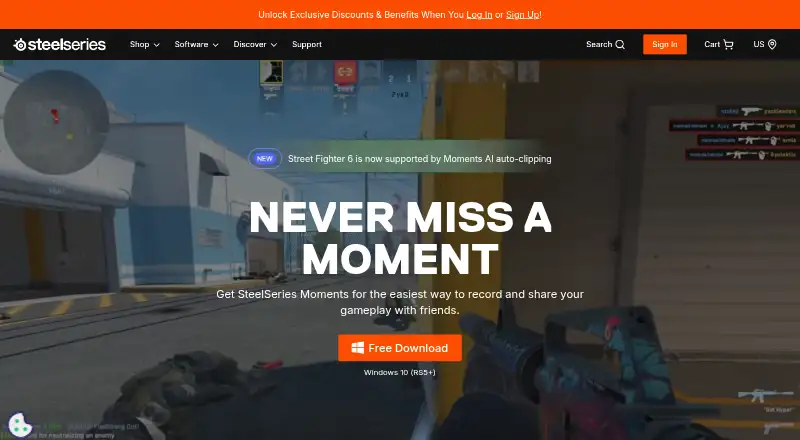
What SteelSeries Moments is
SteelSeries Moments is a free Windows application for capturing and editing gameplay clips. Users can record with a custom hotkey or use AI clipping to save highlights in supported games; listed examples include Fortnite, Counter Strike 2, League of Legends and Street Fighter 6. In-app tools trim footage, combine selected clips into montages and manage clips by exporting, renaming, deleting, filtering or favoriting them. Audio from multiple sources can be captured and edited independently. Clips can be uploaded to YouTube, Discord, Reddit and Twitter (X). Trimmed clips can be saved as new files at full video and audio quality. Users can choose capture intervals and save locations, while adaptive bitrate varies footage quality based on frame complexity. Moments is listed for Windows 10 and newer. Stated system requirements include 8GB RAM, 2GB video RAM and 500MB of disk space, along with specified Intel, AMD, NVIDIA and Intel HD processor or graphics generations.
Who it suits
It suits Windows 10+ players who want to capture, trim and share gameplay clips, or assemble selected footage into montages. It may also fit users who want separate audio tracks or automatic highlights in supported games.
What it does well
- Capture can use a custom hotkey or AI clipping.
- Multi-source audio can be edited independently.
- Clips can be trimmed without reducing video or audio quality.
- Montages can combine selected clips.
- Uploads support YouTube, Discord, Reddit and Twitter (X).
What to know first
- Available for Windows 10 and newer only.
- Requires 8GB RAM and 2GB video RAM.
- Requires 500MB of disk space.
Plans
| Plan | Billed and limits | Price |
|---|---|---|
| Free | — | On request |
As steelseries.com lists them, read 27 Sept 2026. The maker's own page has the final word.
Getting started
- Open the SteelSeries Moments website.
- Download the free application for Windows.
- Check that your PC meets the listed memory, storage, CPU, and GPU requirements.
- Capture gameplay with a custom hotkey or AI clipping in a supported game.
- Trim clips, create montages, manage files, or upload clips to a listed destination.
Overview
SteelSeries Moments is a free Windows app for players who want to save and shape gameplay highlights in one workflow. It is best suited to people who play supported games and want built-in editing and sharing; the main trade-off is that it is Windows-only and automatic clipping is game-dependent.
Key features
Capture can start from a custom hotkey or AI clipping can save event markers automatically in supported games. Fortnite, Counter Strike 2, League of Legends, and Street Fighter 6 are identified, making the automatic option most relevant to players of those titles. Others can still choose moments manually, but should not count on automatic highlights for their game.
Moments trims clips to chosen start and end points while saving edits as new files, preserving the original quality. Multi-track audio lets users capture and edit separate sources independently, and selected clips can be combined into montages. Exporting, renaming, deleting, filtering, and favoriting clips help keep a highlight library manageable. These tools suit preparing and organizing gameplay clips, rather than replacing a broader video-production workflow.
Users can upload clips to YouTube, Discord, Reddit, and Twitter (X), or share them with the Moments community on SteelSeries Discord. Adaptive bitrate allocates more data to complex frames and less to simpler ones. Capture intervals and save locations can also be set, giving users some control over recording and disk use.
Moments also includes audio tools such as noise reduction, equalizer, virtual surround, and audio routing, alongside app-specific and per-game profiles. It can scan a game library and control peripherals, including addressable RGB lighting, lighting profiles, game lighting effects, and cross-device sync. That broader set of controls adds value for SteelSeries peripheral users, while being less central to someone looking only for a clip recorder.
Pricing
Moments is available as a free download, and its Free plan has no published price. No paid tier is described, so there is no stated upgrade path or plan-based cap to weigh. The practical costs to consider are the required Windows system and compatible hardware, rather than a subscription.
Platforms
Moments supports Windows 10 and newer; compatibility is also specified as Windows 10 (RS5+). Requirements include 8GB RAM, 2GB video RAM, and 500MB of HDD space, with Intel Core i5-2xxx or newer or AMD FX-4xxx or newer CPUs. Listed graphics include NVIDIA GeForce 960+, AMD Radeon HD 7870+, and Intel HD 4000+. This is a clear fit for eligible Windows gaming PCs, not for players seeking macOS, Linux, or mobile support.
Who it's for
Choose Moments if you want free gameplay capture with trimming, multi-track audio, montage creation, and direct sharing, especially if you play one of its supported automatic-clipping titles or use SteelSeries peripherals. Look elsewhere if your device is outside Windows, your hardware misses the requirements, or automatic detection for a wider range of games is essential.
Pros and cons
- Pro: Hotkey capture and supported-game automatic clipping cover both deliberate recording and hands-off highlight saving.
- Pro: Non-destructive trimming, independent audio tracks, and montages make it possible to assemble shareable clips without a separate basic editor.
- Pro: Free access plus peripheral, audio, and lighting controls gives SteelSeries users more than capture alone.
- Con: Automatic clipping is limited to supported games, so it is not a universal highlight solution.
- Con: Windows-only support and specified CPU, memory, and graphics requirements rule out some setups.
Alternatives
OBS Studio is a stronger fit for users who need a free recorder across Linux, macOS, and Windows; its free plan has no watermarks or usage limitations and permits commercial use. Outplayed is another Windows freemium option, with Core including three months of Outplayed.tv hosting and Premium including unlimited hosting, ad removal, layout customization, and enhanced fullscreen mode.
NVIDIA ShadowPlay suits Windows users with a supported GPU and GeForce 551.52 driver or later who want NVIDIA App capture at no charge. Medal is worth considering when Android or iOS support matters; its Premium plan is $9.99 a month and includes removable watermarks, auto-generated subtitles, full original-quality uploads, and unlimited cloud storage.
Streamlabs Highlighter is a free macOS or Windows alternative built into Streamlabs Desktop, with automated gameplay highlight detection, editing, and export. Segra is a free Linux and Windows choice with open-source recording, a replay buffer, clip editor, and automatic game highlights.
Bandicam is another freemium recording option. GamePlay may suit Windows users seeking unlimited local gameplay recording and custom keybinds on its free plan; its Pro plan is $9 a month.
Verdict
SteelSeries Moments is a solid choice for Windows players who want free capture, clip editing, montage creation, and sharing, with useful extra controls for SteelSeries peripherals. Its clearest reasons to look elsewhere are a need for another operating system, hardware below its requirements, or automatic clipping beyond its supported games.
Verdict
Moments combines gameplay capture, clip editing, montage creation and sharing in a free Windows app. Check its listed Windows and hardware requirements, and note that automatic clipping is for supported games.
Questions
Does SteelSeries Moments have a free plan?
Yes. Moments is available as a free download.
Which operating systems does it support?
The listed platform is Windows 10 and newer, with Windows 10 (RS5+) also specified.
Can it save gameplay highlights automatically?
Yes. AI clipping can save highlights as event markers in specific supported games. Listed examples include Fortnite, Counter Strike 2, League of Legends, and Street Fighter 6.
Where can I share clips?
Clips can be uploaded to YouTube, Discord, Reddit, and Twitter (X).
Can I edit audio and video in Moments?
Yes. Users can trim clips, save trims as new files at full video and audio quality, and capture and edit audio from multiple sources independently.
What are the listed system requirements?
Requirements include 8GB RAM, 2GB video RAM, 500MB HDD space, Intel Core i5-2xxx or newer or AMD FX-4xxx or newer, and NVIDIA GeForce 960+, AMD Radeon HD 7870+, or Intel HD 4000+ graphics.
Facts from SteelSeries Moments's own pages
- Adaptive bitrate
- Footage uses higher bitrate for complex frames and lower bitrate for simple ones. · steelseries.com, 27 Sept 2026
- AI auto-clipping
- Specific supported games can automatically save highlights as event markers. · steelseries.com, 27 Sept 2026
- In-app editing
- Users can trim clips in the app to set the exact start and end. · steelseries.com, 27 Sept 2026
- Clip management
- Users can export, rename, delete, filter, and favorite clips. · steelseries.com, 27 Sept 2026
- Community Discord
- The Moments community can share clips on the SteelSeries Discord. · steelseries.com, 27 Sept 2026
- CPU requirements
- The listed CPUs are Intel Core i5-2xxx or newer and AMD FX-4xxx or newer. · steelseries.com, 27 Sept 2026
- Disk management
- Users can choose capture intervals and where clips are saved. · steelseries.com, 27 Sept 2026
- Founded
- 2001 · steelseries.com, 28 Sept 2026
- Free download
- Moments is available as a free download. · steelseries.com, 27 Sept 2026
- Free plan
- Yes · steelseries.com, 20 Sept 2026
- Gameplay capture
- Moments captures gameplay with a custom hotkey or AI clipping. · steelseries.com, 27 Sept 2026
- GPU encoding
- Yes · steelseries.com, 20 Sept 2026
- GPU requirements
- The listed GPUs include NVIDIA GeForce 960+, AMD Radeon HD 7870+, and Intel HD 4000+. · steelseries.com, 27 Sept 2026
- Instant replay
- Yes · steelseries.com, 20 Sept 2026
- Montage creation
- Users can combine selected clips into montages within Moments. · steelseries.com, 27 Sept 2026
- Multi-track audio
- Audio from multiple sources can be captured and edited independently. · steelseries.com, 27 Sept 2026
- Non-destructive edits
- Clips can be trimmed and saved as new files at full video and audio quality. · steelseries.com, 27 Sept 2026
- Recording modes
- multi-mode · steelseries.com, 20 Sept 2026
- Sharing destinations
- Clips can be uploaded to YouTube, Discord, Reddit, and Twitter (X). · steelseries.com, 27 Sept 2026
- Supported games
- The page identifies Fortnite, Counter Strike 2, League of Legends, and Street Fighter 6. · steelseries.com, 27 Sept 2026
- Supported platform
- The page lists Windows 10 (RS5+) and Windows 10+ compatibility. · steelseries.com, 27 Sept 2026
- Supported platforms
- Windows 10+ · steelseries.com, 20 Sept 2026
- System requirements
- Requirements include 8GB RAM, 2GB video RAM, and 500MB HDD space. · steelseries.com, 27 Sept 2026
Where SteelSeries Moments stands on Freedom251
- Game recording software#6 of 31
- Graphics optimisers#9 of 35