Freedom251 › Game recording software

Segra
What Segra is
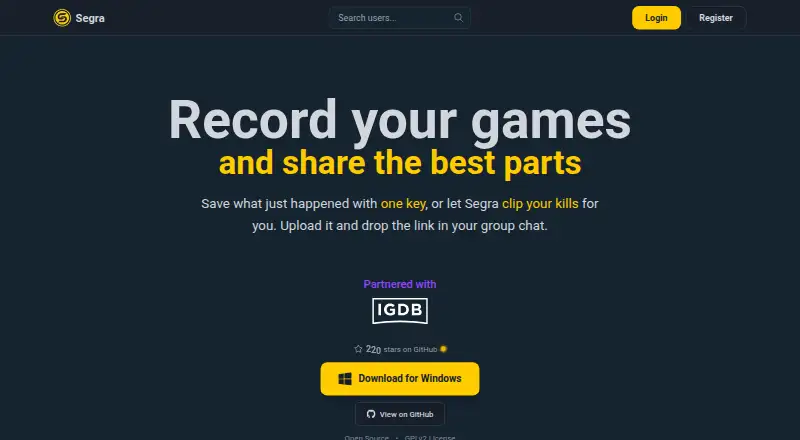
Segra is free, open-source software for recording PC games, capturing recent moments, editing clips, and sharing uploads. Players can bookmark moments with a hotkey, while automatic highlights can detect kills, assists, and deaths in selected games and combine kills into a highlight video. The site says Segra can record games that run on a PC, with automatic clipping available for selected games. Capture is listed at up to 4K and 144 FPS, with GPU encoding and multiple recording modes. The project README lists H.264, HEVC, and AV1 encoding, multiple audio devices, separate audio tracks, and microphone noise suppression. Segra is built on OBS and uses FFmpeg for video and image encoding. It is available for Windows 10/11, with a minimum requirement of Windows 10 64-bit version 1903 or newer; Linux support is described as early alpha and may have broken or missing features. The software is open source under GPLv2. Its privacy policy says uploaded videos may be stored outside the EU through a CDN.
Who it suits
Segra suits PC players who want to record gameplay, save moments, and edit clips without a paid plan. Windows users have specified platform support; Linux users should note that support is early alpha.
What it does well
- Free and open source under GPLv2.
- Records up to 4K at 144 FPS.
- Includes a replay buffer and clip editor.
- Automatic highlights are available for selected games.
- GPU encoding is available.
What to know first
- Linux support is early alpha.
- Automatic clipping is available only for selected games.
- Uploads are limited to content recorded with Segra.
- Uploaded videos may be stored outside the EU.
Limits
The Free plan costs nothing and includes open-source game recording, replay buffer, clip editor, and automatic game highlights. Linux is early alpha, and automatic clipping is available for selected games.
Plans
| Plan | Billed and limits | Price |
|---|---|---|
| Free | Open-source game recording · Replay buffer · Clip editor · Automatic game highlights | Free |
As segra.tv lists them, read 20 Sept 2026. The maker's own page has the final word.
Getting started
- Visit segra.tv and open the download page.
- For Windows, use a Windows 10/11 x64 build; the minimum is Windows 10 64-bit version 1903 or newer.
- For Linux, use the early alpha support described by the project.
- Install and launch Segra, then record gameplay and bookmark moments with a hotkey.
- Edit clips and upload only content recorded with Segra software.
Verdict
Segra offers game recording, replay, editing, and automatic highlights at no cost. Its platform details distinguish specified Windows support from early-alpha Linux support; uploads are restricted to content recorded with Segra.
Questions
How much does Segra cost?
The Free plan costs nothing.
Which platforms does Segra support?
Windows 10/11 is listed, and Linux support is described as early alpha. The Windows download is x64 and requires Windows 10 64-bit version 1903 or newer.
Is Segra open source?
Yes. It is free and open source under GPLv2, and its code is available on GitHub.
Does Segra record games automatically?
It records games in the background, and a hotkey can bookmark moments. Automatic highlights are available for supported games, while automatic clipping is available for selected games.
What is included in the Free plan?
Open-source game recording, replay buffer, clip editor, and automatic game highlights.
Can I upload any video to Segra?
The privacy policy says users may upload only content recorded with Segra software.
Facts from Segra's own pages
- Automatic highlights
- Segra can detect kills, assists, and deaths in supported games and combine kills into a highlight video. · segra.tv, 7 Oct 2026
- Capture resolution
- 4k · segra.tv, 20 Sept 2026
- Code signing
- The download page says Windows builds are code-signed by SignPath Foundation, and that SmartScreen may warn about new releases. · segra.tv, 7 Oct 2026
- Components
- Segra is built on OBS and uses FFmpeg for video and image encoding. · github.com, 7 Oct 2026
- Data location
- The privacy policy says the main application database is processed in the EU, while uploaded videos may be stored outside the EU through a CDN. · segra.tv, 7 Oct 2026
- Free plan
- Yes · segra.tv, 20 Sept 2026
- Game support
- The site says any game that runs on a PC can be recorded, with automatic clipping available for selected games. · segra.tv, 7 Oct 2026
- GPU encoding
- Yes · segra.tv, 20 Sept 2026
- Instant replay
- Yes · segra.tv, 20 Sept 2026
- Linux availability
- The project README describes Linux support as early alpha and warns that it may fail to start or have missing or broken features. · github.com, 7 Oct 2026
- Open source
- Segra is free and open source under GPLv2, and its code is available on GitHub. · segra.tv, 7 Oct 2026
- Privacy
- The privacy policy says Segra does not use third-party tracking services, store IP addresses, or use cookies for advertising or analytics. · segra.tv, 7 Oct 2026
- Purpose
- Segra records PC games in the background, lets players bookmark moments with a hotkey, edit clips, and upload them to share. · segra.tv, 7 Oct 2026
- Recording codecs and audio
- The project README lists H.264, HEVC, and AV1 encoding, multiple audio devices, separate audio tracks, and microphone noise suppression. · github.com, 7 Oct 2026
- Recording modes
- multi-mode · segra.tv, 20 Sept 2026
- Recording quality
- The site says Segra records up to 4K at 144 FPS. · segra.tv, 7 Oct 2026
- Support
- The download page directs users to GitHub and Discord to report bugs, request features, or contact the community. · segra.tv, 7 Oct 2026
- Supported platforms
- Windows 10/11; Linux alpha · segra.tv, 20 Sept 2026
- Upload restriction
- The privacy policy says users may upload only content recorded with Segra software. · segra.tv, 7 Oct 2026
- Windows availability
- The download page lists Windows 10/11 (x64) and minimum requirements of Windows 10 64-bit version 1903 or newer. · segra.tv, 7 Oct 2026
Where Segra stands on Freedom251
- Game recording software#10 of 31