Freedom251 › Game recording software
Outplayed
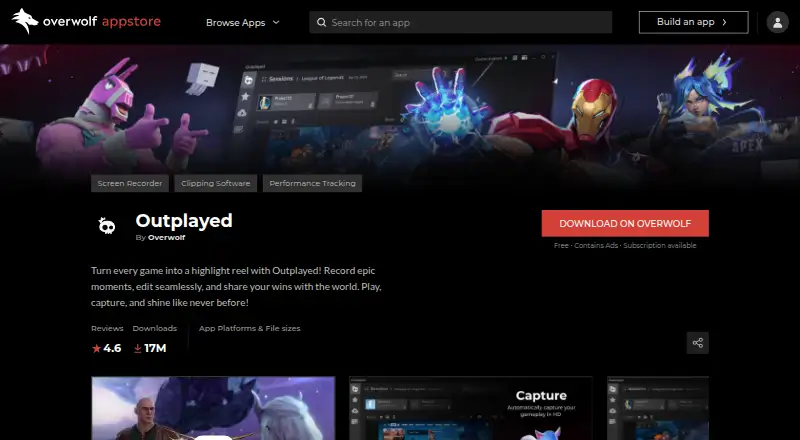
What Outplayed is
Outplayed is a Windows desktop app from Overwolf for recording and clipping game footage. It captures gameplay moments, lets users edit clips, and supports sharing gaming achievements. Its listed recording capabilities include instant replay, multiple recording modes, GPU encoding, webcam overlay, and watermark-free video. Outplayed supports over 5000 games and is made for desktop gaming; it is not a mobile app. The app is available as a free download, and the free tier contains ads. An Outplayed Premium subscription removes ads and unlocks premium features. Premium details include unlimited Outplayed.tv hosting, layout customization, enhanced fullscreen mode, and watermark controls for Editor projects. The Core plan includes three months of Outplayed.tv hosting. Prices are not given for these plans. Downloading Outplayed installs the Overwolf Client. Users do not need to sign in and can opt out of data collection. Overwolf says its performance standards are intended to prevent apps from harming FPS.
Who it suits
Outplayed suits Windows players who want to record gameplay, make clips, and share gaming moments. It may also fit players who want instant replay, webcam overlays, or GPU encoding across its supported games.
What it does well
- Supports over 5000 games.
- Includes instant replay and multiple recording modes.
- GPU encoding and webcam overlay are listed.
- Watermark-free video is supported.
- Users can opt out of data collection without signing in.
What to know first
- The free tier contains ads.
- Downloading the app installs the Overwolf Client.
- There is no mobile app.
Plans
| Plan | Billed and limits | Price |
|---|---|---|
| Core | 3 months Outplayed.tv hosting | On request |
| Core | 3 months Outplayed.tv hosting | On request |
| Premium | Unlimited Outplayed.tv hosting · Ad removal · Layout customization · Enhanced fullscreen mode · Watermark controls for Editor projects | On request |
| Premium | Unlimited Outplayed.tv hosting · Ad removal · Layout customization · Enhanced fullscreen mode · Watermark controls for Editor projects | On request |
| Free | — | On request |
| Outplayed Premium | — | On request |
As overwolf.com lists them, read 20 Sept 2026. The maker's own page has the final word.
Getting started
- Open the Outplayed page on Overwolf's website.
- Download the Windows desktop app; downloading also installs the Overwolf Client.
- Use the free tier or choose an Outplayed Premium subscription.
- Record gameplay, edit clips, and share gaming achievements.
Outplayed is a Windows app for recording gameplay, editing clips, and sharing gaming moments. It best suits PC players who want game-focused capture across a wide range of titles. Its free tier covers the core app, while ads and the required Overwolf Client are meaningful trade-offs.
Overview
Outplayed supports more than 5,000 games and brings recording, clip editing, and sharing into one workflow. Instant replay, multiple recording modes, GPU encoding, webcam overlays, and watermark-free video give players useful capture options, especially when they want to save highlights rather than keep every session as a single recording.
The desktop-only focus makes it a poor fit for mobile gaming. Installing Outplayed also installs the Overwolf Client, an extra part of the setup for players who prefer a standalone recorder. Overwolf says its performance standards are intended to prevent apps from harming FPS; that stated aim does not guarantee the same result on every system. Users do not need to sign in and can opt out of data collection.
Key features
- Game capture: Instant replay and multiple recording modes give players more than one way to preserve gameplay. Support for over 5,000 games makes the app relevant across a broad PC library.
- Editing and sharing: Outplayed combines recording, clip editing, and sharing gaming achievements, so its workflow is aimed at turning gameplay moments into clips.
- Capture options: GPU encoding and webcam overlays support different recording setups, while watermark-free video is useful for sharing clips without a visible mark.
- Privacy controls: No sign-in is required, and users can opt out of data collection. That gives privacy-conscious players control without making account creation part of the basic workflow.
Pricing
Outplayed is freemium, with a free app tier that contains ads. The free option is a sensible starting point for players who want to use the recording and clipping workflow without paying a subscription, but the ads are an ongoing drawback.
Outplayed Premium removes ads and unlocks premium features. Its listed benefits include unlimited Outplayed.tv hosting, layout customization, enhanced fullscreen mode, and watermark controls for Editor projects. Core includes three months of Outplayed.tv hosting, making it the more limited hosting option for players who need a defined hosting period. Premium is the better fit for people who want the listed hosting and customization benefits, while Core may suit those who need hosting for a shorter stretch. No plan prices are listed, so the cost difference cannot be weighed here.
Platforms
Outplayed is a Windows desktop app, with no mobile app. It is suited to PC gameplay capture and does not serve players looking for a phone-based recording tool.
Who it's for
Outplayed fits Windows players who want recording, instant replay, editing, and sharing in a game-focused app with support for many titles. The free tier offers a way to start, and Premium makes more sense for users who want ad removal, unlimited hosting, or the additional editing and layout options. Players who want a mobile app or do not want the Overwolf Client should look elsewhere.
Pros and cons
- Pro: Support for over 5,000 games broadens its usefulness across PC libraries.
- Pro: Instant replay, multiple recording modes, editing, and sharing cover several steps in a highlight workflow.
- Pro: The app supports GPU encoding, webcam overlays, and watermark-free video.
- Pro: Users can opt out of data collection and use the app without signing in.
- Con: The free download contains ads; removing them requires Premium.
- Con: Installation also installs the Overwolf Client, which may not suit players seeking a standalone recorder.
- Con: Windows desktop support excludes mobile users and players on other desktop platforms.
Alternatives
OBS Studio is a strong alternative for players who want a free recorder with no watermarks or usage limitations, including commercial use, and need Linux or macOS support alongside Windows.
SteelSeries Moments is another free Windows option to consider for game recording.
NVIDIA ShadowPlay may suit Windows 10 or 11 players with a supported GPU and GeForce driver 551.52 or later who want a free option.
Medal is worth considering for players who want Android or iOS support in addition to Windows, with a Premium plan at $9.99 a month billed monthly that includes removable watermarks, subtitles, full original-quality uploads, and unlimited cloud storage.
Streamlabs Highlighter may fit users who already use Streamlabs Desktop and want automated gameplay highlight detection, clip editing, and export on macOS or Windows.
Razer Game Clips is a free Windows alternative for players comfortable using Razer Cortex and a Razer ID, with cloud storage at no extra cost.
Segra is a free, open-source option for Linux or Windows players who want game recording and a replay buffer.
Captail is a free, open-source Windows x64 app in early public preview.
For more options, browse Game recording software or Game Playtime Trackers.
Verdict
Choose Outplayed if you play on Windows and want a broad game library, replay and recording options, and a built-in path from capture to edited, shareable clips. Its free tier makes it accessible, but ads, the Overwolf Client installation, and the desktop-only focus are good reasons to compare alternatives.
Verdict
Choose Outplayed if you want a Windows game recorder with clipping, editing, and sharing features across supported titles. The free download contains ads, and the Premium subscription removes them and unlocks premium features; no plan prices are listed.
Questions
Is Outplayed free?
Yes. Outplayed is available as a free download, and its free tier contains ads.
What does Outplayed Premium cost?
A subscription is available, but no price is listed.
What platforms does Outplayed support?
It is a Windows desktop app and has no mobile app.
Does Outplayed require an account?
Users are not required to sign in and can opt out of data collection.
What are the Core and Premium plan details?
Core includes three months of Outplayed.tv hosting. Premium includes unlimited hosting, ad removal, layout customization, enhanced fullscreen mode, and watermark controls for Editor projects.
Who makes Outplayed?
Overwolf is the developer behind Outplayed.
Facts from Outplayed's own pages
- Ad Revenue Share
- App creators receive 70% of ad revenue. · overwolf.com, 28 Sept 2026
- Download Count
- The app page lists 17M downloads. · overwolf.com, 28 Sept 2026
- App Type
- Outplayed is a screen recording and clipping software app for games. · overwolf.com, 28 Sept 2026
- Webcam overlay
- Yes · overwolf.com, 20 Sept 2026
- Desktop Only
- The app is made for desktop gaming and is not made for mobile. · overwolf.com, 28 Sept 2026
- App Developer
- Overwolf is the developer behind Outplayed. · overwolf.com, 28 Sept 2026
- Developer Reach
- Overwolf is trusted by millions of players and over 165k developers and modders. · overwolf.com, 28 Sept 2026
- Free plan
- Yes · overwolf.com, 20 Sept 2026
- Free Tier
- Outplayed is available as a free download and contains ads. · overwolf.com, 28 Sept 2026
- GPU encoding
- Yes · overwolf.com, 20 Sept 2026
- Instant replay
- Yes · overwolf.com, 20 Sept 2026
- Client Required
- Downloading the app installs the Overwolf Client. · overwolf.com, 28 Sept 2026
- FPS Protection
- Overwolf says its performance standards are intended to prevent apps from harming FPS. · overwolf.com, 28 Sept 2026
- Premium Benefits
- Premium removes ads and unlocks premium features. · overwolf.com, 28 Sept 2026
- Privacy Controls
- Users are not required to sign in and can opt out of data collection. · overwolf.com, 28 Sept 2026
- User Rating
- The app has a 4.6 out of 5.0 rating from 2494 ratings. · overwolf.com, 28 Sept 2026
- Core Workflow
- It records moments, edits clips, and supports sharing gaming achievements. · overwolf.com, 28 Sept 2026
- Recording modes
- multi-mode · overwolf.com, 20 Sept 2026
- Subscription Available
- A subscription option is available through Outplayed Premium. · overwolf.com, 28 Sept 2026
- Supported Games
- Outplayed supports over 5000 games. · overwolf.com, 28 Sept 2026
- Supported platforms
- Windows · overwolf.com, 20 Sept 2026
- Watermark-free video
- Yes · overwolf.com, 20 Sept 2026
Where Outplayed stands on Freedom251
- Game recording software#7 of 31