Freedom251 › Graphics optimisers
Gaming Optimizer
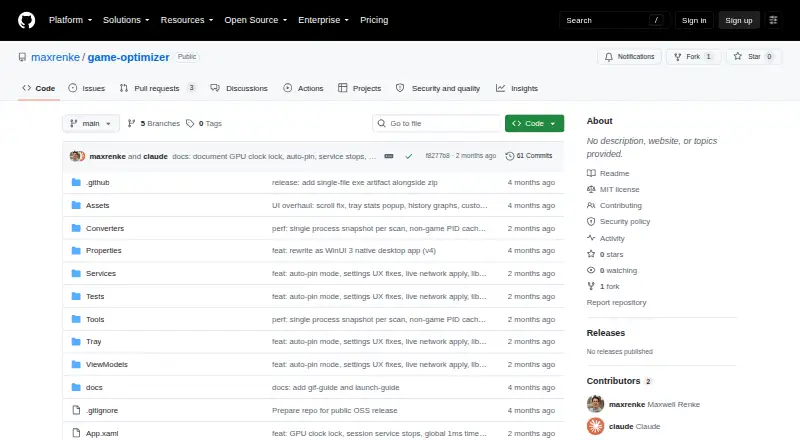
What Gaming Optimizer is
Gaming Optimizer is a free, open-source Windows app for managing CPU affinity in games and background processes. It can assign games to fast cores and demote background activity, but CPU pinning is off by default and process changes do not occur until pinning is enabled. The app says it restores altered processes and system settings when a game closes. Its dashboard displays CPU and GPU measures, network traffic, ping and jitter, bottleneck classifications, and process zones. It detects game launches through WMI and can scan libraries from Steam, Epic Games, GOG, Ubisoft Connect, and EA App. Per-game session reports include average and peak CPU and GPU measures and bottleneck breakdowns, with a cumulative sessions.csv file. An optional setting can lock NVIDIA graphics clocks during a game and reset them afterward. The maker says there is no telemetry, analytics, or update checking; the only outbound connection is a configurable latency ping. It requires Windows 10 version 1809 or Windows 11, an x64 processor, and administrator rights. The README describes ZIP distribution without an installer, while the Releases page lists no releases.
Who it suits
Gaming Optimizer is for Windows gamers who want CPU-affinity controls and system monitoring. The maker notes potential benefit on Intel hybrid CPUs and systems where background activity causes frame-time spikes.
What it does well
- CPU pinning is off by default
- Restores changed settings when a game closes
- Scans several listed game libraries
- Includes per-game session reports
- Maker says it has no telemetry or analytics
What to know first
- Requires administrator rights at launch
- Supports Windows 10 version 1809 or Windows 11
- Requires an x64 processor
- Releases page lists no releases
Limits
The free plan is for Windows. CPU pinning is off by default, and process modifications wait until it is enabled.
Plans
| Plan | Billed and limits | Price |
|---|---|---|
| Gaming Optimizer | No pricing or paid plans stated | Free |
As github.com lists them, read 4 Oct 2026. The maker's own page has the final word.
Getting started
- Open the project website.
- Obtain the ZIP download described in the README.
- Run it on Windows 10 version 1809 or Windows 11 with an x64 processor.
- Launch with administrator rights.
- Enable CPU pinning if you want process modifications to occur.
Overview
Gaming Optimizer is a Windows utility for managing game and background-process CPU priorities alongside performance monitoring. It is best for PC gamers who want session-level controls and records, particularly on Intel hybrid CPUs or systems where background activity causes frame-time spikes. Its opt-in approach is a meaningful safeguard, but administrator access and ZIP distribution add friction.
Key features
Process management
The app can steer games toward fast CPU cores and demote background processes. Pinning starts off, so process changes wait until you enable it; when a game closes, the app says it restores altered processes and system settings. That gives cautious users control over whether optimization runs and limits its intended effects to the session. The cost is that affinity and priority changes require administrator rights at launch.
Monitoring and session records
The dashboard combines per-zone CPU use, GPU metrics, network activity, ping and jitter, process lists, and bottleneck classification. Game launches are detected through WMI, and library scanning covers Steam, Epic Games, GOG, Ubisoft Connect, and EA App. Per-game reports include average and peak CPU and GPU metrics and bottleneck breakdowns, with sessions also accumulated in a CSV file. This makes the tool useful for tracking patterns across play sessions, not just changing process priorities.
GPU and network controls
An optional setting can lock NVIDIA GPU clocks while a game runs and reset them on exit; it relies on nvidia-smi, so it is relevant only to NVIDIA graphics users. The maker says the only outbound connection is a configurable latency ping, with no telemetry, analytics, or update checks. That is a privacy-conscious design, though users who disable the ping give up that network measurement.
Pricing
Gaming Optimizer costs nothing. The free plan includes the app's process management, automatic game detection, profiles, custom boost control, and command-line support; no paid plan or trial is described. There is no stated seat or usage quota to weigh against the zero price. The repository is MIT licensed, which suits users who value public-source software, but setup remains a manual ZIP download rather than an installer.
Platforms
Gaming Optimizer supports Windows 10 version 1809 or Windows 11 on an x64 processor, and requires administrator rights. It is not a fit for macOS or Linux users. The README describes ZIP distribution with no installer, and the GitHub Releases page currently has no releases, so prospective users should weigh that release situation before relying on it as a routine deployment.
Who it's for
Choose it if you use a supported Windows system, want explicit control over process pinning, and value per-game performance records. It has particular potential for Intel hybrid CPUs and PCs where background work contributes to frame-time spikes. It is a weaker choice if you need a conventional installer, do not want to grant administrator access, or want a multi-platform optimizer.
Pros and cons
- Pros: Pinning is off until enabled, and the app says it restores changes when a game exits, giving users control over the scope of process management.
- Pros: Detailed dashboard metrics and per-game reports, plus a cumulative CSV, help track performance and bottleneck patterns over time.
- Pros: The maker says it sends no telemetry, analytics, or update checks; the only outbound connection is a configurable latency ping.
- Cons: Administrator rights are required at launch, which may be unsuitable for users who cannot or will not elevate an app.
- Cons: ZIP-only distribution, with no installer and no releases currently shown on the Releases page, makes adoption less straightforward.
- Cons: Windows-only support excludes gamers looking for the same workflow on macOS or Linux.
Alternatives
For another Windows process-control option, consider CorePin: its free plan supports 64-bit Windows 10/11 for personal, hobby, educational, research, and internal business use, but prohibits commercial resale and paid redistribution.
Linux users should consider Feral GameMode instead; its free offering is a Linux daemon and library under the BSD 3-Clause License.
If you want a broader Windows game-boosting package, PC Game Booster has a free plan with basic game optimizations, system-feature suspension, game management, automatic boosting on launch, and hard-drive defragmentation.
PotatoBoost is another Windows freemium choice, with a free-forever plan covering hardware detection, PC health, memory optimization, privacy scanning and cleanup, and startup and process tools.
For game graphics optimization categories, browse Game Graphics Optimization Software; for a wider PC maintenance comparison, see PC Optimization Software. Game Booster Software is a broader category, while ROM Patching Software is for readers seeking ROM patching tools.
Huawei HiSuite, MAGIX Music Maker, Razer Game Clips, and Smart Game Booster are also alternatives to compare.
Verdict
Gaming Optimizer is a sensible free choice for Windows gamers who want opt-in CPU process management backed by session monitoring and reports. Its strongest case is the combination of reversible, user-enabled controls and useful records without telemetry. Look elsewhere if you need easier installation, broader platform support, or a release channel you can rely on.
Verdict
Gaming Optimizer provides opt-in process management, monitoring, and session reports for supported Windows systems. Check the operating-system and administrator requirements, and note that its README describes ZIP distribution without an installer.
Questions
How much does Gaming Optimizer cost?
The listed plan is free.
Which platforms does it support?
It supports Windows 10 version 1809 or Windows 11 on an x64 processor.
Is Gaming Optimizer open source?
Yes. The public repository identifies the project as MIT licensed.
Does it make changes to processes automatically?
CPU pinning is off by default; the README says process modifications occur only after it is enabled.
What game libraries can it scan?
It can scan Steam, Epic Games, GOG, Ubisoft Connect, and EA App.
What network data does the app send?
The maker says its only outbound connection is a configurable latency ping, and that it has no telemetry, analytics, or update checks.
Facts from Gaming Optimizer's own pages
- Administrator access
- The app requests administrator privileges at launch because affinity and priority changes require them. · github.com, 4 Oct 2026
- Dashboard
- The dashboard displays per-zone CPU use, GPU metrics, network activity, latency and jitter, bottleneck classification, and process lists. · github.com, 4 Oct 2026
- Distribution
- The README describes a ZIP download with no installer, but the GitHub releases page currently says there are no releases. · github.com, 4 Oct 2026
- Game detection
- It detects game launches through WMI and can scan Steam, Epic Games, GOG, Ubisoft Connect, and EA App libraries. · github.com, 4 Oct 2026
- Game library detection
- The app scans Steam, Epic Games, GOG, Ubisoft Connect, and EA App for installed games. · github.com, 3 Oct 2026
- GPU control
- An optional setting can lock NVIDIA graphics clocks while a game runs and reset them when it exits. · github.com, 4 Oct 2026
- GPU support
- Optional GPU clock locking is available for NVIDIA graphics cards through nvidia-smi. · github.com, 3 Oct 2026
- Intended users
- The maker describes it as a Windows-only tool for gamers, with particular potential benefit on Intel hybrid CPUs and systems where background activity causes frame-time spikes. · github.com, 4 Oct 2026
- License
- The repository identifies the project as MIT licensed. · github.com, 3 Oct 2026
- Monitoring
- The dashboard tracks CPU and GPU metrics, network traffic, ping and jitter, bottlenecks, and process zones. · github.com, 3 Oct 2026
- Network and privacy
- The maker says the only outbound connection is a configurable latency ping; the app sends no telemetry, analytics, or update checks. · github.com, 3 Oct 2026
- Open source
- The repository is public and carries an MIT license. · github.com, 4 Oct 2026
- Opt-in pinning
- CPU pinning is off by default, and the app says it makes no process modifications until pinning is enabled. · github.com, 4 Oct 2026
- Platform requirements
- The app requires Windows 10 version 1809 or Windows 11, an x64 processor, and administrator rights. · github.com, 4 Oct 2026
- Privacy
- The maker states the app has no telemetry, analytics, or update checks; its only outbound connection is a configurable latency ping. · github.com, 4 Oct 2026
- Purpose
- Gaming Optimizer automatically manages CPU affinity for Windows games, pinning games to faster cores and demoting background processes. · github.com, 4 Oct 2026
- Release availability
- The GitHub Releases page opened for this research says there are no releases. · github.com, 3 Oct 2026
- Reversible changes
- When a game closes, the app says it reverts process changes and restores system settings to Windows defaults. · github.com, 4 Oct 2026
- Security reporting
- The security policy directs vulnerability reports to GitHub private reporting or the listed email and says reporters should receive a response within 72 hours. · github.com, 3 Oct 2026
- Security support
- The security policy says vulnerability reports receive a response within 72 hours and should be submitted privately or by email. · github.com, 4 Oct 2026
- Session reports
- Per-game session reports include average and peak CPU and GPU metrics, bottleneck breakdowns, and a cumulative sessions.csv file. · github.com, 4 Oct 2026
- Supported versions
- Only the latest release is actively maintained, according to the security policy. · github.com, 3 Oct 2026
Where Gaming Optimizer stands on Freedom251
- Graphics optimisers#4 of 35
- Game Booster Software#3 of 18
- Game Graphics Optimization Software#10 of 34
- PC optimisers#41 of 104
- PC Optimization Software#43 of 97