Huawei HiSuite
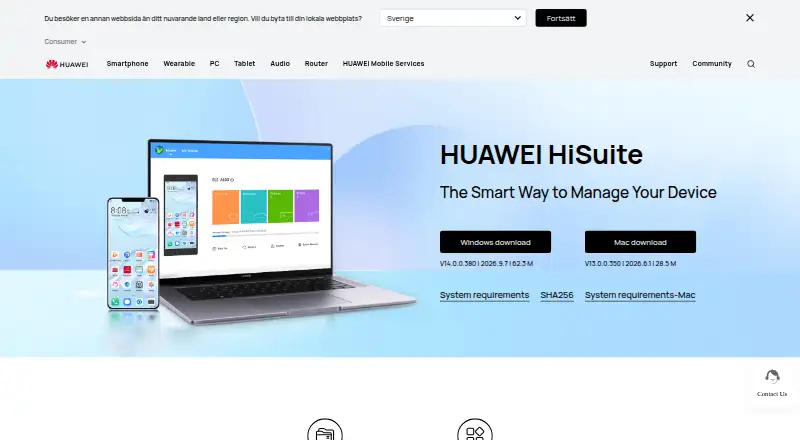
What Huawei HiSuite is
Huawei HiSuite is free computer software for managing a HUAWEI device from Windows or Mac. It lets users work with contacts, messages, pictures, videos, applications, and other data, as well as files on internal storage and SD cards. Files can be imported to phones or exported to computers. HiSuite can back up phone data to a computer and transfer backed-up data to devices, and it offers mobile system upgrade and rollback functions. System Recovery can restore a device to factory settings if its system crashes and will not turn on.
Messaging tools support sending and receiving messages on a computer, exporting messages, and mass text messaging. Setup requires enabling HDB, approving phone authorizations, and entering an eight-digit verification code; HDB authorizations can later be revoked. The Mac version supports only picture, video, and file management, plus backup and restore. Listed Windows requirements are Windows 7, 8.1, 10, or 11 in 32-bit or 64-bit editions, 500 MB of available disk space, and 1 GB RAM.
Who it suits
HiSuite suits HUAWEI device owners who want to manage phone data and files from a computer or back up phone data to a computer. Mac users should note its narrower feature set.
What it does well
- Manages contacts, messages, media, and applications.
- Backs up phone data to a computer.
- Offers system upgrade, rollback, and recovery functions.
- Supports file management on internal storage and SD cards.
- Free for Windows and Mac.
What to know first
- Mac supports only selected management and backup functions.
- Setup requires HDB, phone authorization, and a verification code.
- Windows needs 500 MB disk space and 1 GB RAM.
Limits
The Mac version is limited to picture, video, and file management, plus backup and restore. Windows requirements list Windows 7, 8.1, 10, or 11, 500 MB of available disk space, and 1 GB RAM.
Plans
| Plan | Billed and limits | Price |
|---|---|---|
| HUAWEI HiSuite | Windows and Mac downloads · Mac version supports picture, video, file, and backup/restore functions | Free |
As consumer.huawei.com lists them, read 3 Oct 2026. The maker's own page has the final word.
Getting started
- Visit Huawei's HiSuite support page.
- Download the Windows or Mac version.
- Connect the HUAWEI device and enable HDB.
- Agree to the phone authorizations and enter the eight-digit verification code.
- Use HiSuite to manage data, files, backups, messages, or supported system functions.
- Revoke HiSuite's HDB authorizations afterward if desired.
Overview
Huawei HiSuite is desktop software for managing a HUAWEI phone from a computer. It suits owners who want to organize phone data, keep a computer backup, or handle system recovery without paying for a utility. Windows gets the fuller management and messaging toolkit; Mac is chiefly for media, files, and backup and restore.
Key features
HiSuite brings contacts, messages, pictures, videos, applications, and other phone data into a computer-based workflow. It can back up phone data to a computer and transfer backed-up data to devices, with file-based backup and restore. That makes it useful for keeping a local copy or moving backed-up data, but it is not a computer-backup product: it does not back up a computer or server.
File management covers internal storage and SD cards, with import to the phone and export to a computer. Users can send and receive messages on a computer, export messages, and send mass texts. These tools make the Windows version more capable than a basic file-moving utility; the Mac version supports only picture, video, and file management plus backup and restore.
System Recovery can restore a device to factory settings if its system crashes and will not turn on. Upgrade and rollback functions provide additional ways to manage the HUAWEI mobile system. Recovery is a useful fallback for a device that cannot start, but factory restoration is a consequential measure rather than a routine data-management feature.
Connecting requires enabling HDB, accepting authorizations on the phone, and entering an eight-digit verification code. Users can revoke HiSuite's HDB authorizations afterward. The phone-side steps add friction, but they make the connection a deliberate, authorized process. Huawei's privacy statement says it uses cryptographic technologies for data transmission and storage, alongside access controls that restrict access to personal data.
Pricing
HUAWEI HiSuite: free. The free plan includes Windows and Mac downloads, with the Mac version limited to picture, video, and file management and backup and restore. There are no paid tiers or subscription terms to weigh; the main trade-off is platform capability, not price. It is a straightforward choice for HUAWEI owners who need the supported functions, while users needing the Windows-only tools on a Mac will need another approach.
Platforms
HiSuite is available for Windows and macOS and supports both mobile operating systems. Windows requirements are Windows 7, 8.1, 10, or 11 in 32-bit or 64-bit editions, 500 MB of available disk space, and 1 GB of RAM. Phone-to-phone transfer and app transfer are supported; phone-to-computer transfer is not. Support options include Huawei hotline, email feedback, and service center location assistance.
Who it's for
HiSuite is best for HUAWEI phone owners who want free computer-based access to phone data, a file backup they can restore to devices, or system recovery and update tools. Windows users get the strongest case: messaging and wider data management join backup, file handling, and system functions. Mac users should choose it when media, file management, and backup and restore are enough, not when they need the broader toolkit.
Pros and cons
- Pro: The free plan includes backup and restore, file handling, data management, and system recovery tools, so routine device care does not require a paid plan.
- Pro: Windows users can manage and export messages, send and receive them on a computer, and send mass texts alongside other phone data.
- Pro: Recovery, upgrade, and rollback functions address system maintenance as well as everyday file and data tasks.
- Con: Mac support is limited to pictures, videos, files, and backup and restore, excluding the broader management and messaging workflow.
- Con: Setup depends on HDB, phone-side authorization, and an eight-digit verification code, so connecting is not a plug-in-and-go process.
- Con: Backup is file-based and phone-focused; it does not cover computer or server backup.
Alternatives
For a broader comparison of phone migration tools, start with the Phone Transfer Software list; for local-copy and recovery needs, consult the Backup software list.
CorePin is a free Windows option for personal, hobby, educational, research, and internal business use, but commercial resale and paid redistribution are prohibited. Choose it when that Windows-only licensing profile fits better than a HUAWEI-specific management tool.
Gaming Optimizer is a free, open-source Windows utility under the MIT license. It is a different category of software, so consider it when the need is a gaming optimizer rather than phone management.
MAGIX Music Maker is a Windows music-making app with a free tier that includes six Soundpools, three virtual instruments, and nine professional effects; its Premium plan is $59.99, paid once. Choose it for making music, not managing a HUAWEI phone.
PC Game Booster offers a free tier with basic game optimizations, suspension of unnecessary system features, game management, automatic boosting on launch, and hard-drive defragmentation. It is for PC game optimization rather than phone data and recovery.
PotatoBoost has a free-forever tier for PC health, memory optimization, privacy scanning and cleanup, and startup and process tools. It is aimed at Windows PC maintenance, not HUAWEI device management.
Smart Game Booster is a Windows game-boosting option with basic boosting and manual driver updates on its free plan; choose it for those PC gaming tasks instead.
Wise Game Booster is a free Windows utility for Windows 7 through 11 in 32-bit and 64-bit editions. It is another option to consider for PC game boosting rather than phone management.
OpenGameBoost is a free Windows alternative.
The Game Booster Software list is relevant to readers looking for PC game optimization rather than a phone-management suite.
Verdict
HUAWEI owners who want free Windows-based data management, file backup, messaging, and system tools should choose HiSuite for its unusually broad device-care role at no cost. Mac owners should look elsewhere if they need more than media and file management plus backup and restore, and anyone seeking general computer or server backup needs a different tool.
Verdict
HiSuite covers device management, backup, messaging, and system recovery at no cost. Mac users get fewer functions, and setup requires phone-side authorization steps.
Questions
Is Huawei HiSuite free?
Yes. Its listed plan costs nothing.
Which computer platforms does it support?
HiSuite offers Windows and Mac downloads.
What can the Mac version do?
The Mac version supports picture, video, and file management, plus backup and restore.
Can HiSuite back up a phone?
Yes. It can back up phone data to a computer and transfer backed-up data to devices.
What is required to connect a phone?
Setup requires enabling HDB, agreeing to phone authorizations, and entering an eight-digit verification code. The authorizations can later be revoked.
What are the Windows requirements?
The listed requirements are Windows 7, 8.1, 10, or 11 in 32-bit or 64-bit editions, 500 MB available disk space, and 1 GB RAM.
Facts from Huawei HiSuite's own pages
- Backup and restore
- HiSuite can back up phone data to a computer and transfer backed-up data to devices. · consumer.huawei.com, 3 Oct 2026
- Backup scope
- file · consumer.huawei.com, 20 Sept 2026
- Computer backup
- No · consumer.huawei.com, 20 Sept 2026
- Connection and authorization
- The setup instructions require enabling HDB, agreeing to phone authorizations, and entering an eight-digit verification code; users can revoke HiSuite's HDB authorizations afterward. · consumer.huawei.com, 3 Oct 2026
- Data management
- The software lets users manage contacts, messages, pictures, videos, applications, and other data from a PC. · consumer.huawei.com, 3 Oct 2026
- File management
- Users can manage files on internal storage and SD cards, export files to computers, and import files to phones. · consumer.huawei.com, 3 Oct 2026
- Founded
- 1987 · consumer.huawei.com, 28 Sept 2026
- Free plan
- Yes · consumer.huawei.com, 20 Sept 2026
- Headquarters
- Huawei Base, Bantian, Longgang District, Shenzhen, China · consumer.huawei.com, 28 Sept 2026
- Mac limitation
- The Mac version currently supports only picture management, video management, file management, and backup/restore. · consumer.huawei.com, 3 Oct 2026
- Messaging
- HiSuite supports sending and receiving messages on a computer, exporting messages, and mass text messaging. · consumer.huawei.com, 3 Oct 2026
- Mobile backup
- Yes · consumer.huawei.com, 20 Sept 2026
- Supported platforms
- windows,macos · consumer.huawei.com, 20 Sept 2026
- Privacy and security
- Huawei's privacy statement says it uses cryptographic technologies for data transmission and storage and access controls to restrict access to personal data. · consumer.huawei.com, 3 Oct 2026
- Purpose
- HiSuite is described as a way to manage a HUAWEI device from a computer. · consumer.huawei.com, 3 Oct 2026
- Restore modes
- file · consumer.huawei.com, 20 Sept 2026
- Server backup
- No · consumer.huawei.com, 20 Sept 2026
- Support
- The HiSuite page links to Huawei hotline, email feedback, and service center location support options. · consumer.huawei.com, 3 Oct 2026
- System recovery
- The System Recovery function can restore a device to factory settings if its system crashes and will not turn on. · consumer.huawei.com, 3 Oct 2026
- System updates
- HiSuite provides upgrade and rollback functions for the HUAWEI mobile system. · consumer.huawei.com, 3 Oct 2026
- Windows requirements
- The listed Windows requirements are Windows 7, 8.1, 10, or 11 in 32-bit or 64-bit editions, 500 MB available disk space, and 1 GB RAM. · consumer.huawei.com, 3 Oct 2026
Where Huawei HiSuite stands on Freedom251
- Backup software#56 of 151