Freedom251 › Game Booster Software
Feral GameMode
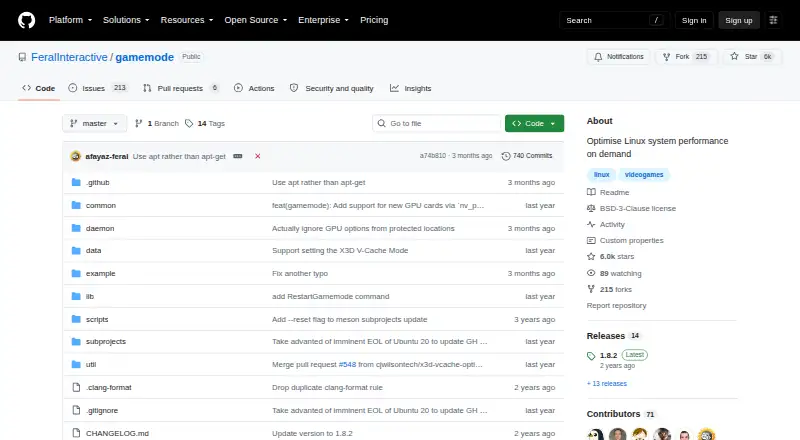
What Feral GameMode is
Feral GameMode is a free Linux daemon and library that lets games request temporary changes to the host operating system or game process. Its supported adjustments include CPU governor, I/O priority, process niceness, scheduler policy, screensaver inhibition, GPU performance mode, CPU core pinning or parking, and custom scripts. Games and launchers that support GameMode can activate it automatically; other games can be started with the `gamemoderun` command or a Steam launch option. GPU performance mode is supported for NVIDIA and AMD, while GPU overclocking is listed for NVIDIA. The project lists packages for Ubuntu, Debian, Solus, Arch, Gentoo, Fedora, OpenSUSE, and Mageia, with possible availability elsewhere. Configuration uses a `gamemode.ini` file with options covering GPU and CPU settings, filters, supervisor access, and scripts. GameMode is maintained by Feral Interactive and uses the BSD 3-Clause License (Revised). Its build depends on Meson, and its internal communication uses systemd; development also requires a C development environment. GameMode cannot automatically integrate hybrid GPU commands such as optirun after the game starts, though the README describes using a wrapper with gamemoderun.
Who it suits
GameMode suits Linux users whose games or launchers support it, or who can start games with its command or a Steam launch option. It also suits users comfortable configuring operating-system and GPU behavior, including any associated risk.
What it does well
- Free Linux daemon and library.
- Supports several CPU, scheduler, and process adjustments.
- GPU performance mode supports NVIDIA and AMD.
- Games and launchers can activate it automatically.
- Configuration supports custom scripts.
What to know first
- Hybrid GPU commands cannot be integrated automatically after game start.
- GPU overclocking settings are used at the user's own risk.
- Build depends on Meson and systemd.
Plans
| Plan | Billed and limits | Price |
|---|---|---|
| GameMode | Linux daemon and library · BSD 3-Clause License | Free |
As github.com lists them, read 4 Oct 2026. The maker's own page has the final word.
Getting started
- Open the GameMode project website.
- Install a package for a listed Linux distribution, where available.
- Configure options in `gamemode.ini` if needed.
- Launch a supporting game or launcher for automatic activation, or start another game with `gamemoderun` or a Steam launch option.
Feral GameMode is a free Linux daemon and library that lets games request temporary changes to system and process settings. It suits Linux players who want supported games to trigger those adjustments automatically, or who are comfortable launching other games through a command. Its configurable controls are useful, but hybrid-GPU setups need a workaround and GPU tuning carries risk.
Overview
GameMode applies optimisations while a game is running rather than serving as a general-purpose system optimiser. Supported adjustments range from CPU scheduling and I/O priority to screensaver inhibition and custom scripts. That makes it a focused choice for players who want game-specific control without paying for software; it is less suitable for anyone seeking a broad desktop tuning tool or a Windows solution.
Key features
Automatic activation is the strongest convenience: games and launchers that support GameMode can request it directly. For other titles, users can launch with gamemoderun or add it as a Steam launch option. The available controls include CPU governor, process niceness, scheduler policy, CPU core pinning or parking, I/O priority, GPU performance mode, and screensaver inhibition.
Configuration through gamemode.ini gives more experienced users options for GPU and CPU settings, filters, supervisor access, and custom scripts. That flexibility also raises the stakes: the example configuration warns that GPU optimisations such as overclocking are used at the user's own risk, including responsibility for hardware damage. NVIDIA and AMD GPU performance modes are supported, while GPU overclocking is listed for NVIDIA.
One important boundary affects hybrid graphics. GameMode cannot automatically integrate hybrid-GPU commands such as optirun once a game has started; the project describes using a wrapper with gamemoderun instead. Users who depend on that command flow should expect extra setup rather than seamless activation.
Pricing
| Plan | Price | Includes |
|---|---|---|
| GameMode | free | Linux daemon and library; BSD 3-Clause License |
The free plan is the whole offer, with no free trial or paid tier to weigh against it. That fits Linux users who can install and configure the software themselves; the trade-off is that its system-level focus and configuration make it a poor substitute for a more guided, cross-platform product.
Platforms
GameMode targets Linux and is also self-hosted. Packages are listed for Ubuntu, Debian, Solus, Arch, Gentoo, Fedora, OpenSUSE, and Mageia, with possible availability elsewhere. Building depends on Meson, while internal communication uses systemd; development also requires a C development environment. Those requirements matter most to users installing outside the listed package routes or modifying the project.
Who it's for
Choose GameMode if you play on Linux, value temporary per-game adjustments, and either use a supporting game or are willing to add a launch command. Its range of CPU, process, and GPU controls will appeal most to users comfortable with system configuration. Look elsewhere if you need Windows support, hands-off hybrid-GPU command integration, or prefer not to assume the risks of GPU tuning.
Pros and cons
Pros
- Free under the BSD 3-Clause License, with no paid tier required to access its daemon and library.
- Automatic activation in supporting games and launchers, with a command or Steam launch option for other games.
- Broad, configurable adjustments cover CPU behavior, process scheduling, GPU performance mode, and custom scripts.
- Packages are listed across several major Linux distributions.
Cons
- Linux-only support excludes players looking for a Windows or macOS option.
- Hybrid-GPU commands such as optirun need a wrapper approach rather than automatic integration after launch.
- GPU optimisation, including overclocking, is explicitly at the user's own risk.
- Installation or development outside packaged distributions can involve Meson, systemd, or a C development environment.
Alternatives
For a wider comparison, browse Game Booster Software or Game Graphics Optimization Software. Among named alternatives, CorePin is the closer fit for someone seeking a free, 64-bit Windows 10/11 tool for personal, hobby, educational, research, or internal business use; its terms prohibit commercial resale and paid redistribution. Gaming Optimizer is another free, open-source choice for Windows users, with a public repository under the MIT license.
PC Game Booster may suit Windows players seeking basic optimizations, game management, and automatic boosting on launch; its free plan also lists suspending unnecessary system features and hard-drive defragmentation. PotatoBoost is a Windows freemium option whose free forever plan includes hardware detection and PC health tools, memory optimization, privacy scanning and cleanup, plus startup and process tools. Smart Game Booster offers free basic boosting and manual driver updates on Windows, with a separate VIP tier.
Huawei HiSuite is a free Mac and Windows option, but its Mac version is for picture, video, file, and backup/restore functions rather than Linux game tuning. MAGIX Music Maker is a Windows music-production app, not a game optimiser. Razer Game Clips focuses on free cloud storage and requires Razer Cortex and a Razer ID on Windows 10 (64-bit) or Windows 11.
Verdict
GameMode is a sound choice for Linux players who want supported games to trigger temporary system adjustments and who value having configurable controls at no cost. Its chief reason to choose is that focused, free combination of automatic activation and per-game tuning; its chief reason to look elsewhere is the Linux-only scope, especially if hybrid-GPU workflows must work without a wrapper or GPU settings are not worth the added risk.
Verdict
GameMode provides temporary Linux system and process adjustments for games, with automatic activation available where supported. Users should account for its hybrid-GPU limitation and treat GPU optimization settings with care.
Questions
Is GameMode free?
Yes. The listed GameMode plan is free, and the software is available under the BSD 3-Clause License (Revised).
Which platforms does it support?
The supported platform is Linux. The project lists packages for Ubuntu, Debian, Solus, Arch, Gentoo, Fedora, OpenSUSE, and Mageia, with possible availability elsewhere.
How does a game activate GameMode?
Games and launchers with GameMode support can activate it automatically. Other games can be started with `gamemoderun` or a Steam launch option.
What GPU settings does it support?
GPU performance mode is supported for NVIDIA and AMD. GPU overclocking is listed for NVIDIA, and GPU optimisations are used at the user's own risk.
Who maintains GameMode?
The repository identifies Feral Interactive as its maintainer. Feral Interactive says it began in 1996 with a mission to bring games to Mac.
Where should users report issues?
The README directs users to report GameMode issues in the repository's GitHub Issues section rather than directly to Feral.
Facts from Feral GameMode's own pages
- Configuration
- GameMode uses a gamemode.ini file, and its example configuration documents options including GPU, CPU, filters, supervisor access, and custom scripts. · github.com, 4 Oct 2026
- Founded
- 1996 · github.com, 28 Sept 2026
- Game integration
- Games and launchers with GameMode support activate it automatically; other games can be started with the gamemoderun command or Steam launch option. · github.com, 4 Oct 2026
- GPU settings caution
- The example configuration warns that GPU optimisations such as overclocks are used at the user's own risk and that resulting hardware damage is the user's responsibility. · github.com, 4 Oct 2026
- GPU support
- GPU performance mode is supported for NVIDIA and AMD, and GPU overclocking is listed for NVIDIA. · github.com, 4 Oct 2026
- Headquarters
- London, England · github.com, 28 Sept 2026
- License
- GameMode is available under the BSD 3-Clause License (Revised). · github.com, 4 Oct 2026
- Limit: hybrid graphics
- The README says GameMode cannot automatically integrate hybrid GPU commands such as optirun after the game has started, but describes using a wrapper with gamemoderun. · github.com, 4 Oct 2026
- Linux distributions
- The project lists packages for Ubuntu, Debian, Solus, Arch, Gentoo, Fedora, OpenSUSE, and Mageia, with possible availability elsewhere. · github.com, 4 Oct 2026
- Maintainer
- The repository identifies Feral Interactive as the maintainer of GameMode. · github.com, 4 Oct 2026
- Maker history
- Feral Interactive says it began in 1996 with a mission to bring games to Mac. · feralinteractive.com, 4 Oct 2026
- Optimisations
- Supported optimisations include CPU governor, I/O priority, process niceness, scheduler policy, screensaver inhibition, GPU performance mode, CPU core pinning or parking, and custom scripts. · github.com, 4 Oct 2026
- Support route
- The README asks users to report GameMode issues in the repository's GitHub Issues section rather than directly to Feral. · github.com, 4 Oct 2026
- System requirements
- The project says its build depends on Meson and its internal communication uses systemd; development also requires a C development environment. · github.com, 4 Oct 2026
- What it does
- GameMode is a daemon and library that lets games request temporary optimisations to the Linux host operating system or game process. · github.com, 4 Oct 2026
Where Feral GameMode stands on Freedom251
- Game Booster Software#1 of 18
- Game Graphics Optimization Software#2 of 34
- Graphics optimisers#16 of 35