Freedom251 › Hardware Diagnostic Software
FurMark
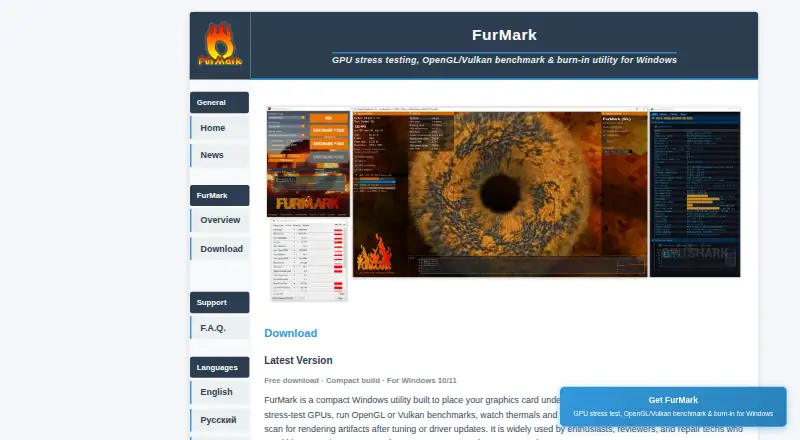
What FurMark is
FurMark is a Windows application for putting a graphics card under sustained 3D load and running graphics benchmarks. It helps users examine GPU thermals, cooling headroom, power limits, and overclock stability. Available rendering paths include OpenGL and Vulkan. Benchmark options include 1080p, 1440p, and 4K resolution presets, as well as timed passes. Artifact-oriented checks can help identify visual glitches: sparkling or corrupted textures may point to heat, memory strain, or unstable tuning. For sensor context, FurMark can be paired with vendor tools or overlays such as GPU-Z and HWiNFO. It is offered as an installer and as a portable edition that runs from a folder or USB stick without installation. The listed download is free for personal testing on Windows 10/11. FurMark is intended for overclockers, PC gamers and builders, reviewers and benchmarkers, and support technicians. Runs should be supervised, temperatures watched, and tests stopped if thermals appear unsafe. The FAQ directs users to a forum for troubleshooting and advises downloading from trusted sources, checking published hashes, and reviewing publisher information if antivirus software flags a download.
Who it suits
FurMark suits overclockers, PC gamers and builders, reviewers, benchmarkers, and support technicians who need to assess GPU behavior under a sustained workload. It is for Windows desktop and laptop users, with OpenGL and Vulkan paths available where supported.
What it does well
- Free download for personal testing on Windows 10/11.
- Includes 1080p, 1440p, and 4K benchmark presets.
- Offers OpenGL and Vulkan rendering paths where available.
- Portable edition runs from a folder or USB stick.
- Supports artifact-oriented checks for visual glitches.
What to know first
- Targets Windows only; it is not a macOS or Linux tool.
- Tests require temperature monitoring and supervision.
Limits
The free download is for personal testing on Windows 10/11. FurMark targets Windows desktops and laptops, and the site advises stopping runs if thermals appear unsafe.
Plans
| Plan | Billed and limits | Price |
|---|---|---|
| Free download | Personal testing · Windows 10/11 · Installer or portable edition | Free |
As furmark.app lists them, read 4 Oct 2026. The maker's own page has the final word.
Getting started
- Visit the FurMark website.
- Choose the installer or portable edition from the download page.
- Run the installer, or launch the portable edition from a folder or USB stick.
- Select a rendering path and benchmark preset or timed pass.
- Supervise the run, watch temperatures, and stop if thermals appear unsafe.
Verdict
Choose FurMark if you need a free Windows tool for GPU stress testing, benchmarking, and artifact checks. Look elsewhere if you need a macOS or Linux tool.
Questions
How much does FurMark cost?
The listed free download costs nothing for personal testing on Windows 10/11.
Which operating systems does it support?
FurMark targets Windows desktops and laptops. It is not a macOS or Linux tool.
Does FurMark support OpenGL and Vulkan?
Yes. OpenGL and Vulkan rendering paths are available where supported.
Can I use FurMark without installing it?
Yes. The portable edition can run from a folder or USB stick without installation.
Where can I get troubleshooting help?
The FAQ directs users to a forum for additional context and troubleshooting.
What should I do if antivirus flags a download?
The FAQ advises using trusted download sources, verifying hashes when published, and reviewing publisher information.
Facts from FurMark's own pages
- Artifact checks
- FurMark supports artifact-oriented testing, with visual glitches such as sparkling or corrupted textures described as possible signs of heat, memory strain, or unstable tuning. · furmark.app, 4 Oct 2026
- Benchmark presets
- The site describes resolution presets including 1080p, 1440p, and 4K, plus timed benchmark passes. · furmark.app, 4 Oct 2026
- Distribution options
- The download page offers installer and portable editions; the portable edition can run from a folder or USB stick without installation. · furmark.app, 4 Oct 2026
- Download integrity
- The FAQ advises downloading from trusted sources, verifying hashes when published, and reviewing publisher information if antivirus flags a download. · furmark.app, 4 Oct 2026
- Graphics APIs
- It supports OpenGL and Vulkan rendering paths where available. · furmark.app, 4 Oct 2026
- Intended users
- The site identifies overclockers, PC gamers and builders, reviewers and benchmarkers, and support technicians as intended users. · furmark.app, 4 Oct 2026
- Monitoring integrations
- The site recommends pairing FurMark with vendor tools or overlays, and names GPU-Z and HWiNFO as examples for sensor context. · furmark.app, 4 Oct 2026
- Operating system limit
- The FAQ says FurMark targets Windows desktops and laptops and is not a macOS or Linux tool. · furmark.app, 4 Oct 2026
- Pricing note
- The FAQ describes community builds as emphasizing free GPU stress testing and benchmarking, and says some distributions may offer optional paid bundles elsewhere. · furmark.app, 4 Oct 2026
- Purpose
- FurMark is a Windows GPU stress test and graphics benchmark that uses a sustained 3D workload to assess thermals, cooling headroom, power limits, and overclock stability. · furmark.app, 4 Oct 2026
- Safety guidance
- The site advises supervising tests, watching temperatures, and stopping runs if thermals appear unsafe. · furmark.app, 4 Oct 2026
- Support
- The FAQ directs users to a forum for more context and troubleshooting. · furmark.app, 4 Oct 2026
Where FurMark stands on Freedom251
- Hardware Diagnostic Software#5 of 26