Freedom251 › Hardware Diagnostic Software

GSmartControl
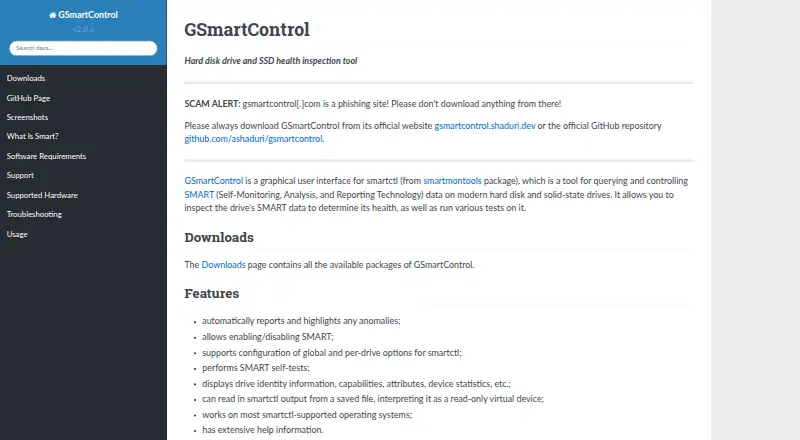
What GSmartControl is
GSmartControl is a desktop graphical interface for smartctl, the drive-inspection utility in the smartmontools package. It displays drive identity, capabilities, SMART attributes, and device statistics, and automatically reports and highlights anomalies. Users can run drive tests, enable or disable SMART, and configure global or per-drive smartctl options. The application can also open saved smartctl output as a read-only virtual device. It supports ATA drives, including SATA and PATA, and NVMe drives, as well as some drives connected through USB bridges or selected RAID controllers. SCSI and SAS drives are not supported, although some information about them may appear. GSmartControl is free software under the GNU General Public License version 3, with Linux, Windows, macOS, and several BSD and Unix operating systems listed among its supported systems. Downloads include Linux distribution packages, Windows installers and portable archives, FreeBSD ports, macOS packages, and source code. The Windows packages include the required software, while other use depends on smartmontools. Root or Administrator privileges are needed for useful operations because operating systems restrict direct hardware access. SMART data can help inspect a drive, but good readings do not guarantee it will not fail.
Who it suits
GSmartControl suits people who want a graphical way to inspect SMART data and run drive tests on supported hardware. It is also useful for people who need to review saved smartctl output or configure SMART and smartctl options.
What it does well
- Free software licensed under GNU GPL version 3.
- Displays drive identity, SMART attributes, capabilities, and statistics.
- Automatically reports and highlights anomalies.
- Supports ATA and NVMe drives.
- Can read saved smartctl output as a read-only virtual device.
- Provides packages for several desktop operating systems.
What to know first
- SCSI and SAS drives are not supported.
- Useful operations require Root or Administrator privileges.
- smartmontools is a runtime requirement outside the official Windows packages.
- Immediate Offline Tests are unsupported.
Limits
The free software does not support SCSI or SAS drives, and Immediate Offline Tests are unsupported. Useful hardware operations require Root or Administrator privileges.
Plans
| Plan | Billed and limits | Price |
|---|---|---|
| Free | GPLv3 software · desktop drive health inspection | Free |
As gsmartcontrol.shaduri.dev lists them, read 9 Oct 2026. The maker's own page has the final word.
Getting started
- Open the GSmartControl website and choose a download for your operating system.
- Install a Linux distribution package, Windows package, FreeBSD port, or macOS package, or obtain the source code.
- Provide smartmontools where required; the official Windows packages include the required software.
- Run the application with Root or Administrator privileges for useful hardware operations.
- Select a drive to inspect its SMART data or run supported tests.
Overview
GSmartControl is a graphical front end for smartctl, built for people who want to inspect drive health and run tests without relying on a command line. It is a practical free option for supported desktop systems and drives, though direct hardware access requires elevated privileges and SMART readings cannot rule out failure.
Key features
The app shows drive identity, capabilities, attributes and device statistics, then automatically flags anomalies. That brings potential warning signs into view, but it does not turn SMART data into a guarantee: a drive with reassuring readings can still fail.
Users can enable or disable SMART and adjust smartctl options globally or per drive. GSmartControl can also open saved smartctl output as a read-only virtual device, which is useful for reviewing a capture but offers no control over the drive represented by it.
Supported hardware includes ATA drives (SATA and PATA), NVMe, and some devices connected through USB bridges or RAID controllers. SCSI and SAS are not supported, even if the app can display some information about them. Immediate Offline Tests are also unavailable; they are described as mostly obsolete.
Pricing
GSmartControl has one plan: Free, at no cost. It includes desktop drive-health inspection under the GNU General Public License version 3, with SMART monitoring. There are no paid tiers to unlock, making it a sensible choice for an individual or organization that needs the supported inspection and test functions without a software charge.
The free price does not remove the practical requirements: smartmontools is a runtime dependency, and useful operations need root or Administrator privileges because operating systems restrict direct hardware access. The official Windows packages include the required software, so Windows users do not need to install an additional dependency separately.
Platforms
GSmartControl is available for Linux, Windows and macOS, as well as FreeBSD, NetBSD, OpenBSD, DragonFlyBSD and Solaris. The requirements page specifies Windows Vista SP2 or later and also mentions QNX support as untested. Downloads include Linux distribution packages, Windows installers and portable archives, FreeBSD ports, macOS packages and source code. This breadth suits users across several desktop Unix-like systems, but QNX users should treat compatibility as uncertain.
Who it's for
Choose GSmartControl if you want a free graphical way to review SMART attributes, spot flagged anomalies and run supported tests on ATA or NVMe hardware. It is especially useful when you prefer a visual interface but can provide the privileges needed for direct access. Look elsewhere if your drives are SCSI or SAS, or if you need Immediate Offline Tests. And treat its results as diagnostic clues rather than a promise of continued reliability.
Pros and cons
- Pro: Free software with no paid feature tier, making supported desktop inspection available without a purchase.
- Pro: Combines anomaly highlighting, drive details and SMART controls, rather than limiting users to viewing attributes.
- Pro: Can read saved smartctl output, so captured data can be reviewed as a read-only device.
- Con: Useful operations require root or Administrator privileges, which can complicate access on managed or restricted systems.
- Con: No SCSI or SAS support, and some USB-bridge or RAID-controller setups may not be compatible.
- Con: SMART data cannot ensure a drive will not fail, and Immediate Offline Tests are unsupported.
Alternatives
smartmontools is the direct alternative for readers who prefer its smartctl and smartd utilities over a graphical interface; it is also free and supports Linux, macOS and Windows.
DiskMaster is another free option for Linux, macOS and Windows. Hard Disk Sentinel is worth considering for readers comparing a paid product with a free trial and Linux and Windows support.
nvm, Active@ Hard Disk Monitor, CrystalDiskMark, DRevitalize and HDAT2 are other listed alternatives.
Browse Disk Diagnostic Software, Hardware Diagnostic Software and Disk Health Monitoring Software for more options.
Verdict
GSmartControl is a strong fit for users who want free, graphical SMART inspection and supported drive tests across a broad range of desktop systems. Its useful controls and anomaly reporting make it more than a passive viewer, but hardware access depends on elevated privileges and the hardware exclusions matter. Pick it for supported ATA or NVMe drives; look elsewhere for SCSI or SAS, or if you need a guarantee that a drive is healthy.
Verdict
Choose GSmartControl for free graphical inspection of SMART data and drive tests on supported ATA or NVMe hardware. Look elsewhere if you need SCSI or SAS support, or if you cannot provide the privileges required for direct hardware access.
Questions
How much does GSmartControl cost?
It is free software under the GNU General Public License version 3.
Which operating systems are supported?
The requirements list Linux, Windows Vista SP2 or later, FreeBSD, NetBSD, OpenBSD, DragonFlyBSD, macOS, and Solaris. QNX support is described as untested.
Which drives does it support?
It supports ATA drives, including SATA and PATA, NVMe drives, and some drives behind USB bridges or selected RAID controllers. SCSI and SAS drives are not supported.
Does it need another package?
GSmartControl uses smartmontools as a runtime requirement. The official Windows packages include the required software.
Can it inspect saved output?
Yes. It can read saved smartctl output as a read-only virtual device.
Does good SMART data guarantee a drive will not fail?
No. The documentation cautions that good SMART data does not guarantee a drive will not fail.
Facts from GSmartControl's own pages
- Anomaly alerts
- It automatically reports and highlights anomalies. · gsmartcontrol.shaduri.dev, 8 Oct 2026
- Anomaly reporting
- The software automatically reports and highlights anomalies. · gsmartcontrol.shaduri.dev, 9 Oct 2026
- Availability
- The downloads page lists Linux distribution packages, Windows installers and portable archives, FreeBSD ports, macOS packages, and source code. · gsmartcontrol.shaduri.dev, 8 Oct 2026
- Drive compatibility
- It supports ATA (SATA and PATA) and NVMe drives, plus some drives behind USB bridges and RAID controllers. · gsmartcontrol.shaduri.dev, 8 Oct 2026
- Drive controls
- Users can enable or disable SMART and configure global and per-drive smartctl options. · gsmartcontrol.shaduri.dev, 9 Oct 2026
- Drive information
- It displays drive identity, capabilities, attributes, and device statistics. · gsmartcontrol.shaduri.dev, 9 Oct 2026
- Drive limitation
- SCSI and SAS drives are not supported, though the application may display some information about them. · gsmartcontrol.shaduri.dev, 8 Oct 2026
- Integration
- GSmartControl is a graphical interface for smartctl from the smartmontools package; smartmontools is a runtime requirement. · gsmartcontrol.shaduri.dev, 8 Oct 2026
- License
- GSmartControl is licensed under GNU General Public License version 3. · gsmartcontrol.shaduri.dev, 9 Oct 2026
- Operating systems
- The site lists Linux, Windows, FreeBSD, NetBSD, OpenBSD, DragonFlyBSD, macOS, Solaris, and untested QNX support. · gsmartcontrol.shaduri.dev, 8 Oct 2026
- Privileges
- Root or Administrator privileges are needed to perform useful operations because operating systems restrict direct hardware access. · gsmartcontrol.shaduri.dev, 9 Oct 2026
- Purpose
- GSmartControl is a graphical interface for smartctl that lets users inspect SMART data and run drive tests. · gsmartcontrol.shaduri.dev, 9 Oct 2026
- Runtime dependency
- GSmartControl uses smartmontools, while official Windows packages include the required software. · gsmartcontrol.shaduri.dev, 9 Oct 2026
- Saved output
- It can load smartctl output from a saved file as a read-only virtual device. · gsmartcontrol.shaduri.dev, 9 Oct 2026
- SMART caveat
- The documentation cautions that good SMART data does not guarantee a drive will not fail. · gsmartcontrol.shaduri.dev, 9 Oct 2026
- SMART controls
- It can enable or disable SMART and configure global and per-drive smartctl options. · gsmartcontrol.shaduri.dev, 8 Oct 2026
- Support
- Users are directed to report bugs through the GitHub issue tracker after consulting the troubleshooting page. · gsmartcontrol.shaduri.dev, 9 Oct 2026
- Supported hardware
- It supports ATA drives, NVMe drives, some USB bridges, and selected RAID controllers; SCSI and SAS drives are not supported. · gsmartcontrol.shaduri.dev, 9 Oct 2026
- Supported operating systems
- The requirements page lists Linux, Windows Vista SP2 or later, FreeBSD, NetBSD, OpenBSD, DragonFlyBSD, macOS, Solaris, and untested QNX support. · gsmartcontrol.shaduri.dev, 9 Oct 2026
- Testing limit
- Immediate Offline Tests are unsupported because they are described as mostly obsolete. · gsmartcontrol.shaduri.dev, 9 Oct 2026
- Windows requirement
- The official Windows packages require no additional software. · gsmartcontrol.shaduri.dev, 8 Oct 2026
Where GSmartControl stands on Freedom251
- Hardware Diagnostic Software#1 of 26
- Disk Diagnostic Software#5 of 26
- Disk Health Monitoring Software#8 of 30